What Is a Virtual Phone Number? A Complete Guide
Your personal cell just rang. It's a client. Do you answer?
A virtual phone number solves that. Instead of giving out your personal number (or buying a second phone), you get a dedicated business line that works on the devices you already own.
But what exactly is a virtual phone number? How does it work? And is it right for your business?
Let's break it down.
TL;DR:
- A virtual phone number is a business line that isn't tied to a physical phone or SIM card. It uses the internet (VoIP) to route calls and texts to any device you already own.
- Businesses save 30% to 50% on phone costs with VoIP, and up to 75% when replacing legacy systems, according to research from Zoom (which sells VoIP, so read it as the optimistic end).
- For a team, per-user pricing decides the bill. At $15 to $25 per user, a flat-priced plan around $49 a month gets cheaper from about two to four people up. For one person, a $10 to $15 single line is cheaper.
- Virtual numbers come in four main types: local, toll-free, vanity, and international.
- Expect to pay $15 to $30 per user per month. Watch for taxes, international rates, and SMS registration fees on top of the base price.
- You can set one up in about 15 minutes, or port your existing number over in 1 to 2 weeks with no downtime.
- Key features to look for include call forwarding, voicemail transcription, multi-device support, SMS, call recording, and analytics.
What is a virtual phone number?
A virtual phone number is a phone number that isn't tied to a physical phone line or SIM card. It uses the internet to route calls and texts to any device you choose, whether that's your smartphone, laptop, tablet, or desk phone.
Think of it this way: traditional phone numbers are like home addresses. They're permanently attached to one location. A virtual phone number is more like an email address. You can access it from anywhere, on any device, as long as you have an internet connection.
Here's the simple version:
- Traditional number: Tied to one phone, one location
- Virtual number: Works anywhere, on any device with internet
The technical term is VoIP (Voice over Internet Protocol). Your voice gets converted into data packets, travels across the internet, and reassembles as clear audio on the other end. If you've ever used FaceTime, WhatsApp calls, or Zoom, you've already experienced VoIP.
How does a virtual phone number work?
A virtual phone number works by routing calls through your provider's cloud servers instead of a physical line. The call travels over the internet and rings whichever devices you've connected.
Here's what happens behind the scenes when someone calls:
- Caller dials your number - It looks and acts like any normal phone number
- Signal hits the cloud - The call routes through your provider's servers
- You receive it anywhere - The call rings on your phone, computer, or tablet
The entire process takes milliseconds. To the caller, it feels exactly like calling a regular phone number. They won't know (or care) that it's virtual.
Most virtual phone providers give you an app for your smartphone and computer. Some also work with traditional desk phones if you prefer that setup. You pick where calls go. Ring your cell during business hours, send to voicemail after 6 PM, or forward to a teammate when you're on vacation.
Types of virtual phone numbers
Virtual phone numbers come in four main types: local, toll-free, vanity, and international. Each serves a different purpose:
Local numbers
Want to look like you're based in Chicago, Miami, or any other city? Local virtual numbers give you an area code from that region, even if you're actually working from your couch in Denver.
Why this matters: people are far more likely to pick up a call from a local area code than from one they don't recognize. For sales teams making outbound calls, that's a huge advantage.
Toll-free numbers
The classic 800, 888, 877, and similar prefixes. Callers don't pay for the call, which removes a barrier for customers reaching out. It also makes your business look more established.
Vanity numbers
These spell out words or phrases: 1-800-FLOWERS, 1-888-BEST-BUY. They're memorable and great for marketing. Vanity numbers can cost more from a marketplace, but they can pay off in brand recognition.
International numbers
Need a presence in the UK, Germany, or Australia? You can get local numbers for dozens of countries without setting foot there. Your customers call a local number, and it rings on your phone wherever you are.
For a deeper look at these options, check out our guide on business phone number types.
Why businesses switch to virtual phone numbers
Businesses switch to virtual phone numbers to cut costs, support remote teams, separate work from personal life, and look more professional from day one. Usually, though, it's one specific pain that pushes them over the edge.
Ray runs operations for a property management company with four offices. Before virtual numbers, each office had its own landline contract, leasing calls rang one desk and nowhere else, and nobody could see which office was missing calls until a tenant complained.
Sound familiar?
Here's why businesses like Ray's are making the switch:
Cost savings that actually matter
Let's talk numbers. According to Zoom's research on VoIP statistics, businesses save 30% to 50% on phone costs with VoIP, and up to 75% for those replacing legacy systems. Zoom sells VoIP, so treat that as the optimistic end of the range.
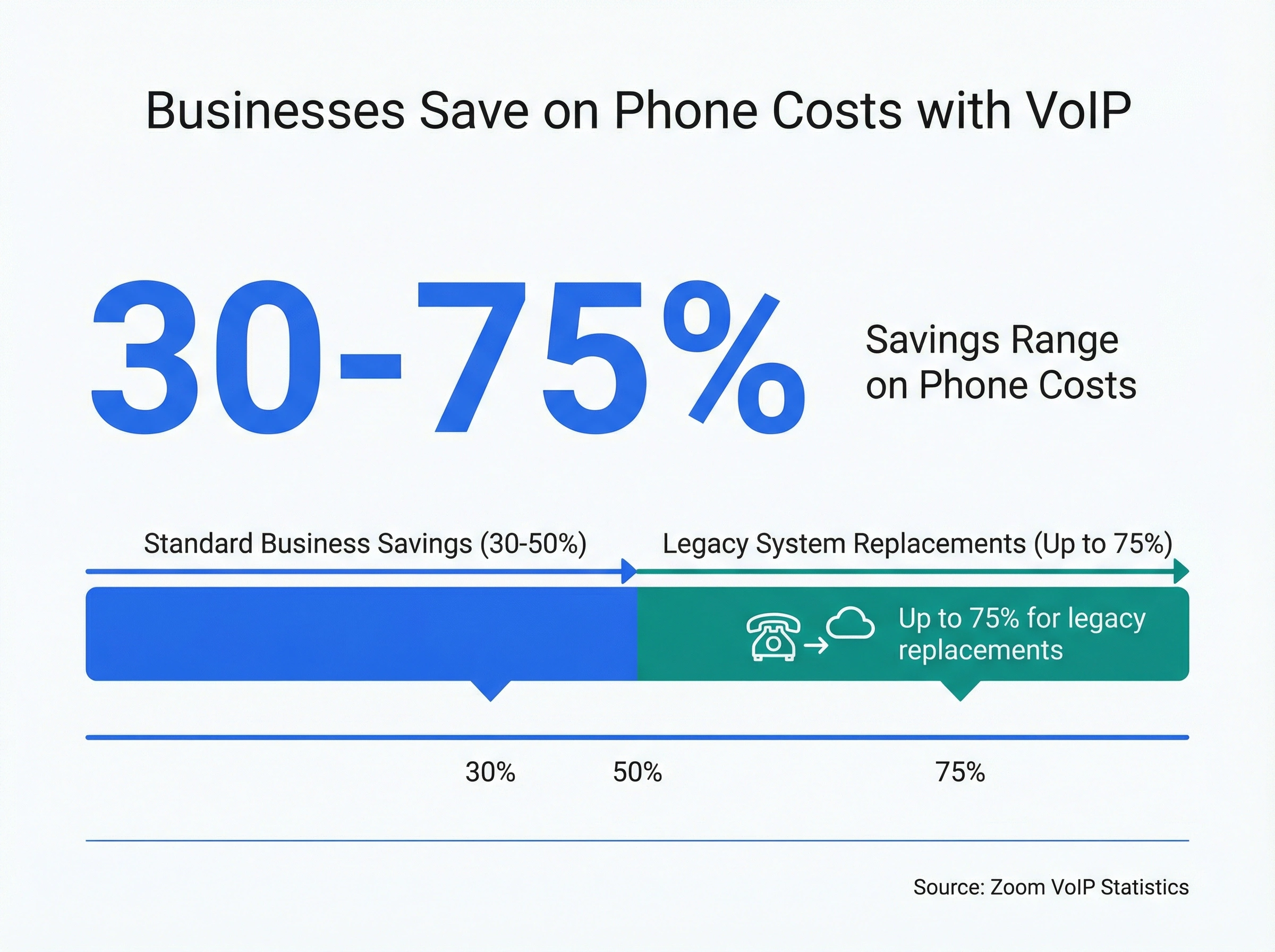
What that means in dollars depends almost entirely on your team size. The cost section below works it out for one, three, six, and twelve people.
The savings come from:
- No expensive hardware to buy
- No maintenance contracts
- Lower per-minute rates (especially for international calls)
- No separate business phone line bills
Work from anywhere (and actually mean it)
For most small businesses, "anywhere" means the field, not a beach. Marcus runs a six-person plumbing company, and his four techs spend the day in crawlspaces and vans. A virtual number (some providers call it a cloud phone number) rings all of them at once, so the shop number gets answered by whoever's hands are free.
A virtual number means your team stays reachable regardless of where they work. Home office, job site, international trip: it doesn't matter. The same business number follows them everywhere.
This isn't just convenient. It's essential when your team rarely shares an office.
Separate business from personal life
I'll be honest: mixing personal and business calls on the same phone is a recipe for burnout. You end up checking messages at dinner, feeling obligated to answer during weekends, and never fully switching off.
A virtual number creates a clear boundary. Business calls go to your business number. Personal calls stay personal. You control when work mode ends.
Professional image from day one
Starting a business? A dedicated business number instantly adds credibility. Customers trust businesses with professional phone presence more than those asking clients to "text my cell."
You can set up auto-attendants ("Press 1 for sales, 2 for support"), custom voicemail greetings, and business hours routing. Small touches that signal professionalism.
Virtual phone number features worth knowing
The features that matter most are call forwarding, voicemail transcription, multi-device support, business SMS, call recording, and analytics. Not every system includes all of them, so check before you buy.
For a side-by-side ranking of providers, see our best virtual phone systems for business guide with real 10-user costs.
Call forwarding and routing
Send calls to different team members based on time of day, caller location, or custom rules. Good routing is the difference between a phone system that saves time and one that just forwards chaos around the office.
Voicemail transcription
Reading a voicemail is faster than listening to one. Most modern systems convert voice messages to text and send them to your email or app.
Multiple device support
Your virtual number should ring on your phone, computer, and tablet simultaneously. Answer wherever is most convenient.
SMS and MMS
Texting isn't optional anymore. Look for systems that support business texting from your virtual number.
Texting matters more than it looks. A customer who can't get through will often text instead, and a number that can't receive that text loses the lead quietly.
Call recording
Useful for training, quality assurance, and having a record of important conversations. Just check your state's consent rules before you hit record, since some states require both parties to agree.
Analytics and reporting
Who's calling? How long are calls? Which team members handle the most volume? Good systems give you this data.
How much does a virtual phone number cost?
Most virtual phone numbers cost $15 to $30 per user per month, and that usually covers calling, texting, and the core features. Toll-free and vanity numbers add a little more.
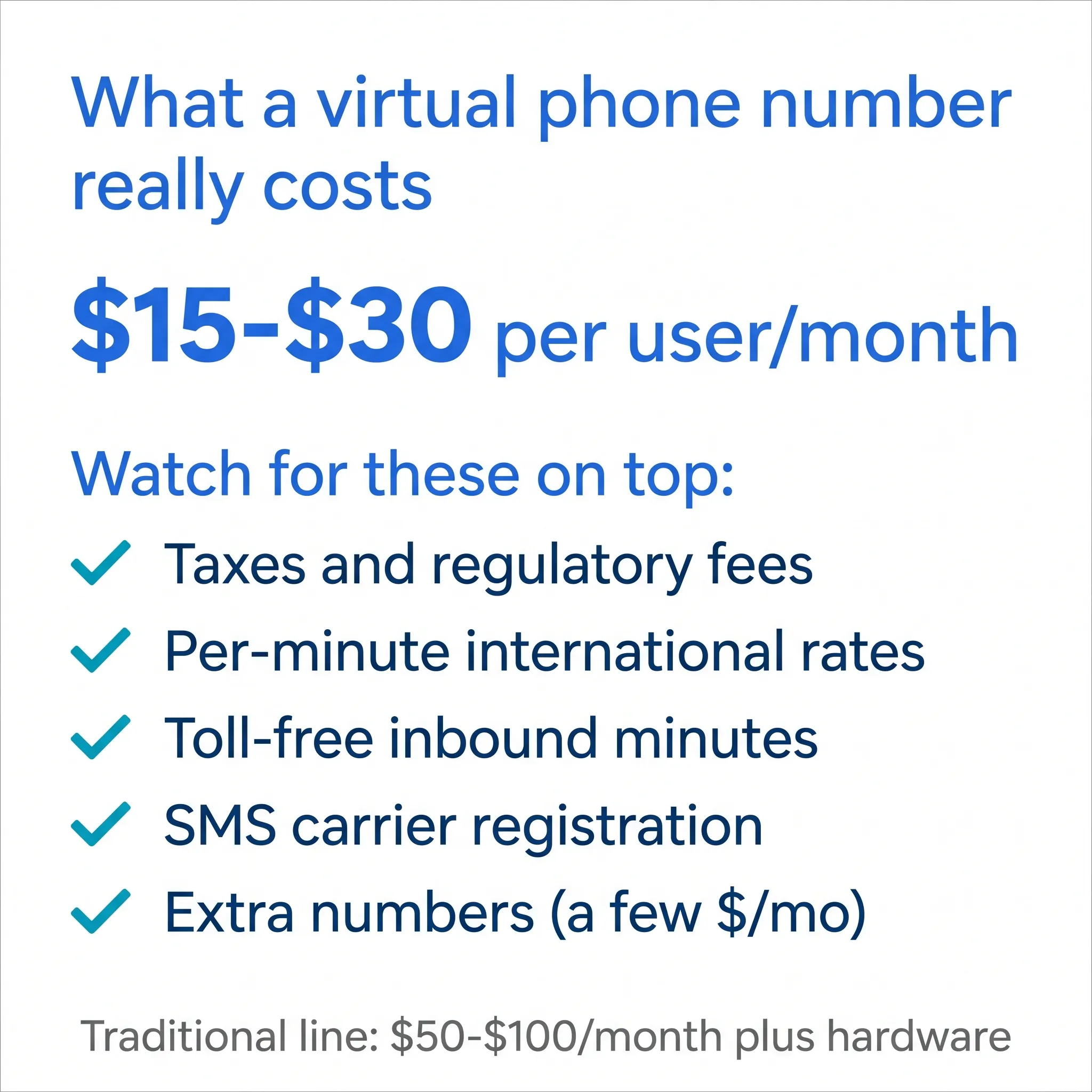
Here's what typically moves the price up or down:
- Plan tier: Entry plans cover calling and voicemail. Higher tiers add analytics, integrations, and AI features.
- Extra numbers: Most providers charge a few dollars per month for each additional number.
- International calling: Some plans include it, others bill per minute. Check rates for the countries you actually call.
- Toll-free minutes: Inbound calls to toll-free numbers often bill by the minute.
Then there are the costs nobody puts on the pricing page. Taxes and regulatory fees vary by state, and honestly, we can't predict exactly what yours will add up to until the first invoice arrives. In the US, business texting also requires carrier registration, which can carry a small fee.
Compare all that to a traditional line at $50 to $100 per month, plus hardware and wiring, and the math isn't close.
One piece of advice: judge providers on the total monthly bill for your team size, not the teaser price on the homepage. A $15 plan that charges extra for texting, recording, and integrations can end up pricier than a $25 plan that includes everything.
What does a virtual phone number cost for your team size?
For one person, a basic single line is the cheapest option. From about two to four people up, a flat-priced plan beats per-user pricing, because a per-user bill grows with every hire and a flat price doesn't.
Here's the monthly math for a VoIP phone number at published list prices (annual billing, checked October 2026). Team size is the only input that changes:
| Team size | Google Voice Starter ($10/user + Google Workspace, about $8.40/user) | OpenPhone Starter ($15/user) | A typical $25/user plan (RingCentral, Dialpad Pro) | dialnote Team ($49/mo flat, any team size) |
|---|---|---|---|---|
| 1 person | $18.40 | $15 | $25 | $49 (or $19 on Solo, which covers one person) |
| 3 people | $55.20 | $45 | $75 | $49 |
| 6 people | $110.40 | $90 | $150 | $49 |
| 12 people | $220.80 | $180 | $300 | $49 |
The crossover points fall out of that table:
- Against $25/user plans, flat pricing wins from 2 people ($50 vs $49).
- Against a $15/user plan, it wins from 4 people ($60 vs $49).
- Against Google Voice, it wins from 3 people if you'd buy Workspace just for Voice, or from 5 people if you already pay for Workspace for email ($10/user, so 5 people is $50).
What does that look like for real businesses?
Elena, solo attorney. She needs one professional number so clients stop calling her cell. A $10 to $15 single line is the cheapest virtual business phone she can get, and that's the honest pick unless she wants features like call routing or AI answering that the basic lines don't include.
Marcus, six-person plumbing company. Him, four techs, and a part-time bookkeeper all need to answer the shop number. Per-user plans run $90 to $150 a month for six people. A flat plan is $49, so he keeps $41 to $101 a month, roughly $490 to $1,210 a year, and the gap grows every time he hires a tech.
Ray, twelve people across four offices. Here the per-user bill is $180 to $300 a month. Ray's other unit is numbers: each office wants its own local number so tenants call a familiar area code. Check how many numbers a plan includes and what extras cost. dialnote's Team plan includes 2, and additional numbers are a small monthly add-on.
One honest caveat on flat pricing: it covers people, not unlimited usage. Calling minutes usually come as a pooled bundle shared by the team, and AI features are often metered separately. Compare the whole bill for your call volume, not just the headline price.
How to get a virtual phone number
You can get a virtual phone number by signing up with a provider, picking your number type and area code, and setting your routing rules in the app. The whole process takes about 15 minutes.
- Choose a provider - Compare features, pricing, and reviews
- Pick your number type - Local, toll-free, or vanity
- Select your area code - Or port your existing number
- Download the app - Most providers have mobile and desktop apps
- Configure your settings - Set up routing, voicemail, and business hours
No technicians, no installation appointments, no waiting weeks for activation.
Those five steps are the whole industry pattern. What varies is how much friction each provider stacks on top of them. The legacy version of this errand meant booking a phone company visit, waiting at home for a technician, and paying for wiring nobody ever sees again. Plenty of modern providers still make you sit through a sales call before you touch a number.
In dialnote, the part that matters for this task is that signup drops you straight onto a Quick Start page where Get Phone Number is the first card, so claiming a number is a click, not an appointment.
Claim a number without the phone company
10-day free trial, no credit card needed.
- Sign up and land on the Quick Start page
- Click Get Phone Number and search by area code, city, or specific digits
- Claim the number you want (trial accounts can claim a local US or Canadian number; toll-free and mobile numbers open up on a paid plan)
- Click Make a Call Now and dial your own cell
- Answer it, and you've just heard your new business number working
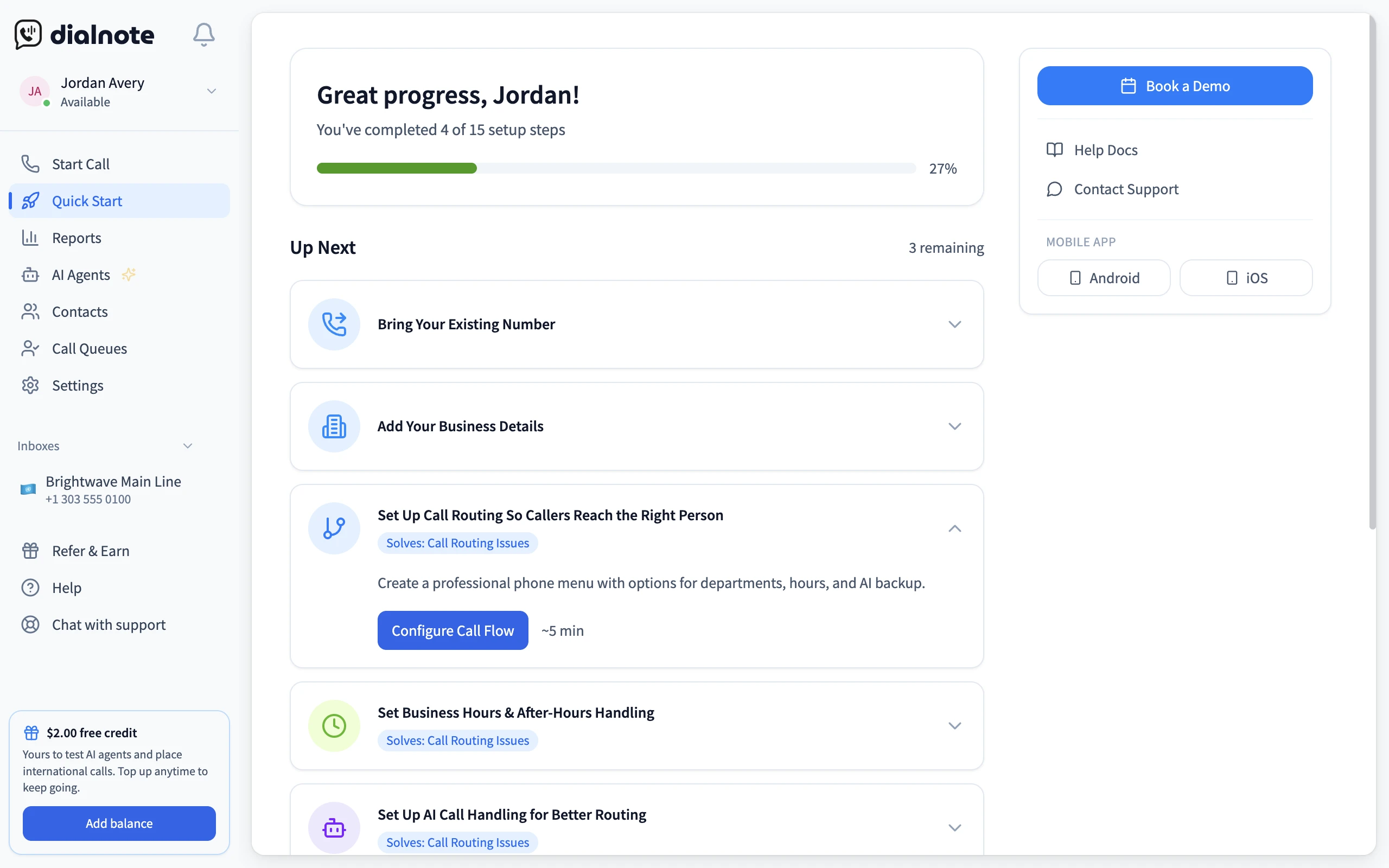
The whole errand, from creating an account to hearing your cell ring from your new business line, fits inside a coffee break. That's the test worth running before you commit to any provider: claim a number, call yourself, and time it. If getting a working line took minutes instead of an installation window, you've found the setup experience the rest of your phone system will match. Decide from that first call, not from the pricing page.
Already have a business number you love? You can port it to a virtual system. The process takes 1-2 weeks, and your number keeps working throughout. The FCC's porting guide covers your rights during the transfer, including a big one: your old provider can't refuse to release your number just because you still owe them money.
And if you don't have any phone line at all yet, our walkthrough on business phone number without a landline covers every option.
Mistakes to avoid when setting up a virtual number
The most common mistakes are canceling your old line before porting finishes, skipping SMS registration, shopping on price alone, and ignoring your area code choice. All four are easy to dodge.
Canceling your old service too early. Port your number first, confirm calls ring through, then cancel. Do it in the wrong order and your number can get released back into the pool, where anyone can claim it. That mistake is permanent.
Skipping SMS registration. US carriers now require businesses to register before texting from local numbers, and unregistered messages get filtered before they reach anyone. Your provider handles most of the paperwork, but you supply the business details. Do it during setup, not after your first campaign flops.
Shopping on price alone. A cheap plan with slow support costs more than it saves the first time your phones go down on a busy Monday. Read recent reviews and test how fast support actually responds during your trial.
Grabbing a random area code. Marcus learned this one the hard way: he returned quote requests from a number with an out-of-state area code, and fewer people picked up. Once he switched to a local number matching the towns he serves, his callbacks started getting answered. People pick up for numbers that look like neighbors.
Virtual numbers vs traditional phone lines
Virtual numbers beat traditional lines on cost, setup speed, flexibility, and features. Traditional lines only make sense where reliable internet isn't available.
Still wondering? Here's a quick comparison:
| Feature | Virtual Number | Traditional Line |
|---|---|---|
| Setup time | Minutes | Days to weeks |
| Monthly cost | $15-30/user | $50-100/line |
| Hardware needed | None (use existing devices) | Desk phones, wiring |
| Work from anywhere | Yes | No |
| Add new lines | Instant | Technician visit |
| International calling | Included or cheap | Expensive add-on |
For a deeper comparison, check out VoIP vs traditional phone lines.
Common questions about virtual phone numbers
Can people tell I'm using a virtual number?
No. To callers, it looks and sounds like any other phone number. The only difference is what happens behind the scenes.
Do virtual numbers work without internet?
They need an internet connection, but modern mobile data and WiFi coverage makes this a non-issue for most people. If you're somewhere without internet, calls can forward to a regular phone number as backup.
Are virtual phone numbers secure?
Reputable providers use encryption and secure data centers. In many cases, they're more secure than traditional phone systems, which were designed decades ago without modern security in mind.
Can I keep my existing number?
Yes. Number porting lets you transfer your current business number to a virtual system. It takes 1-2 weeks and the number stays active during the transition.
What about call quality?
With a decent internet connection, call quality matches or beats traditional lines. The VoIP industry has come a long way from the choppy calls of early internet phones.
Is a virtual phone number right for you?
For most small businesses, remote teams, and solo founders, yes. The one real exception is anyone stuck with genuinely unreliable internet.
Here's my honest take: if you run a business in 2026 and you're still using a personal cell phone or a traditional landline, you're leaving money and efficiency on the table.
Virtual phone numbers make sense for:
- Remote teams needing professional phone presence
- Small businesses wanting to project a bigger image
- Growing companies that need to add lines quickly
- Sales teams wanting local presence in multiple markets
- Anyone wanting to separate work from personal life
And that internet caveat? Given that most of us have multiple ways to get online (home WiFi, mobile data, coffee shop networks), it's rarely a dealbreaker.
Get a virtual phone number in minutes
dialnote covers the whole checklist above: numbers in the US, Canada, UK, France, and India, calling to 90+ countries, and call routing, voicemail transcription, and analytics built in, with business SMS (sending starts on the Team plan). The Team plan is $49 a month flat for the whole team with 2 numbers included, and Solo is $19 for one person. No contracts.
If the walkthrough earlier looked painless, that's because it is. Run it during the trial and let the first test call make the decision.
Frequently asked questions
Sometimes. Virtual numbers send and receive regular SMS just fine, but some apps block VoIP numbers when sending verification codes. If you need a number mainly for verifying accounts, test it during a free trial before you commit.
Yes. Virtual phone numbers are legal for business and personal use in the US, UK, Canada, and most other countries. Providers still follow telecom rules, so expect to verify your identity and business details when you sign up.
Yes. A shared virtual number can ring several teammates at once or in a set order, so whoever's free picks up. Everyone sees the same call history and voicemails, which beats bouncing calls between personal cells.
You usually get a short window to port the number elsewhere before it's released. Don't cancel until the port finishes, or you could lose the number for good. Start the transfer first, then close the old account.
Yes. Your number lives in the cloud, so it works anywhere you have WiFi or mobile data. You can answer a US business line from a hotel in Lisbon without roaming charges because the call travels over the internet.
As many as you want. Most providers let you add extra numbers to one account for a few dollars each per month. That's handy for tracking ad campaigns or giving each office location its own local presence.

Written by
Lancelot Dsouza
Chief Marketing Officer, SmartReach.io
Lancelot Dsouza is the Chief Marketing Officer at SmartReach.io, where he built the Marketing, Sales, and Customer Success verticals from the ground up. With over 25 years of experience spanning digital marketing, business development, and strategic...
Lancelot Dsouza is the Chief Marketing Officer at SmartReach.io, where he built the Marketing, Sales, and Customer Success verticals from the ground up. With over 25 years of experience spanning digital marketing, business development, and strategic...
Related Articles
How to Get a Business Phone Number Without a Landline
Learn how to get a business phone number without a landline in under 30 minutes. Compare VoIP, virtual, and mobile options for small businesses.

SIP trunking explained: how it works and why it matters
Learn what SIP trunking is, how it works, and how it cuts business phone costs while scaling call capacity over the internet connection you already pay for.
Grasshopper Pricing: What You Pay and What You Don't Get
See Grasshopper pricing plan by plan: $18 to $70 a month, less on annual billing, the hidden texting and number fees, and the real cost with AI answering.
