VoIP Phone System for Customer Support: dialnote
"Where's my order?" Five times before lunch. Then three "Can I reschedule?" calls back to back. Your support team isn't solving problems. They're answering the same questions over and over.
Stan runs a 6-person support team for an e-commerce brand. His agents are sharp. But last month, he pulled the numbers and found that 60% of their inbound calls were variations of the same five questions: order status, return policy, shipping times, store hours, and appointment rescheduling. His best reps were spending their day on calls that a well-trained FAQ page could answer.
Sound like your Monday morning?
Here's the thing. The right VoIP phone system for customer support doesn't just route calls. It answers the easy ones automatically, routes the hard ones to the right person, and gives your team the context they need before they even say hello. That's what we built dialnote to do.
TL;DR:
- A VoIP phone system for customer support routes calls intelligently, connects to your helpdesk and CRM, and lets AI handle repetitive queries automatically.
- AI voice agents can fully resolve tier 1 calls like order status, store hours, and appointment rescheduling, deflecting 30-40% of simple support calls.
- dialnote connects with 50+ tools (Shopify, Zendesk, HubSpot, Jobber, Zapier) so its AI pulls live customer data during a call instead of reading from a static FAQ.
- Small teams of 5-20 agents get call queues, queue analytics, and AI call evaluation on every call, without an enterprise contract.
Why does customer support need a VoIP phone system?
A VoIP phone system for customer support gives you more than a phone number. It gives you a system that manages call flow, distributes workload across your team, and plugs AI into the gaps.
Traditional phone setups fail support teams in three ways. First, they can't distribute calls intelligently. One agent gets slammed while another sits idle. Second, they don't integrate with your helpdesk or CRM, so agents spend half the call asking "Can I get your order number?"
Third, they send every overflow call to voicemail. And according to SQM Group research, the industry average for first call resolution sits at just 70%. That means 30% of support calls already need a follow-up.
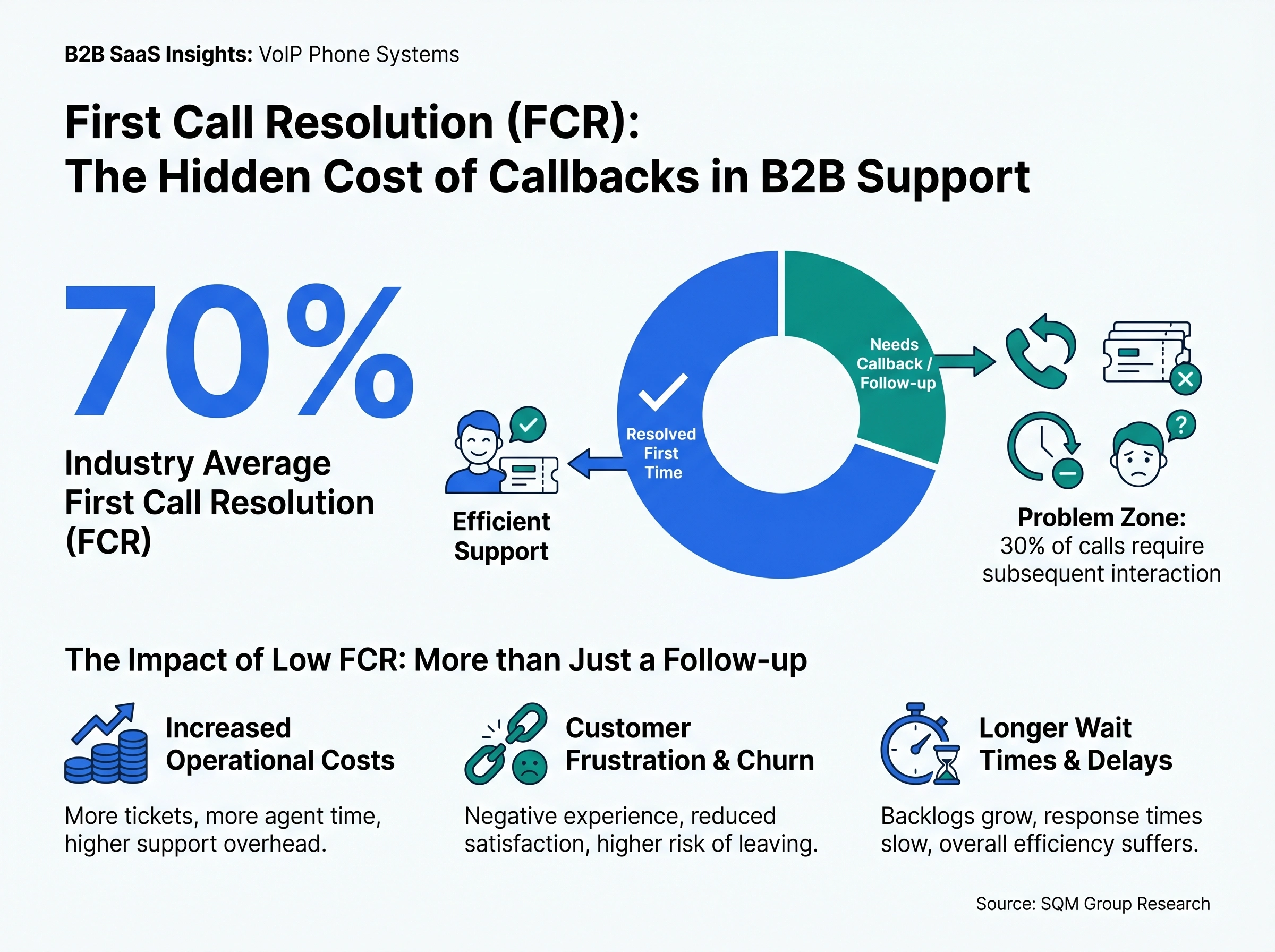
Why does that matter? Because every callback is another ticket, another wait time, another frustrated customer.
A modern VoIP phone system fixes this by routing calls to available agents automatically, connecting to your business tools so agents have context on screen, and letting AI handle the calls that don't need a human at all.
And the numbers back this up. According to research from Pylon, teams that deploy AI to handle repetitive support queries can reduce their ticket volume by up to 60%. Even conservative estimates put it at 30-40% for teams with high volumes of simple, data-lookup calls like order status and appointment scheduling.
That's not a marginal improvement. If you're a 6-person team handling 200 calls a day, deflecting 30% of those means 60 fewer calls your agents need to pick up. That's 60 more slots for the calls that actually need human judgment.
What types of support queries can dialnote handle?
Not all support calls are created equal. Some need a human. Most don't. Here's how dialnote breaks that down.
Tier 1: AI handles it completely
These are the calls your team answers on autopilot anyway. dialnote's AI voice agents take them off your plate entirely:
- "What are your hours?" - The AI pulls from your knowledge base and answers instantly.
- "Where's my order?" - Connected to your order management system via webhook, the AI looks up the order and gives a live status update.
- "Can I reschedule my appointment?" - The AI checks your Calendly or Cal.com calendar and rebooks on the spot.
- "What's your return policy?" - Straight from your knowledge base. No hold time, no agent needed.
- "Do you offer [specific service]?" - FAQ handling with natural conversation, not a robotic menu.
These calls don't require judgment. They require data lookup and a clear answer. AI is faster and more consistent at this than a human who's multitasking across three screens.
Tier 2: AI qualifies, then transfers
Some calls start simple but need a person to finish. The AI handles the opening:
- Billing disputes - AI collects account info and the nature of the issue, then transfers to your billing specialist with context attached.
- Technical problems - AI asks what product, what's happening, and what they've tried. Your tech support agent picks up with the troubleshooting context already documented.
- Complaints - AI acknowledges the issue, captures details, and routes to a senior agent. The customer doesn't have to repeat themselves.
The AI doesn't try to resolve these. It qualifies them so your human agents don't waste the first 90 seconds of every call gathering basic information.
Tier 3: Straight to a human
Complex issues, sensitive situations, VIP customers. These bypass AI entirely and go straight to your best agents via priority routing or a dedicated queue.
You decide what falls into each tier using dialnote's call flow builder. The boundaries are yours to set.
How integrations make your AI agent smarter
This is where dialnote's support value really shows up. An AI agent that can only read from a static FAQ is limited. An AI agent connected to your actual business systems? That's a different story.
dialnote connects with 50+ tools, and many of those connections feed directly into what your AI agent can do on a live call.
E-commerce and retail - Connect with Shopify and your AI can look up order status, shipping tracking, and purchase history while the customer is still on the line. "Your order #4521 shipped yesterday via FedEx and should arrive Thursday." That's not a canned response. That's live data.
Restaurants and hospitality - Toast and OpenTable integrations let your AI handle reservation checks, table availability, and order inquiries. "I can see your reservation for Saturday at 7 PM for four people. Would you like to change that?" No host needed for that call.
Field service - Jobber integration means your AI can check appointment schedules, confirm service windows, and even reschedule jobs for trades like plumbing, HVAC, and electrical. Your dispatcher doesn't need to answer the phone to confirm a 2 PM window.
Professional services - DocuSign, Stripe, and similar tools let your AI confirm payment status, check contract details, or trigger follow-up actions. "Your invoice was paid on May 2nd. I can send you a copy by text right now."
CRM and helpdesk - HubSpot, Salesforce, Pipedrive, Zendesk, and Freshdesk integrations mean every call is logged automatically. Transcripts, AI summaries, and action items attach to the right customer record. Your agents see the full history when they pick up.
Automation platforms - Zapier, Make, and n8n connect dialnote to thousands of other apps. Need to update a Google Sheet when a specific call tag is applied? Send a Slack notification when a VIP customer calls? Create a task in Asana after a support call? All possible without writing code.
ESP and communication tools - Email service providers and messaging platforms connect through Zapier and webhooks too. When a call ends, trigger an automatic follow-up email with a summary of what was discussed. Or push a notification to your team's Slack channel when a high-priority caller is in the queue. The AI agent can also send SMS during the call itself, texting the customer a tracking link, a confirmation code, or a scheduling URL while they're still on the line.
The key here is that these aren't just "nice to have" connections. They fundamentally change what your AI agent can do. Without integrations, your AI reads from a static FAQ. With them, it pulls live data from your actual business systems and gives customers real answers in real time.
Think about the difference. Without Shopify connected: "I'm sorry, I can't check your order status. Let me transfer you to an agent." With Shopify connected: "Your order shipped yesterday via FedEx. Here's your tracking number. I just texted it to you."
One of those calls needs a human. The other doesn't. Multiply that across hundreds of calls per month and you start to see why integrations aren't optional for support teams. They're the thing that makes AI actually useful.
How dialnote works for small call centers
You don't need 50 agents and an enterprise contract to run a proper support operation. dialnote gives small teams (5-20 people) the same call center tools that big operations use.
Call queues with smart distribution - Create dedicated queues for different support tiers. Use "round robin" to spread calls evenly, or "longest idle" to route to the agent who's been free the longest. Position announcements tell callers where they are in line. Estimated wait times set expectations.
Queue analytics that actually help - Track calls answered vs. abandoned, average wait time, and service level (percentage of calls answered within 60 seconds). See per-agent breakdowns so you know who's carrying the load and who might need backup during peak hours.
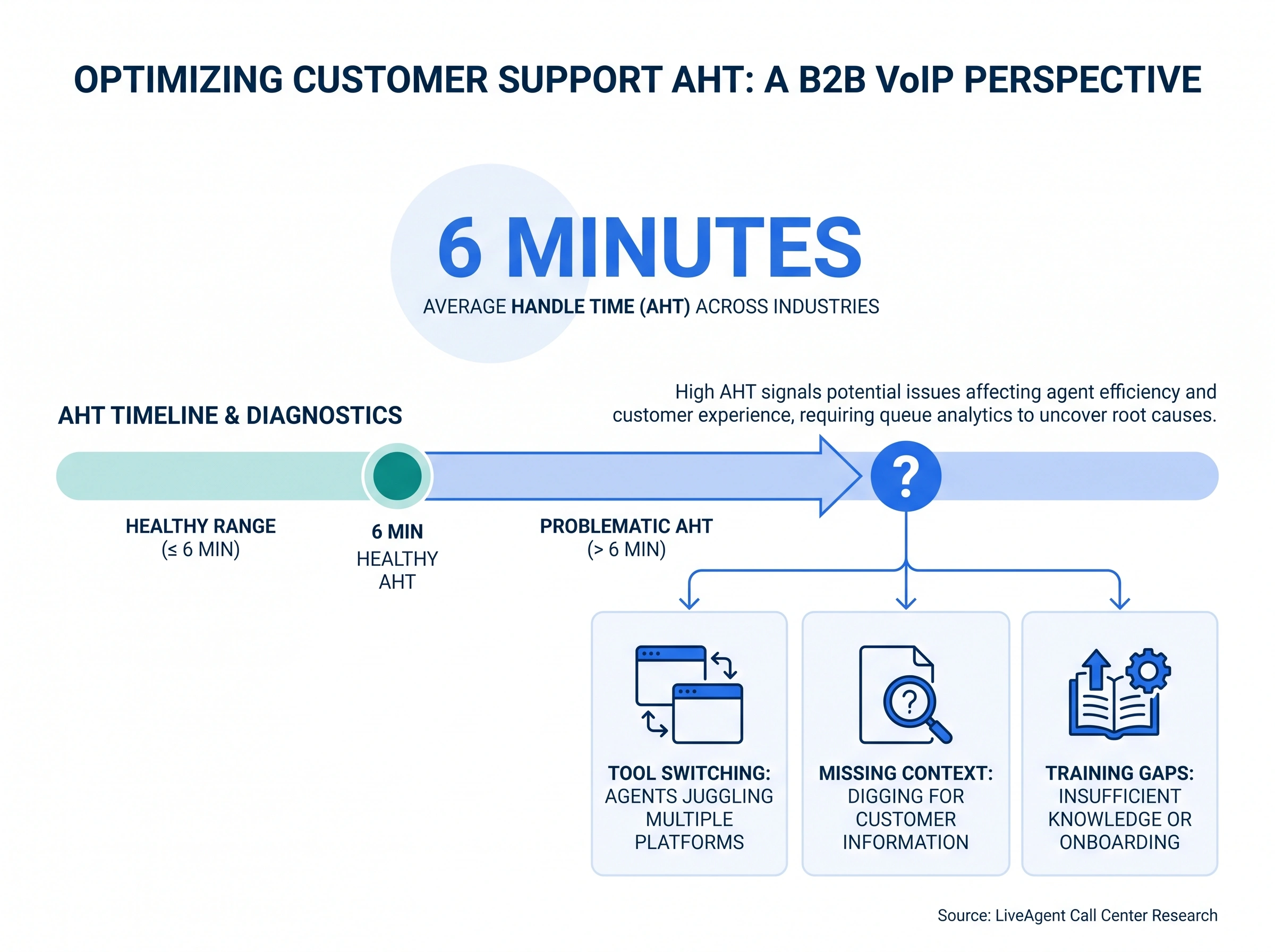
According to LiveAgent's call center research, the average handle time across industries is about 6 minutes. If your team's AHT is significantly higher, queue analytics help you figure out why. Is it training? Is it tool switching? Is it missing context that forces agents to dig for information?
AI call evaluation on every single call - This is the one that changes QA for small teams. Traditional quality assurance means a manager listens to 5-10 random calls per agent per month and scores them on a rubric. That's a tiny sample size, and it's inherently biased. The calls you pick, the mood you're in, the agents you pay more attention to.
dialnote's AI evaluates every call automatically. After each conversation ends, the AI reads the full transcript and assigns a score from 1 to 10 based on whether the issue was resolved, how the conversation flowed, and the caller's sentiment. Every agent gets the same scoring criteria applied to every call. No sampling bias. No favorites.
You get a score, a success/fail tag, a sentiment reading (positive, neutral, negative), and a short evaluation summary for each call. Aggregate that across your team and you can spot patterns: which agents consistently score 8+, who's struggling with billing calls, where training would make the biggest difference. It's the kind of quality insight that used to require a dedicated QA team. Now it runs in the background on every call.
Accept/reject mode - Instead of auto-dialing the next agent, let your team see caller info first and choose to accept or pass. Useful when certain agents specialize in certain issue types.
Business hours with after-hours AI - During working hours, calls go to your team through the queue. After hours, the AI voice agent picks up, handles what it can, and leaves a detailed message for your agents to follow up on in the morning. Weekends and holidays get their own flow.
Overflow to voicemail or callback - When the queue maxes out (you set the timer), callers can leave a message or request a callback instead of hanging up frustrated. Your team gets back to them without losing the lead.
Is that realistic for a team of 5? Absolutely. These aren't enterprise-only features. They're built into dialnote's Business and Pro plans and take about 15 minutes to configure.
Here's a real scenario. Say you run a property management company with 3 support agents. Tenants call about maintenance requests, rent payments, and lease questions. With dialnote, your AI agent handles the simple stuff: "Your rent payment was received on May 1st" or "I've logged a maintenance request for your kitchen faucet. A tech will call you within 24 hours." Your agents only pick up calls that need actual conversation, like a lease negotiation or a noise complaint that needs mediation.
Or picture a small e-commerce store during holiday season. Your usual 4-person team can't keep up with the order status calls pouring in. Instead of hiring temps, you turn on the AI agent with your Shopify integration active. It handles the "where's my package?" calls (which make up 40-50% of holiday volume) while your team focuses on actual problems like damaged items or wrong shipments.
Here's my honest take: most small support teams are either using a basic phone line with no queueing at all, or they're paying for a full contact center platform they'll never grow into. dialnote sits right in between. You get real call center tools without the bloat or the contract.
What does a typical support call flow look like?
Let's walk through what actually happens when a customer calls your support line with dialnote.
Step 1: Business hours check. It's 2 PM on a Tuesday. The call enters your flow.
Step 2: IVR menu. "Press 1 for order status, press 2 for technical support, press 3 for billing, or stay on the line for general help."
Step 3a: The customer presses 1 (order status). The call routes to your AI voice agent. The AI greets them: "I can help with that. Can I get your order number or the email address on the account?" The customer provides it. The AI checks Shopify via webhook, finds the order, and responds: "Your order shipped yesterday and is expected Thursday. I just sent you a text with the tracking link."
Call resolved. No human involved. Took about 90 seconds.
Step 3b: The customer presses 2 (technical support). The AI picks up first: "Before I connect you with our tech team, can you tell me which product you're having trouble with and what's happening?" The customer explains. The AI captures the details, then transfers to your tech support queue. The agent sees the issue summary on their screen before they even say hello.
Step 3c: The customer presses 3 (billing). Straight to your billing queue. Round robin rings the next available agent.
Step 4: After hours. Same call at 9 PM? The AI handles tier 1 queries directly and takes detailed messages for everything else. Your team reviews the transcripts and AI summaries first thing in the morning.
Every call gets transcribed automatically. AI generates a summary with action items. Call recordings attach to the customer's record in your CRM. Nothing falls through the cracks.
What makes this powerful is the combination of IVR, AI, and queues working together. The IVR sorts calls by intent. The AI resolves the simple ones. The queues distribute the rest. Your agents only see the calls that actually need them, and when they pick up, they already know what the customer wants because the AI captured the context.
You can build this entire flow in dialnote's visual call flow editor without writing a single line of code. Drag, drop, connect. Each phone number gets its own flow, so your support line works differently from your sales line. Change it anytime without filing an IT ticket.
We're not sure exactly how many tickets AI voice agents can deflect for every team. It depends on your industry and the complexity of your queries. But the teams we've worked with that have high volumes of repetitive calls (e-commerce, restaurants, property management, home services) typically see the biggest impact.
Setting up dialnote for your support team
Getting started takes less than a day. Here's the path:
-
Get a support number - Pick a local or toll-free number. If you already have one, port it over. Takes 1-2 weeks for the port, but you can start with a new number immediately.
-
Build your call flow - Go to Settings → Phone Numbers, select the number, and click Configure call flow. Add a Business Hours node, then an IVR Gather node with your support categories. Route each option to the right queue or AI agent.
-
Set up your AI agent - Tell it your company name, what it should ask callers, what it can answer from your knowledge base, and when to transfer. Upload your FAQ docs, product guides, and policy pages. Connect Calendly or Cal.com for scheduling.
-
Connect your integrations - Link your CRM (HubSpot, Salesforce, Pipedrive) for auto-logging. Connect Shopify, Jobber, or your industry tools via Zapier or webhooks so the AI can look up real customer data.
-
Create your support queues - Set up queues for each tier: general, tech, billing. Pick ring strategies, set wait times, enable position announcements.
-
Train and go live - Test your AI agent with the built-in simulation. Make a few test calls. Adjust the knowledge base and call flow based on what you hear.
Step 5 is where per-tier queues usually turn into a spreadsheet project on legacy systems. In dialnote a queue is created inside the same Call Flow Editor, right where the call needs it:
- Add an Enter Queue node, or open a Ring Users node and turn on If nobody answers
- Pick Create a new queue and name it for the tier, like Support or Billing
- Choose a ring strategy and a max wait time
- Click Create Queue, then Save Flow

Your first week live, the Monitor tab is the report that decides your tier design. A queue whose waiting count never hits zero needs another agent or an AI overflow path; a queue that's always empty can fold into the tier above it. Adjust one queue at a time and watch the missed column, not the total.
Set up your support line before the next ticket spike
10-day free trial, no credit card needed.
Your support team's job is solving real problems for real customers. The repetitive stuff? Let your phone system handle it. That's what a VoIP phone system for customer support should do, and it's what dialnote was built for.
Frequently asked questions
The best system depends on your team size and query volume. For support teams that need AI call handling, smart routing, and deep integrations with tools like Shopify or Zendesk, look for a VoIP platform built with support workflows in mind.
Yes, for common queries. AI agents can answer FAQs, check order status via integrations, book appointments, and route complex issues to the right rep. They won't replace your team, but they'll handle the repetitive calls that eat up your agents' time.
It depends on your industry and query mix. Teams with high volumes of simple, repetitive questions (order status, hours, pricing) typically see 30-40% of calls fully handled by AI without human involvement.
Yes. dialnote's call queues, ring strategies, and queue analytics give small teams (5-20 agents) the same call distribution and reporting tools that enterprise contact centers use, without the enterprise price tag.
dialnote connects with 50+ tools including CRMs (HubSpot, Salesforce, Pipedrive), helpdesk platforms (Zendesk, Freshdesk), e-commerce (Shopify), scheduling (Calendly), and automation tools (Zapier, Make, n8n). Custom webhooks connect to anything else.

Written by
Lancelot Dsouza
Chief Marketing Officer, SmartReach.io
Lancelot Dsouza is the Chief Marketing Officer at SmartReach.io, where he built the Marketing, Sales, and Customer Success verticals from the ground up. With over 25 years of experience spanning digital marketing, business development, and strategic...
Lancelot Dsouza is the Chief Marketing Officer at SmartReach.io, where he built the Marketing, Sales, and Customer Success verticals from the ground up. With over 25 years of experience spanning digital marketing, business development, and strategic...
Related Articles

VoIP Phone System for Sales: How dialnote Works
See how dialnote's VoIP phone system helps sales teams catch every inbound lead with smart routing, call queues, and AI receptionists.
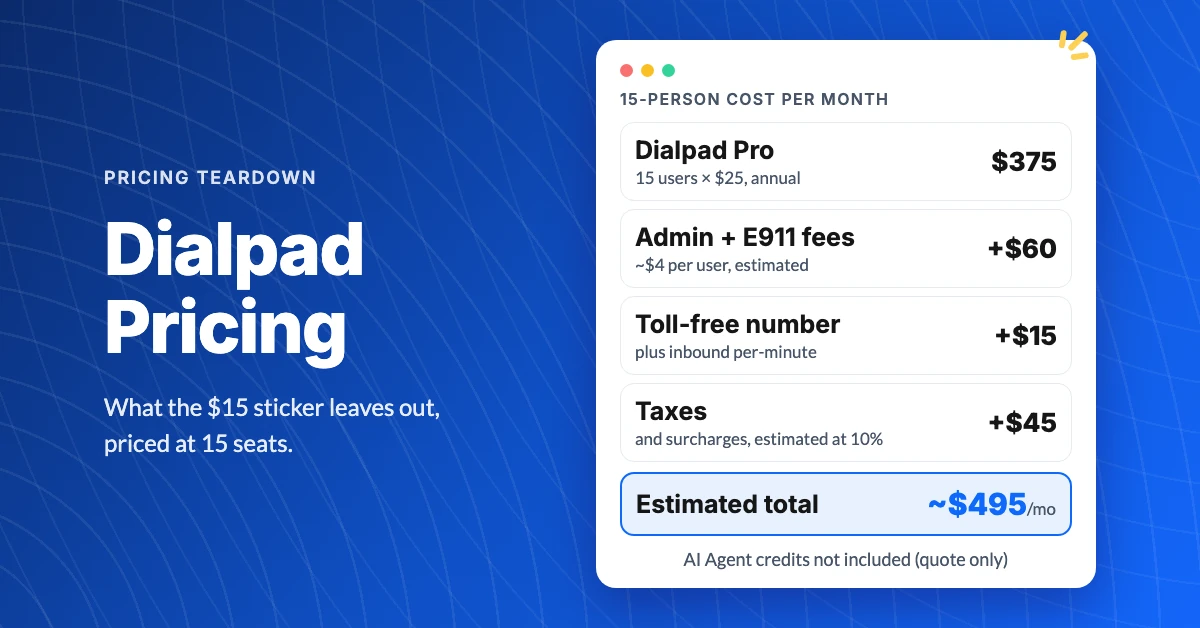
What Does Dialpad Pricing Really Cost a Small Team?
See what Dialpad pricing really costs: $15 to $35 per user, the 3-seat Pro minimum, per-text and admin fees, and real team math at 5, 15 and 30 people.
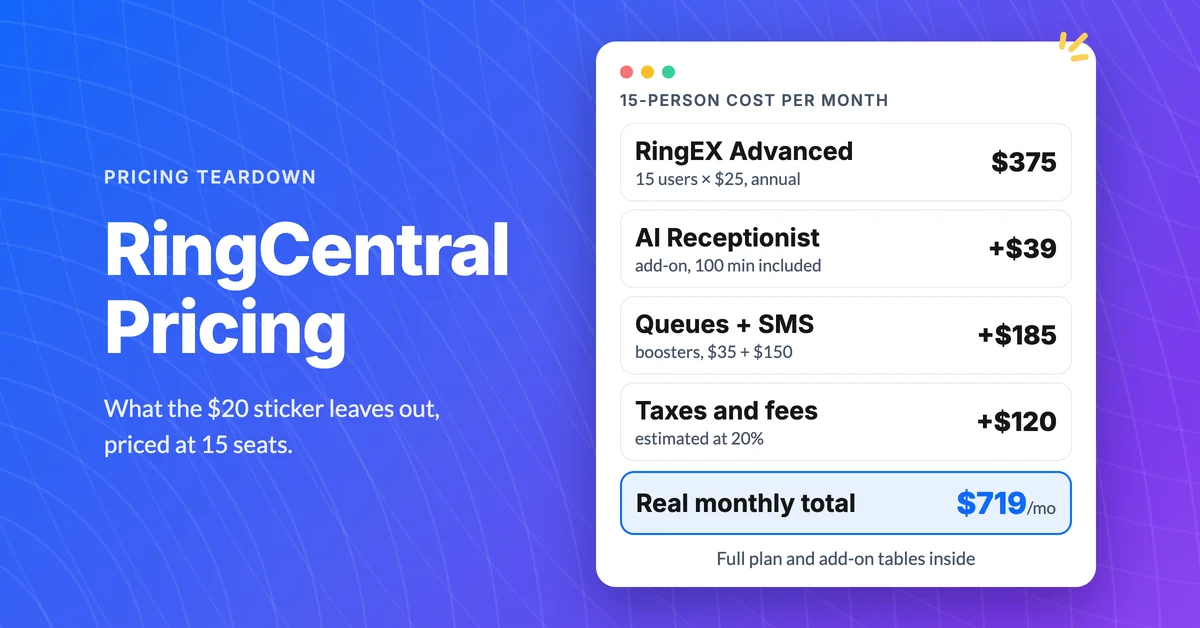
How Much Does RingCentral Really Cost per User?
RingCentral cost per user starts at $20, but add-ons, SMS caps and regulatory fees decide the real bill. See the 15-person math and the flat-rate comparison.
