How to Get a Business Phone Number Without a Landline
Amy is opening a bakery in Austin next month. The space is leased, the signage is up, and her business cards arrive tomorrow. But one thing keeps slipping down her to-do list: how to get a business phone number without a landline before opening day.
She doesn't want to pay $80 a month for a copper line she'll only use to take cake orders. She doesn't want customers calling her personal cell at 10 PM either. So what's the real answer?
This is the question we hear most often from new business owners. The good news: you can be up and running in about 15 minutes, often for less than the cost of a dinner out. Here's exactly how it works, and which option fits your situation.
TL;DR:
- You can get a business phone number without a landline in about 15 minutes using a VoIP or virtual phone service that runs on the phone, laptop, or tablet you already own.
- Plans start around $15 per user per month, and flat-rate providers like dialnote cover unlimited users for $49 a month, versus $80 to $150 for a two-line landline.
- With decent broadband (5 Mbps up and down), call quality matches or beats a copper landline, and calls can fall back to your cell network if WiFi drops.
- You can keep your current number by porting it, a move that takes 1 to 2 weeks while your old line stays active.
- Skip carrier add-ons and forwarding-only services if you plan to grow, since they lack team routing, SMS, and AI features.
What does "no landline" actually mean for a business phone number?
A business phone number without a landline is a real, working phone number that runs over the internet (or a cellular signal) instead of a copper wire to your office. To your customers, it rings, takes voicemail, and shows up on caller ID like any other phone number. To you, it lives in an app on your phone or laptop.
These are usually called virtual phone numbers, VoIP numbers, or cloud phone numbers. We use the terms loosely, but they all point at the same idea: a number untied from any physical jack on the wall.
The move away from copper isn't a trend, it's a wind-down. The FCC has been tracking the decline of traditional phone service for over a decade, and most US carriers are actively retiring copper lines. So if you're starting fresh today, skipping the landline isn't just convenient. It's the default.
Why a business phone number without a landline is the new default
Let's be blunt: paying for a separate landline today is a tax on inertia. Unless your industry has a specific regulatory requirement (some elevator phones and fire alarm panels still need analog lines), there's almost no reason to install one for a new business.
After 25 years in marketing leadership, here's what we've watched play out with small business clients:
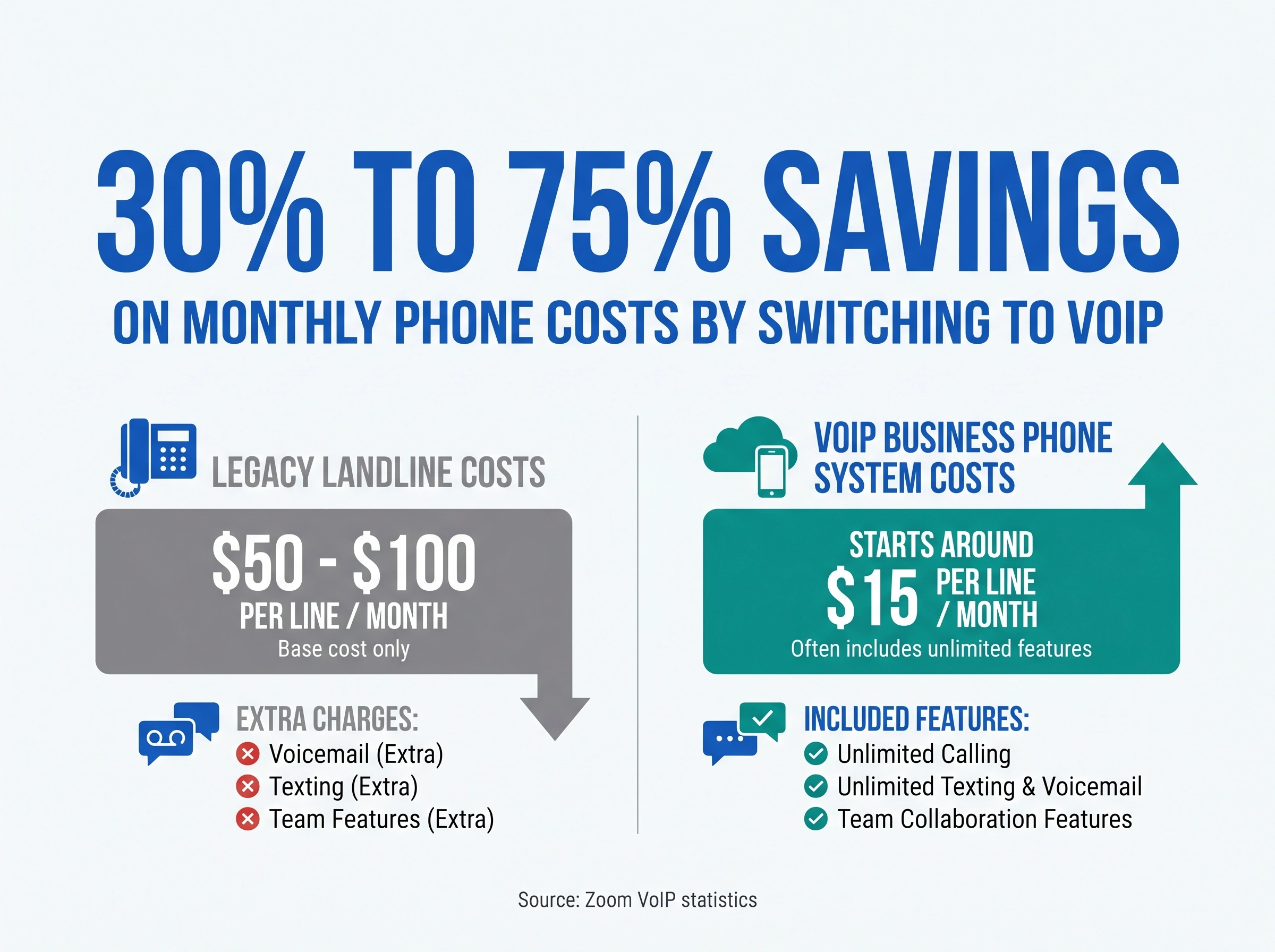
Cost. Landlines run $50 to $100 per line per month. Virtual numbers start around $15 and often include unlimited calling, texting, voicemail, and team features that landlines charge extra for. According to Zoom's industry research, businesses save 30% to 50% switching to VoIP, and up to 75% when replacing legacy systems.
Flexibility. Your business doesn't sit at one desk anymore. A virtual number rings on your phone at the bakery, your laptop at home, and your tablet at a trade show. Try doing that with a copper line.
Speed. Landlines often take a technician visit and a week of waiting. A virtual business number can be live in 15 minutes, with a local area code in any US city you want.
Features. Auto-attendants, voicemail transcription, call recording, team inboxes, SMS, and AI receptionists are built in. None of that comes standard with a landline.
Sound like a no-brainer? It mostly is. But the right option still depends on your team size, call volume, and how professional you want to sound on day one.
5 ways to get a business phone number without a landline
There are five practical paths to a no-landline business number. Each fits a different stage and budget.
1. A virtual phone or VoIP service (the recommended path)
This is where most small businesses land, and it's what we'd suggest first. A virtual phone provider gives you a real phone number that lives in an app on your existing devices. You can pick any US area code, set business hours, route calls to teammates, and add SMS, all without buying hardware.
Best for: any business that takes more than a handful of calls a week, plans to add team members, or wants to look professional from day one.
Typical cost: $15 to $30 per user per month for per-seat providers. A few platforms charge a flat fee for unlimited users instead, which usually wins on price once you cross three teammates. We cover the platform we'd pick in a dedicated section below. For a deeper look at the category, see our what is a virtual phone number guide.
2. A second line through your cell carrier
Most major US carriers offer a second-line add-on for $15 to $20 per month. It gives you a separate business number that rings on your existing cell.
Best for: solopreneurs who only need one number and aren't ready to evaluate phone systems.
Tradeoffs: limited features (often no auto-attendant, no team routing, no analytics). The number is also locked to your carrier. If you switch providers, you may lose it. Long term, this is the option people regret most.
3. A mobile app secondary line (Sideline, Line2, Burner)
A handful of apps add a second number to your existing smartphone. Cheap, fast, app-based.
Best for: testing a side hustle or running a project-based business where you may want a number you can throw away later.
Tradeoffs: these aren't built for teams. If you grow past one user, they fall apart quickly. There's no real CRM, no team inbox, and no AI features.
4. A forwarding-only service
Some providers offer a cheap number that simply forwards every call to your cell phone. No app, no dashboard.
Best for: very low-volume use cases (think: a vacation rental listing).
Tradeoffs: you can't text, route, or analyze anything. We don't recommend this for anyone planning to grow.
5. Google Voice for Business
Google Voice (bundled with Workspace) offers a basic business number for $10 per user per month. It works if you already pay for Workspace and you only need a second number for one person.
Best for: solo consultants who already use Google Workspace and have no plans to grow past one user.
Tradeoffs: no SMS in some markets, no real auto-attendant, no team inbox, no AI receptionist, no call recording, no analytics. Most teams we've worked with hit those walls inside the first year and end up migrating to a full virtual phone system. For a side-by-side breakdown, see our Google Voice alternatives for business guide.
Which one fits you? For most small businesses, option 1 is the safe bet. The platform we'd put on the table: dialnote is an AI business phone system with no per-user pricing. AI voice agents answer calls, capture leads, and book meetings 24/7. Plans from $19/mo. It works as a full cloud VoIP phone system, rolling a business number, team routing, SMS, voicemail transcription, and call analytics into a single app on your phone or laptop, with no hardware or contract.
We dig into pricing, features, and setup in a dedicated section below. If you want to compare the broader category first, our roundup of the best virtual phone systems for business breaks down real ten-user costs across major providers.
How much does a business phone number without a landline cost?
Honest answer: for most small businesses, between $0 and $50 a month total.
Here's the rough math:
- Solo founder, one number: $10 to $20 per month (Google Voice, carrier add-on, or a basic virtual plan)
- Two to five-person team: $30 to $80 per month with a team-pricing virtual provider
- Growing team (5 to 25 people): $49 to $99 per month on unlimited-user plans like dialnote
- Larger teams (25+): $99 to $200 per month, often with AI features, call queueing, and analytics
Compare that to a basic two-line business landline plan, which typically lands at $80 to $150 per month before features. The math isn't close.
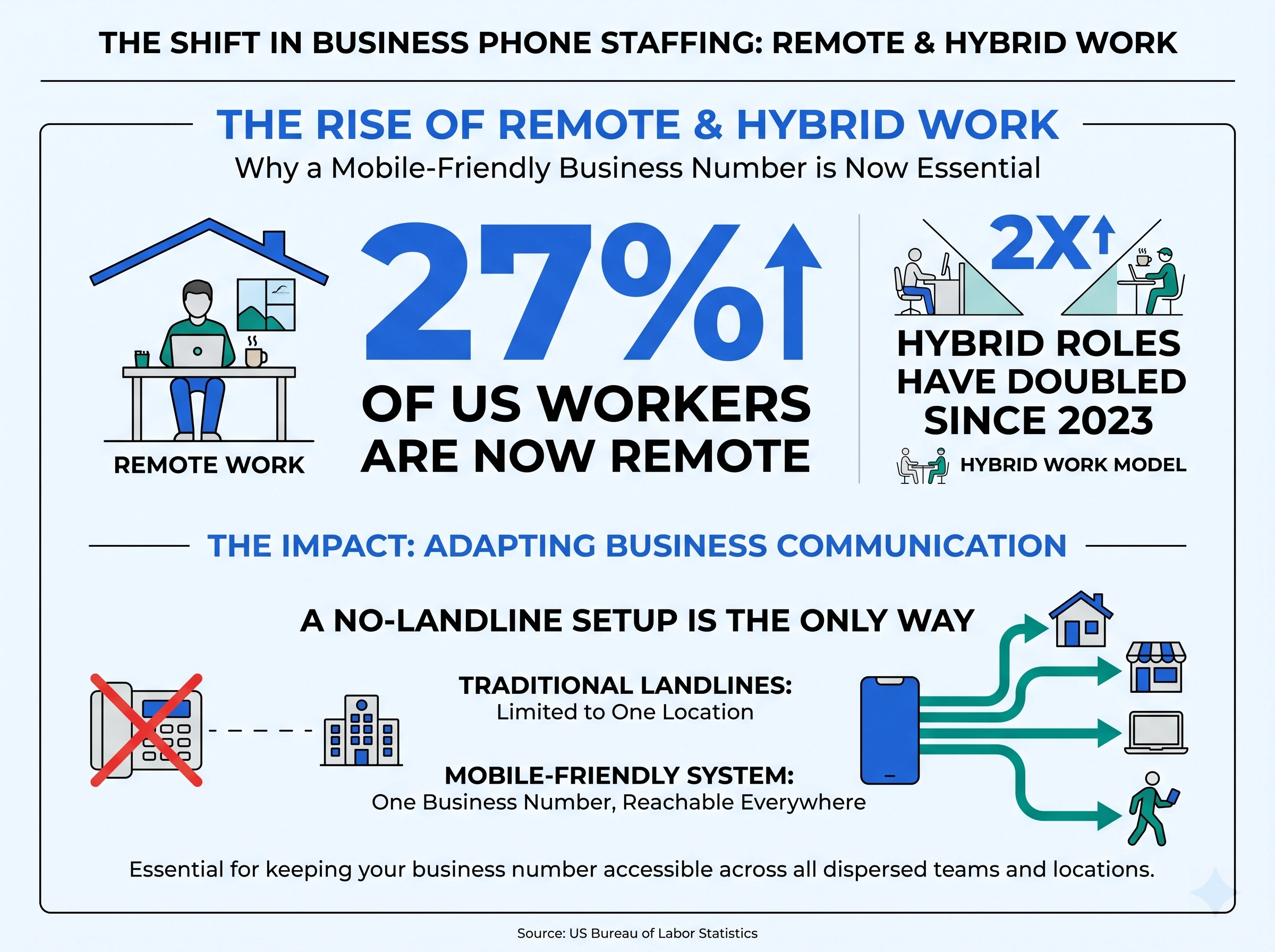
There's also a bigger shift in how small businesses staff their phones. Roughly 1 in 4 US workers now works remotely, and hybrid roles have more than doubled in recent years. A no-landline setup is the only way to keep one business number reachable across all those locations.
What about call quality and reliability without a landline?
This is the single most common worry we hear, and it deserves a straight answer.
With a reasonable broadband connection (5 Mbps up and down is plenty), call quality on a virtual business number is indistinguishable from a landline. Often better, because modern audio codecs handle background noise more cleverly than copper ever could.
The honest caveat: if your office WiFi is unreliable, calls can degrade. The fix is simple. Set your virtual number to fall back to your cell network when WiFi drops. Most good providers do this automatically.
One thing we're not 100% sure about: a small number of US banks still ask for a landline as proof of business address when opening accounts. We've heard mixed reports on this lately. If it comes up, a printed utility bill or lease usually works as a stand-in. Worth checking with your bank before you sign up.
Common mistakes to avoid when ditching the landline
A few patterns we see new business owners stumble on:
- Picking a random area code. Customers trust local numbers. If you serve Chicago, get a 312 number, not a 949. People are about twice as likely to answer a call from their own area code.
- Skipping voicemail setup. A default greeting that says "the person at extension 1 is not available" tanks your credibility. Spend two minutes on this.
- Forgetting SMS. Roughly 75% of customers prefer texting a business over calling. If your new number can't text, you're missing leads.
- Using a personal Gmail-linked Google Voice for a serious business. It works until your team grows past one person, then becomes a mess.
- Buying a number you can't port out. Some carrier add-on plans lock the number to that carrier. Read the fine print, or just skip them.
For a broader breakdown of what to look for, our choose the right business phone system guide goes deeper.
How dialnote gives you a business phone number without a landline
We named dialnote in the "which one fits you" callout above. Here's the full picture of what you get, what it costs, and how to set it up.
dialnote comes from the SmartReach.io group and is built for small and mid-sized businesses. The whole product runs in an app on the devices your team already owns, no hardware required. It bundles inbound and outbound calling, SMS, voicemail, an AI receptionist, team routing, and call analytics into a single dashboard, which is the main reason we'd point a landline-skipper at it first.
Flat monthly pricing with unlimited users on every plan
Most virtual phone providers charge per seat, so a five-person team costs five times a one-person team. dialnote does the opposite: every plan is a flat fee that covers as many users as you want.
Here's the monthly pricing ladder:
- Team: $49 a month. Unlimited users, the AI receptionist, AI call summaries, voicemail transcription, SMS, business hours, and team routing. The right starting point for almost every small business.
- Business: $99 a month. Everything in Team, plus AI answering in 14 languages and up to 5 AI voice agents. The fit for retail, multi-location service businesses, and growing sales teams.
- Pro: $199 a month. Everything in Business, plus call queueing, AI call tags, and AI evaluation for sales coaching. The fit when you start running a real call center inside your business.
Outbound calling reaches 90+ countries, with international calls billed at per-minute rates from your account wallet.
Real AI built in, not bolted on
The AI receptionist picks up the phone when you're decorating cupcakes, driving between job sites, or in a customer meeting. It greets the caller, answers basic questions about your business, captures contact info, and books appointments straight into your calendar. AI call summaries land in your inbox after every call, so you can skip the "I'll send notes" loop.
Most landline replacements still treat AI as an add-on you pay extra for. With dialnote, it's part of the $49 Team plan.
How do you set up your business phone number in 30 minutes?
Here's the actual setup flow. We've watched first-time founders go from sign-up to first inbound call in under 20 minutes. It starts with the free trial, which drops you on the Quick Start page:
Step one: create your account
10-day free trial, no credit card required.
- Click Get Phone Number and search by area code, city, or specific digits (our local vs toll-free numbers guide helps you pick)
- Check the number's capability badges (Call, SMS, MMS) and claim it
- Click Make a Call Now and ring your own cell to confirm audio both ways
- Set Business Hours and record a voicemail greeting, the step most people skip and regret when calls hit their cell at midnight
- Go to AI Agents, click Configure AI Agent, add your business info and the questions it should ask callers, and link Calendly or Cal.com so it books appointments
- Click Invite Team Members, decide who picks up what, then call your number from your cell: the AI answers, captures your details as a test caller, and the conversation lands in the team inbox
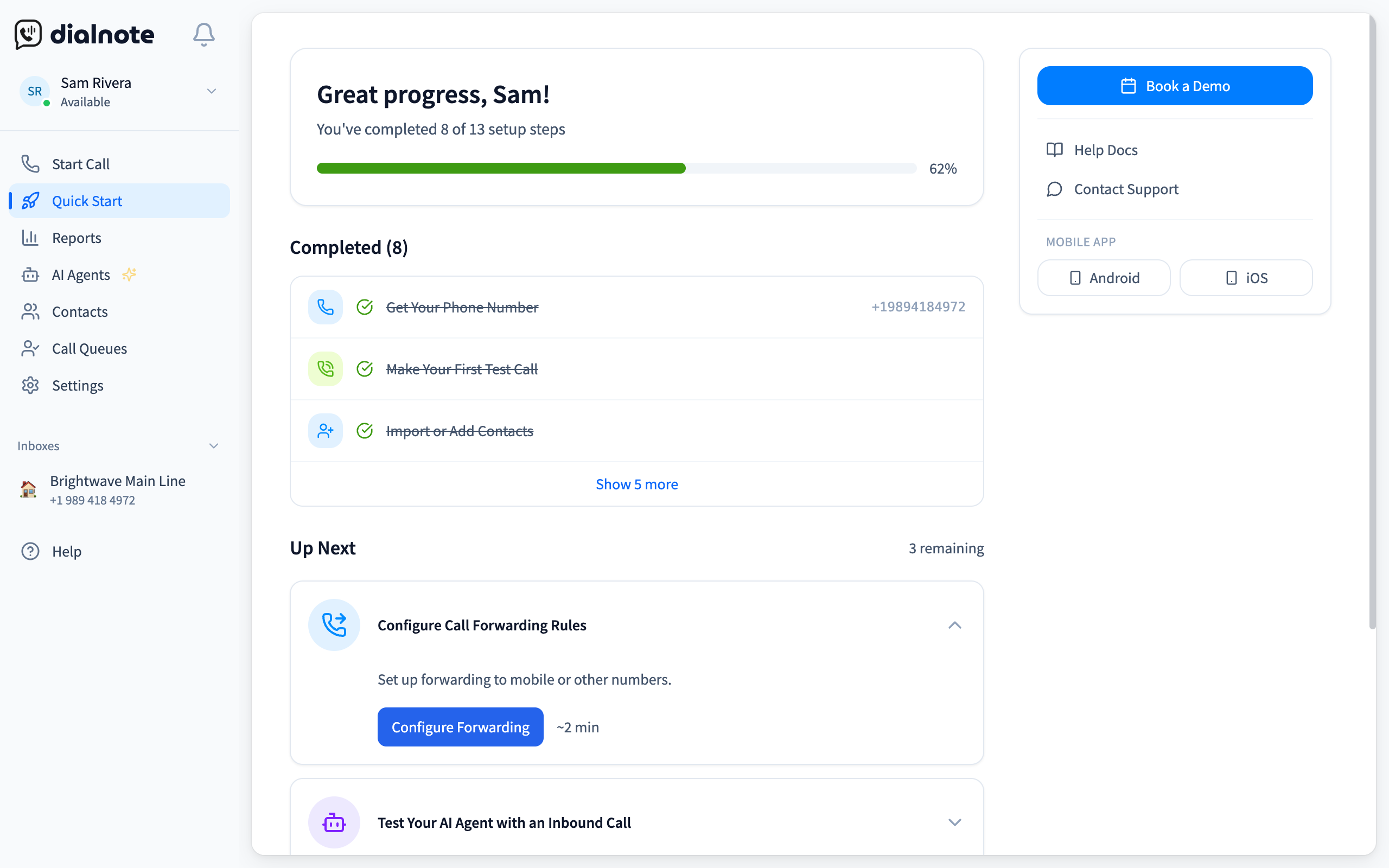
The Quick Start page detects each finished task on its own, so the progress bar doubles as your opening-day checklist. Already have a business number you love? You can port it. The transfer takes 1 to 2 weeks, your old line stays active during the move, and dialnote handles the paperwork.
Who dialnote isn't for
To stay honest: dialnote isn't the right fit if your business has a regulatory requirement for an analog landline (think elevator phones, fire alarm panels, certain medical applications). It's also overkill if you genuinely take fewer than five calls a month. A basic cell carrier add-on is cheaper for that case. For everyone else, including the bakery in our opening example, dialnote is the simplest path from no phone system to a working business number.
Get your business phone number without a landline today
Skipping the landline is the right call for almost every new business. A virtual number runs on the devices your team already owns, costs a fraction of a copper line, and includes the features customers expect from a real business: SMS, voicemail, smart routing, and an AI receptionist that picks up when you can't.
dialnote covers all of that on the $49 Team plan with unlimited users, so you can hire your fourth or tenth teammate without a billing surprise. The Business and Pro plans add more AI agents, languages, and call-center features when you're ready to grow into them.
Pick your area code, claim your number, and take the first call this afternoon. No credit card. No landline required.
Frequently asked questions
Yes. A virtual phone or VoIP service gives you a real business number that runs on your existing phone, laptop, or tablet over the internet. Most setups take under 15 minutes and start around $15 per month.
Plans start around $15 per user per month. dialnote's Team plan covers unlimited users for $49 per month. Most small businesses save 30% to 75% versus traditional landline costs.
Yes, with a solid internet connection, call quality matches or beats landlines. Top providers route calls through global data centers and fail over to your cell network if WiFi drops.
Yes. You can port your existing number to a virtual provider. The move takes 1 to 2 weeks, your old line stays active during the port, and most providers handle the paperwork for free.
No. Callers can't tell the difference. The number looks and sounds like any other phone number on caller ID. Audio quality is identical or better than a copper landline.

Written by
Lancelot Dsouza
Chief Marketing Officer, SmartReach.io
Lancelot Dsouza is the Chief Marketing Officer at SmartReach.io, where he built the Marketing, Sales, and Customer Success verticals from the ground up. With over 25 years of experience spanning digital marketing, business development, and strategic...
Lancelot Dsouza is the Chief Marketing Officer at SmartReach.io, where he built the Marketing, Sales, and Customer Success verticals from the ground up. With over 25 years of experience spanning digital marketing, business development, and strategic...
Related Articles
What Is a Virtual Phone Number? A Complete Guide
Learn what a virtual phone number is, how it works, what it costs, and how to get one in minutes. See why businesses save up to 75% on phone costs.
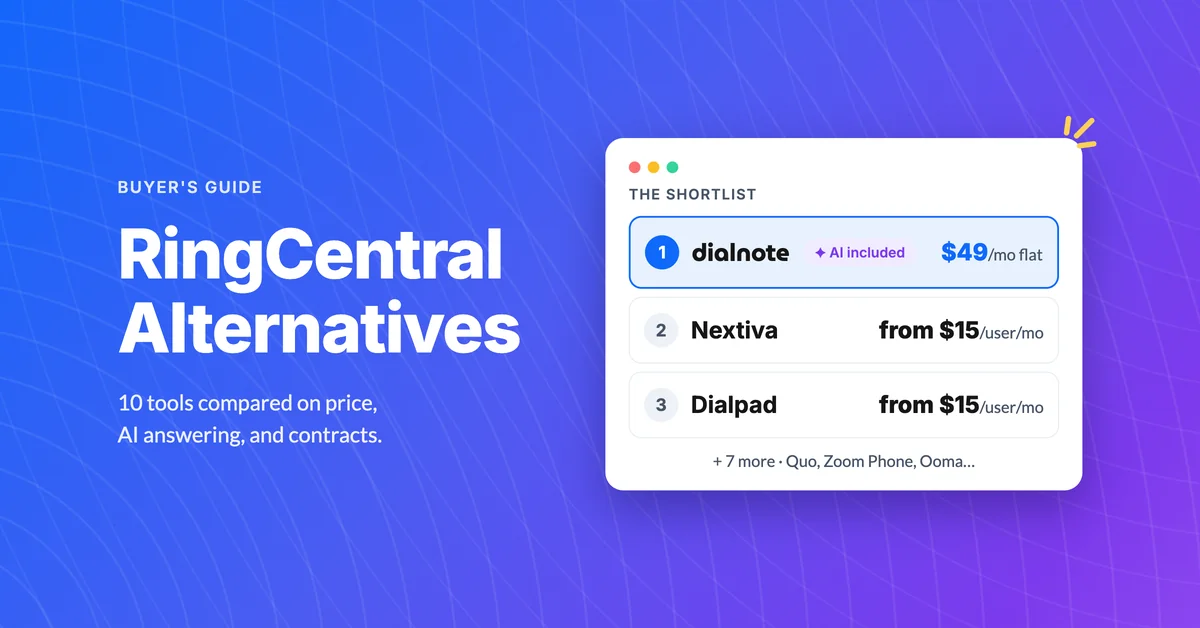
10 Best RingCentral Alternatives for Small Business
Compare 10 RingCentral alternatives for small business by real per-user cost, AI receptionists, and contract traps before you renew.

Google Voice Alternatives: 7 Picks for Business
Compare 7 Google Voice alternatives built for serious business use by AI features, multi-level IVR, CRM sync, and real per-user costs.
