How to choose a business phone system in 2026
Your phone rings during a busy Tuesday. Three calls stack up at once. One's a new lead, one's an angry customer, and one's your best client. Which one gets picked up, and which one hangs up for good?
That's the real stakes behind knowing how to choose a business phone system. It's not about dial tones. It's about whether the right call reaches the right person before they give up and try a competitor. Get this decision right and you save money, sure, but you also save the deals you never even hear about.
TL;DR:
- Knowing how to choose a business phone system starts with your team size, call volume, and where people work, not with a feature list.
- Cloud (VoIP) systems win for most small and mid-sized businesses: lower upfront cost, work-from-anywhere, and features that update on their own.
- Must-have features: auto-attendant, call routing, voicemail-to-email, a mobile app, and call recording. AI call summaries are quickly moving from nice-to-have to standard.
- Watch hidden costs: setup fees, number porting, per-minute international rates, and per-seat charges that balloon as you grow.
- Your internet is almost certainly ready. A single VoIP call needs less than 0.5 Mbps, but test on your real network during your busiest hour before committing.
- The costliest buying mistakes: shopping on sticker price, signing annual contracts before a trial, and per-seat plans that punish growth.
- Pick a monthly plan you can test first, keep your existing numbers, and pilot with a small group before the full switch.
Start with your team, not the feature list
Before you compare a single provider, answer four questions about your business. The right system falls out of the answers.
How many people need a line? How many calls do you handle on a normal day? Where does your team actually work: one office, home, or all over? And what does a caller need to happen when they reach you?
Meet Priya. She runs a six-person insurance agency, and half her team works from home two days a week. Her old desk phones were useless the moment anyone left the building. Calls to the main line rang out. She didn't need more phones, she needed a system that followed her people wherever they logged in. That single insight, work-from-anywhere, ruled out half the options on her shortlist in an afternoon.
Skip this step and you'll end up buying features you never touch. Nail it, and the shortlist writes itself.
Cloud vs on-premise: the big decision
A cloud phone system runs your calls over the internet and is hosted by the provider. An on-premise system uses hardware boxes installed at your office. For most small and mid-sized businesses today, cloud wins, and it isn't close.
Here's the honest split.
Cloud-based (VoIP) systems
VoIP has become the default for a reason. There's no hardware closet to babysit, and adding a new hire takes minutes instead of a service call.
Strong points:
- Nothing physical to maintain or repair
- Add or remove users in a few clicks
- Works from a laptop or phone anywhere with internet
- Low upfront cost, predictable monthly billing
- New features roll out automatically
Best for: remote and hybrid teams, growing businesses, multi-location shops, and anyone who wants to be running this week.
Want the full trade-off breakdown? Our guide on cloud vs on-premise phone systems walks through both in detail.
On-premise systems
Traditional systems with hardware on-site. You own the boxes, and you own the upkeep.
Strong points:
- Full control over the hardware
- Runs even if your internet drops
- One-time purchase in some setups
Best for: large enterprises with a dedicated IT team, or locations where the internet is genuinely unreliable.
Honestly? Unless you're over 100 seats with IT staff on payroll, on-premise is overkill for most teams. The maintenance alone eats the savings.
Is your internet ready for a cloud phone system?
Almost certainly, yes. A single VoIP call uses less than 0.5 Mbps, a sliver of what one video stream burns. Stability, not raw speed, is what makes or breaks call quality.
According to the FCC's broadband guide, a VoIP call needs under 0.5 Mbps of bandwidth. Even ten calls at once won't strain a basic business connection. So why do some offices still get choppy audio?
Three culprits show up again and again:
- Congested wifi. Fourteen laptops, a smart TV in the lobby, and a video meeting all fighting over one router. Voice packets lose that fight.
- Jitter and packet loss. Voice needs packets to arrive in order and on time. A fast but inconsistent connection sounds worse than a slow, steady one.
- No traffic priority. Most business routers can put voice traffic first (look for a QoS setting). Few offices ever switch it on.
The fixes are cheap. Put your front desk and heaviest callers on a wired connection. Turn on QoS. Then run test calls during the busiest hour of your week, not at 7 am when the office is empty.
Here's the honest part: we can't predict how your wifi behaves at 2 pm on a Wednesday with the whole team online. Neither can you, until you test it. That's the real reason free trials exist.
Which features actually matter?
Focus on features that touch every call, not the long checklist a sales rep waves at you. A handful of core tools cover 90% of what a small business needs day to day.
Start with the must-haves. Everything else is a bonus.
Must-have features
- Auto-attendant: a professional greeting that routes callers to the right place.
- Call routing and forwarding: send calls to the right person, on any device, so nothing rings out.
- Voicemail-to-email: messages land in your inbox as text or audio, so you never lose one.
- Mobile app: your business line on your phone, without giving out your personal number.
- Call recording: for training and, in some industries, legal compliance.
Features worth paying more for
- AI call summaries: automatic notes so nobody scribbles during a call, and every conversation becomes searchable text.
- CRM integration: calls tied to customer records in tools like HubSpot, Salesforce, or Pipedrive.
- Call analytics: see volume, missed calls, and busy hours so you can staff smarter.
- Multiple number types: local, toll-free, or both, depending on who you serve and where.
- Multi-language support: for teams that serve callers in more than one language.
How do integrations fit into the decision?
If your team lives in a CRM, your phone system has to connect to it. Calls that never land in customer records get forgotten, and forgotten calls cost real deals.
Stan, a sales ops manager, learned this the slow way. He spent three weeks building a call activity dashboard, and it looked great right up until he noticed 40% of the data was missing. Reps weren't logging calls by hand, and the old phone system had no way to push them into the CRM automatically. The fix wasn't more nagging in the Monday meeting. It was a phone system that logged every call on its own.
Before you shortlist anything, write down the three tools your team can't work without. Then check each provider against that list:
- Native or via middleware? A native CRM integration (HubSpot, Salesforce, and Pipedrive are the common ones) syncs on its own. "Connects via Zapier" also works and covers thousands of smaller apps, but it's one more thing to set up and maintain.
- What actually syncs? Some integrations log only that a call happened. The useful ones push recordings, notes, and outcomes into the contact record where the next person can see them.
- Scheduling. If callers book meetings with your team, check that the phone system talks to the booking tool you already use.
One question worth asking on every demo: "Show me what a finished call looks like inside my CRM." The answer tells you more than the integrations page on their website ever will.
How much does a business phone system cost?
Most cloud phone systems run $15 to $50 per user per month, with the real total shaped by add-ons and call volume. The sticker price rarely tells the whole story, so read the fine print before you sign. For the loaded numbers, taxes, fees, and the per-user vs flat-rate math, see our full business phone system cost breakdown.
Here's how the common pricing models compare.
| Pricing model | Typical cost | Best for |
|---|---|---|
| Per user / month | $15 to $50 per user | Small to mid-sized teams |
| Flat unlimited | $50 to $500 per month | High-volume or growing teams |
| Pay-as-you-go | Per-minute rates | Seasonal or low-volume users |
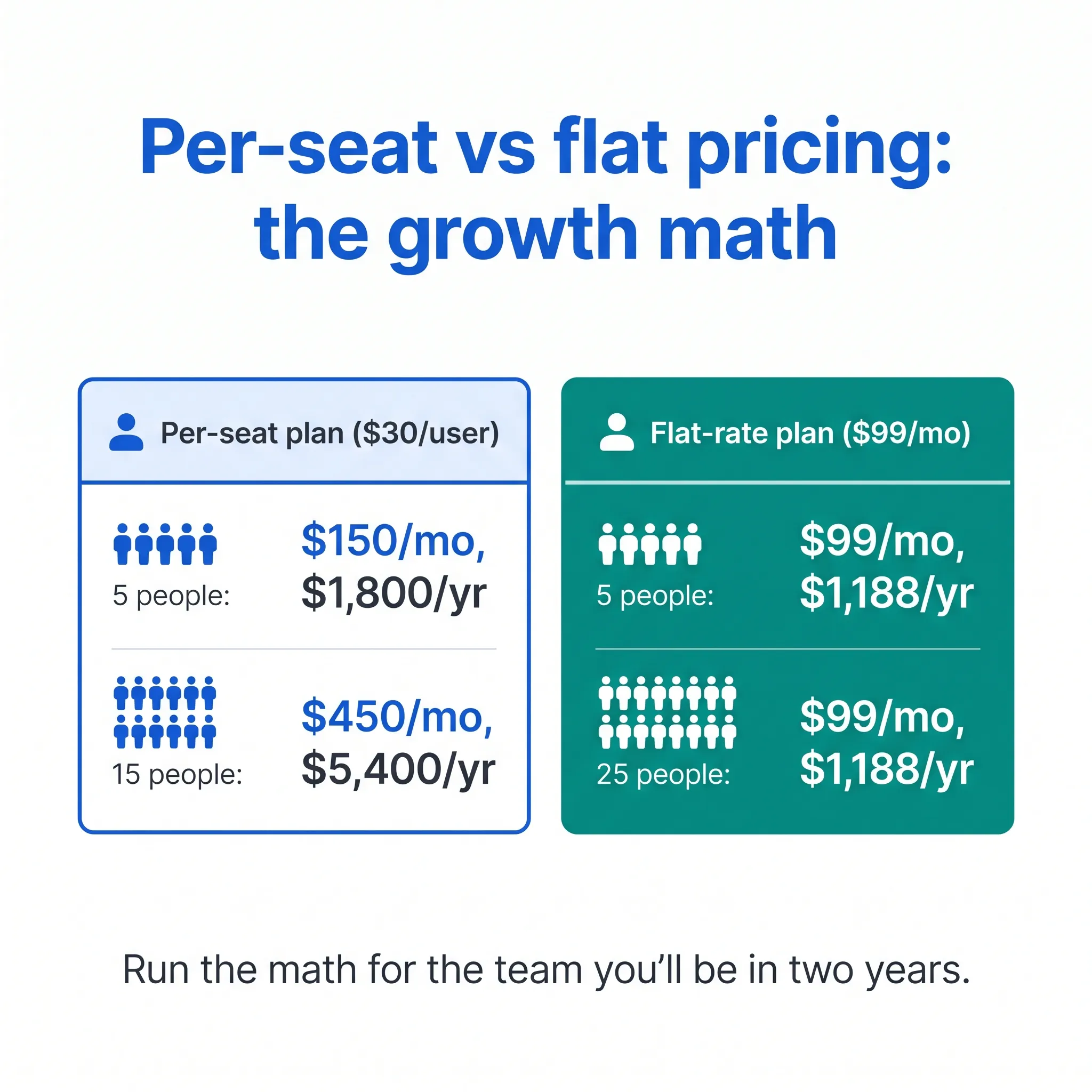
Which model wins? For a growing team, flat pricing with unlimited seats usually beats per-user billing. Per-seat plans look cheap at five people and painful at twenty-five. That's the trap most buyers walk into.
A quick cost walk-through
Run the math for the team you'll be in two years, not the team you are today. That's where per-seat pricing shows its teeth.
Say five people share a $30-per-user plan: $150 a month, $1,800 a year. Manageable. Grow to fifteen and the same plan costs $450 a month, $5,400 a year, for features that haven't changed. A flat-rate plan at, say, $99 a month stays at $1,188 a year whether you're five people or twenty-five.
Growth shouldn't come with a phone-bill penalty. If you're planning to hire, flat pricing isn't just cheaper on paper. It removes a small tax on every new hire.
Hidden costs to watch
The monthly price is just the entry fee. These extras quietly pad the bill:
- Setup and activation fees
- Number porting charges
- International calling, billed per minute
- Add-on features that should've been included
- Hardware you didn't know you needed
Ask for the all-in monthly cost, not the per-line teaser. A good provider will give you a straight answer.
Questions to ask every provider
Before you commit, put every shortlist provider through the same five questions. The answers separate the honest ones from the ones counting on you not to read closely.
- What's actually in the base price? Confirm the core features aren't paid add-ons.
- What's the uptime commitment? Look for a clear service-level agreement, not a vague promise.
- How does support work? Real humans, and hours that match when you're open.
- What's the contract length? Month-to-month gives you room to leave if it's a bad fit.
- How easy is it to scale? Adding or removing people should take minutes, not a support ticket.
Push on question one especially. "Unlimited calling" that quietly excludes the features you need isn't unlimited. It's marketing.
What mistakes should you avoid when choosing?
The expensive ones: buying on sticker price alone, signing an annual contract before testing, and ignoring how per-seat pricing scales. Every one of them is avoidable with a short trial.
Alex runs a sales team of 12, and he's got the scar tissue to prove it. Two years back he signed an annual per-seat deal because the demo impressed him and the first-year discount sealed it. Then the team grew to 18. The renewal quote jumped by half, and leaving early meant a termination fee. He paid the fee. It was still cheaper than staying.
Learn from his bill:
- Shopping on price alone. The cheapest tier usually strips out routing, recording, or the mobile app, exactly the features you'll want by month two.
- Signing long contracts untested. Honestly? Committing to a year of a system you've never routed a real call through is gambling, not saving. Start month-to-month, then take the annual discount once it's proven.
- Ignoring the growth math. A per-seat plan quoted for today's headcount is a different product at next year's headcount. See the cost walk-through above.
- Skipping the support test. Call their support line before you buy. The wait you experience as a prospect is the best-case version of the wait you'll get as a customer.
- Testing only on perfect wifi. A demo in a quiet room tells you nothing about a Tuesday rush. Pilot on your real network with real calls.
None of these mistakes show up in a feature comparison chart. All of them show up on the invoice.
What's the smartest way to switch without downtime?
Plan a phased switch over two to four weeks, keep your existing numbers by porting them, and pilot with a small group before the full cutover. Rushing the move is how businesses drop calls during the transition.
A typical migration looks like this:
- Week 1: set up accounts, users, and call routing.
- Week 2: start number porting so you keep your existing lines.
- Week 3: test call flows and train the team.
- Week 4: flip everyone over, with the old system on standby.
According to the FCC's porting rules, businesses can keep their existing phone numbers when they switch providers, so there's no reason to lose the number your customers already know. Porting can take a few business days, which is why you start it early, not on go-live day.
To keep disruption near zero: train staff before the switch, run a pilot group first, and have a fallback for the transition window. Ever lived through a botched phone cutover? It's a special kind of chaos, and it's entirely avoidable with a plan.
The pilot is also where most buyers cut corners. They test the finalist with two polite internal calls in a quiet room, declare it fine, and sign the annual contract. Then the Tuesday rush arrives and they learn the demo never looked anything like their real call load.
If your shortlist finalist offers a real trial, you can run that pilot before you sign anything. dialnote makes this cheap to do: the Quick Start page walks a new account from claimed number to live test calls in about ten minutes, and the 10-day free trial needs no credit card, so the evaluation costs nothing but the time.
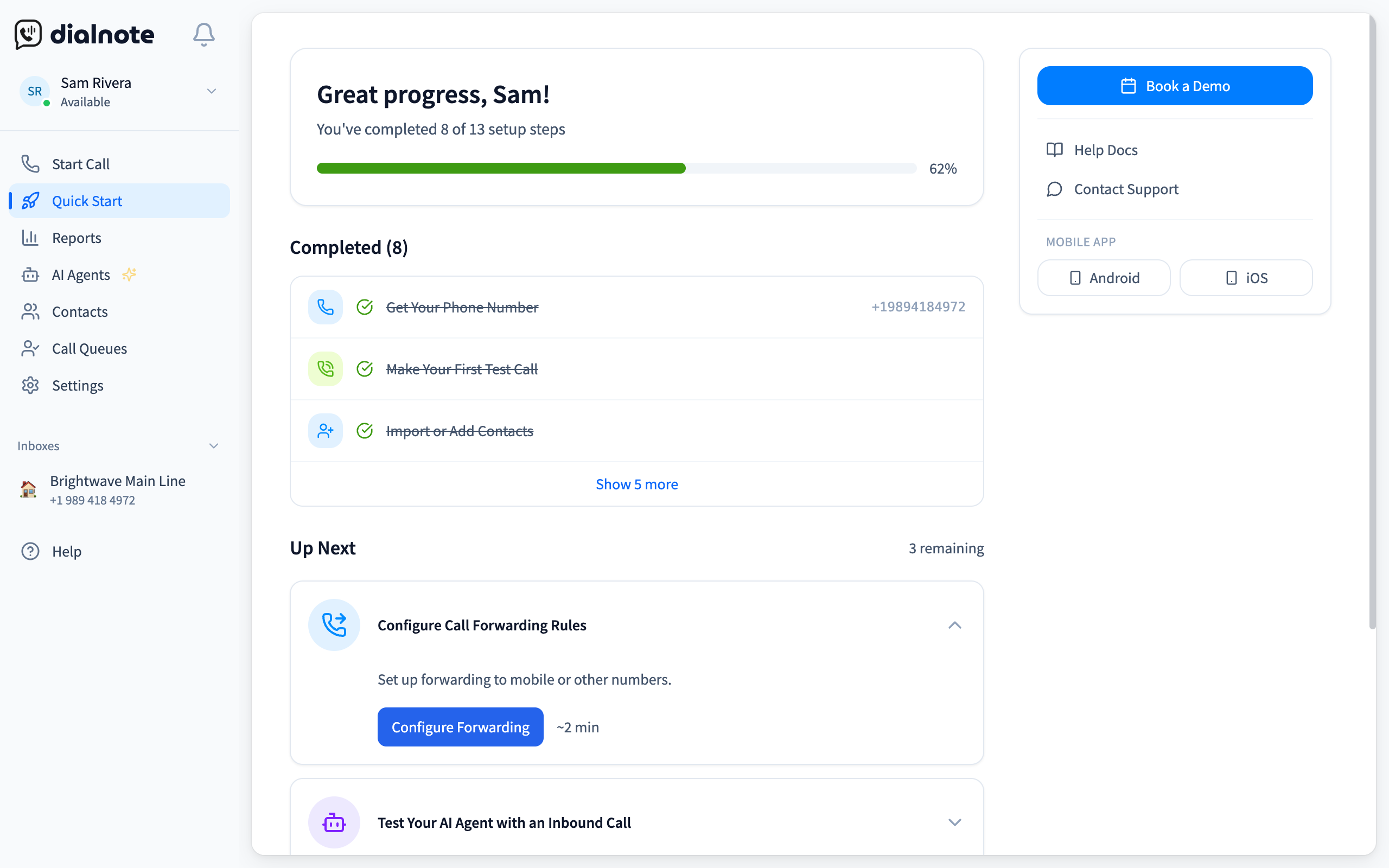
Here's the pilot in four moves:
- Click Get Phone Number and claim a local test line
- Click Make a Call Now and dial your own cell to hear quality on your real network
- Set Business Hours to match your actual schedule
- Use Invite Team Members to add your pilot group, then route a week of live calls through the line
What you have at the end of that week is the only evidence that matters: real callers, your wifi at 2 pm, your team's actual habits. If the finalist held up, sign and take the annual discount. If it didn't, cross it off and run the runner-up through the same week. Either way, you've made the call on live traffic instead of a sales demo.
Run your switching pilot on live calls
10-day free trial, no credit card needed. Cancel with nothing lost if it fails your Tuesday test.
How to choose a business phone system for your team
There's no single best phone system, only the best one for your team. Knowing how to choose a business phone system comes down to matching the tools to how you actually work: a solo consultant and a 40-person support floor need very different things.
- Remote or hybrid teams: prioritize the mobile app and work-from-anywhere access.
- High call volume: prioritize call routing, queues, and analytics.
- Regulated industries: prioritize call recording and compliance features.
- Multi-location: prioritize a single system that handles every site under one account.
If you're still weighing named providers, our roundup of the best business phone systems and the best VoIP phone systems for small business compare real pricing side by side.
Where dialnote fits in
Once you've mapped your needs, it's worth seeing one modern option in action. dialnote is an AI business phone system with no per-user pricing. AI voice agents answer calls, capture leads, and book meetings 24/7. Plans from $19/mo. It also works as a cloud VoIP phone system for small and mid-sized teams, with calls, texts, and AI call notes in one place, so a small team can sound like a much bigger one.
A few things make it a strong pick when you're choosing:
- Flat pricing with unlimited seats: plans start at $19/mo, and the Team plan at $49/mo adds unlimited users, so growth doesn't punish you.
- Fast setup: get a line running quickly, with no hardware to install.
- AI call summaries and transcription in 14 languages, so nobody takes notes by hand.
- Calling to 90+ countries and integrations with HubSpot, Salesforce, Pipedrive, and Zapier.
- A 10-day free trial with no credit card required, so you can test the fit before you commit.
Want to see the calling side in depth? Take a look at the VoIP phone system built for teams that live on the phone, then judge it the way you'd judge anything else on your shortlist: with real calls, on your real network, during your busiest hour.
Frequently asked questions
Yes. US carriers have to let you port your number, and the FCC's rules back that up. Porting usually takes a few business days, so start it early and keep your old service active until the port completes.
Very little. A single VoIP call uses less than 0.5 Mbps, so almost any broadband plan can handle a handful of calls at once. Stability matters more than speed, so test on your real network during your busiest hour.
No. Cloud systems run through apps on computers and smartphones, so many teams skip desk phones entirely. If someone prefers a physical handset, most providers support standard IP phones you can buy separately.
Usually fewer than you'd think. A cloud system lets a whole team share one main number with routing rules, so most small businesses run fine on one or two numbers plus direct lines for roles that need them.
VoIP sends calls over the internet, so it works on laptops and phones anywhere and costs less per month. A landline runs on dedicated wiring tied to one address. For most small teams, VoIP wins on price and flexibility.

Written by
Lancelot Dsouza
Chief Marketing Officer, SmartReach.io
Lancelot Dsouza is the Chief Marketing Officer at SmartReach.io, where he built the Marketing, Sales, and Customer Success verticals from the ground up. With over 25 years of experience spanning digital marketing, business development, and strategic...
Lancelot Dsouza is the Chief Marketing Officer at SmartReach.io, where he built the Marketing, Sales, and Customer Success verticals from the ground up. With over 25 years of experience spanning digital marketing, business development, and strategic...
Related Articles

Phone System for Real Estate Agents [2026 Guide]
A phone system for real estate agents should catch leads on the road. Here's what to look for, the features that matter, and mistakes to avoid.

Does Your Law Firm Phone System Cost You Clients?
See how the right law firm phone system fixes client communication, stops missed calls from becoming lost cases, and keeps your firm reachable all day.

Getting started with VoIP for your business
Learn how getting started with VoIP works, what you need to switch, and the steps to set up a business phone system that saves money and adds features.
