Best VoIP phone systems for small business
If you're searching for the best VoIP phone systems for small business, here's something most comparison guides won't tell you upfront: the monthly fee you see on the pricing page doesn't include your calling costs.
"Unlimited calling" sounds like exactly that. But every VoIP provider buries a fair use clause in their terms. That unlimited plan? It typically covers calls within the US and Canada, up to a set minute threshold. Call clients in Mexico, the UK, or India, and you're paying per minute. Use more minutes than the plan's fair use allowance, and you're paying for those too.
Amy runs a 10-person marketing agency. She switched to a popular VoIP provider to cut costs. First month, she had a handful of calls with a client in Toronto and a couple in London. Her bill came in $80 over what she expected. Sound familiar?
This guide covers 9 of the best VoIP phone systems for small business, with real pricing estimates for a 10-person team. Most readers here are figuring out how to handle inbound calls better, whether that means a smarter auto-attendant, a call queue that doesn't drop customers, or an AI receptionist that works after hours. Each section covers what the platform actually does for inbound call handling, plus the full cost picture including AI agents, IVR, and phone numbers. If you want a broader market ranking, our best VoIP providers compared and ranked guide ranks 8 providers (including enterprise picks) by total 10-seat cost. For a small-team angle that zooms in on per-seat math and Reddit-pulled gripes, see our best VoIP phone systems for small teams breakdown.
TL;DR:
- The best VoIP phone systems for small business are priced two ways: per seat (RingCentral, Aircall, Dialpad at roughly $23-$50 per user) or flat-rate for unlimited users (dialnote at $49-$199/month).
- The advertised monthly fee never includes your calling costs. "Unlimited" plans cap domestic minutes under a fair use policy, and international calls are billed per minute.
- For a 10-person team, dialnote's Business plan is $99/month flat; even modeled with 10 local numbers it comes to about $134/month with an AI receptionist built in, versus $230-$500/month for most per-seat competitors before AI add-ons.
- AI receptionist features are often metered per minute on top of the seat fee, so always ask what AI costs before you sign up.
- Flat-rate pricing pulls ahead once a team passes 5 people, because adding users doesn't raise the bill.
Is "unlimited calling" actually unlimited?
The short answer: no. Not for any provider.
Every VoIP company (dialnote, RingCentral, Dialpad, Quo, all of them) has a fair use policy on "unlimited" calling plans. The minutes included are usually capped at somewhere between 500 and 3,000 per month, and they apply only to calls within the US and Canada (or whatever domestic region the provider covers).
What gives? The economics don't work otherwise. A true unlimited plan with no cap would let a single user run a call center on a $25/month subscription. That's why the fine print always exists.
For most small businesses making routine calls within their home country, you'll rarely hit the cap. But the moment you have international clients, remote employees in other countries, or a sales team doing high-volume outbound calling, calls to premium numbers, or incoming calls to toll-free numbers, those calling costs add up fast. According to GetVoIP's 2026 business phone system guide, VoIP services for small teams typically range from $25 to $40 per user monthly and that's before factoring in usage. The platform fee and the calling cost are two separate bills. Keep that in mind as you read through each option below.
Three hidden costs most VoIP comparisons skip
The sticker price on a pricing page is rarely what you pay. Three things quietly change which platform actually fits a small business, and most comparison articles leave them out.
Per-seat fees scale linearly, your budget doesn't. A $20/user plan sounds fine at 3 people. At 12 it's $240/month, at 20 it's $480, and the per-seat price usually jumps the moment you need AI or a CRM integration, which sit a tier or two higher. Flat-rate plans like dialnote Team stay at $49/month whether you have 3 users or 30.
AI receptionist features are often billed per minute, on top of the plan. This is the most ignored line item in VoIP pricing. An AI receptionist frequently costs a tier upgrade and a per-minute usage fee. Dialpad, OpenPhone, and RingCentral all meter AI on top of the seat fee, typically $0.10-$0.30/min on lighter platforms and far more on enterprise modules. A team taking 200 calls a month at 3 minutes each can spend $60-$180 in AI minutes alone. dialnote builds AI minutes into every paid plan instead, with overflow at a published $0.89/min from a wallet, so there's no surprise add-on.
"1,000+ integrations" usually means Zapier. When a vendor advertises hundreds of integrations, most aren't native. They're third-party connectors via Make or Zapier that you build and maintain yourself. Native integrations pass call data and transcripts in real time without a middleman. Before picking on integration count, list the 3-5 tools your team uses daily and check the vendor's native integration page, not its Zapier directory.
Watch: the best VoIP phone systems, tested side by side
Prefer to see the tools in action before you read the breakdown? Our team put the top VoIP phone systems for small business through the same real-world setup and recorded what actually happened. The video below walks through pricing, AI features, and call routing on each one, so you can spot the trade-offs fast. Then keep scrolling for the full ranking and the hidden costs behind every quote.
Best VoIP phone systems for small business: at a glance
Below is a side-by-side comparison of all 9 tools, including estimated monthly cost for a team of 10 with AI agent and IVR features included. Calling costs aren't included in any of these estimates. That's billed separately based on usage.
| Tool | Pricing model | Est. cost (10 users/mo) | AI agent | IVR | Phone numbers |
|---|---|---|---|---|---|
| dialnote | Unlimited seats | ~$99 (Unlimited Seats) | ✓ Included (Business+) | ✓ Included | 2 included, ~$5/extra |
| RingCentral | Per seat | ~$300–$400 | Add-on (~$10/user) | ✓ Included | 1/user included |
| Vonage Business | Per seat | ~$210+ | Add-on (custom pricing) | ✓ Included (Premium+) | 1/user included |
| GoTo Connect | Per seat (quote) | ~$290–$390 | Included (quote-based) | ✓ Included | Included |
| Aircall | Per seat | ~$390 | Add-on (+$9/user/mo) | ✓ Included | 1 per team |
| CloudTalk | Per seat | ~$390+ | Add-on (+$9/user/mo) | ✓ Included | Extra |
| Dialpad | Per seat | ~$230 | Built-in (basic) | ✓ Included | Included |
| Quo (OpenPhone) | Per seat | ~$250+ | Basic transcription only | No IVR | $2/extra number |
| Nextiva | Per seat | ~$240 | Add-on (custom pricing) | ✓ Included | Included |
Prices shown are estimated based on published rates and publicly available information as of April 2026. Always request a quote that includes calling costs, number rental, and any AI add-ons before signing up.
1. dialnote
dialnote is an AI-powered VoIP phone system built for small and mid-sized businesses. It's part of the SmartReach.io group, the same team behind a multi-channel sales outreach platform that competes with Outreach.io and Salesloft. That background shows in how dialnote is built: it's designed for teams that actually use phones to reach customers, not just for internal communication.
The biggest differentiator is dialnote's pricing model. Instead of charging per seat, dialnote charges per account: $49/month for Team (unlimited users), $99/month for Business (unlimited users), and $199/month for Pro (unlimited users). Add 10 people, add 50 people. The platform fee stays the same.
What's included on each plan:
| Feature | Team ($49/mo) | Business ($99/mo) | Pro ($199/mo) |
|---|---|---|---|
| Unlimited users | ✓ | ✓ | ✓ |
| AI call transcription and summaries | ✓ | ✓ | ✓ |
| Auto CRM updates | ✓ | ✓ | ✓ |
| SMS sending | ✓ | ✓ | ✓ |
| AI receptionist / AI voice agents | No | ✓ (5 agents) | ✓ (10 agents) |
| AI SMS agent | No | ✓ | ✓ |
| AI voice agent jobs | No | ✓ | ✓ |
| 14-language support | No | ✓ | ✓ |
| AI call evaluation | No | No | ✓ |
| Bulk SMS | No | No | Coming soon |
| AI call tags | No | No | ✓ |
| Branded AI voice agent | No | No | ✓ |
The AI receptionist on Business+ handles inbound calls, qualifies leads, and routes callers, all without needing a live person to answer. You can test dialnote's AI receptionist directly on their website before committing to a plan.
Phone numbers are available in the US, Canada, UK, India, and France, with calling to 90+ countries. Native integrations cover HubSpot, Salesforce, Pipedrive, Calendly, and Cal.com, with 5,000+ more apps via Zapier.
For a 10-person team on Business, you're looking at $99 (platform) plus $35 for 7 additional local numbers (3 are included, extras at $5 each), coming to around $134/month total before calling usage. That's the base package with AI receptionist already built in. No add-on fees.
The per-seat comparison is stark. At $134/month for 10 users, dialnote costs about $13 per person. Most competitors in this list charge $30 to $50 per seat, putting a 10-person team at $230 to $500/month before AI features.
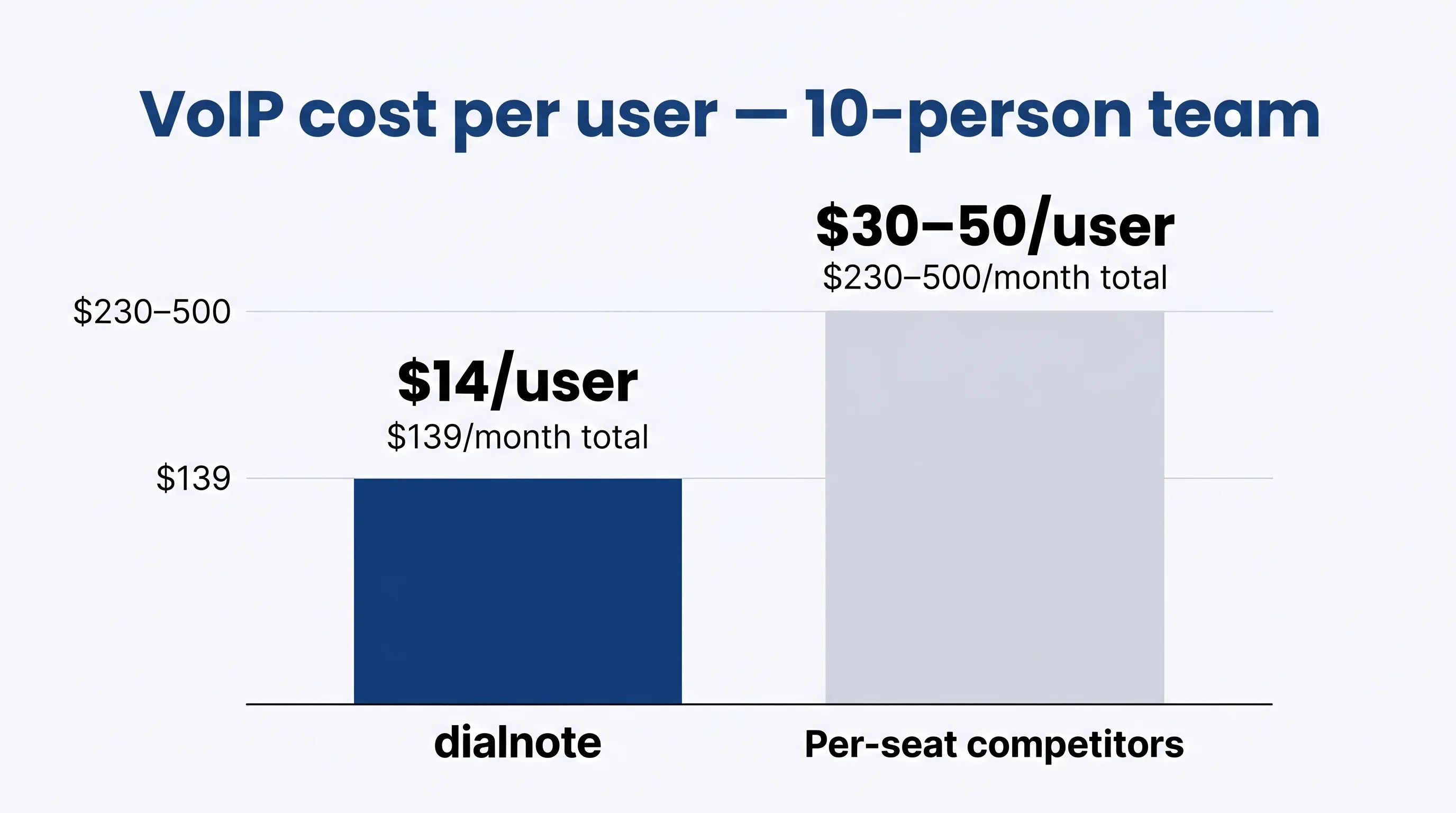
The Team plan at $49/month doesn't include the AI receptionist. If that's a feature you need, Business at $99/month is the right starting point. AI call evaluation and bulk SMS are Pro-only features at $199/month.
Fair use: Like every VoIP provider, dialnote applies a fair use policy on calling. "Unlimited" applies to domestic minutes within the plan's covered region. International calling and high-volume outbound usage are billed separately.
Best for: Small businesses that want predictable, flat-rate pricing as they grow, plus AI call handling without paying per-feature.
10-user cost estimate: ~$139/month (Business, unlimited users + 10 numbers, AI receptionist included). Calling costs separate.
Integrations: dialnote connects natively with HubSpot, Salesforce, Pipedrive, Calendly, and Cal.com, plus 5,000+ apps through Zapier, Make, n8n, and webhooks. After every call, transcripts and AI summaries sync to your CRM automatically. No manual call logging needed. That's useful for small teams where everyone is already wearing too many hats.
2. RingCentral
RingCentral is one of the most widely used business phone systems globally. The RingEX platform covers calls, video, messaging, and team collaboration in a single app.
Plans are priced per seat, starting at around $30/user/month for the Core plan (billed annually). At 10 users, that's $300/month before adding anything. AI features (transcription, summaries, intelligent routing) are available as add-ons that typically run $10/user/month or more. IVR (auto-attendant) is included at most plan tiers.
For inbound call handling, RingCentral supports multi-level IVR, skills-based routing, and call queues with configurable hold settings. There's a visual call flow builder that lets you map exactly how calls get routed across departments or locations. That level of routing customization is hard to find at the same scale elsewhere.
RingCentral integrates with Salesforce, HubSpot, Microsoft 365, Google Workspace, and dozens of other tools. It's a mature platform with strong reliability and a large third-party ecosystem. On G2, users rate RingCentral 4.0/5 overall and consistently call out reliability and integration depth as the strengths. The main complaints: setup complexity and support response times once you're past the onboarding phase.
Where it struggles for small businesses: the per-seat model gets expensive fast, and the feature list is so broad that smaller teams often pay for things they don't need.
Best for: Mid-to-large businesses that want a full unified communications suite and can absorb per-seat costs.
10-user cost estimate: ~$300–$400/month (base plus AI add-on, before calling costs).
3. Vonage Business
Vonage Business Communications (VBC) offers three tiers: Mobile ($14/user/month), Premium ($21/user/month), and Advanced (~$28/user/month) when billed annually. IVR is available on Premium and above. AI features (Vonage's conversational AI, built on AI Studio) are sold as separate add-ons with custom pricing.
For a 10-person team on the Premium plan, you're at roughly $210/month for the platform, not counting the AI layer.
On inbound calls, Vonage includes a virtual receptionist, call queues, and after-hours routing. One feature worth knowing: Vonage offers a virtual hold option on some plans, where callers can request a callback instead of waiting on hold. That reduces hang-ups for busy customer-facing teams.
Vonage has solid international coverage and a strong API ecosystem. For a small business, the interface can feel more complex than necessary, and the AI add-on pricing isn't transparent without going through a sales conversation. G2 reviewers give it around 4.3/5, with international calling quality and API flexibility as the highlights.
Best for: Small businesses with international communication needs or those who might grow into a more complex phone setup.
10-user cost estimate: ~$210/month (Premium, before AI add-on and calling costs).
4. GoTo Connect
GoTo Connect bundles VoIP calling, video meetings, and messaging into one platform. It's designed for businesses that want fewer tools to manage. The platform includes IVR, call queues, and an AI receptionist.
GoTo Connect no longer lists public pricing. All plans are quote-based, which makes direct comparison harder. Based on third-party reviews, pricing tends to land around $29–$39/user/month for a standard plan. For 10 users, that's roughly $290–$390/month.
We're not 100% sure how GoTo Connect structures its AI receptionist pricing for teams under 25 people. The website pushes you toward a demo rather than a pricing page, so it's worth asking specifically about that during a sales call.
For inbound calling, GoTo Connect handles call queues, virtual receptionist, after-hours routing, and call recording. Routing rules are set through a drag-and-drop dial plan editor, which is one of the more approachable interfaces in this category.
It's a solid all-in-one option. Support reviews are mixed: easy to reach during setup, slower for ongoing technical issues. International calling coverage is good through the GoTo infrastructure.
Best for: Small businesses that want video and phone in one platform and don't mind getting a custom quote.
10-user cost estimate: ~$290–$390/month (quote-based, calling costs separate).
5. Aircall
Aircall is built specifically for sales and support teams that make a lot of outbound calls. It integrates deeply with HubSpot, Salesforce, Intercom, and other CRMs. That's its main selling point.
Pricing starts at $30/user/month for the Essential plan, with a minimum of 3 users. AI features (transcription, summaries, call coaching) cost an extra $9/user/month. For 10 users with AI, that's $300 + $90 = $390/month.
For inbound call handling, Aircall has a shared inbox where the whole team can see who's in queue and who's on hold. Warm transfers, call notes that follow a call, and live activity feeds are all built in. Agents can also set custom hold music and waiting messages per number. That's useful for support teams that want visibility without a full contact center setup.
The platform is good at what it does, but it's essentially a call-centric tool. It doesn't have the same breadth as RingCentral or Vonage for internal communications. Also, phone number availability is limited. You typically get one number per team, and adding more costs extra. G2 users rate Aircall around 4.3/5, with CRM integrations and call quality getting strong marks. The cost and limited number of included phone numbers are the most common complaints.
Honestly, Aircall is overpriced for small businesses that don't have a dedicated sales or support team making hundreds of calls per week. The per-seat AI add-on fee stings when you're paying it 10 times over.
Best for: Sales teams of 5–20 people already using HubSpot or Salesforce who want native call intelligence.
10-user cost estimate: ~$390/month (Essential plus AI add-on, before calling costs).
6. CloudTalk
CloudTalk is a cloud call center platform popular with European-based businesses. It covers inbound and outbound calling, IVR, call recording, and a growing AI suite including call summaries, sentiment analysis, and an AI Voice Agent.
Pricing follows a per-seat model: around $19/user/month for the Lite plan, $30/user/month for Essential, and $50/user/month for Expert (all billed annually). AI costs an additional $9/user/month. At 10 users on the Essential plan with AI, you're at $390/month.
Phone number pricing is an add-on. CloudTalk charges separately for numbers, which many competitors include. That pushes the real cost higher than it first appears. Is it worth the extra? For European businesses with heavy inbound call volume and a need for strong analytics, probably yes. For a US-based 10-person team, there are cheaper ways to get the same result.
CloudTalk's inbound calling features include smart routing by agent skill, availability, or location, plus a callback queuing option where callers can hang up and receive a call back instead of waiting. The real-time queue dashboard shows every active call and wait time at a glance. For support teams measuring first-call resolution, the built-in analytics have the depth you'd expect to pay more for.
CloudTalk's international coverage is strong, particularly across Europe. On G2, it scores around 4.4/5, with European teams consistently rating the analytics and call quality highly. US-based teams sometimes flag call quality inconsistencies depending on region.
Best for: European businesses or teams with high call volume that need strong analytics and don't mind per-seat pricing.
10-user cost estimate: ~$390+/month (Essential plus AI plus phone numbers, before calling costs).
7. Dialpad
Dialpad includes AI by default, not as an add-on. Transcription, call summaries, and basic AI coaching are built into every plan. The Standard plan starts at $23/user/month, making it one of the more affordable per-seat options.
For 10 users on Standard, that's $230/month with AI already included. IVR (multi-level auto-attendant) is available, though the most advanced routing features require higher-tier plans. International coverage spans 70+ countries.
The "unlimited calling" on Dialpad has a fair use cap of around 3,000 minutes per month, which is higher than many competitors but still a limit. High-volume outbound teams will hit it.
On inbound calls, Dialpad's AI transcribes in real time and can surface suggested answers from a knowledge base during the call. Agents get answers without putting callers on hold. Sentiment tracking on inbound calls is also available on higher-tier plans. For teams that handle support calls, that real-time assist is one of the more useful AI features in this list.
Dialpad's interface is clean and easy to onboard. It connects with Google Workspace, Microsoft 365, Salesforce, and Zendesk natively. G2 users rate it around 4.4/5, with AI features and ease of setup as standout positives.
Best for: Small teams that want AI features included without paying extra and prefer a clean, modern interface.
10-user cost estimate: ~$230/month (Standard with AI built in, before calling costs).
8. Quo (formerly OpenPhone)
Quo, which rebranded from OpenPhone in 2025, is built for founders, small teams, and startups that want a simple business phone number on top of their personal devices. It's intentionally lightweight: no contact center features, no IVR, just a clean interface for calls and texts.
Business plan pricing is around $25/user/month. For 10 users, that's $250/month. There's no native IVR, and AI features are limited to basic call transcription. Extra phone numbers cost $2/each per month.
Quo's fair use policy sits at roughly 1,000 minutes per month, one of the lower thresholds in this list. For a busy team of 10, that's 100 minutes per person. That's not a lot if your team is actively calling customers.
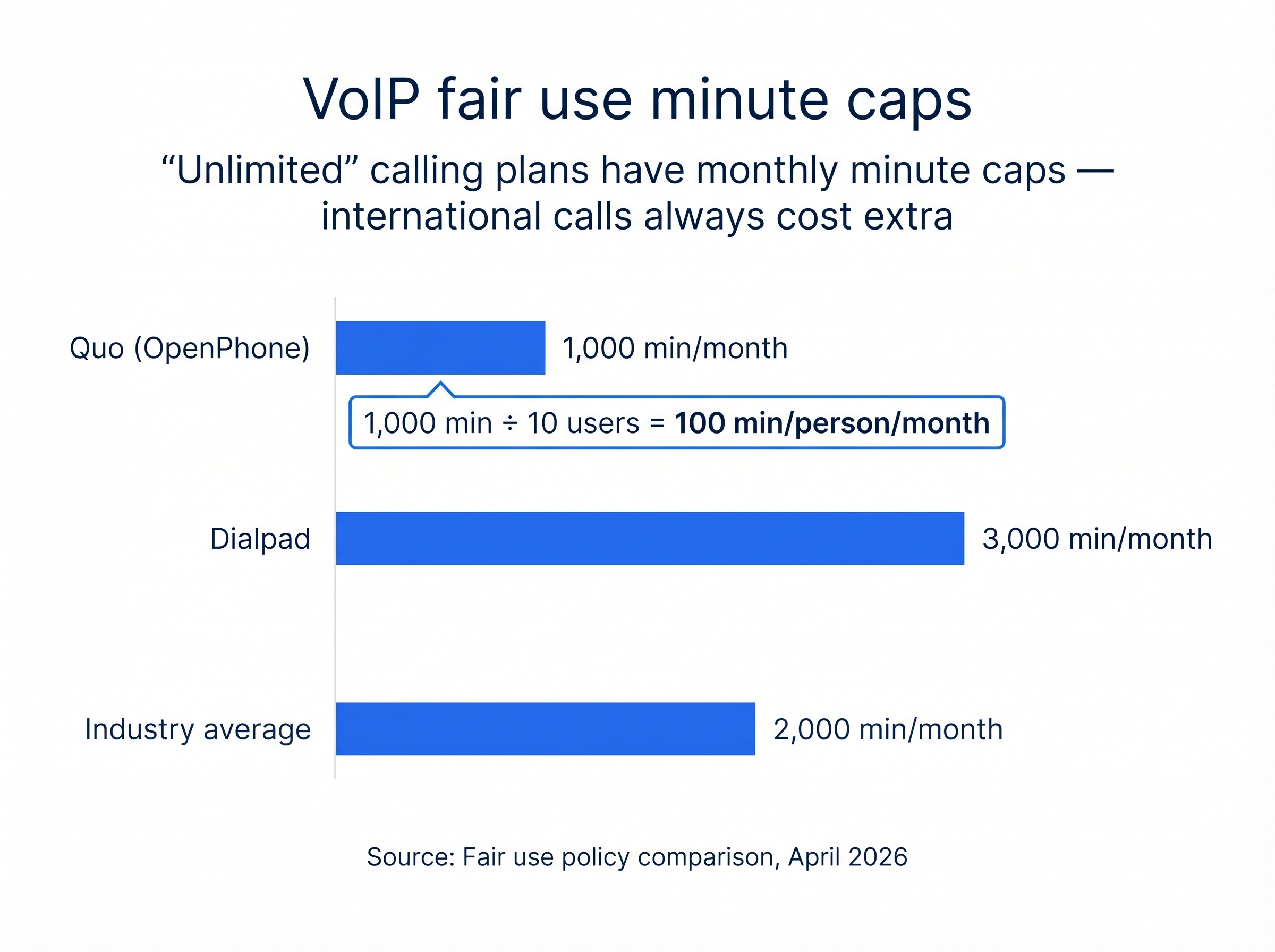
It's a good tool for a 1–3 person operation that needs a separate business number quickly. For a 10-person team with real communication needs, there are better-value options.
Best for: Solo operators, freelancers, and very early-stage startups that need a simple business number.
10-user cost estimate: ~$250+/month (10 users plus phone numbers, no IVR or AI agents, before calling costs).
9. Nextiva
Nextiva is a full-featured business communications platform covering VoIP calling, video, messaging, and customer experience tools. According to Nextiva's published pricing, the Core plan starts at around $24/user/month for smaller teams. IVR is included across most tiers. AI conversation features are available but require contacting sales for pricing.
For 10 users on Core, you're at roughly $240/month. The platform has strong reliability and good US-based support. Nextiva's recent product direction has moved toward customer experience and contact center tools, which makes it a great fit for service businesses, though potentially more than what a small team needs from day one.
For inbound-focused businesses, Nextiva's strengths are queue management, automated CSAT surveys sent after calls, and an agent dashboard that shows call history and customer context before you pick up. If your team handles a high volume of customer support calls, it's one of the better-built options in this list for that use case.
Integration coverage is broad: Salesforce, HubSpot, Zendesk, Microsoft Teams, and more. G2 users rate Nextiva around 4.5/5, with support quality and reliability as the strongest points.
Best for: Service-oriented small businesses that want a polished platform with good support and plan to grow into contact center features.
10-user cost estimate: ~$240/month (Core, before AI add-on and calling costs).
What does a VoIP phone system actually cost for 10 people?
Here's the honest breakdown most providers don't show you on their websites. There are typically three layers of cost:
Layer 1: Platform fee. This is what you see advertised. It covers the software, users, and standard features. Per-seat tools run $20–$40/user/month. Flat-rate tools like dialnote run $49–$199/month regardless of team size.
Layer 2: Feature add-ons. AI agents, AI call evaluation, advanced IVR, and bulk SMS often cost extra, especially on per-seat platforms. For a 10-person team, these add-ons can double the base price.
Layer 3: Calling costs. Phone number rental ($5/number/month), outbound calling rates per minute, and international call charges. None of the "unlimited" plans actually cover all of this. Domestic calling within the US/Canada is usually included up to a fair use cap. Everything else gets metered.
For a small team of 10 doing regular domestic business calls, a realistic total might look like this:
- dialnote Business: ~$139/month platform + ~$50–$100/month calling = ~$190–$240/month total
- RingCentral Core with AI: ~$400/month platform + calling costs = $450+/month total
- Dialpad Standard: ~$230/month platform + calling costs = ~$280–$330/month total
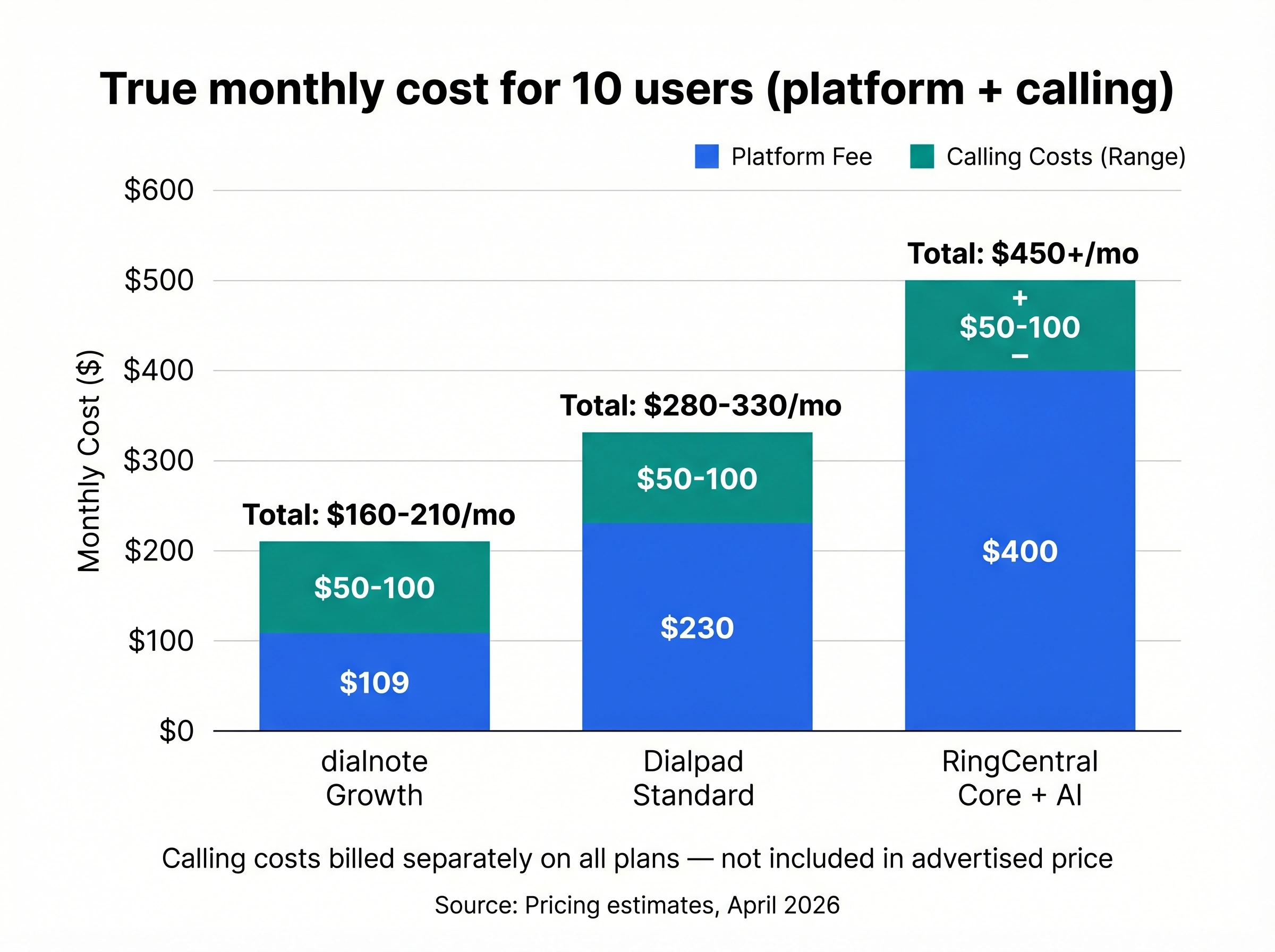
The gap between flat-rate and per-seat pricing becomes obvious at team sizes above 5. At 10 people, it's stark. At 20, it's the difference between a manageable operating cost and a significant line item that's hard to justify.
For more detail on how to think about business phone system costs and what's actually included, that breakdown covers the numbers across different team sizes.
How do you pick the right VoIP system for your small business?
Start with two questions: How many people need access? And do you need AI call handling?
If your team is 5+ people and you need an AI receptionist to handle inbound calls, a flat-rate pricing model is almost always cheaper. dialnote's Business plan at $99/month is the clearest example. AI receptionist is built in, and adding more team members doesn't raise the bill.
If you already use Salesforce or HubSpot and your team handles high volumes of inbound or outbound calls, dialnote, Aircall, and Dialpad all connect natively with those tools. dialnote syncs call logs, transcripts, and AI summaries to your CRM automatically after every call. Aircall and Dialpad offer tighter workflow triggers, like auto-creating tasks or deals based on call outcomes. Which fits better depends on whether you want passive sync or active workflow automation.
If you're a solo operator or a 2–3 person team, Quo is genuinely easy to set up and affordable at that scale.
Whatever you choose, ask the provider three things before signing up: What's your fair use cap on calling? Are phone numbers included or extra? What does AI cost on top of the base plan? Those three questions will tell you the real monthly number.
The right business phone system isn't always the one with the longest feature list. It's the one where the pricing is straightforward, the calling coverage matches where your customers are, and the AI features actually work without requiring a consultant to set them up.
If you want to see what AI-handled inbound calling actually looks like before committing to a plan, dialnote lets you test the AI receptionist directly on its website. No sales call required.
Frequently asked questions
dialnote's Business plan at $99/month covers unlimited users with AI receptionist included. That's roughly $10 per person. Most competitors charge $23-40 per user, which adds up to $230-400/month for the same team.
No. Every VoIP provider applies a fair use policy. 'Unlimited' typically means US and Canada calls up to a set minute cap, often 1,000 to 3,000 minutes. Calls to other countries or usage beyond the cap cost extra per minute.
dialnote includes AI receptionist on the Business plan ($99/mo, unlimited users). Most other providers (RingCentral, Vonage, Aircall) charge separately for AI features or require a higher-tier plan.
Usually not. VoIP platform fees cover software access, users, and features. Calling costs (minutes used, phone number rental, international calls) are billed separately. Always ask for a full quote that includes usage.
Yes. Most VoIP providers support number porting. The process takes about 1-2 weeks, and your provider handles the transfer paperwork.

Written by
Upasana Sahu
Senior Digital Marketing Specialist, SmartReach.io
Upasana Sahu is a Senior Digital Marketing Specialist at SmartReach.io with over 10 years of experience in content marketing, SEO, and digital strategy. She manages end-to-end blog operations, from content creation and on-page/off-page SEO to traffic...
Upasana Sahu is a Senior Digital Marketing Specialist at SmartReach.io with over 10 years of experience in content marketing, SEO, and digital strategy. She manages end-to-end blog operations, from content creation and on-page/off-page SEO to traffic...
Related Articles
Best Virtual Phone Systems for Business
8 best virtual phone systems for business compared on real 10-user cost, hidden AI per-minute fees, and Reddit reviews. See where dialnote ranks in 2026.
Best VoIP providers compared & ranked
Compare the best VoIP providers ranked by total cost, with real 10-seat pricing including the platform fee, AI agent, IVR setup, and a phone number.
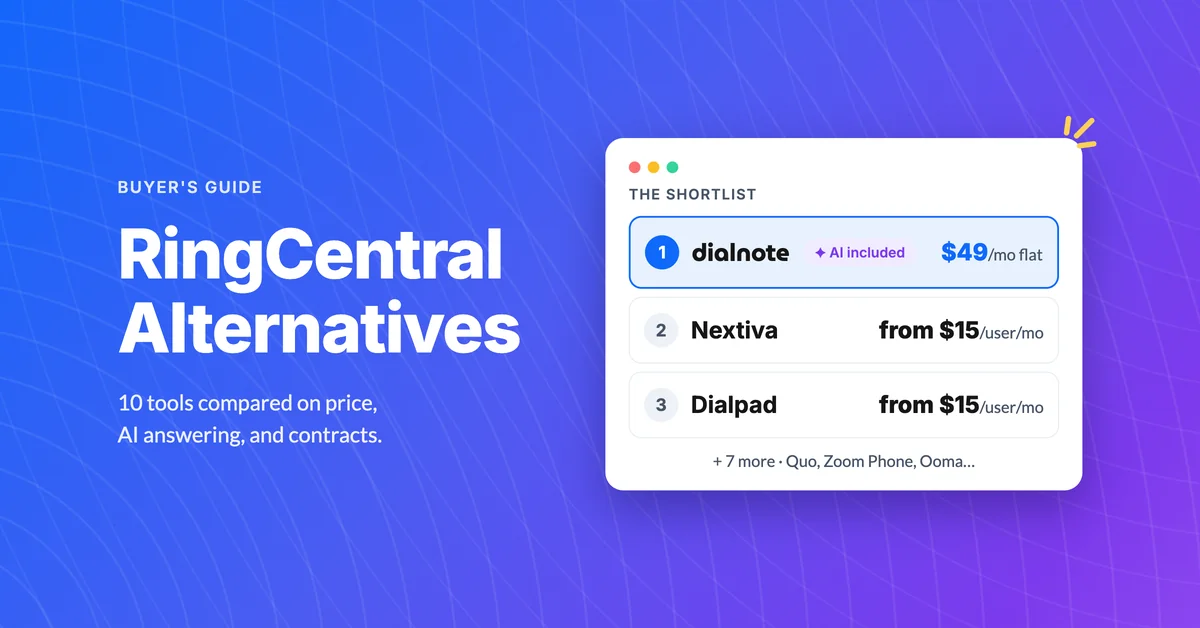
10 Best RingCentral Alternatives for Small Business
Compare 10 RingCentral alternatives for small business by real per-user cost, AI receptionists, and contract traps before you renew.
