VoIP Cost Savings: How to Cut Phone Bills by 50%
What if you could cut your monthly phone bill in half, and get better features at the same time?
That's not a sales pitch. It's what thousands of small businesses discover when they switch from traditional phone lines to VoIP. The VoIP cost savings are real, and they add up fast.
TL;DR:
- VoIP cost savings typically run 50-70% versus traditional landlines, mostly by cutting line rental, long-distance, and PBX maintenance fees.
- Most small businesses pay $20-35 per user per month for VoIP, with voicemail, mobile apps, and video meetings included instead of billed as add-ons.
- Flat-rate plans change the math for growing teams: dialnote, an AI business phone system, runs $19-199/mo flat with unlimited users from the $49 Team plan up, so headcount stops driving the bill.
- Cloud VoIP has near-zero setup cost since it runs on computers and phones you already own, while a traditional PBX can cost $20,000 or more upfront.
- Watch the fine print: taxes and regulatory fees, month-to-month premiums, and add-on charges for recording or auto-attendant all narrow the gap.
- You can keep your business numbers when you switch. Porting takes 1-2 weeks, and you only need about 100 Kbps of bandwidth per call.
The phone bill that made Stan rethink everything
Stan manages operations at a 25-person marketing agency. Every month, he'd review expenses and wince at the phone bill: $2,400 for landlines, long-distance charges, and a clunky PBX system that needed constant maintenance.
One day, the PBX went down during a client pitch. The repair bill? $800. That was the last straw.
Stan started researching alternatives. What he found surprised him: businesses like his were saving 50-70% by switching to VoIP. Not in some distant future. Right now, over the internet connection his office already paid for.
If you're weighing specific providers, our best VoIP phone systems comparison covers 9 options with real 10-user cost estimates. This post covers the money side: what VoIP actually costs, where the savings come from, and the traps that shrink them.
Why phone costs are higher than they should be
Traditional phone bills run high because you pay separately for things that should be bundled: line rental for every number, long-distance minutes, PBX maintenance, and add-on fees for basic features.
Here's what piles up on a typical landline bill:
- Line rental fees for each phone number
- Long-distance charges that spike during busy months
- Maintenance contracts for aging PBX hardware
- Add-on fees for voicemail, call forwarding, and conference calls
Add it together and a traditional setup often costs two to three times what a comparable VoIP plan does. That's before you count surprise repair bills like Stan's $800 emergency.
The math is simple: old phone systems charge extra for features that come standard with VoIP.
Do VoIP cost savings really reach 50%?
Yes. Most small businesses cut phone costs by 50-70% after switching to VoIP, mainly by dropping line rental, long-distance fees, and PBX maintenance. Features like voicemail, video calls, and auto-attendants come bundled instead of billed as pricey add-ons.
Where does the money actually come from? Three places, mostly:
- No line rental: One internet connection carries every call, so you stop renting a copper line for each number.
- Flat-rate calling: Domestic long distance is included in the monthly price, and international rates drop sharply.
- No PBX: The phone closet full of hardware, and the maintenance contract that came with it, disappears entirely.
The exact percentage depends on what you pay today. Heavy long-distance callers save the most. A business already on a discounted bundle saves less, but still saves. We haven't seen a small business switch properly and end up paying more.
How much does VoIP cost per user?
Most small businesses pay $20-35 per user per month for VoIP. That range usually covers unlimited domestic calling, voicemail, and a mobile app at no extra charge. Basic plans start near $15-20 per user, while advanced tiers with analytics and auto-attendant run $35-50. Here's how the tiers break down:
Monthly per-user costs
| Plan type | Cost | What you get |
|---|---|---|
| Basic | $15-20/user | Unlimited domestic calls, voicemail, mobile app |
| Standard | $25-35/user | Call recording, video meetings, integrations |
| Advanced | $35-50/user | Analytics, auto-attendant, priority support |
Most small businesses land in the $20-35 range, and that includes features they'd pay extra for with traditional phones.
Setup costs
Here's where VoIP really shines:
- Cloud-based VoIP: Near zero setup cost. You use your existing computers and smartphones.
- Traditional PBX: $20,000+ for hardware, wiring, and installation.
Stan's agency made the switch with zero hardware purchases. His team downloaded an app, logged in, and started making calls.
How do you calculate your VoIP savings?
Subtract your projected VoIP bill from your current total phone spend, including repairs and add-ons. The difference is your monthly savings, and for most small teams it's a big one.
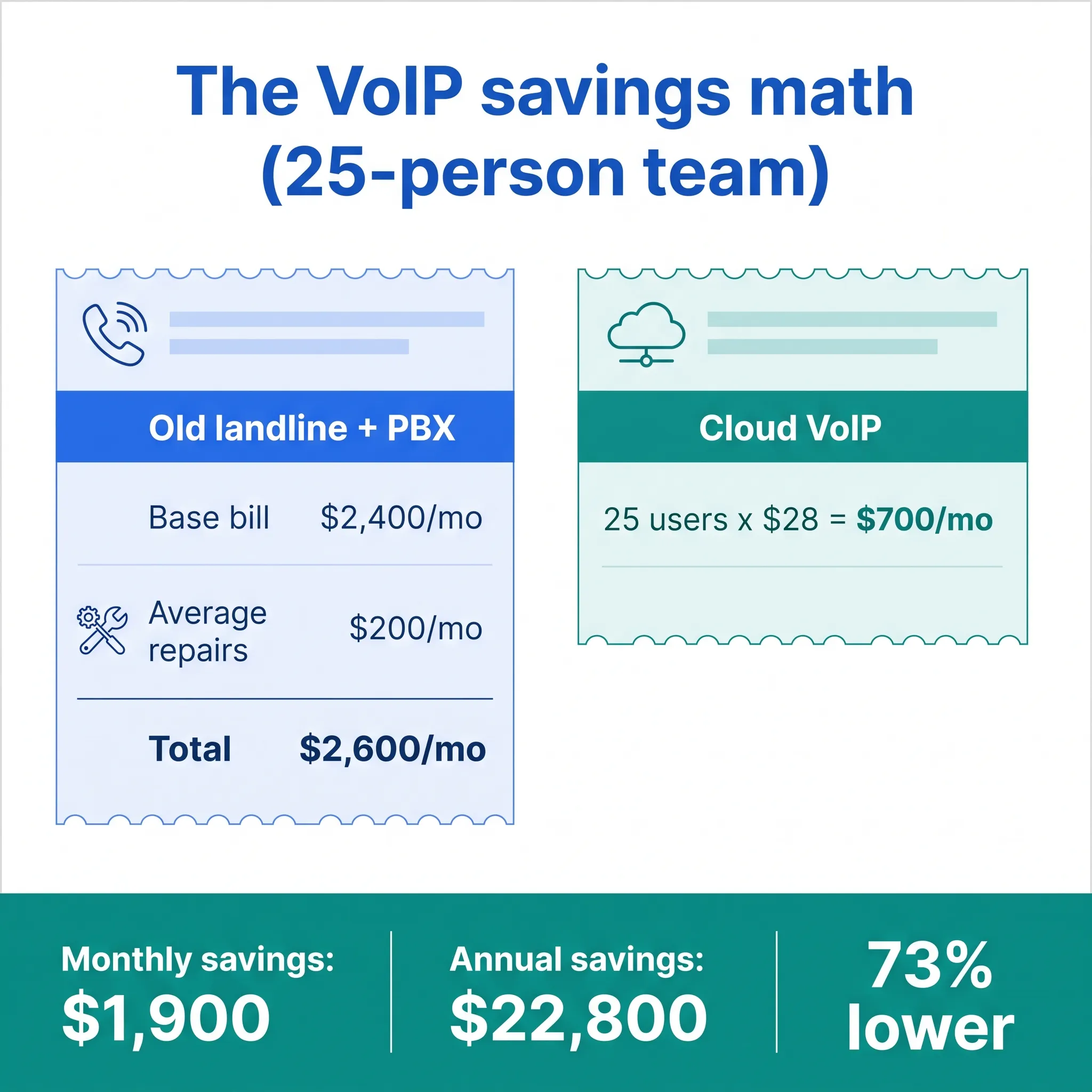
Here's the formula:
Current monthly phone costs - VoIP costs = Monthly savings
For Stan's 25-person team:
- Old system: $2,400/month + $200 average repairs = $2,600
- VoIP at $28/user: $700/month
- Monthly savings: $1,900
- Annual savings: $22,800
Over three years, that's nearly $70,000 back in the budget: money that went toward hiring and marketing instead of phone bills.
Curious what your number looks like? Pull your last phone bill and run the same math. It takes five minutes.
What hidden costs eat into VoIP savings?
The main hidden costs are taxes and regulatory fees, contract premiums, feature add-ons, and international rates. None of them erase the savings, but they narrow the gap if you skip the fine print.
Taxes and regulatory fees
Advertised prices almost never include them. VoIP bills carry Universal Service Fund contributions, E911 fees, and state and local taxes, just like other phone services. The exact amount varies by state and provider.
Ask for a sample invoice, not just a price sheet. And since 911 works differently on VoIP (calls route based on the address you register with your provider), the FCC's guide to VoIP and 911 service is worth five minutes of your time.
Contract traps
- Month-to-month plans cost 15-25% more than annual contracts
- Three-year contracts save money but lock you in
- Best bet: Annual contracts balance savings with flexibility
Feature add-ons
Some providers advertise low base prices, then charge extra for:
- Call recording: $5-15/user/month
- Auto-attendant: $10-20/month
- CRM integrations: $10-20/user/month
Ask for a "fully loaded quote" that includes everything you need, taxes included.
International calling
If your team calls overseas regularly, check international rates. They vary wildly between providers, from $0.01 to $0.50 per minute for the same countries.
How much internet speed do you need for VoIP?
Plan for roughly 100 Kbps of bandwidth per concurrent call, upload and download. A 10-person office where five people talk at once needs about half a megabit for voice, which nearly any business connection covers.
Speed is rarely the problem, though. Stability is. VoIP cares more about jitter (uneven packet delivery) and latency than raw bandwidth. A few practical checks before you switch:
- Run your provider's connection quality test on a normal workday, not first thing in the morning
- Plug computers or desk phones into ethernet where possible, since wifi adds jitter
- Turn on QoS (quality of service) on your router so voice traffic jumps the queue
- If your internet already drops every month, fix that first or plan mobile failover
Imagine you're on a call with your biggest client and your voice turns robotic because someone started a massive file upload. Annoying? Very. But that's a router-settings problem, not a VoIP problem, and a free QoS tweak usually fixes it.
Do you need new desk phones for VoIP?
No. Most small teams run VoIP entirely through apps on computers and smartphones they already own, which keeps hardware spending at zero.
Want physical handsets anyway? IP desk phones cost about $60-150 for solid models, and a comfortable USB headset runs $30-50. Neither is required to start.
Our honest take: skip desk phones for almost everyone. A headset plus the desktop app does the same job, costs less, and moves with your laptop. The one exception is a shared front-desk phone, where a dedicated handset still earns its keep.
Making the switch: a step-by-step guide
Switching takes five steps: audit your current costs, list must-have features, collect three quotes, test on a free trial, then port your numbers. Most teams finish inside a month.
Ready to capture those VoIP cost savings? Here's how to do it right:
Step 1: Audit your current costs
Pull your last 3 months of phone bills. Add up:
- Base service fees
- Long-distance charges
- Feature add-ons
- Maintenance and repair costs
This is your baseline for comparison.
Step 2: List your must-have features
Not every business needs every feature. Prioritize what matters:
- Unlimited domestic calling
- Mobile app for remote work
- Call routing for directing calls to the right person
- Call analytics to track team performance
- Integration with your CRM
Step 3: Get quotes from 3 providers
Request quotes that include:
- Per-user monthly costs for your team size
- All features you need (no surprise add-ons)
- Taxes, regulatory fees, and setup or porting charges
- Contract terms and cancellation policy
Step 4: Test before you commit
Most VoIP providers offer free trials. Use them. Test:
- Call quality on your internet connection
- Mobile app reliability
- How easy it is to manage users and settings
A trial is also your best defense against quote fiction, because it turns a sales number into a real invoice preview. The catch: on per-seat plans, a full-team pilot has a price tag, so most teams test with two or three seats to keep it cheap. Then the real bill lands when all 25 people join, and it looks nothing like the pilot did.
dialnote is an AI business phone system with no per-user pricing. AI voice agents answer calls, capture leads, and book meetings 24/7. Plans from $19/mo. Since the price never moves with headcount, the per-seat pilot math disappears: the $49/mo Team plan costs the same with 3 users or 25, so the number you test is the number you'll pay.
- Click Get Phone Number and claim a number for the trial
- Click Make a Call Now and check call quality on your office internet
- Set Business Hours and listen to how an after-hours call gets handled
- Click Invite Team Members and add everyone, so the pilot runs at your real headcount
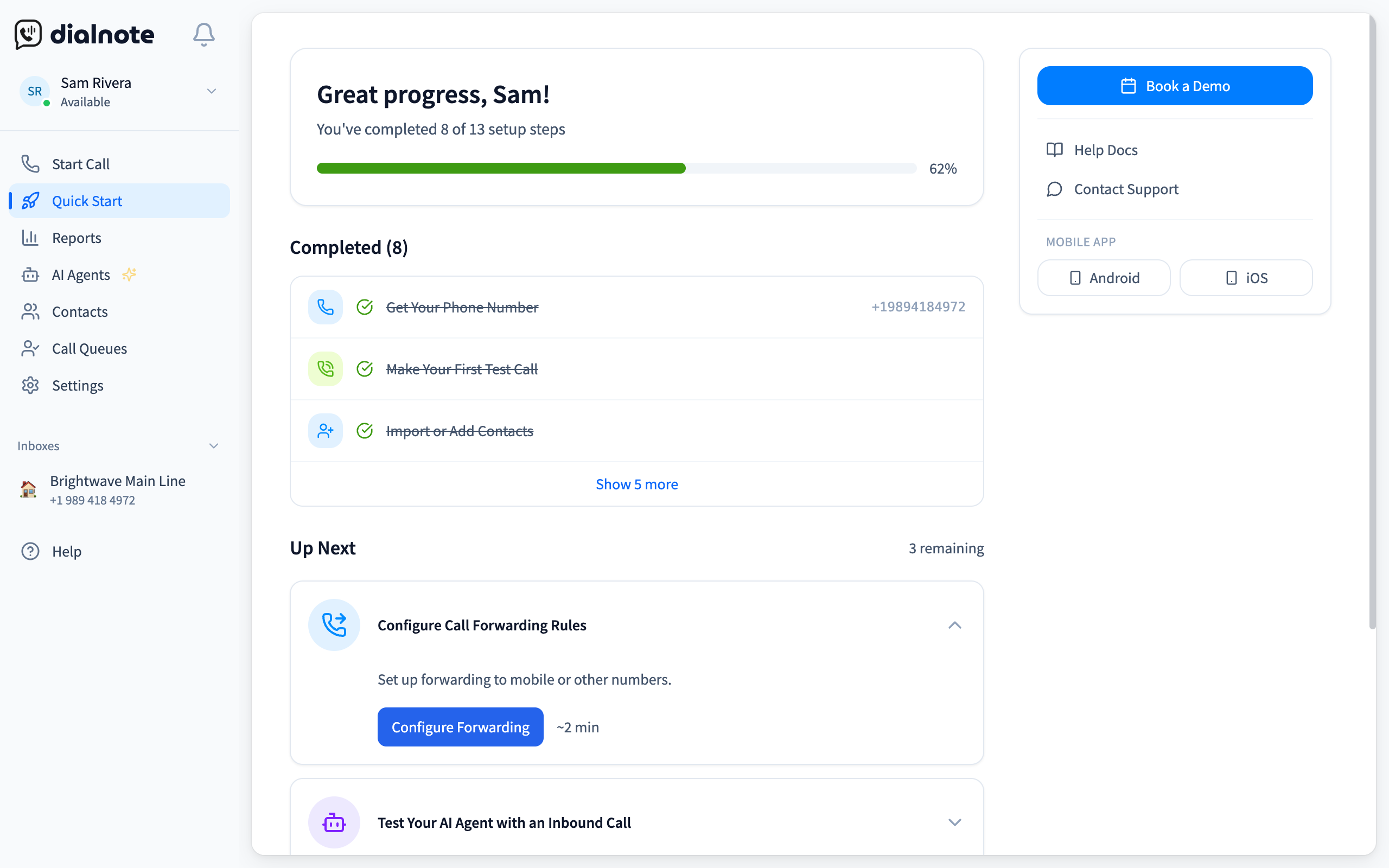
Treat that task list as your add-on audit. Every item on it (AI agent, business hours, call routing, team invites) is part of the flat price, so lay it next to the quotes from Step 3 and circle each line a provider bills separately. A quote that adds $10-20 a month for what the trial handed you on day one just priced itself out. Pick the provider whose loaded total beats your Step 1 baseline at your real headcount, not at pilot size.
Run your trial at full team size
10-day free trial, no credit card.
Step 5: Plan your number porting
You can keep your existing business phone numbers, and porting is your right under FCC porting rules. The process takes 1-2 weeks for business numbers, so plan a brief overlap. Don't cancel the old service until the port completes.
Which mistakes shrink your VoIP cost savings?
The biggest savings killers are long contracts signed too early, per-seat pricing on a growing team, and comparing base prices instead of loaded quotes. Dodge those three and the projected savings actually arrive.
We've watched a lot of teams make this switch. The same mistakes keep showing up. Sound familiar?
Signing a three-year contract on day one. Honestly? Three-year VoIP contracts are a bad deal for most small teams. Your headcount, call volume, and the provider's quality can all change in that window. Start annual, then extend once the service has earned it.
Paying per seat while you're hiring. Per-user pricing punishes growth. Add five people and your "cheap" $25/user plan jumps $125 a month overnight. Flat-rate plans with unlimited seats flip that math in your favor.
Comparing base prices instead of loaded quotes. We're not sure why so many providers quote prices without taxes, fees, and the add-ons you'll obviously need, but nearly all of them do. Compare fully loaded quotes or you're comparing fiction.
Buying the top tier "just in case." Start on the plan that covers your must-have list. Upgrading later takes two clicks. Downgrading after overpaying for a year takes a support ticket and some regret.
Canceling the old service too soon. Cancel before your port completes and you can lose the number entirely. Keep both lines alive through the overlap. It costs one extra month of service; losing a 10-year-old business number costs far more.
Beyond cost: other benefits you'll notice
Lower bills are the headline, but they're not the whole story. VoIP also adds flexibility, smarter call handling, faster scaling, and better data than any landline setup offers.
Stan's team noticed these within the first month:
Work from anywhere: Team members take calls from home, coffee shops, or client sites, all on the same business number. That flexibility matters for remote teams and for field crews who live in their trucks.
Better call handling: Auto-attendants and ring groups route callers to the right person automatically, so nobody has to play receptionist.
Easier scaling: Adding a new employee takes minutes, not a service call. Same for removing users when needed.
Richer data: Call logs, duration tracking, and performance metrics help managers spot issues and coach their teams.
When is VoIP not the right fit for a small business?
VoIP isn't ideal in three cases: shaky internet, frequent power outages, and heavily regulated industries with strict compliance rules. For most small businesses, these are minor trade-offs next to the cost savings.
- Unreliable internet: VoIP needs stable broadband. If your connection drops constantly, fix the connection before you switch phone systems.
- Power outages: Unlike landlines, VoIP goes down when the internet does. A failover rule that forwards calls to mobile phones covers most of the risk.
- Heavily regulated industries: Medical offices need HIPAA compliance (and a signed business associate agreement), and some financial firms have call-retention rules. Confirm your provider supports the paperwork before you commit.
If your office loses power weekly and your internet is a coin flip, a landline might genuinely serve you better. That describes very few businesses in 2026.
The bottom line
Stan's marketing agency cut phone costs from $2,600 to $700 per month, a 73% reduction. They got better features, happier remote workers, and stopped babysitting old hardware.
VoIP cost savings aren't theoretical. They're sitting inside your current phone bill, waiting for you to claim them.
If per-seat math is the part of your bill that keeps growing, dialnote is the strongest fit: flat plans from $19/mo, with unlimited users from the $49 Team plan up, so hiring five people changes your phone bill by exactly zero. For everyone else, pull last month's bill, run Stan's subtraction, and let the numbers make the call.
Frequently asked questions
Yes. US providers must support number porting, so your number moves with you. Business ports usually take 1-2 weeks. Keep your old service active until the transfer finishes, or you risk losing the number.
Usually not. Bills add regulatory charges like Universal Service Fund contributions, E911 fees, and state and local taxes on top of the per-user rate. Ask each provider for a sample invoice so you can compare real totals.
Most teams are making calls the same day they sign up, since cloud VoIP needs no wiring. Number porting is the slow part at 1-2 weeks, so run both systems in parallel for a short overlap.
Calls can't run through your office connection during an outage, but most providers can forward to mobile phones automatically. Set up failover rules in advance so callers reach a person instead of dead air.
Yes. A solo user typically pays $15-25 a month for VoIP with voicemail, a mobile app, and unlimited domestic calls included. A business landline with fewer features often costs twice that.

Written by
Lancelot Dsouza
Chief Marketing Officer, SmartReach.io
Lancelot Dsouza is the Chief Marketing Officer at SmartReach.io, where he built the Marketing, Sales, and Customer Success verticals from the ground up. With over 25 years of experience spanning digital marketing, business development, and strategic...
Lancelot Dsouza is the Chief Marketing Officer at SmartReach.io, where he built the Marketing, Sales, and Customer Success verticals from the ground up. With over 25 years of experience spanning digital marketing, business development, and strategic...
Related Articles
How to Choose a Home Service Business Phone System
Learn how to pick the right phone system for your HVAC, plumbing, or home service business. Stop missing calls and start booking more jobs today.
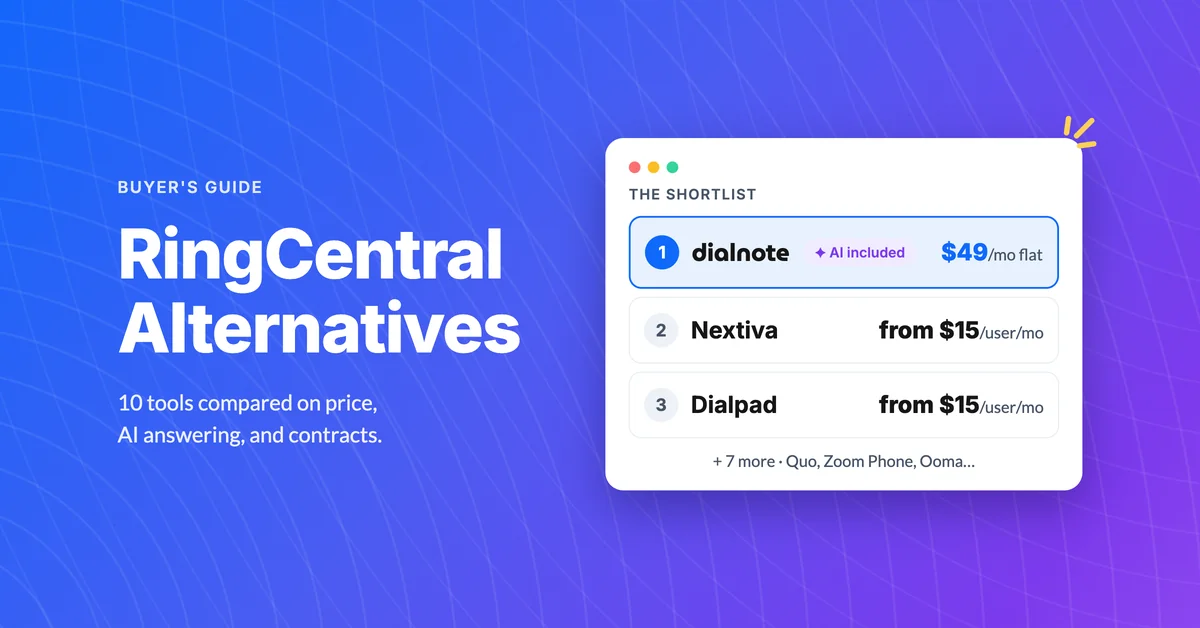
10 Best RingCentral Alternatives for Small Business
Compare 10 RingCentral alternatives for small business by real per-user cost, AI receptionists, and contract traps before you renew.

How to Get a Business Phone Number Without a Landline
Learn how to get a business phone number without a landline in under 30 minutes. Compare VoIP, virtual, and mobile options for small businesses.
