Call routing explained: a guide for small business
A customer calls your shop with a simple billing question. The call rings the sales line, gets bounced to a voicemail, then lands with someone who can't help. Three transfers later, they hang up. That's a call routing problem, and it costs you the sale.
Good call routing fixes this quietly in the background. It reads each incoming call and sends it to the person most likely to help, right away. Get it wrong and callers bail. Get it right and your small team can sound like a much bigger operation. Sound familiar?
TL;DR:
- Call routing sends each incoming call to the best available person or team based on rules you set.
- The basic types are direct dialing, hunt groups, and ring groups; the advanced ones add time, skill, and location rules.
- Call queues and IVR menus keep callers from hitting a dead end when everyone's busy.
- Track first-call resolution, transfer rate, and abandonment rate to see if your call routing actually works.
- Routing rules come bundled with most cloud phone plans, so the real cost is the calls that route wrong.
- Start with one simple flow (business hours plus a voicemail fallback) and add layers only when the data says you need them.
What is call routing?
Call routing is the process of directing an incoming call to the most appropriate destination based on rules you set. Done well, callers reach the right person on the first try. Done poorly, they get bounced around until they give up.
Think of it as a smart switchboard operator who never sleeps. Instead of one receptionist deciding where each call goes, the system does it in a fraction of a second. Modern phone systems give you deep routing options that used to be reserved for big enterprise call centers.
Why does call routing matter for small businesses?
Because a small team can't afford to waste a single call, and bad routing wastes plenty. Every missed or mishandled call is a lead, a renewal, or a referral walking out the door.
Picture Maria, who runs a three-person HVAC office. In summer her phones don't stop, and one person can't grab every call. Without routing, the second and third callers hit a busy tone and dial a competitor instead. With a ring group and a queue, those same calls roll to whoever's free, and nobody hears a dead line.
According to Microsoft's Global State of Customer Service report, more than 90% of consumers say customer service is a factor when they choose or stay loyal to a brand. The phone is still where a lot of that service happens. In our own onboarding calls, the small teams that set up even basic routing tell us their "missed call" complaints drop fast once callers stop hitting voicemail during business hours.
So the payoff isn't fancy. It's fewer lost calls, shorter waits, and a phone line that behaves like you hired more people.
Basic call routing types
These are the building blocks. Most small businesses start here and never need much more.
Direct inward dialing (DID)
Each employee gets their own number that rings straight to them. Simple and effective when callers already know who they need, like a client calling their account manager.
Best for: professional services, account-based businesses.
Hunt groups
Calls ring several phones in a set order until someone picks up. The "hunt" keeps hopping until it finds a free person.
Ring patterns you can pick from:
- Linear: rings the first phone, then the second, then the third.
- Circular: rotates the starting point with each new call so nobody gets slammed.
- Simultaneous: every phone rings at once, first to answer wins.
Best for: sales teams and general inquiry lines.
Ring groups
Similar to hunt groups, but built for a team handling the same kind of calls. You drop people into a group and the group answers as one.
Incoming Call → Sales Ring Group
                ├── Rep 1 (available) ✓
                ├── Rep 2 (on call)
                └── Rep 3 (available) ✓
Best for: support pools, sales pools, and home service dispatch.
Advanced call routing strategies
Once the basics run smoothly, these strategies squeeze out more value. You don't need all of them. Pick the one that maps to a real problem you have.
Time-based routing
Route calls differently depending on when they come in. Days, nights, weekends, holidays: each can send callers somewhere fitting.
| Time | Routing |
|---|---|
| Mon-Fri 9-5 | Main office |
| Mon-Fri 5-9 | After-hours team |
| Weekends | Emergency line |
| Holidays | Holiday message |
This one alone solves a huge share of complaints, because callers stop reaching a live team when nobody's there. For a deeper look at off-hours coverage, see our guide to an after-hours answering service.
Skills-based routing
Send calls to the person best equipped to solve them:
- Technical issues to your certified techs.
- Spanish speakers to bilingual agents.
- Long-time clients to a senior rep.
- Tricky escalations to a specialist.
This cuts transfers and lifts first-call resolution, which is the number that really moves customer happiness.
Geographic routing
Route based on where the caller is. Local numbers ring the local office, and calls from another time zone reach a team that's actually awake. That's how a small company covers longer hours without paying for overnight shifts.
Which call routing setup fits your business?
Match the setup to how your callers behave, not to what the software can do. Most small teams need two or three rules, and that's it.
A rough map:
- Solo operator: business-hours rule, mobile forwarding, and a voicemail fallback. Done.
- Storefront, clinic, or front desk: one simultaneous ring group so the first free person grabs the call.
- Sales team: a circular hunt group, so leads spread evenly instead of piling onto whoever answers fastest.
- Service business with crews in the field: time-based rules plus mobile forwarding, with an emergency path for nights and weekends.
- Two or more locations: geographic routing so local callers reach local staff.
Alex learned this the hard way. He manages a sales team of 12, and his first setup rang all twelve phones at once. His two fastest reps grabbed nearly every lead while the rest coasted, and coverage collapsed the week both took vacation. Switching to circular ringing spread calls evenly, and his pipeline stopped depending on two people's reflexes.
Start with the smallest call routing setup that solves a problem you actually have. You can always add a layer next month.
How do call queues and IVR work?
Call queues hold callers in line when everyone's busy, and IVR menus let callers pick where they want to go. Together they keep people from hitting a dead end.
Call queues
A queue is the digital version of "please hold, we'll be right with you," but smarter. A good call queue does more than play music:
- Position updates: "You're caller number 3."
- Wait estimates: "Estimated wait: 2 minutes."
- Hold messages: useful info, not just elevator jazz.
- Callback option: "Press 1 and we'll call you back."
- Overflow routing: past a set wait, send the call somewhere else.
A few queue habits worth keeping:
- Aim to keep waits under two minutes.
- Update callers often so silence doesn't feel like abandonment.
- Offer a way out, like a callback or voicemail.
- Staff up for your known busy hours.
- Watch your queue numbers and fix what drags.
IVR menus
IVR (interactive voice response) is the "press 1 for sales" menu that lets callers route themselves.
"Thanks for calling.
Press 1 for Sales
Press 2 for Support
Press 3 for Billing
Press 0 for an operator"
Honestly? Most IVR menus are too long and try to do too much. Keep it to four or five options, put the popular choices first, skip the jargon, and always offer a human at zero. A menu that traps people is worse than no menu at all. But does a shorter menu really move the needle? In practice, yes, because fewer choices mean fewer wrong turns.
How does AI change call routing?
AI answering puts a conversational layer in front of your rules. An AI agent picks up instantly, asks the caller a few questions, and routes based on the answers instead of button presses.
That's the practical difference from a classic IVR. Callers don't have to translate their problem into "press 2." They just say "my water heater's leaking," and the agent treats it as an urgent service request. No menu, no wrong turns.
The useful part for small teams is lead capture. You decide which details the agent collects (name, callback number, job type, address) and it asks those questions on every call, then logs the answers. Whoever takes the transfer starts with context instead of asking "how can I help you?" all over again. During the call, an AI agent can book a meeting, send an SMS, check a calendar, or hand the caller to a teammate. After hours, it can take the whole call instead of dropping people into voicemail.
One caution: AI won't fix a broken flow. If your ring groups point at the wrong people, the agent just transfers callers to the wrong people faster. Clean up the rules first, then add the AI layer on top.
How do you set up call routing?
Start small and build. You can stand up a working flow in an afternoon, then refine it as you learn where calls get stuck.
- Map your call types. List the top three or four reasons people call. That list becomes your routing menu.
- Set business hours. Decide what happens during the day versus nights, weekends, and holidays.
- Build your groups. Create a ring group per team (sales, support, billing) and add the right people.
- Pick a ring pattern. Simultaneous for speed, circular to spread the load fairly.
- Add a queue and a fallback. Set a ring timeout (30 seconds is a fine start) that rolls unanswered calls to voicemail or a callback.
- Test it yourself. Call your own line from a cell phone and walk the whole path before customers do.
That last step matters more than it sounds. Plenty of broken flows go live because nobody ever dialed the number to check.
The place this plan usually dies is sequencing. On most systems, hours live on one screen, the menu on another, forwarding on a third, and nothing tells you what's still missing. So the flow launches half-built, and calls keep piling onto one overworked cell phone.
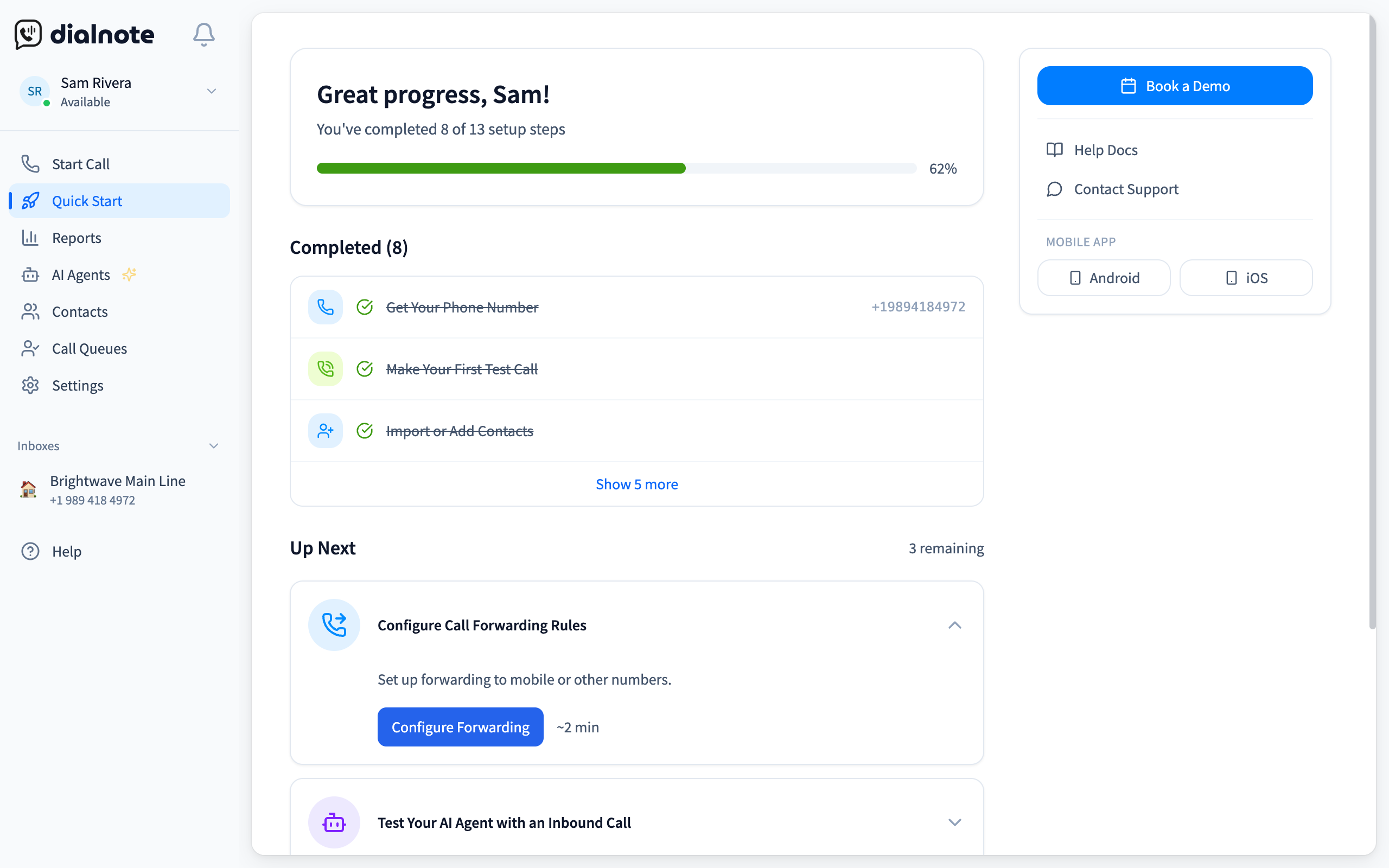
dialnote is an AI business phone system with no per-user pricing. AI voice agents answer calls, capture leads, and book meetings 24/7. Plans from $19/mo. The routing tree that once needed a PBX technician sits on its Quick Start page as three task cards, Business Hours, Call Flow / IVR, and Call Forwarding, each with a time estimate, and the page checks tasks off on its own as your flow comes together.
Build your first call flow this afternoon
10-day free trial, no credit card needed.
To turn the map from step 1 into a live flow:
- Sign up and land on the Quick Start page
- Scroll to the Call Routing tasks under Explore All Features
- Open Business Hours and set your open and closed hours
- Open Call Flow / IVR and map each menu key to a team, voicemail, or an AI voice agent
- Add Call Forwarding for anyone who answers from a cell phone
- Call your own number and walk every branch until each caller type reaches the right person
When the test call in step 6 hits a wrong turn, the card that owns that branch is the one to reopen: wrong hours means Business Hours, a mis-keyed menu means Call Flow / IVR. And resist finishing all three cards on day one. Set hours and forwarding first, then open the menu card once your call log shows at least two destinations worth splitting.
How much does call routing cost?
Usually nothing extra. Cloud phone systems bundle ring groups, routing rules, and IVR menus into their base plans, so you're paying for seats and numbers, not for the rules themselves.
That's a big change from the old world. An on-premise PBX meant an install crew, a server closet, and a consultant invoice every time you wanted a new greeting. Routing changes took weeks. Now they take minutes in a web dashboard, and calls travel over your internet connection instead of copper lines. If internet calling is new territory for you, the FCC's consumer guide to VoIP covers the basics in plain language.
So what should you watch for instead? Three things:
- Per-user pricing. Some providers charge per seat, so every hire multiplies the bill. Flat-rate plans skip that math.
- Feature gates. Queues, IVR, and analytics sometimes hide behind pricier tiers. Read the plan matrix before you commit.
- Usage charges. International calls and toll-free minutes can stack per-minute fees on top of the subscription.
The real cost of call routing was never the software. It's every call that routes wrong.
Failover: what happens when things break?
Failover routing is your backup plan for when a call can't reach its first destination. It reroutes automatically so callers never hear silence.
Common failover moves:
- Agent doesn't pick up, so the call rolls to the next person.
- Ring times out, so it drops to voicemail.
- Internet or power drops at the office, so calls forward to mobile phones.
We're not 100% sure why so many teams skip this, but the ones that build failover in almost never get caught flat-footed during an outage. Redundancy is boring right up until the day it saves you.
Call routing mistakes that quietly cost you sales
The most common call routing mistakes are deep phone menus, missing fallbacks, stale rules, and flows nobody ever test-dialed. Each one leaks callers you already paid to attract.
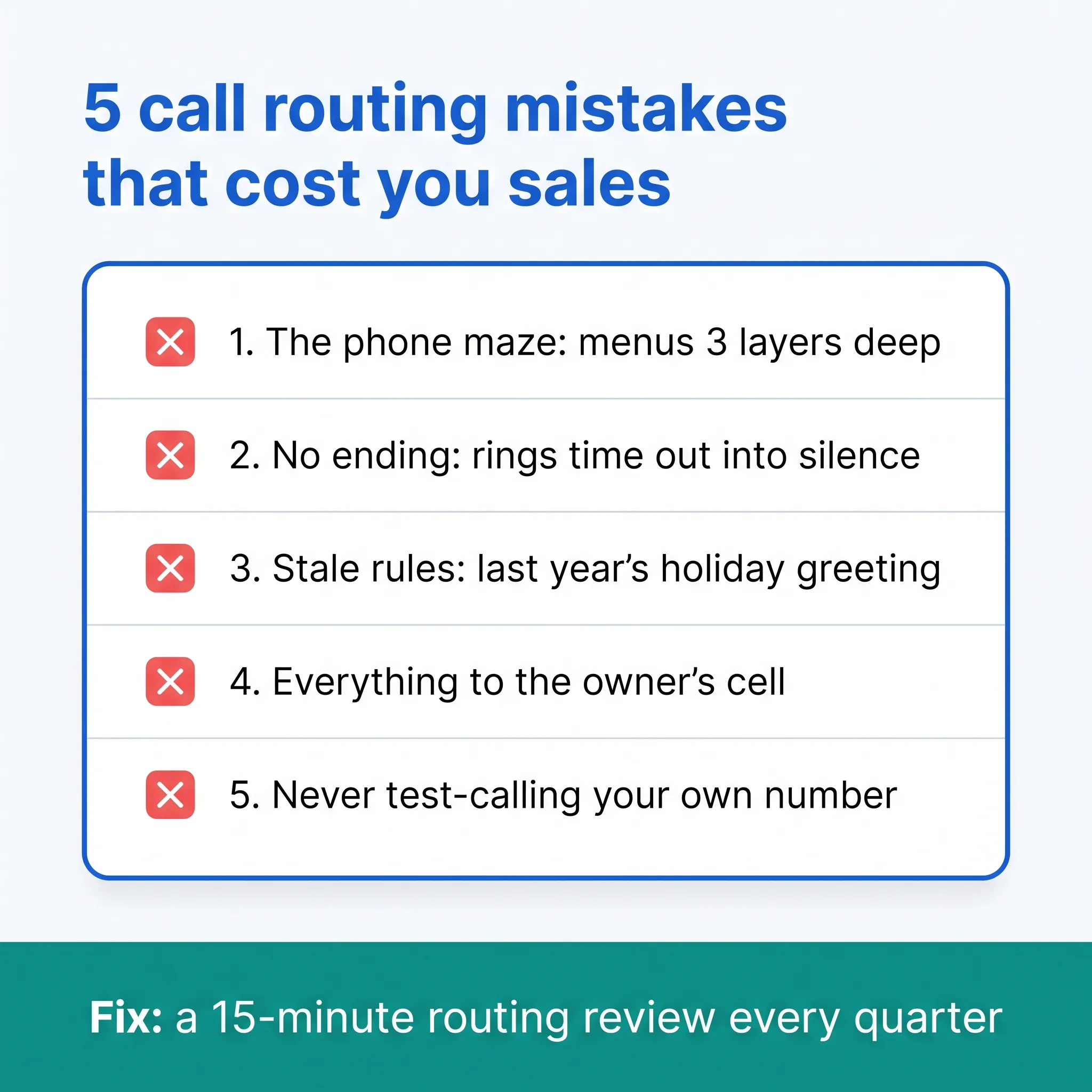
- The phone maze. Menus nested three layers deep. Callers bail long before "press 4 for more options."
- No ending. A ring group that times out into silence or a full voicemail box. Every path needs a destination a caller can live with.
- Stale rules. The holiday greeting from last December, the teammate who left in March still sitting in the support group, hours that never moved when your schedule did.
- Everything to the owner's cell. It works until you're on a ladder, in a meeting, or asleep. That's not routing, that's a bottleneck with a ringtone.
- Never test-calling. Dial your own number once a month and walk every branch like a stranger would.
Put a 15-minute routing review on the calendar each quarter. Rules rot quietly, and the callers they lose never tell you.
How to measure if your call routing works
Track a handful of numbers, not a dashboard full of noise. These five tell you whether calls are landing where they should:
| Metric | Target | Why it matters |
|---|---|---|
| First-call resolution | >70% | Shows callers reach the right person |
| Average handle time | Benchmark | A steady efficiency read |
| Transfer rate | <15% | Fewer transfers means smarter routing |
| Abandonment rate | <5% | Tells you if your queue is too slow |
| Wait time | <60 sec | The caller's patience meter |
If your transfer rate is high, your routing rules are guessing wrong. If abandonment climbs, your queue is too slow or your staffing is off. The metrics point straight at the fix. Which one would you check first?
Still picking the system you'll build your flow on? Our roundup of the best business phone systems compares the options, routing features included.
Your callers won't notice good routing. They'll just notice they reached the right person, fast. That's the whole point.
Frequently asked questions
Call forwarding sends every call to one other number. Call routing applies rules: time of day, team, caller choice, and availability all decide where each call lands. Forwarding is one blunt redirect, routing is a decision tree.
No. Cloud phone systems run routing entirely in software, so calls ring your existing cell phones, desk phones, or laptops. You set the rules in a web dashboard and changes go live right away.
Four or five at most. Put the popular choices first, skip internal jargon, and always let callers press 0 to reach a person. Menus deeper than one layer frustrate callers and raise hang-up rates.
Yes. Time-based rules can send after-hours calls to a mobile, an on-call teammate, an answering service, or voicemail. Many teams route true emergencies to a cell and everything else to next-morning callbacks.
Aim to keep waits under two minutes, and under one minute if you can. Past that, abandonment climbs fast. Offer a callback option so callers keep their place in line without holding.
Yes. Cloud routing rings people, not desks, so teammates can answer from anywhere. Ring groups and queues treat a home office or a job site exactly the same as a desk at headquarters.

Written by
Lancelot Dsouza
Chief Marketing Officer, SmartReach.io
Lancelot Dsouza is the Chief Marketing Officer at SmartReach.io, where he built the Marketing, Sales, and Customer Success verticals from the ground up. With over 25 years of experience spanning digital marketing, business development, and strategic...
Lancelot Dsouza is the Chief Marketing Officer at SmartReach.io, where he built the Marketing, Sales, and Customer Success verticals from the ground up. With over 25 years of experience spanning digital marketing, business development, and strategic...
Related Articles

Phone System for Real Estate Agents [2026 Guide]
A phone system for real estate agents should catch leads on the road. Here's what to look for, the features that matter, and mistakes to avoid.
Does Your Law Firm Phone System Cost You Clients?
See how the right law firm phone system fixes client communication, stops missed calls from becoming lost cases, and keeps your firm reachable all day.

Ecommerce Answering Service: Recover Abandoned Orders
See how an ecommerce answering service answers product and order calls around the clock, recovers abandoned carts, and what it costs per saved order.
