How to Choose a Home Service Business Phone System
Your HVAC tech is elbow-deep in a furnace repair when the phone rings. Nobody picks up. That caller? They just hired your competitor.
This happens way more than most home service business owners realize. According to Housecall Pro research, home service businesses miss about 27% of their inbound calls. That's roughly one out of every four potential jobs walking out the door. And here's what makes it worse: 85% of those callers won't try you again. They'll call the next plumber, electrician, or HVAC company on their list.
A home service business phone system fixes this. It makes sure every call gets answered, routed to the right person, and tracked, even when your whole crew is out in the field. But picking the right setup isn't always obvious, especially if you've been getting by with personal cell phones and a shared voicemail box.
Stan runs a 12-person HVAC and plumbing company in Phoenix. Last summer, his busiest season, he figured out they'd missed over 400 calls in three months. At an average job value of $285, that's more than $100,000 in potential revenue.
Gone.
His techs were great at their jobs. They just couldn't answer phones while fixing someone's AC in 110-degree heat.
TL;DR:
- A home service business phone system makes sure every call gets answered and routed to the right technician, even when your whole crew is out in the field.
- Home service businesses miss about 27% of inbound calls, and 85% of those callers never try you again, so unanswered phones quietly hand jobs to competitors.
- Look for five core features: smart call routing, after-hours answering, CRM and scheduling integration, a mobile app with a dedicated business line, and voicemail transcription.
- VoIP runs $10-40 per user per month, far less than traditional lines at $40-60, and most systems take about 15 minutes to set up.
- Emergency calls carry the most urgency and convert 73% higher than routine requests, so the calls you miss are often your most valuable ones.
Why do home service businesses miss so many calls?
Most missed calls happen for one simple reason: your team is busy doing the actual work. Field technicians can't pick up the phone when they're crawling under a house or standing on a roof. And if you're a smaller operation, there probably isn't a dedicated receptionist sitting at a desk.
According to research compiled by CallBird AI, the average small contracting business loses between $45,000 and $120,000 per year to unanswered calls. The range is wide because it depends on your ticket size, call volume, and how many of those missed calls would've converted to booked jobs.
The voicemail problem makes this worse. Only about 20% of callers bother leaving a message. Most homeowners expect a callback within 10 minutes. If your team is on a job site for the next 3 hours, that's just not going to happen. By the time you check your voicemail at the end of the day, that customer already has someone else scheduled.
Ever tried returning 20 missed calls while driving between jobs? It doesn't go well. Half those numbers don't pick up because the homeowner's already moved on.
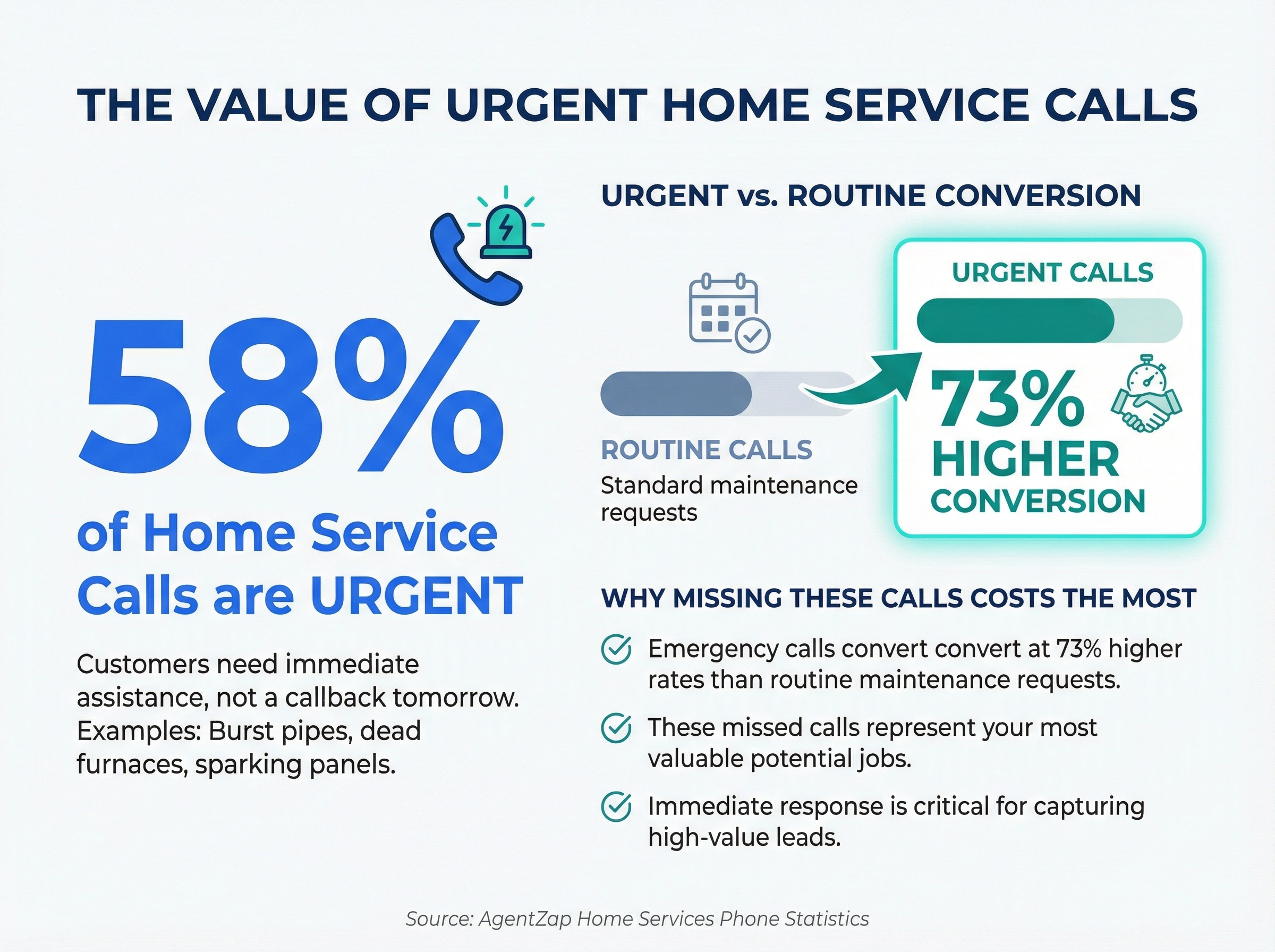
And there's a timing issue too. According to home services phone statistics from AgentZap, about 58% of home service calls involve some level of urgency. A burst pipe. A dead furnace in January. A sparking electrical panel. These people need help now, not a callback tomorrow morning. Those emergency calls convert to booked jobs at rates 73% higher than routine maintenance requests, so the calls you're missing are often your most valuable ones.
It's not that home service companies don't care about their phones. The nature of field work makes it almost impossible to answer every call without the right system backing you up.
What should a home service business phone system include?
A home service business phone system needs to do three things well: answer calls when you can't, route them to the right person, and keep a record of everything. Here are the features that actually matter for contractors and field service teams.
Call routing that follows your team
Your phone system should send calls to the right technician based on availability, location, or specialty. If your HVAC tech is already on a job, the call goes to the next available person, not to a generic voicemail box that nobody checks until 5 PM.
Good call routing means fewer missed calls and faster response times. For home service companies, this is probably the single most important feature to get right. A customer calling about a gas leak shouldn't end up in a voicemail queue behind someone asking about a routine tune-up.
After-hours answering
Emergencies don't follow business hours. A flooded basement at 2 AM or a broken heater on a Sunday morning needs an immediate response. Your phone system should have auto-attendant or AI voice assistant features that can take messages, capture caller info, and schedule callbacks without a human on the line.
Hard to say if AI answering works perfectly for every trade, but early industry data suggests HVAC companies using AI phone assistants capture 15-20% more appointments outside regular hours. That's revenue you'd otherwise lose to a competitor who simply picks up the phone.
CRM and scheduling integration
Every call should automatically log in your system. Who called, when they called, what they needed, and what happened next. This kills the "who talked to that customer last week?" guessing game that eats up your dispatcher's morning.
If your team uses ServiceTitan, Jobber, or Housecall Pro for scheduling, your phone system should plug right into it. New calls create new job entries. Customer records update on their own. No double data entry, no sticky notes getting lost on the dashboard of a service van.
Mobile app access
Your team lives on their phones. They need to make and receive business calls from their personal devices without giving out their personal number. A mobile app with a dedicated business line keeps things professional and makes every call trackable.
This also means your techs can call customers back from the company number instead of a random cell number the customer doesn't recognize. That alone improves callback answer rates significantly.
Voicemail transcription
Even with the best system, some calls will go to voicemail. When they do, you want transcriptions sent straight to your dispatcher's phone or email. Reading a transcription takes 10 seconds. Listening to a 2-minute voicemail takes, well, 2 minutes. Multiply that by 20 messages a day and you've saved your dispatcher a real chunk of time.
Call recording
Recording calls helps with training new dispatchers, resolving customer disputes, and making sure job details don't get lost between the phone call and the work order. When your dispatcher takes 40+ calls a day, they're going to miss details. Recordings are the backup.
How does a VoIP phone system work for field teams?
VoIP (Voice over Internet Protocol) sends your calls over the internet instead of traditional phone lines. Your business number works anywhere you've got a WiFi or cell signal, which is basically everywhere your techs already go.
Here's why a VoIP phone system matters for home service companies specifically:
No office required. Traditional phone systems need physical hardware at a fixed location. VoIP runs on your smartphone, laptop, or tablet. Your dispatcher can work from home. Your techs can take business calls from a customer's driveway. You don't need a landline at a shop you barely use.
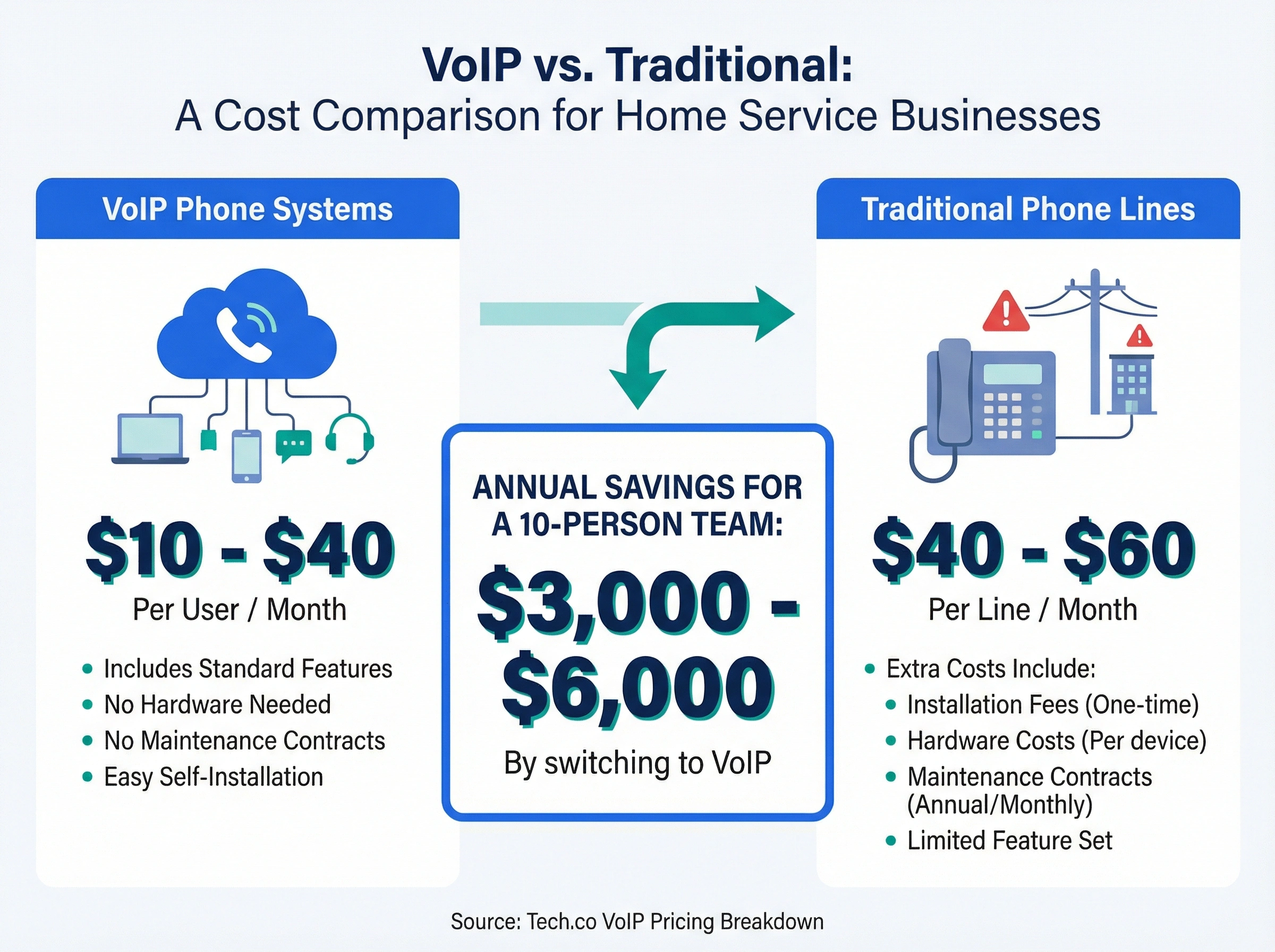
Lower costs. According to Tech.co's VoIP pricing breakdown, most VoIP systems cost $10-40 per user per month. Compare that to traditional business phone lines at $40-60 per line, plus installation fees, hardware costs, and maintenance contracts. For a 10-person team, switching to VoIP can save $3,000-6,000 a year on phone costs alone. Here's a deeper look at VoIP cost savings for small businesses.
Grows with your team. Adding a new technician takes about 5 minutes. Send them an invite, they download the app, and they're connected to your business number. No new phone lines to install, no hardware to buy, no waiting two weeks for the phone company to come out.
Works on the road. Your techs drive from job to job all day. With VoIP on their phone, they can check voicemails, return calls, and text customers from the business number between stops. They can even send appointment confirmations from the truck. No more scribbling numbers on sticky notes and hoping someone remembers to call back at the end of the day.
But what happens when your whole team is out on jobs? That's where features like auto-attendant and call queuing come in. Callers hear a professional greeting, get options to route their call, and wait in a short queue instead of hitting a dead-end voicemail. It's the difference between sounding like a 2-person side hustle and sounding like a company that has its act together.
Setting up your home service business phone system in 5 steps
You don't need a tech background to get this running. Most modern VoIP systems are designed for business owners who'd rather manage jobs than configure phone software.
Step 1: Pick your number
Choose a local number, a toll-free number, or both. For most home service companies, a local number builds trust with your community. People searching for "plumber near me" want to see a local area code, not an 800 number. A local number tells callers you're nearby and you know the area.
If you already have a business number, you can port it to your new system. The process usually takes 1-2 weeks, and you keep using your old number during the transition. Don't worry about downtime. Most providers handle the switch in the background so you never miss a beat.
Step 2: Map your call flow
Before you start clicking buttons, write out what should happen when someone calls. Does it ring your dispatcher first, then the lead tech, then the on-call person? Do after-hours calls go to an auto-attendant? What about weekends?
Getting this right upfront saves a lot of trial and error. Here's a helpful guide on choosing the right business phone system that covers call flow planning in detail.
Step 3: Add your team
Send app invites to your technicians and office staff. Each person gets the business number on their personal device. They can make and receive calls that show your company name and number, not their personal cell.
Most teams get fully set up in under an hour. There's no training manual involved. If someone can download an app, they can do this.
Step 4: Record your greetings
Write a quick script for your auto-attendant. Keep it short and direct: "Thanks for calling [Company Name]. For service requests, press 1. For billing, press 2. For emergencies, stay on the line."
Nobody wants to sit through a 45-second phone menu with 8 options. Three choices is the sweet spot for home service companies.
Step 5: Connect your tools
Hook your phone system into your scheduling and dispatch software. Whether you use ServiceTitan, Jobber, or another platform, this connection means new calls can automatically create customer records and job entries. Automating your phone system saves your dispatcher hours of manual data entry every week and cuts down on the mistakes that happen when someone's juggling 30 calls a day.
What this looks like in practice
On paper, those five steps read like an afternoon of admin. In practice, the piece that decides whether the system earns its keep is coverage: someone, or something, has to pick up when every tech is mid-job, because that's exactly when the urgent calls land.
The manual fixes all have holes. An answering service bills by the minute, an on-call rotation burns out your best tech, and voicemail catches maybe 20% of callers. The faster route is the AI voice agent in dialnote: it answers when your crew can't, asks the lead-capture questions you choose, and books the appointment straight onto your Calendly or Cal.com calendar, on flat plans from $19/mo with no per-user pricing.
Set up your after-hours coverage tonight
10-day free trial, no credit card needed.
Signing up lands you on a Quick Start page that mirrors the five steps you just planned and checks off each task on its own as you finish.
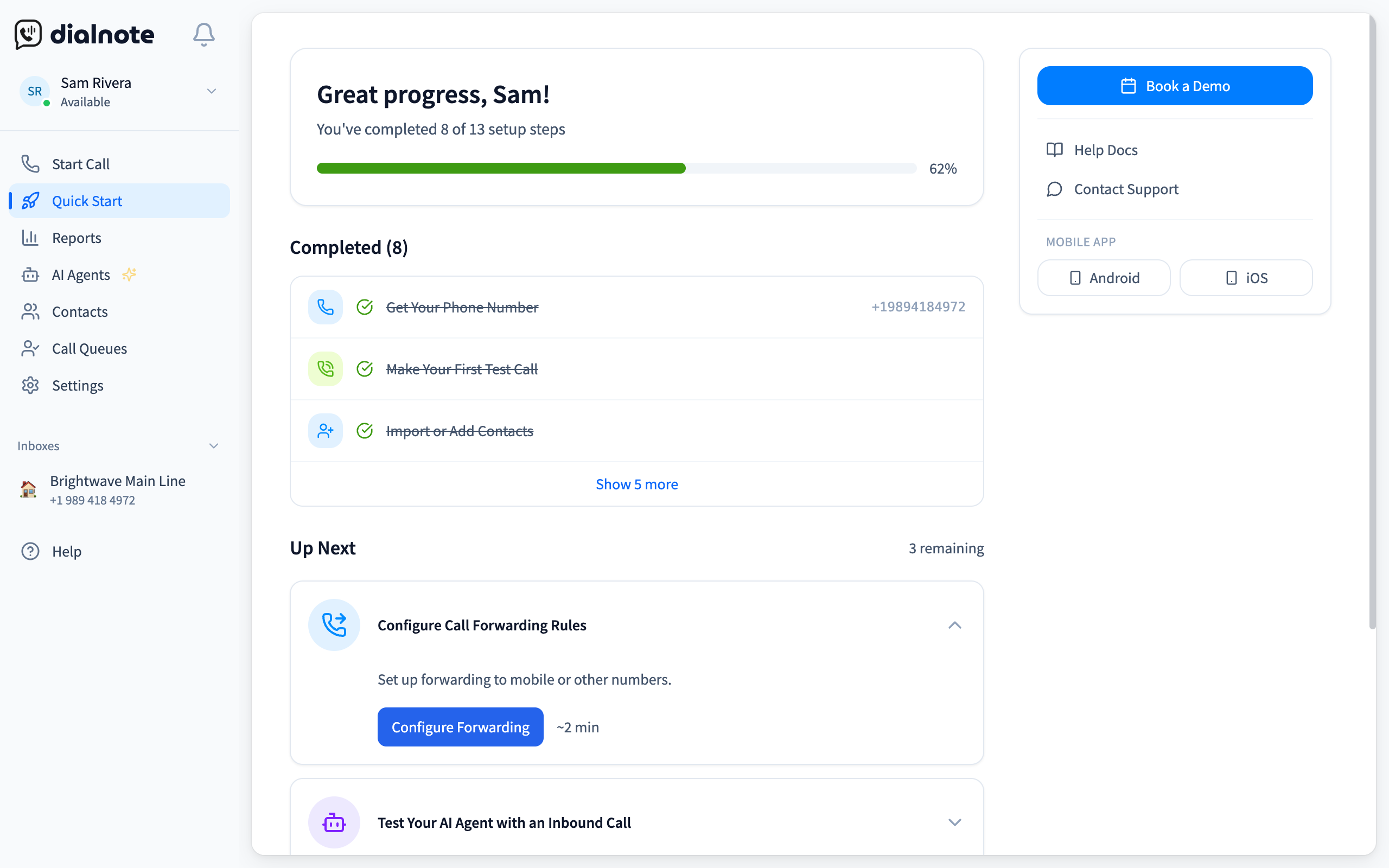
From that page:
- Click Get Phone Number and claim a local number in your area code
- Click Make a Call Now and test the line from your own cell
- Set your Business Hours so after-hours calls route to the AI agent instead of voicemail
- Click Invite Team Members and add each tech's cell
- Open AI Agents in the sidebar and click Configure AI Agent
- Add your business info and the questions the agent should ask callers, then call your own number and let it answer
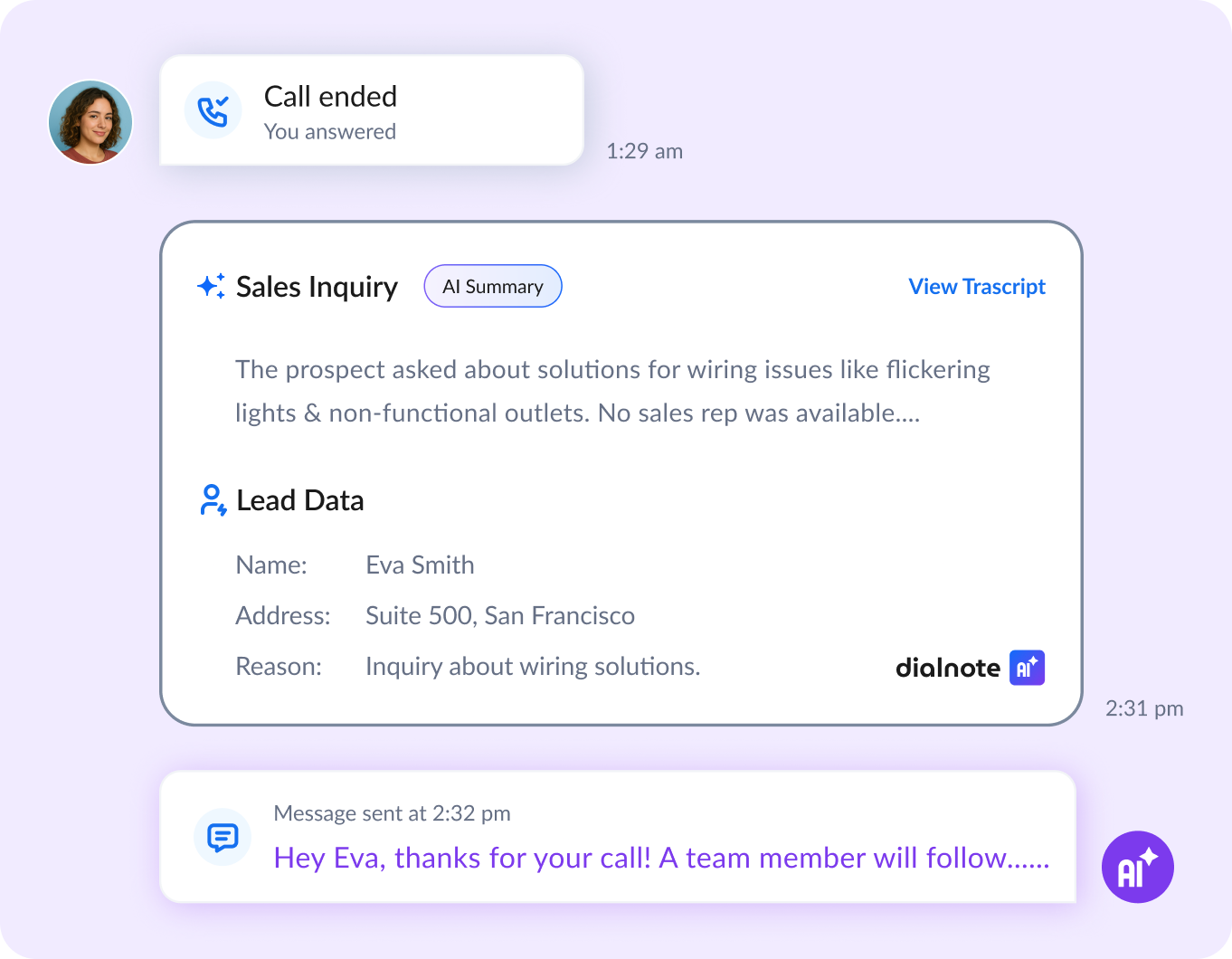
Now run that test call like a customer would: give a fake name, describe a dead AC unit, ask for a Saturday slot. Then read the call summary the agent writes up. If it captured the name, the address, and the problem, point your main line at it and send the crew back into the field. If something's missing, add that question to the agent's setup before the weekend rush.
Common phone system mistakes home service companies make
Getting a phone system is step one. Using it well is step two. Here are the pitfalls I see home service companies fall into most often.
Sticking with personal cell phones too long
This is the biggest one. Your tech's personal number on your Google Business listing creates a real problem. When that tech leaves your company, they take that number, and those customer relationships, with them. A business phone system means your numbers belong to your business, period.
It also means customers always see the same number when you call them back. That builds recognition and trust. When "ABC Plumbing" shows up on caller ID every time, people are far more likely to answer than when a random cell number pops up.
Ignoring after-hours calls entirely
Your competitors are answering at 7 PM on a Wednesday. If you're not, you're handing them jobs. Even a basic auto-attendant that captures the caller's name, number, and what they need puts you ahead of companies that just let the phone ring out.
This goes double for weekends. Saturday morning is prime time for homeowners to finally call about that leaky faucet they've been putting off all week. If your phone goes straight to a generic voicemail on Saturday, you're leaving money on the table every single week.
Overcomplicating the phone menu
Honestly? Most home service companies don't need more than 3 options on their phone menu. Service request, billing, emergency. That's it. Every extra menu layer costs you callers who hang up frustrated. Don't bother with a 5-level phone tree unless you're running a 200-person operation.
Not tracking call data
If you don't know how many calls you're getting, when they come in, and how many get answered, you're flying blind. Call data tells you your peak hours, average response times, and which marketing channels actually drive phone calls. Any decent VoIP dashboard gives you this visibility without the complexity of enterprise analytics tools.
Skipping call recording
New dispatcher fumbles a service request? Without a recording, you'll never know exactly what went wrong. Call recordings aren't just for quality control. They protect you when a customer claims they were told one price and you charged another. They're your safety net for both training and disputes.
Not training your team on the system
You bought the phone system. Great. But if your techs don't know how to transfer calls, check voicemail through the app, or update their availability status, the system isn't doing its job. Spend 30 minutes walking your team through the basics during your next morning meeting. It pays off every single day after that.
The most common issues? Techs forgetting to toggle their status to "on a job" so calls keep ringing through, and dispatchers not knowing how to pull up call recordings when a customer dispute comes in. A quick walkthrough solves both.
How dialnote helps home service teams stay connected
dialnote is an AI business phone system with no per-user pricing. AI voice agents answer calls, capture leads, and book meetings 24/7. Plans from $19/mo. Every call gets recorded, transcribed, and summarized automatically, so your dispatcher doesn't have to scribble notes between calls.
For home service companies, the biggest win is after-hours coverage. Your AI agent handles late-night emergency calls, collects the caller's details with the questions you set, and can transfer urgent ones to your on-call tech. No extra staff needed, no answering service fees.
dialnote also includes a mobile app, smart call routing, CRM integration, and unlimited calling in the US and Canada. Your team gets everything mentioned in this post, in one system that takes about 15 minutes to set up.
Your home service business phone system pays for itself
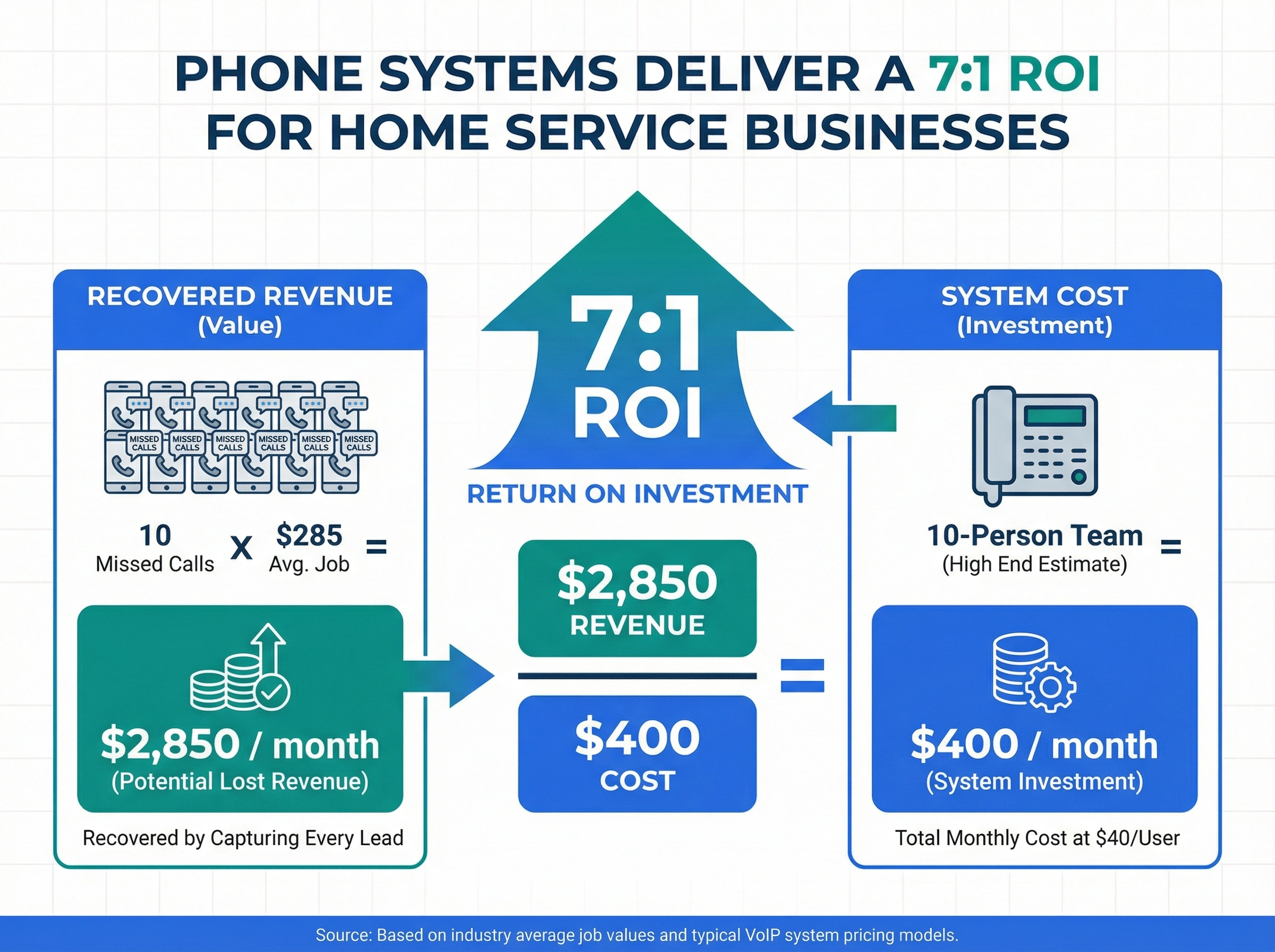
The math here is straightforward. If your average job brings in $285 and you're missing even 10 calls a month that would've booked, that's $2,850 in lost revenue every month. A VoIP phone system costs $10-40 per user. Even at the high end with a 10-person team, you're looking at $400/month.
That's a 7:1 return. And we're being conservative with those numbers.
The real value goes beyond catching missed calls. A proper phone system makes your company look professional when customers call. It keeps your customer data organized across your whole team. And it frees your techs to focus on the work they're actually good at: fixing things.
So why do so many contractors skip this step? Probably because "phone system" sounds like something only big companies with call centers need. It's not. If you've got a team of even 3-5 people and you're regularly missing calls, you need one.
Whether you run an HVAC company, a plumbing business, a roofing company, an electrical shop, a construction company, or any other home service operation, the right home service business phone system turns missed calls into booked jobs. It doesn't matter if you've got 3 techs or 30. The principle is the same: if a customer calls and nobody answers, that job goes to someone else.
Set up a system that answers for you, and you'll stop losing the work your team is already good at doing.
Frequently asked questions
VoIP phone systems work best for most home service businesses. They're affordable ($10-40/user/month), run on mobile devices, and include features like call routing and after-hours answering that field teams need.
Most VoIP phone systems cost $10-40 per user per month. A 5-person team typically pays $50-200/month, which is less than traditional phone lines and includes features like call routing and mobile apps.
Yes, you can port your current business number to a new VoIP system. The transfer usually takes 1-2 weeks, and your provider handles the paperwork. You won't lose your number during the switch.
No. Modern VoIP systems work through mobile apps on smartphones your team already has. Techs can make and receive business calls from the field without desk phones or extra hardware.
Set up an auto-attendant or AI answering feature that answers calls 24/7. It can capture caller info, classify emergencies, and alert on-call staff so you don't miss urgent jobs outside business hours.

Written by
Upasana Sahu
Senior Digital Marketing Specialist, SmartReach.io
Upasana Sahu is a Senior Digital Marketing Specialist at SmartReach.io with over 10 years of experience in content marketing, SEO, and digital strategy. She manages end-to-end blog operations, from content creation and on-page/off-page SEO to traffic...
Upasana Sahu is a Senior Digital Marketing Specialist at SmartReach.io with over 10 years of experience in content marketing, SEO, and digital strategy. She manages end-to-end blog operations, from content creation and on-page/off-page SEO to traffic...
Related Articles

VoIP Cost Savings: How to Cut Phone Bills by 50%
Discover how VoIP cost savings can cut your phone bills in half. Learn the real numbers, hidden costs to avoid, and steps to switch your business phones.
10 Best RingCentral Alternatives for Small Business
Compare 10 RingCentral alternatives for small business by real per-user cost, AI receptionists, and contract traps before you renew.

How to Get a Business Phone Number Without a Landline
Learn how to get a business phone number without a landline in under 30 minutes. Compare VoIP, virtual, and mobile options for small businesses.
