Does Your Law Firm Phone System Cost You Clients?
Only 40% of law firms answer their phones.
That stat comes from the 2024 Clio Legal Trends Report, and it's down from 56% just five years ago. Meanwhile, nearly half of firms are essentially unreachable by phone during business hours. For an industry built on trust and responsiveness, that's a problem.
A law firm phone system isn't just about having a number clients can call. It's about making sure someone (or something) answers when they do. Miss that first call, and there's a good chance you've lost that client to the firm down the street.
Marcus manages operations at a 12-attorney family law practice. Last month, three potential clients called while the team was either in court or on other lines. Nobody picked up. Nobody called back within the hour. All three hired different firms. Marcus knows because one of them told him when he finally returned the call two days later.
That's not unusual. It happens at firms of every size, every single day.
TL;DR:
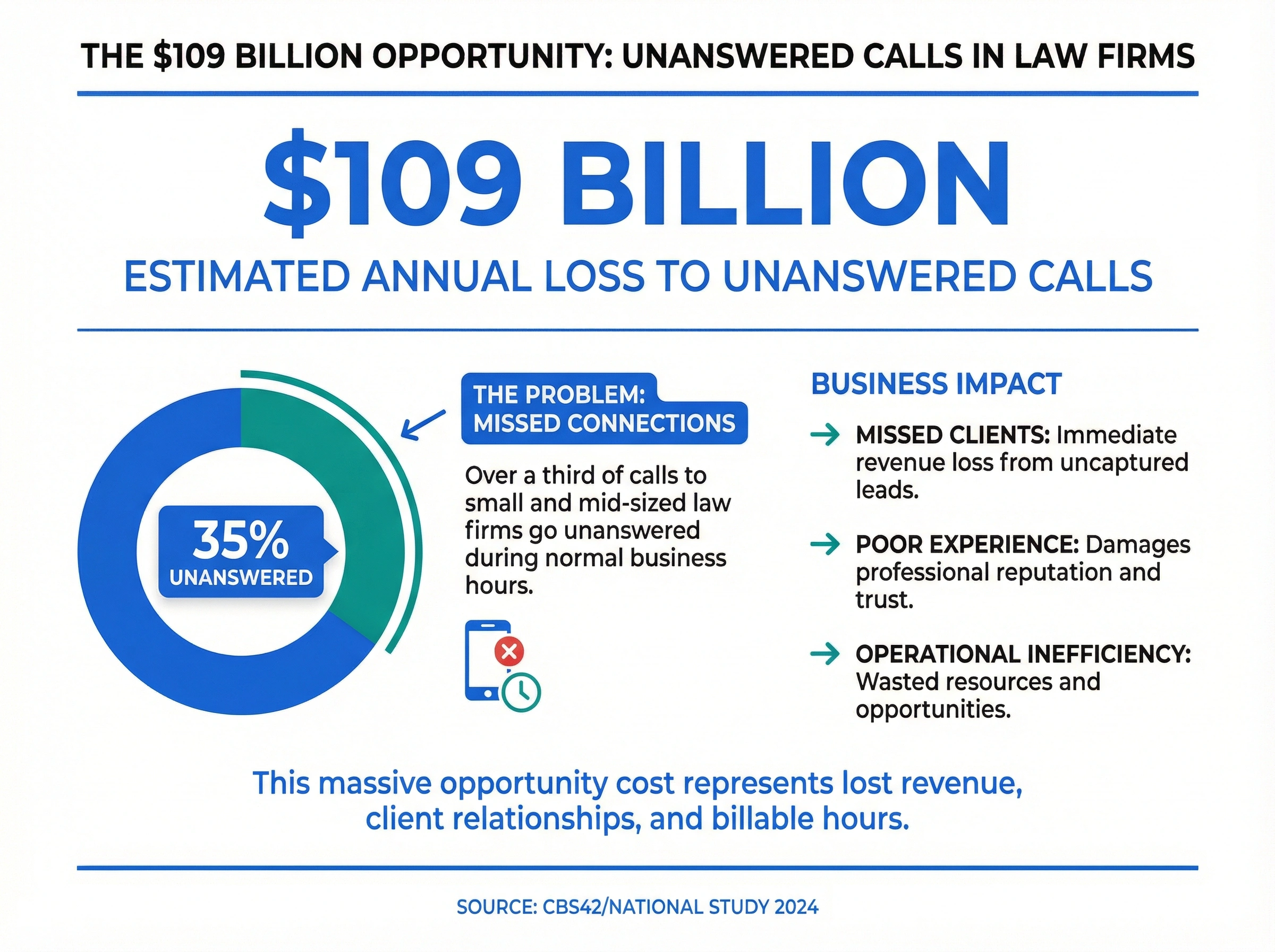
- Only 40% of law firms answer their phones, and 35% of calls to small and mid-sized firms go unanswered, costing the legal industry an estimated $109 billion a year.
- A modern law firm phone system routes calls across devices, answers with an AI receptionist, and transcribes voicemails so no client call slips through.
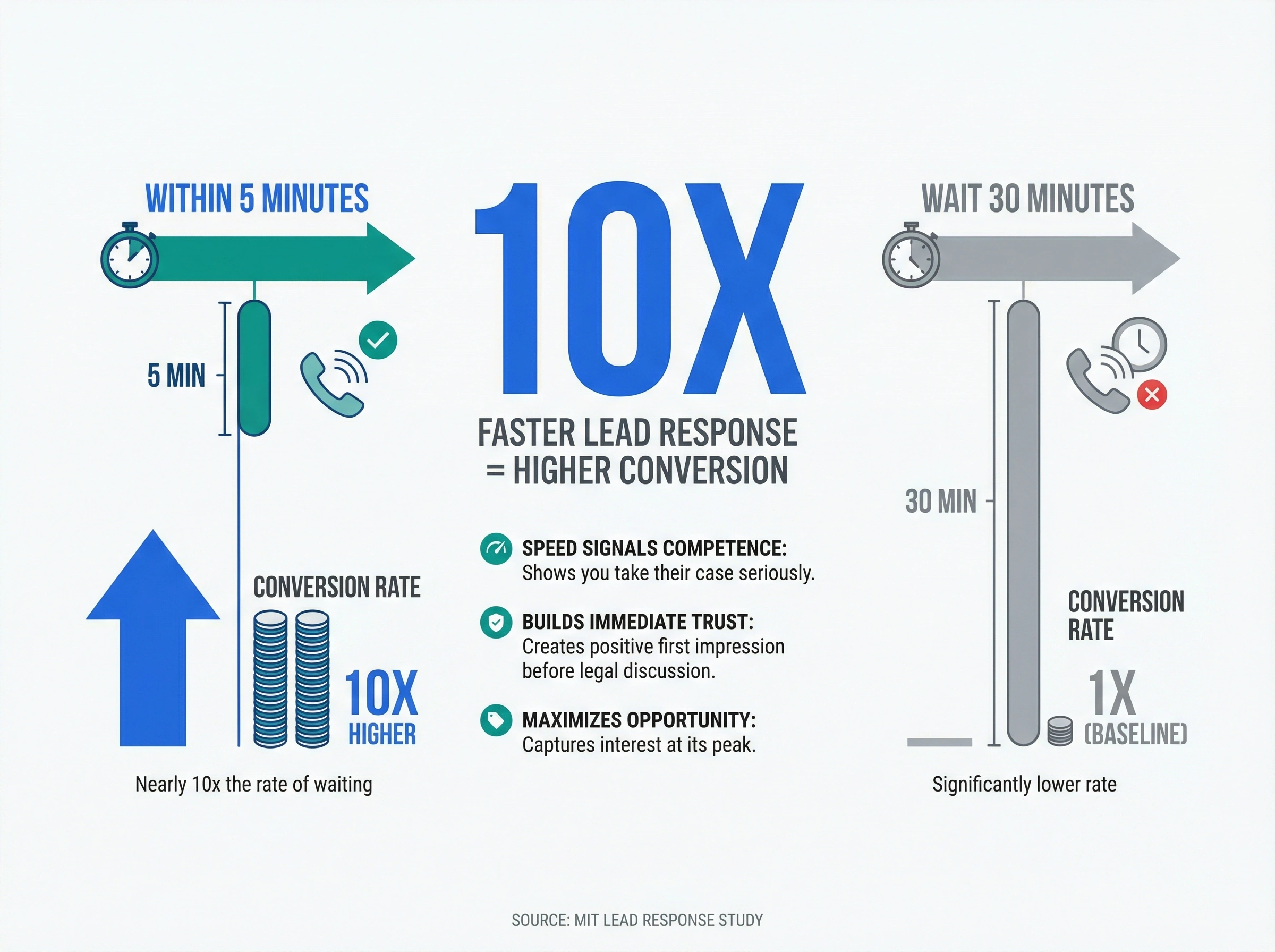
- 82% of legal consumers say fast communication is essential, and firms that call leads back within 5 minutes convert at nearly 10x the rate of those that wait 30 minutes.
- Cloud-based VoIP for lawyers runs about $15-50 per user per month, works on any device, and can meet compliance standards like SOC 2 and CCPA.
Why missed calls cost law firms clients
The legal industry loses an estimated $109 billion annually to unanswered phone calls. That number sounds almost too big to believe, but here's how it adds up: 35% of calls to small and mid-sized law firms go unanswered during normal business hours.
Every one of those calls represents a potential case. Someone looking for help with a divorce, a contract dispute, a personal injury claim. They called you first. But if nobody answers, they'll call someone else.
Sound familiar?
The problem isn't that law firms don't care about client calls. It's that attorneys spend most of their day doing attorney things: depositions, court appearances, client meetings, document review. Phones ring while everyone's busy. Voicemails pile up. By the time someone listens to them, the caller has already moved on.
Traditional phone setups make this worse. Landlines with limited extensions. No easy way to transfer calls. No visibility into who called and when. No mobile access when you're out of the office.
And here's the thing about legal clients: they're often calling during a crisis. Someone just got served divorce papers. A business owner discovered their partner has been stealing. A family needs help after an accident. These aren't people who will patiently wait three days for a callback. They need help now, and they'll find someone who picks up.
What do clients expect when they call a law firm?
Legal clients expect a fast, human response. Most people calling a law firm want someone to pick up, route them to the right attorney without repeated transfers, return voicemails within hours, and let them text too. Speed and clarity on that first call often decide whether they hire you.
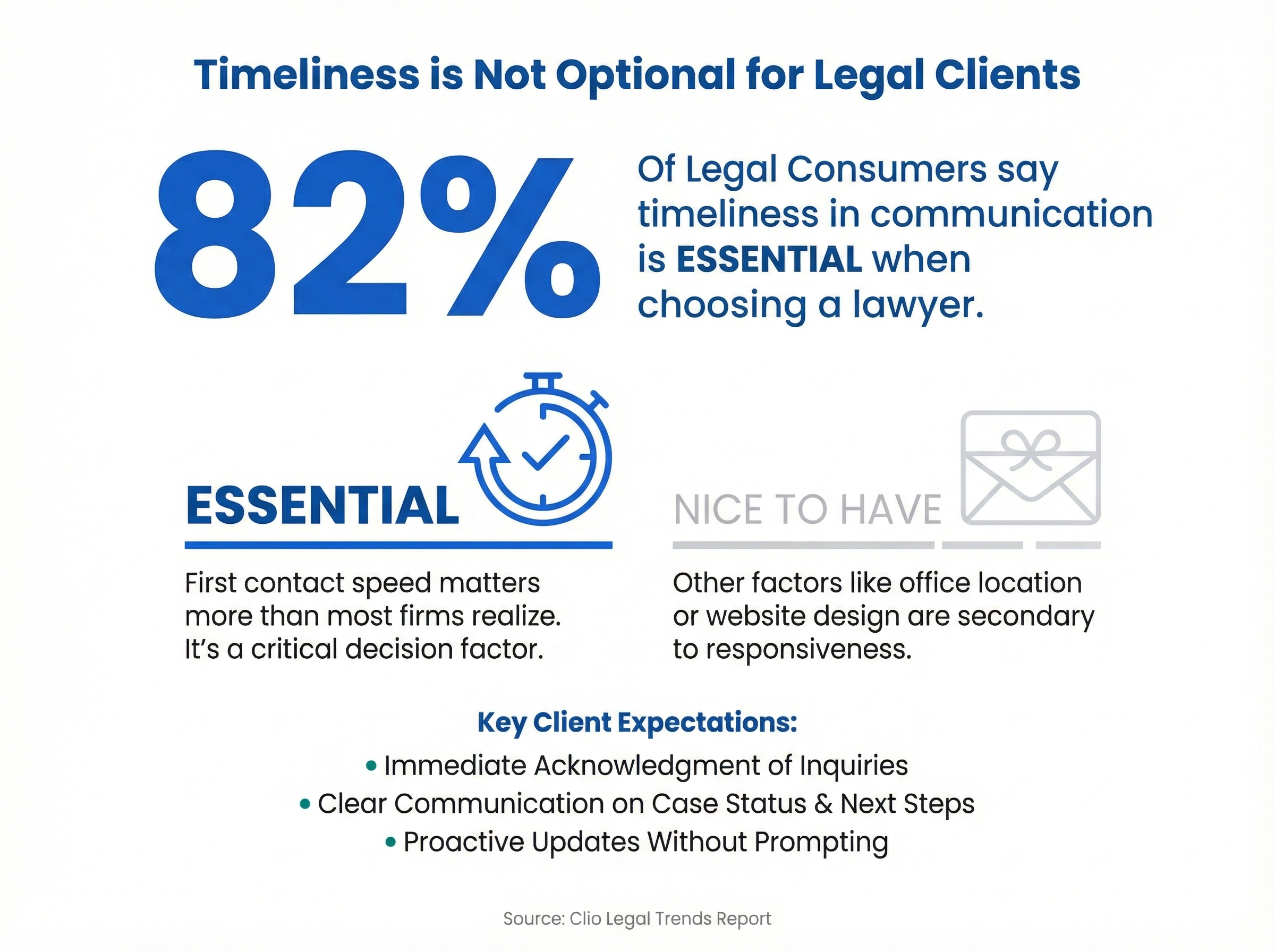
Here's something worth knowing: 82% of legal consumers say timeliness in communication is essential when choosing a lawyer. Not "nice to have." Essential.
But what does that actually look like in practice?
First contact speed matters more than most firms realize. A study from MIT found that the odds of contacting a lead drop 100 times if you wait 30 minutes instead of calling back within 5 minutes. That's not a typo. One hundred times.
Clients also expect professionalism when they call. That means:
- Someone answers. A real person or at least a polished auto-attendant that routes calls correctly.
- They don't get lost. Callers should reach the right department or attorney without being transferred four times.
- Messages get returned. If they leave a voicemail, they expect a callback within hours, not days.
- Texts work too. Many clients, especially younger ones, prefer texting to calling. Your phone system should support that.
This is table stakes for most businesses. But law firms often lag behind because they're using phone technology from 2005.
There's also the matter of existing clients. Poor communication is the second most common reason clients fire their law firm, accounting for nearly 23% of client departures. That's not just lost revenue from one case. It's lost referrals, negative reviews, and damaged reputation in your community.
Think about it from the client's perspective. They're paying you hundreds of dollars an hour. They have questions about their case that keep them up at night. When they call and nobody answers, what message does that send?
What features does a law firm phone system need?
A law firm phone system needs an auto-attendant, call routing across devices, voicemail transcription, SMS, call recording, practice-management integration, and encryption. Together these features make sure every client call gets answered, logged, and protected, whether an attorney is at a desk or in court.
Skip the multi-line desk phones. They're expensive, hard to maintain, and tie you to your office. What you want is a cloud-based system (often called VoIP) that works on any device.
Here's what to look for:
Auto-attendant or virtual receptionist
When nobody's available to answer, an auto-attendant greets callers and routes them to the right person or department. Done well, it feels professional. Done poorly, it frustrates callers. Look for systems that let you customize greetings and menu options without calling IT.
Call routing across devices
Attorneys aren't chained to desks. A good phone system rings your office phone, your mobile, and your laptop at the same time. Pick up from wherever you are. If you're in court, send calls to voicemail or a colleague with one tap.
You can also set up time-based routing. After 6 PM, calls from existing clients go to your cell. New inquiries go to voicemail with a message promising a callback first thing in the morning. On weekends, route everything to an AI answering service. The flexibility matters because every firm operates differently.
Voicemail transcription
Nobody has time to listen to 20 voicemails. Transcription turns voice messages into text you can scan in seconds. Better systems summarize the key points so you know exactly what the caller needs without pressing play.
SMS and text messaging
Some clients hate phone calls. Let them text your business number instead. You can respond from your computer or phone without giving out your personal cell.
Call recording and transcripts
For compliance, training, or just keeping accurate records, automatic call recording saves you from he-said-she-said disputes later. Transcripts make those recordings searchable.
Integration with practice management software
Your phone system should talk to your case management tools. When a client calls, you should see their case history on screen. When you hang up, notes should sync automatically. This saves hours of data entry.
The best integrations also log calls as billable time automatically. No more forgetting to track that 20-minute conversation. The system captures it, tags it to the right client matter, and adds it to your billing queue. For firms that bill hourly, this alone can pay for the phone system several times over.
Encryption and compliance
Law firms handle sensitive information. Make sure your phone provider offers encryption and meets relevant data protection standards like SOC 2 or CCPA.
This isn't optional. Attorney-client privilege extends to your communications. If your phone system stores recordings or transcripts in the cloud (and most do), you need to know where that data lives and how it's protected. Ask providers about their security certifications and data retention policies before signing up.
Common phone system mistakes law firms make
Before we get into setup, let's talk about what not to do. These are the patterns we see trip up firms again and again.
Relying on a single receptionist. When your one front desk person is at lunch, sick, or on another call, nobody answers. Redundancy matters.
Not checking voicemails until end of day. That potential client who called at 10 AM has already hired someone else by 4 PM. Voicemail transcription sent to your phone fixes this.
Giving out personal cell numbers. It feels helpful in the moment, but now clients text you at 11 PM on Saturday. A business number with proper boundaries protects your sanity.
Assuming your current system is "good enough." If you haven't upgraded your phones in five years, you're probably losing clients without knowing it. The technology has changed dramatically.
How much does a law firm phone system cost?
A cloud-based law firm phone system runs about $15-50 per user per month, far less than traditional lines once you count hardware and maintenance. dialnote keeps pricing flat, with plans starting at $19/mo per user and a 10-day free trial that needs no credit card. Most firms recover the cost from a single captured lead.
There's no long-term contract or per-line hardware bill. You pay for the seats you use, add or remove attorneys as your practice changes, and get features like AI answering, routing, and transcription in every plan. For a firm that bills hourly, one recovered client call usually covers a year of service.
How to set up a law firm phone system with dialnote
Getting started with dialnote takes less than a day. Here's how to set up your firm for success:
Step 1: Get your business number
Port your existing number (dialnote handles the paperwork, takes 1-2 weeks) or get a new local or toll-free number instantly. Most firms keep their main number and add direct lines for key attorneys.
Step 2: Configure your AI receptionist
dialnote's AI receptionist answers calls when your team is unavailable. Set up a professional greeting and let the AI handle routing, take messages, and answer common questions about your practice. Clients get help immediately instead of voicemail.
Step 3: Set up smart call routing
Ring your desk, mobile, and laptop simultaneously. Set after-hours rules so existing client calls go to your cell while new inquiries get a callback promise. The AI handles overflow when everyone's on a line.
These rules live in the Call Flow Editor. Go to Settings → Phone Numbers, select your main line, click Configure call flow, then:
- Add a Business Hours node to split open hours from evenings
- Add a Ring Users node set to ring your devices at once
- Point the No Answer path at your AI Agent
- Click Save Flow
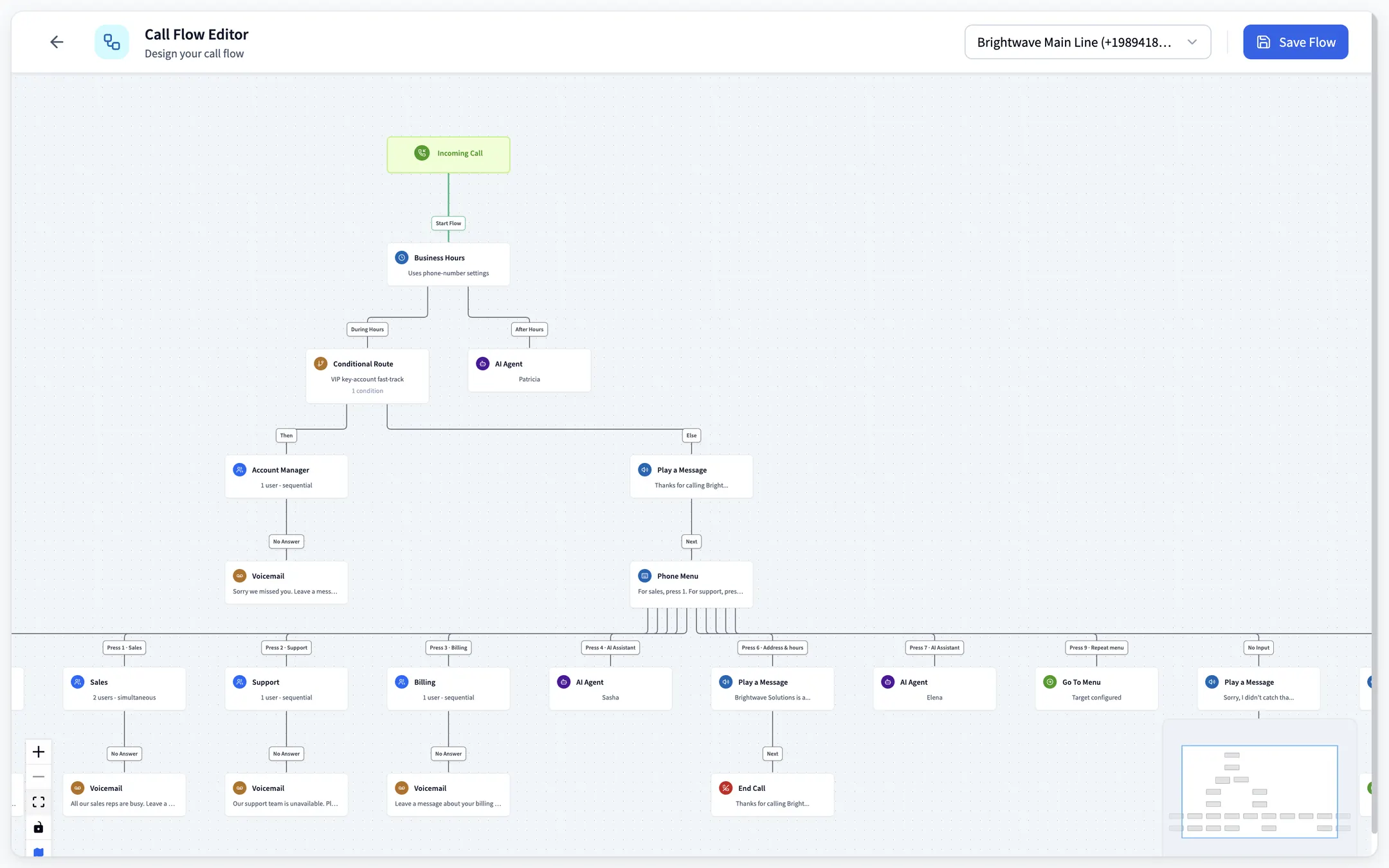
Read the after-hours branch the way a prospective client experiences it at 7 PM. Every branch that dead-ends in silence is a case that calls the next firm on the list; the flow you save here is the 5-minute responsiveness from the stat below, made mechanical instead of heroic.
Step 4: Turn on voicemail transcription and summaries
Voicemails get transcribed automatically, with AI summaries that tell you exactly what clients need without listening to the full message. Summaries hit your inbox instantly.
Step 5: Connect your practice management software through Zapier
Native CRM integrations cover HubSpot, Salesforce, and Pipedrive; legal tools like Clio and MyCase connect through Zapier, which reaches 5,000+ apps. Call summaries and notes sync into your matter workflows after each call, so the log exists without manual entry.
Step 6: Download the mobile app
Every attorney and staff member should install the dialnote app. Make calls from your business number, respond to texts, and check voicemails from anywhere.
Step 7: Test the client experience
Call your own number from a personal phone. Does the AI receptionist sound professional? Are calls routing correctly? Do transcriptions arrive promptly? Fix any issues before clients encounter them.
Set up your firm's line before the next intake call
10-day free trial, no credit card needed.
Why does this matter so much? Because responsiveness builds trust. And trust is everything in legal services.
We're not 100% sure why, but firms that answer calls within 5 minutes convert leads at nearly 10x the rate of those that wait 30 minutes. Speed signals competence. It says "we take your case seriously" before you've said a word about the law.
Your phone system shapes your firm's reputation
Every missed call is a first impression you didn't get to make. Every voicemail that goes unanswered for days tells a potential client what working with your firm might be like.
A law firm phone system that routes calls intelligently, transcribes voicemails, and lets attorneys respond from anywhere isn't a luxury. It's how modern practices operate.
dialnote's VoIP phone system gives law firms exactly this. Cloud-based calling on any device. AI-powered voicemail summaries. Call routing that keeps you connected whether you're at your desk or in the courthouse parking lot. You can try it free and see how many fewer clients slip through the cracks.
Your phone rings. Someone needs your help. The only question is whether you'll be the one to answer.
Frequently asked questions
A cloud-based VoIP system works best for small law firms. It includes features like voicemail transcription, call routing, and mobile access without expensive hardware.
Attorneys spend most of their day in court, depositions, or meetings. Without proper call routing and mobile access, calls go unanswered when staff is busy.
Yes, you can port your existing business number to a VoIP provider. The process typically takes 1-2 weeks, and the provider handles the paperwork.
Cloud-based VoIP systems for law firms typically cost $15-50 per user per month. That's often less than traditional phone lines with more features included.
Yes, reputable VoIP providers offer encryption and meet compliance standards like SOC 2 and CCPA. Check that your provider supports call recording for client files.
Related Articles

Phone System for Real Estate Agents [2026 Guide]
A phone system for real estate agents should catch leads on the road. Here's what to look for, the features that matter, and mistakes to avoid.

How to choose a business phone system in 2026
Learn how to choose a business phone system with a clear buyer's guide covering cloud vs on-premise, must-have features, real costs, and switching.
What Does Dialpad Pricing Really Cost a Small Team?
See what Dialpad pricing really costs: $15 to $35 per user, the 3-seat Pro minimum, per-text and admin fees, and real team math at 5, 15 and 30 people.
