Phone System for Real Estate Agents [2026 Guide]
A missed call in real estate isn't just an inconvenience. It's a lost commission. According to industry research, 78% of homebuyers work with the first agent who responds to their inquiry. If that's not you, someone else just picked up your paycheck.
The best phone system for real estate agents doesn't just make calls. It catches leads when you're showing a house, routes calls when you're driving between listings, and keeps your personal number out of it entirely.
Carla runs a four-person real estate team in Austin. She was using her personal cell for everything: buyer calls, seller follow-ups, lender coordination. By the time she checked voicemail after a showing, three leads had already moved on.
She didn't need more marketing. She needed a phone system that actually worked for how real estate agents operate.
Sound familiar? Here's what to look for and what to avoid.
TL;DR:
- The best phone system for real estate agents forwards calls to your cell, routes leads to your team, and keeps your personal number out of the conversation.
- Speed wins deals: about 78% of homebuyers hire the first agent who responds, so after-hours and AI call handling stop leads from going to voicemail.
- Must-have features are call forwarding with mobile apps, an auto-attendant or IVR, call recording and voicemail transcription, AI receptionists, and CRM integration.
- Flat-rate plans with unlimited seats beat per-user pricing once your team grows past a few agents.
- Skip per-seat billing, long-term contracts, and any system without a solid mobile app.
Why do real estate agents need a dedicated phone system?
Real estate agents spend most of their day away from a desk. You're at showings, open houses, closings, and coffee meetings. But your phone keeps ringing, and every missed call could be a buyer ready to make an offer.
A personal cell phone can't handle this. You've got one number, one voicemail, and no way to separate work from personal life. When a lead calls at 9 PM on a Saturday, you either answer and lose your evening, or miss it and lose the deal.
A dedicated business phone system fixes this. You get a professional business number that forwards to your cell, routes calls to team members when you're busy, and captures every lead with voicemail transcription so you can scan messages between showings instead of listening to them.
There's also the professionalism factor. When you call a prospect back from your personal number, they see an unfamiliar cell number and might not pick up. When you call from your business line, it matches the number on your website and business card. That small detail matters more than most agents realize.
According to NAR's Technology Survey, agents who adopt communication technology tools close more deals and respond to leads faster. That's not a coincidence. Speed kills in this business, and the agent who picks up first usually wins.
And the numbers back this up. Industry research suggests that 78% of homebuyers end up working with the first agent who responds. If your phone system sends leads to voicemail while you're at a showing, that first-responder advantage goes to someone else. It's not about working harder. It's about being reachable.
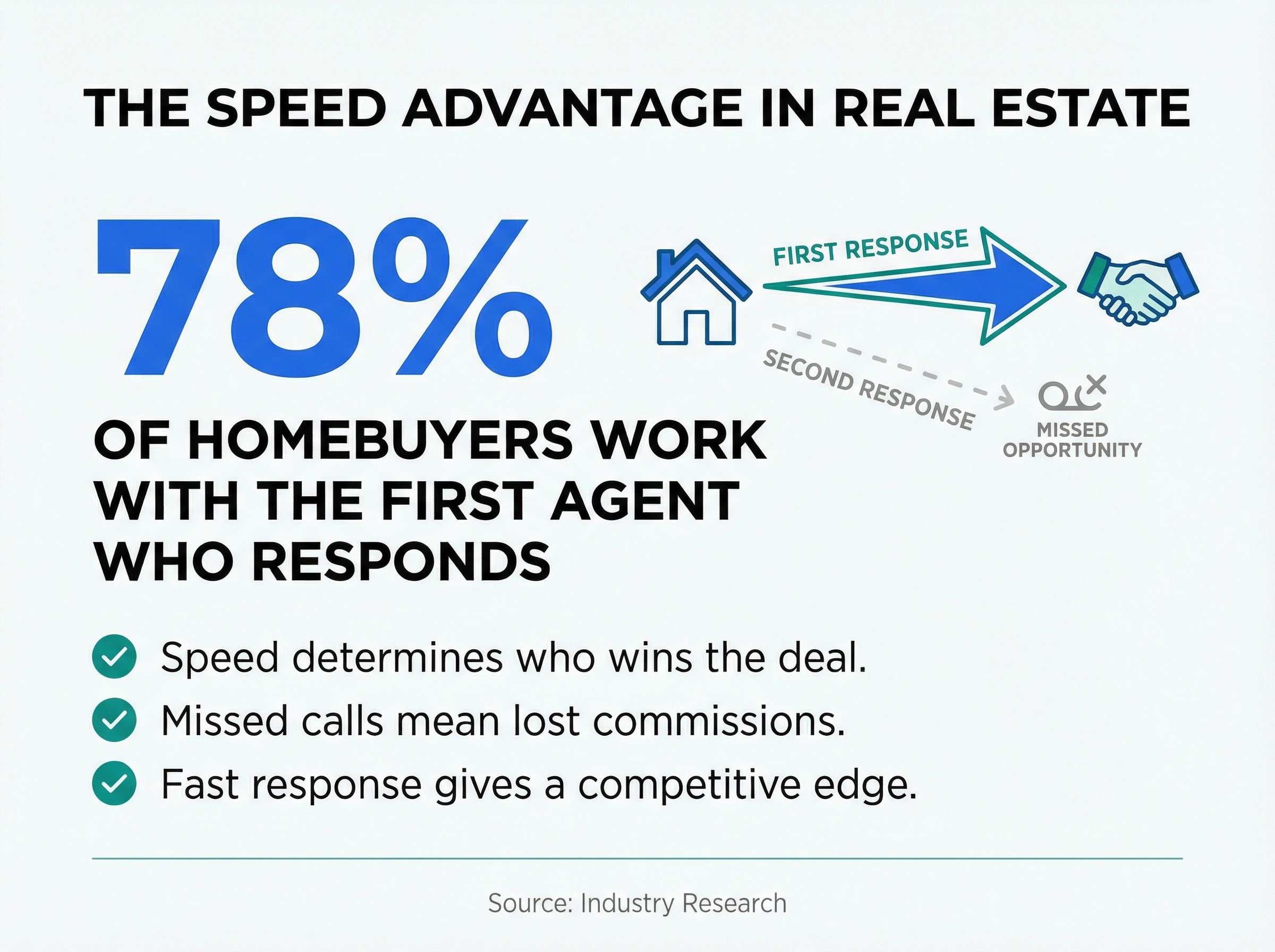
We've seen this play out with dozens of agents and brokerages who've switched to dialnote. The ones who set up proper call routing and after-hours handling stopped losing leads to voicemail. It's a straightforward fix with a big payoff.
What features should a phone system for real estate agents have?
The right phone system for real estate isn't about having the most features. It's about having the right ones for how agents actually work. Here's what matters.
Call forwarding and mobile access
This is non-negotiable. If your phone system can't forward calls to your cell automatically, it's not built for real estate. Period.
You need calls to follow you: desk phone at the office, mobile app on the road, softphone on your laptop at home. And your business number should show up on outgoing calls from your cell so you're not giving prospects your personal number.
The best systems include iOS and Android apps that work like a second phone line on your existing device. No extra hardware. No second phone in your pocket.
Auto-attendant and IVR
When a lead calls your office line and nobody picks up, what happens? If the answer is "it goes to a generic voicemail," you're losing business.
An auto-attendant answers professionally and routes the caller: press 1 for sales, press 2 for property info, press 3 to leave a message. It gives your small team the feel of a bigger operation and keeps callers engaged instead of hanging up.
For brokerages, IVR gets even more useful. You can route calls by location ("press 1 for our downtown office, press 2 for the north side"), by department ("press 1 for an agent, press 2 for property management"), or even by listing. Some agents set up dedicated extensions for specific properties so buyers can call and hear listing details instantly.
Call recording and transcription
Every agent knows how it goes. You're on a call with a buyer, they mention their budget, their timeline, the school district they want. You hang up and realize you forgot half of it.
Call recording fixes that. You can replay the conversation and pull out exactly what the buyer said. Some systems even generate AI summaries so you get the key points without re-listening to a 20-minute call.
And voicemail transcription means you can read messages in 10 seconds instead of listening for two minutes. Between showings, that time adds up fast. You're sitting in your car between appointments, scrolling through transcribed voicemails instead of pressing play, waiting, pressing play again. It's a small feature that saves real time every single day.
Recording is also important for compliance and training. If you're growing a team, new agents can listen to how experienced agents handle objections, pricing conversations, and difficult sellers. It's better than any training manual.
AI call handling
This is where the market is heading, and honestly? If your phone system doesn't offer some form of AI in 2026, it's already behind.
AI receptionists can answer calls when you're unavailable, capture caller details, answer basic questions about listings, and even schedule showings. They're not replacing you. They're making sure no lead falls through while you're face-to-face with another client.
According to PwC's Emerging Trends in Real Estate, AI adoption in real estate is accelerating, with firms reporting decreased costs and faster response times. If you've been thinking about AI for your business, your phone system is the easiest place to start. We wrote a detailed guide on AI receptionists for real estate that covers this in depth.
CRM integration
Your phone system should talk to your CRM. When a lead calls, their contact info should pop up automatically. When a call ends, the notes should sync without you copying and pasting anything.
Look for native integrations with platforms real estate teams actually use: HubSpot, Salesforce, Follow Up Boss, or industry tools like Propertybase. If the only integration option is Zapier, that's a yellow flag. Native connections are more reliable and don't cost an extra $20 a month.
Team features
If you run a team or brokerage, you need shared phone numbers, ring groups, and the ability to transfer calls between agents. A buyer calling your main office line should be able to reach whichever agent is available, not just one person.
Internal extensions, team messaging, and presence indicators (showing who's on a call vs. available) keep your team coordinated without a separate app.
Ring groups are especially useful for real estate. Set up a group for your sales team so when a new lead calls, every available agent's phone rings at once. First one to answer gets the lead. It's simple, fair, and makes sure someone always picks up. If you're running a larger brokerage, you can create separate ring groups for different office locations or specialties (commercial vs. residential, buyers vs. sellers).
For team collaboration tools and how they work with phone systems, check out our guide to team collaboration features.
How does a phone system for real estate agents handle leads?
A good VoIP phone system doesn't just connect calls. It captures and organizes leads automatically so nothing slips through.
Here's how it works in practice: a potential buyer sees your sign on a property and calls. Your phone system answers with a professional greeting, captures their name and number, asks what property they're calling about, and either connects them to you live or takes a message with all the details. When you check your phone 20 minutes later, you've got a complete lead record, not just a missed call notification.
Hard to say exactly how many leads the average agent loses to missed calls, but the numbers out there are sobering. Industry data suggests agents miss about 40% of incoming calls, and 85% of those callers won't call back. They'll just contact the next agent on the list.
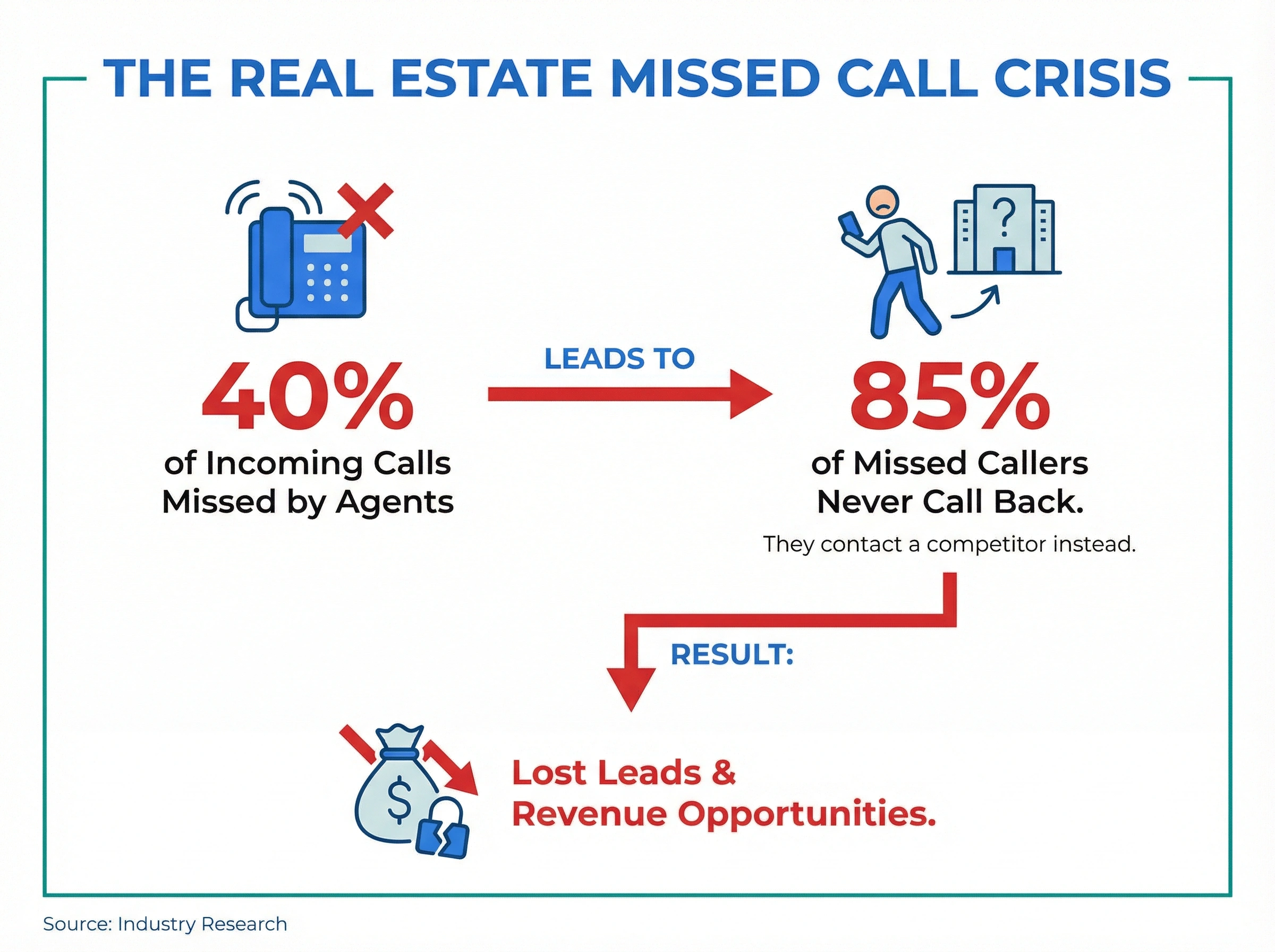
That's where after-hours call handling makes a real difference. Your best leads don't care that it's 8 PM. They want answers now. An after-hours answering service or AI receptionist keeps you in the game even when you're off the clock.
Call analytics matter here too. You should be able to see which marketing channels drive the most phone calls, what times of day you get the most leads, and how fast your team responds. If you're spending $2,000 a month on Zillow ads but can't tell which calls came from them, you're flying blind. A good call analytics dashboard connects the dots between your marketing spend and actual conversations.
Some phone systems also let you assign different phone numbers to different marketing channels. One number on your Zillow listings, another on your yard signs, a third on your website. When a call comes in, you instantly know where it came from. Over time, this data shows you where your money is actually working and where you're wasting it.
This kind of visibility is something most agents don't think about until they realize they've been pouring money into a channel that doesn't generate calls. Don't wait until then.
What should you look for when picking a real estate phone system?
Not all phone systems understand real estate. Here's a step-by-step approach that works.
Step 1: Figure out your setup. Are you a solo agent, a small team, or a brokerage with multiple offices? This matters because the right system depends on how you work.
Solo agents need a simple mobile-first system with a business number, voicemail transcription, and maybe an AI receptionist for after-hours. You don't need 50 features. You need three or four that work really well. To see how the leading options compare, start with our roundup of the best VoIP phone systems for small business.
Teams need shared numbers, call routing, and the ability to transfer calls between agents. When a buyer calls your main line, someone on your team should always be able to pick up.
Multi-office brokerages need something that scales without charging per seat. If you're growing, look at unlimited seat phone systems so your bill doesn't jump every time you bring on a new agent. You also need separate numbers and routing rules per location, all managed from one dashboard.
Step 2: Test the mobile app. Download the app. Make test calls. See if it actually works the way you need it to on the road. Does the call quality hold up on cellular data? Can you switch between Wi-Fi and mobile without dropping a call? Does the app drain your battery?
Step 3: Check call handling options. What happens when you can't answer? Does the system offer voicemail, an auto-attendant, or an AI receptionist? Can you customize the greeting? Can callers leave detailed messages or just hit a dead end?
Step 4: Look at the real cost. Some providers advertise $15 a month but charge extra for call recording, voicemail transcription, and the mobile app. Ask for the all-in price with everything you'll actually use. No surprises.
Also check whether pricing is per user or flat rate. Per-user pricing sounds cheap at first ($25 per agent), but a team of six agents is suddenly paying $150 a month for a basic phone system. Flat-rate plans that include unlimited seats can save a lot, especially for growing teams.
Step 5: Ask about number porting. You probably already have a business number. Make sure you can bring it with you. Porting usually takes one to three weeks, and your provider should handle the paperwork.
Step 6: Read the contract. Month-to-month beats annual. You don't want to be locked in for two years with a phone system you hate. Some of the best providers offer month-to-month plans because they're confident you'll stay.
Common mistakes agents make with their phone setup
Even agents who invest in a good phone system sometimes set it up wrong. Here's what to avoid.
Using your personal number for everything. This is the most common mistake. Once clients have your personal cell, there's no boundary. You can't route calls, can't track leads, can't hand off to a team member. Get a business number. It's the single most impactful change you can make. If you've been getting by with a free workaround like Google Voice, our guide to Google Voice alternatives for business walks through options with real call routing and team features.
Ignoring voicemail setup. A generic "leave a message after the beep" voicemail tells callers you don't take their call seriously. Record a professional greeting that mentions your name, your brokerage, and when you'll call back. Better yet, set up an auto-attendant so they don't hit voicemail at all.
Not using call forwarding rules. Most agents turn on call forwarding and call it done. But smart forwarding rules make a huge difference. Forward to your cell during business hours, to a team member when you're in a showing, and to an AI receptionist after hours. Different situations need different routing.
Some agents even set up time-based rules for weekends. Saturday morning calls forward to the agent on open house duty. Sunday evening calls go to AI. It takes 15 minutes to set up and saves you from missing leads all week.
Skipping the CRM connection. If your phone system and CRM don't talk to each other, you're manually logging calls. That means some calls don't get logged. That means leads fall through the cracks. Connect them.
Choosing based on price alone. A $10 a month phone system that drops calls and has no mobile app will cost you far more in lost deals than a $99 system that captures every lead. The cheapest option isn't the best value for agents who depend on the phone for their income.
Not setting up a local number. If you serve a specific market, having a local area code number builds trust. A buyer in Dallas is more likely to answer a 214 number than an 800 number. Most phone systems let you pick a local number for free or a few dollars a month. Our guide on local vs. toll-free numbers breaks down when to use each one.
The right phone system for real estate agents makes the difference
Your phone is your most important business tool. Not your website, not your social media, not your yard signs. Your phone. When a motivated buyer calls and you're not there, they don't wait around.
The right phone system for real estate agents solves this. It forwards calls intelligently, captures leads automatically, works from anywhere, and gives you back the time you'd spend managing voicemail and missed calls.
Here's what to remember:
- Get a dedicated business number. Stop using your personal cell.
- Pick a system with real mobile support, not just a desktop app.
- Set up call routing rules that match how you actually work.
- Don't skip AI features. They're the difference between catching leads and losing them.
If you're ready to stop losing leads to missed calls, dialnote gives real estate agents a phone system with unlimited seats, AI-powered call handling, and a mobile app that works the way you need it to. No per-seat fees, no feature gating, no surprises.
Frequently asked questions
Solo agents need a mobile-first VoIP system with a dedicated business number, call forwarding, voicemail transcription, and an after-hours AI receptionist. Look for flat-rate plans so you're not paying per user.
You can, but it's not ideal. A dedicated business number separates work and personal life, looks more professional to clients, and lets you use features like call routing and analytics.
VoIP phone systems for real estate range from $15 to $45 per user monthly with per-seat pricing. Flat-rate plans with unlimited seats start around $99 a month regardless of team size.
No. VoIP replaces landlines entirely and costs less. You get a business number that works on your cell, computer, and desk phone, all over the internet. No extra hardware needed.
Yes. Features like auto-attendants, AI receptionists, and after-hours call handling make sure someone always answers. Agents who use these features miss fewer calls and respond to leads faster.

Written by
Lancelot Dsouza
Chief Marketing Officer, SmartReach.io
Lancelot Dsouza is the Chief Marketing Officer at SmartReach.io, where he built the Marketing, Sales, and Customer Success verticals from the ground up. With over 25 years of experience spanning digital marketing, business development, and strategic...
Lancelot Dsouza is the Chief Marketing Officer at SmartReach.io, where he built the Marketing, Sales, and Customer Success verticals from the ground up. With over 25 years of experience spanning digital marketing, business development, and strategic...
Related Articles
Does Your Law Firm Phone System Cost You Clients?
See how the right law firm phone system fixes client communication, stops missed calls from becoming lost cases, and keeps your firm reachable all day.

How to choose a business phone system in 2026
Learn how to choose a business phone system with a clear buyer's guide covering cloud vs on-premise, must-have features, real costs, and switching.
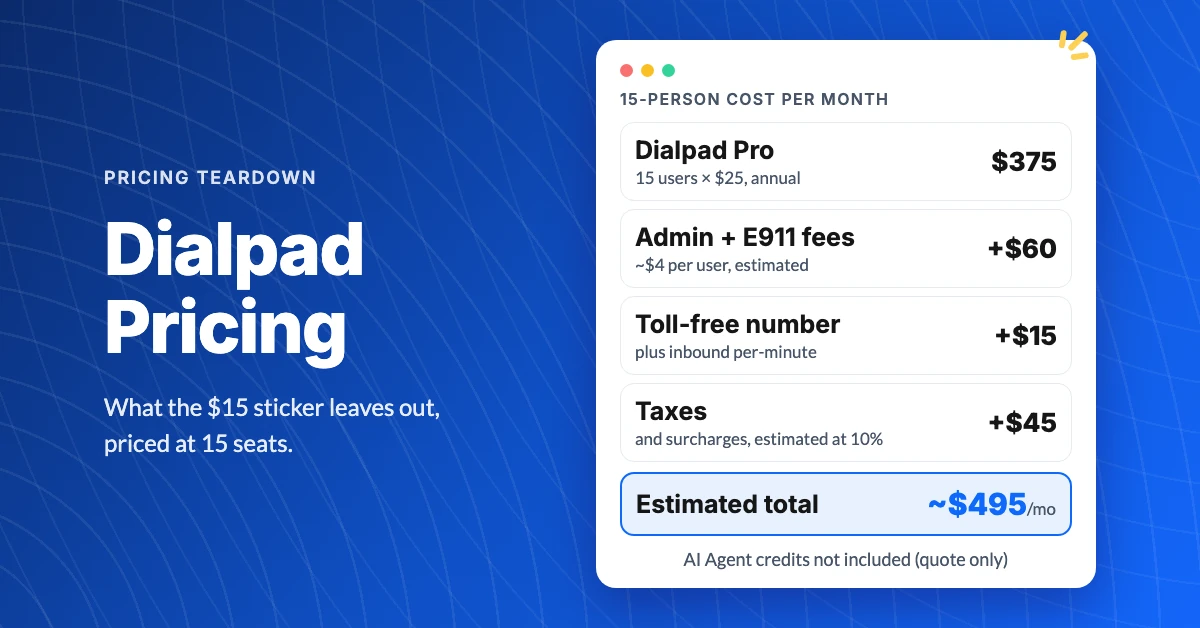
What Does Dialpad Pricing Really Cost a Small Team?
See what Dialpad pricing really costs: $15 to $35 per user, the 3-seat Pro minimum, per-text and admin fees, and real team math at 5, 15 and 30 people.
