Does Your Business Need an After Hours Answering Service?
Your business closes at 5 PM. Your customers don't.
Every evening, your phone keeps ringing. Weekends too. Holidays, definitely. And every unanswered call is a potential customer deciding in real time whether to leave a voicemail (they probably won't) or call your competitor (they probably will). An after hours answering service exists to solve this exact gap, but the options range from a $25/month voicemail box to a $2,000/month live answering team. Which one actually makes sense?
Stan runs a mid-size home services company outside of Dallas. Eight trucks, three office staff, and a phone that doesn't stop. During business hours, his team handles calls well enough. But after 5 PM, everything goes to voicemail. He assumed most callers would leave a message and try again in the morning. When he finally pulled the data, only 15% of after-hours callers left voicemail. The rest just vanished. That meant roughly 30 leads per month, gone, with an average job value of $380. You do the math.
Stan's problem isn't unique. And the after hours answering service market has exploded with options over the past two years. The trick is figuring out which type of service fits your business, your budget, and your customers' expectations.
TL;DR:
- An after hours answering service catches calls that come in after you close, when roughly 85% of callers who don't reach a live person won't call back.
- AI answering services cost $30-$300/month at a flat rate, while live human services run $150-$2,000/month with per-minute billing and night, weekend, and holiday surcharges.
- After-hours callers tend to be urgent and high-intent, so businesses that answer them recover 15-20% more appointments than those that go dark after 5 PM.
- For most small businesses under 100 after-hours calls a month, a flat-rate AI service gives the best ROI; high-volume or high-stakes industries (legal, medical, property management) do better with a hybrid AI-plus-human setup.
- You keep your existing business number and route calls to the service outside your open hours, with no new hardware needed.
What happens to your calls after 5 PM?
Most small businesses lose between 25% and 40% of all inbound calls. But after hours, that number gets worse. Way worse.
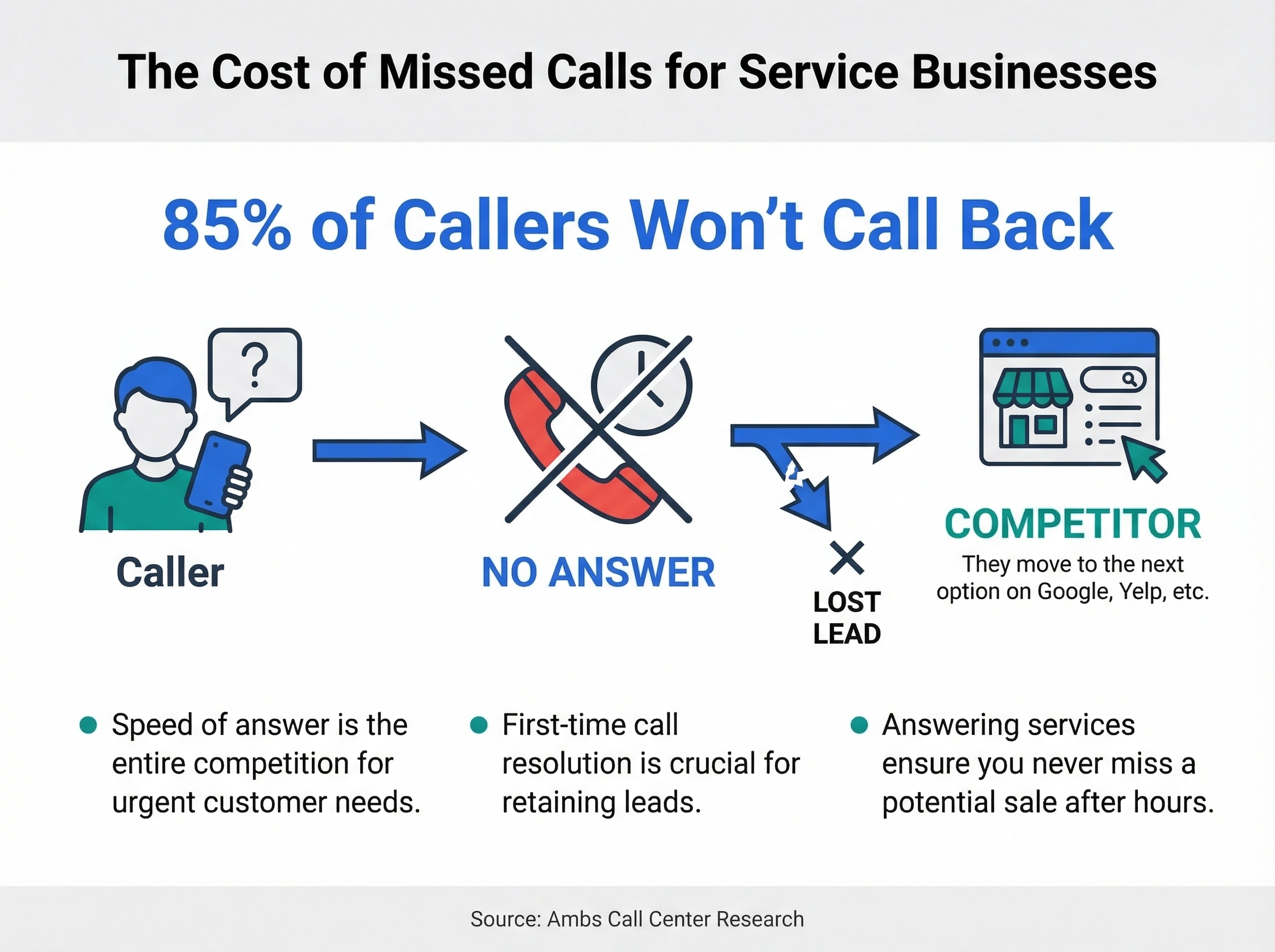
According to Ambs Call Center research, 85% of callers who don't reach a live person on the first try won't call back. They'll move to the next option on Google, Yelp, or whatever list they're scrolling. For service businesses where customers need help now (think plumbing emergencies, dental pain, locked-out tenants), speed of answer is the entire competition.
Here's what typically happens with after-hours calls when there's no answering service in place:
- Voicemail: Caller hears a generic greeting, decides whether to leave a message (most don't), and hangs up. You find out the next morning, if they bothered.
- No answer at all: Phone rings until it stops. Caller assumes you're not a serious business. They're gone.
- Ring-to-cell forwarding: Your personal phone rings at dinner, during your kid's soccer game, at 11 PM. You answer some. Miss others. Burn out fast.
None of these options actually capture the lead. They just delay the loss or shift the burden to your personal time.
But what's that actually costing you?
According to research from CompuVoIP, small businesses lose an average of $126,000 annually from missed calls. Even if only a fraction of those are after-hours calls, you're looking at tens of thousands of dollars walking out the door every year.
And here's the thing about after-hours callers: they're often more motivated than daytime callers. Someone searching for a service at 8 PM is usually dealing with something urgent. They're not casually browsing. They need a solution, and they need it before morning. If your phone just rings out, that urgency works against you.
How much revenue do after hours calls actually represent?
The short answer: more than most business owners realize.
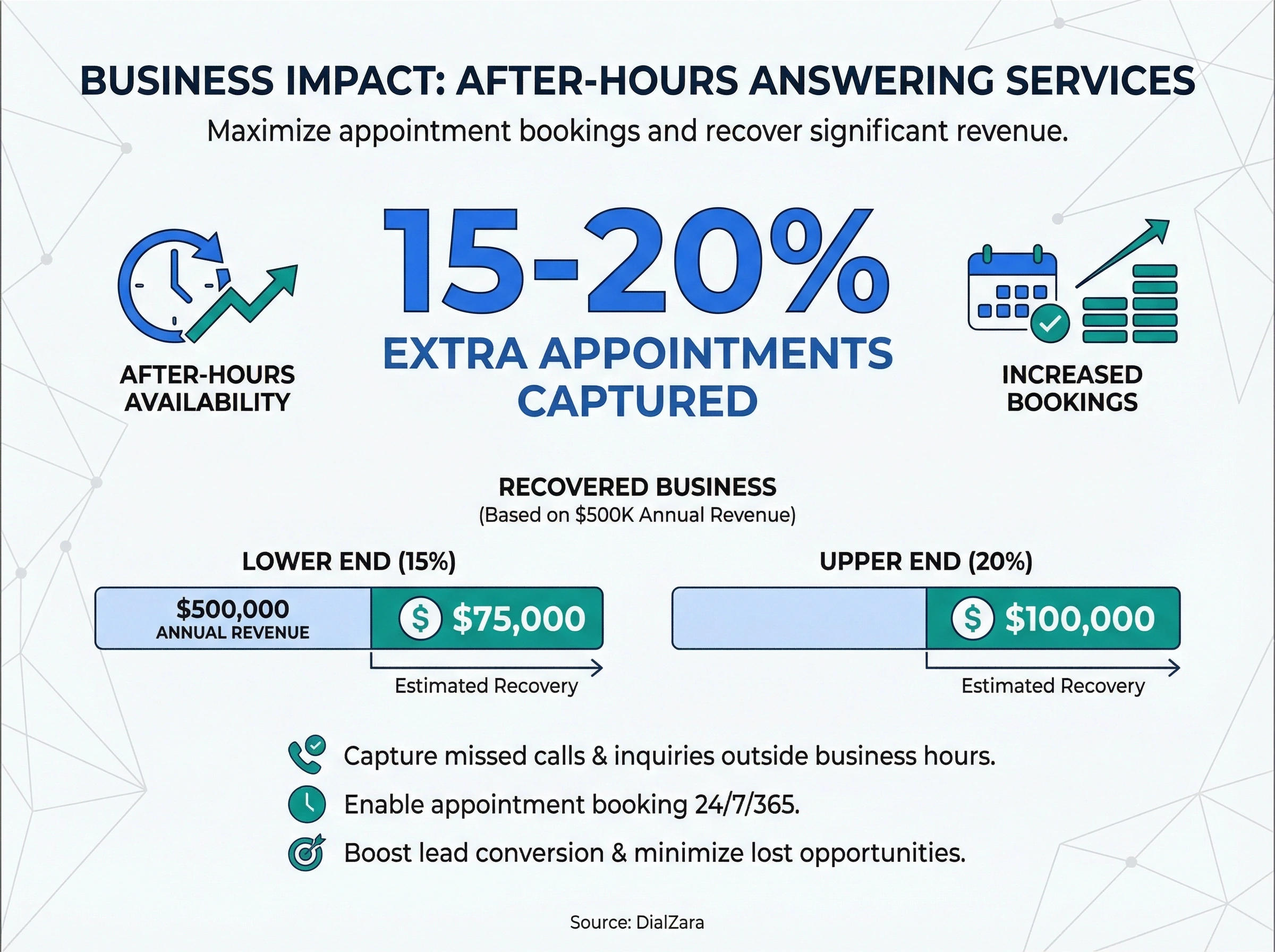
A study from DialZara found that businesses using after-hours answering services capture an extra 15-20% of appointments that would've otherwise been lost. For a company doing $500,000 in annual revenue, that's $75,000-$100,000 in recovered business.
Hard to say exactly what percentage of your specific after-hours callers would convert. It depends on your industry, your average deal size, and how urgent your services are. But the data consistently shows that businesses answering after-hours calls book more jobs and grow faster than those who don't.
Let's look at the numbers by industry:
| Industry | Avg. after-hours calls/week | Avg. job value | Est. monthly revenue at risk |
|---|---|---|---|
| Plumbing/HVAC | 20-35 | $350-$600 | $7,000-$21,000 |
| Dental/medical offices | 15-25 | $200-$500 | $3,000-$12,500 |
| Legal services | 10-20 | $500-$2,000 | $5,000-$40,000 |
| Property management | 15-30 | $150-$400 | $2,250-$12,000 |
| Auto repair shops | 10-20 | $300-$800 | $3,000-$16,000 |
The legal services row stands out. A single after-hours call from someone who just got in a car accident or needs an emergency custody order could be worth thousands in billable hours. Missing that call isn't just losing a sale. It's losing a relationship that could generate revenue for years.
Property management is another one worth calling out. Tenants don't have emergencies on a schedule. A burst pipe at midnight, a broken heater on a Friday evening, a lockout on a holiday. If your tenants can't reach you after hours, they get frustrated fast, and frustrated tenants leave bad reviews, break leases early, or just stop renewing. The cost of tenant turnover ($3,000-$5,000 per unit) makes after-hours coverage look cheap by comparison.
We've seen this pattern across dozens of service businesses. The ones that capture calls between 5 PM and 9 AM consistently outperform their competitors who go dark after business hours. Not by a little. By a lot.
What are your options for an after hours answering service?
There are five main approaches to handling calls outside business hours. Each one sits at a different price point and capability level. Let's break them down honestly.
1. Voicemail and auto-attendant
This is the baseline. Your phone system plays a recorded greeting and lets callers leave a message or press buttons to reach different departments.
Cost: $0-$50/month (usually included with your phone system)
What it does well: It exists. It technically captures messages from the small percentage of people willing to leave them. And an auto-attendant can route callers to specific voicemail boxes so at least the message lands with the right person.
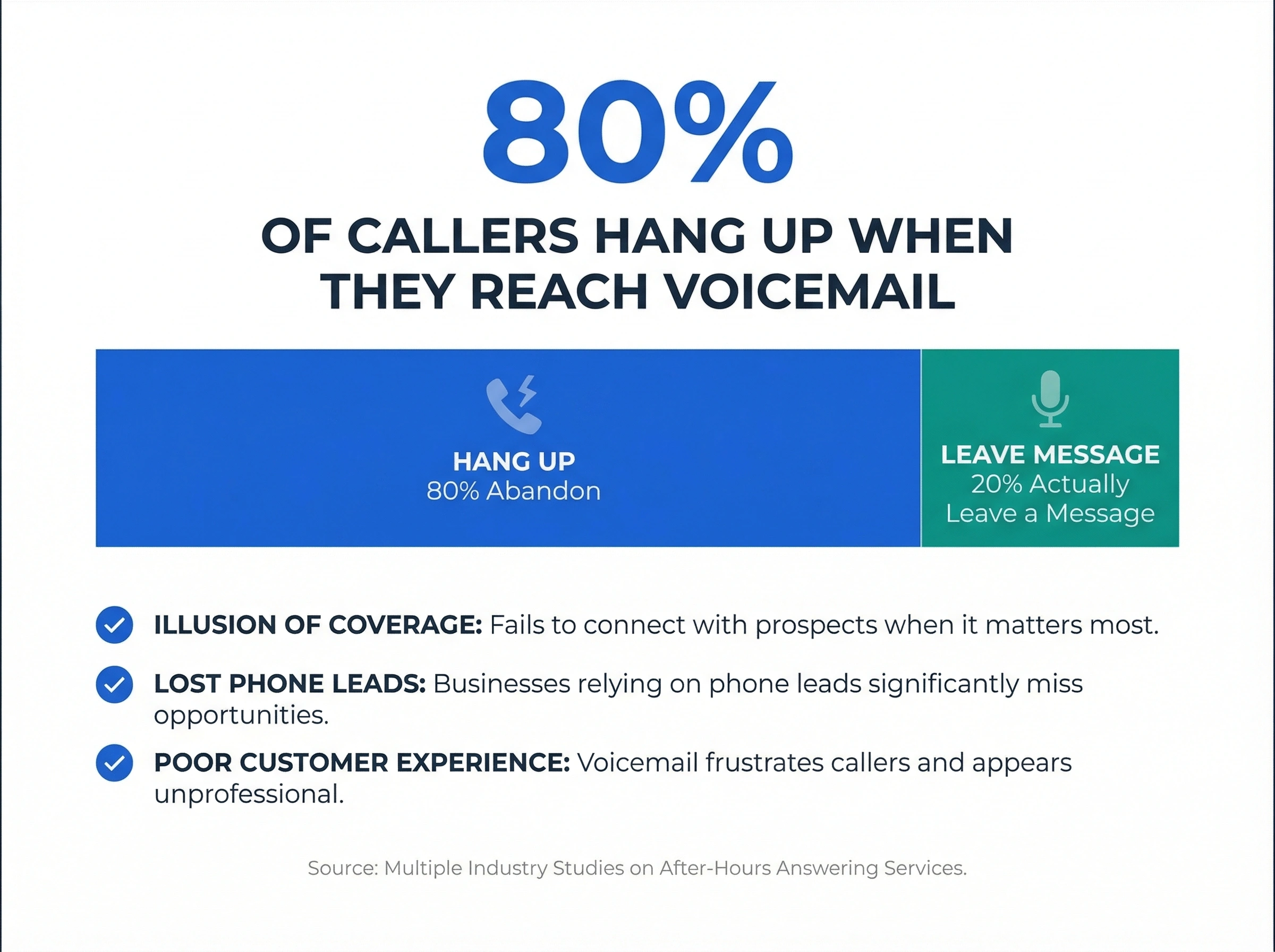
What it doesn't do: Convert leads. According to multiple studies, 80% of callers hang up when they reach voicemail. For businesses that depend on inbound calls, voicemail is basically a polite way of losing customers.
Honestly? Voicemail is the worst after-hours option for any business that depends on phone leads. It gives you the illusion of coverage without actually covering anything. You feel like you've handled it because there's a greeting playing. But your callers don't feel handled at all.
2. Call forwarding to personal phones
You set up rules so after-hours calls ring your cell phone (or rotate through a team).
Cost: $0-$30/month (built into most VoIP systems)
What it does well: A real person answers, which callers prefer. You can triage urgent vs. non-urgent. And with call management features, you can set schedules so calls only forward during certain windows.
What it doesn't do: Respect your personal time. If you're forwarding calls to yourself, you're basically always on the clock. We've talked to dozens of business owners who started with this approach and burned out within six months. The calls come at dinner, during vacations, at 2 AM. And you feel guilty every time you let one ring through to voicemail anyway.
It also doesn't scale. Once you have more than a handful of after-hours calls per week, you need a real system, not just a redirect.
3. Live answering service (human agents)
A third-party call center answers your phones using a script you provide. Agents take messages, transfer urgent calls, and sometimes book appointments.
Cost: $150-$2,000/month depending on call volume (typically $0.75-$2.00 per minute)
What it does well: Real human conversation. Agents can handle complex or emotional callers. Good services train on your specific business. Some integrate with your CRM or scheduling system.
What it doesn't do: Stay cheap at scale. Live answering services charge per minute, and after-hours calls tend to be longer (callers are more chatty, more urgent, more detailed). A busy service business could easily hit $1,500/month during peak season. There's also a quality control problem: you're trusting strangers to represent your brand, and agent turnover at call centers is notoriously high.
Plus, holidays and weekends often cost extra. Some services charge 1.5x-2x their normal rate for nights and weekends, which is exactly when you need after-hours coverage the most.
For a deeper comparison, check out our post on AI receptionists vs. live answering services.
4. AI answering service
An AI-powered system answers calls using conversational voice technology. It sounds like a real person, follows your business rules, books appointments, captures lead details, routes emergencies, and works 24/7 with no overtime.
Cost: $30-$300/month (flat rate, no per-minute charges)
What it does well: Everything a live service does, at a fraction of the cost. Modern AI answering services handle natural conversations, understand context, and can do things like check your calendar availability in real time. They don't get tired, they don't call in sick, and they don't charge extra for holidays.
An AI voice agent can also handle multiple calls at once. During a storm that knocks out power to half a neighborhood, your phone might ring 15 times in 20 minutes. A human receptionist handles one call at a time. AI handles all of them simultaneously.
What it doesn't do (yet): Handle every edge case perfectly. Complex emotional situations, callers with thick accents, or very unusual requests can still trip up AI systems. The technology has improved dramatically in the last two years, but it's not flawless. We're honest about that.
For more detail on pricing, read our guide on AI answering service costs and benefits.
5. Hybrid approach (AI + human escalation)
AI handles the first interaction, then transfers to a human agent if the call requires it. This gives you the speed and cost efficiency of AI with a human safety net.
Cost: $200-$800/month (AI base + per-minute human escalation)
What it does well: Combines the strengths of both models. Routine calls (appointment booking, directions, hours, FAQs) stay with AI. Complex calls get a warm transfer to a live person. Your average cost per call drops because AI handles the 70-80% of calls that are straightforward.
What it doesn't do: Eliminate complexity. You're now managing two systems, and the handoff between AI and human needs to be smooth or callers get frustrated. It's a great option for larger businesses with high call volume, but overkill for a five-person company getting 10 after-hours calls a week.
How much does after hours answering service pricing actually look like?
Let's put real numbers side by side. This is the comparison most business owners need but rarely find.
After hours answering service pricing varies wildly depending on the model. Here's a breakdown assuming a small business that gets about 80 after-hours calls per month with an average call length of 3 minutes:
| Service type | Monthly cost | Per-call cost | After-hours premium | Annual cost |
|---|---|---|---|---|
| Voicemail only | $0-$25 | $0 | None | $0-$300 |
| Call forwarding | $0-$30 | $0 | None (your time) | $0-$360 |
| Live answering (basic) | $200-$400 | $2.50-$5.00 | 1.5x nights/weekends | $2,400-$4,800 |
| Live answering (premium) | $500-$2,000 | $6.25-$25.00 | Often included | $6,000-$24,000 |
| AI answering service | $50-$300 | $0.63-$3.75 | None | $600-$3,600 |
| Hybrid (AI + human) | $200-$800 | $2.50-$10.00 | Varies | $2,400-$9,600 |
So which option makes sense for your business?
That depends on three things: your call volume, your average deal size, and how complex your calls typically are.
If you get fewer than 20 after-hours calls per month and most are simple inquiries, an AI answering service at $50-$100/month is the clear winner. You're paying pennies per call, and the system handles booking, messages, and routing without any human involvement.
If you get 20-100 after-hours calls per month with a mix of simple and complex calls, either a mid-tier AI service ($100-$300/month) or a hybrid approach ($200-$500/month) makes sense. The ROI math works out quickly when your average deal size is above $200.
If you get 100+ after-hours calls per month or operate in a high-stakes industry (legal, medical, property management), a hybrid approach gives you the best coverage. AI handles the volume, and humans handle the exceptions.
For nearly every small business we've worked with, the pure AI option delivers the best ROI per dollar spent. The technology has reached a point where callers genuinely can't tell they're talking to AI for routine interactions. And the cost difference between AI and live answering is dramatic enough that it changes the math on whether after-hours coverage is affordable at all.
What should you look for when choosing an after hours answering service?
Not all services are built the same, and the cheapest option isn't always the best deal. Here's what actually matters when you're evaluating providers.
Call routing and escalation rules
Your after-hours system needs to know the difference between a routine inquiry and a genuine emergency. A tenant calling about a leaky faucet at 10 PM is different from a tenant reporting a gas leak. Your IVR and call routing setup should handle both scenarios with different workflows.
Look for services that let you define custom escalation rules: specific keywords, call types, or caller responses that trigger an immediate transfer to your on-call person. If the service can't distinguish between urgent and non-urgent calls, it's not doing its job.
Integration with your existing tools
An after hours answering service that doesn't connect to your CRM, calendar, or dispatch system creates more work, not less. You'll spend your mornings manually entering the leads and appointments from the night before.
The best services connect directly to tools like Google Calendar, HubSpot, ServiceTitan, or Jobber. When a call comes in at 9 PM, the appointment should already be on your calendar by the time you check your phone in the morning.
Reporting and call analytics
You can't improve what you don't measure. Look for a service that tracks:
- Number of after-hours calls received
- Average call duration
- Appointment conversion rate
- Most common call reasons
- Peak after-hours call times
This data tells you whether you need to extend your business hours, hire evening staff, or adjust your marketing to capture more daytime leads instead. Call analytics should come standard, not as a premium add-on.
Natural language and conversation quality
This matters more for AI services, but it applies to live answering too. Have someone call your service pretending to be a customer. Does the experience feel professional? Does the agent (human or AI) ask the right questions? Can it handle follow-up questions without getting confused?
For AI specifically, test with different accents, background noise, and call scenarios. A system that only works in quiet conditions with clear speech isn't ready for real-world calls from a busy parking lot or a noisy kitchen.
Transparent pricing with no hidden fees
Watch out for per-minute billing with holiday surcharges, setup fees, minimum commitments, and overage charges. The advertised price for live answering services often doesn't include the extras that add up fast.
AI services tend to be more straightforward with flat monthly pricing. But check whether there are limits on call volume, call duration, or features. A "$50/month" plan that caps at 30 calls isn't really saving you money if you get 80 calls.
How to set up after hours call handling in 4 steps
Getting after-hours coverage running doesn't need to be a months-long project. Here's the practical path.
Step 1: Audit your current after-hours call volume
Before you pick a service, you need data. Check your phone system's call logs for the past 90 days. How many calls came in outside business hours? What days and times are busiest? What percentage went to voicemail vs. got answered?
If you don't have this data, set up basic call analytics and track for two weeks before making a decision. Even rough numbers help you pick the right tier of service.
Pay attention to the day-of-week patterns too. Many service businesses see a spike on Sunday evenings as people plan their week and realize they need to schedule that appointment. Knowing your peak after-hours windows helps you decide whether you need full 24/7 coverage or just extended evening hours.
Step 2: Define your after-hours call flow
Map out exactly what should happen for each type of call:
- Routine inquiries (hours, location, pricing): Automated response or AI handles it completely
- Appointment requests: Book directly into your calendar
- Urgent/emergency calls: Immediate transfer to on-call staff with full context
- Sales inquiries: Capture details, send summary to your sales team, schedule callback
This call flow becomes the blueprint your answering service follows. The more specific you are, the better the results. Don't just say "take a message." Specify what information you need: name, phone, service type, urgency level, preferred callback time.
Step 3: Choose your service and configure
Based on your call volume and budget from steps 1-2, pick the right option from the comparison above. For most small businesses with fewer than 100 after-hours calls per month, an AI answering service at $50-$300/month is the sweet spot.
Configure your business hours, call routing rules, greeting scripts, and integration with your calendar and CRM. Most AI services can be set up in under an hour. Live answering services typically need 3-5 business days for script development and agent training.
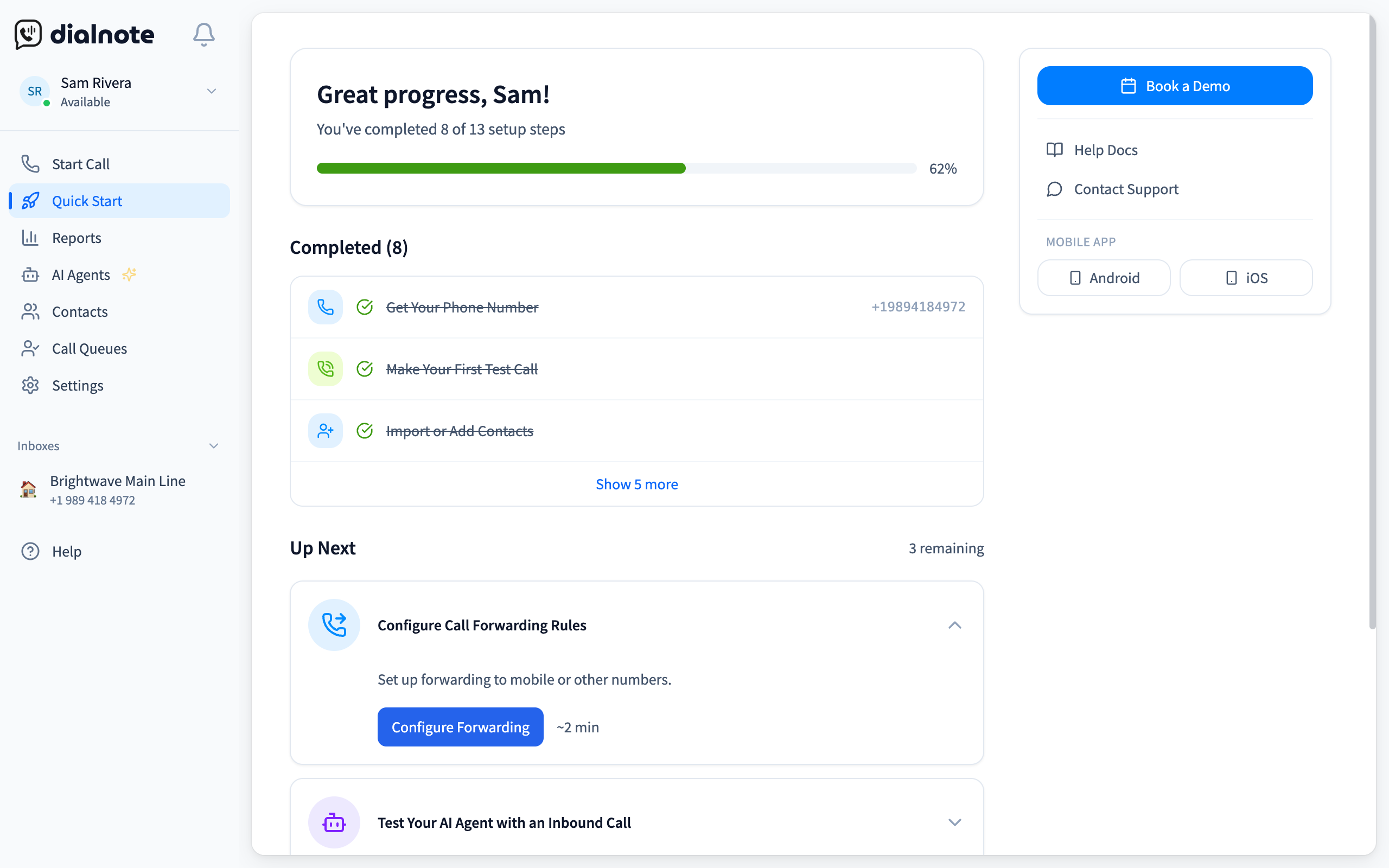
The manual version of this step is either a night-shift hire or your own cell ringing at 11 PM. In dialnote, after-hours coverage is two task cards on the Quick Start page you land on after signup: Business Hours defines when you're open, and the AI voice agent takes every call outside those hours, asks callers the questions you set, and books appointments through your Calendly or Cal.com link. Plans are flat, from $19/mo, and nobody hires a night shift.
Close the after-hours gap from the Quick Start page
10-day free trial, no credit card needed.
- Sign up and open the Quick Start page; the Business Hours card sits in the Call Routing group
- Go to Settings → Phone Numbers, pick your number, and turn on Enable business hours
- Set your time zone and weekly schedule (the Weekdays preset covers Monday to Friday, 9 AM to 5 PM)
- Point the after-hours branch at your AI agent instead of voicemail
- Open AI Agents in the sidebar, click Configure AI Agent, and add your business info plus the questions it should ask
- Call your number after closing time from another phone and book a test appointment
The next morning, the question stops being "did we miss anything?" and becomes "which callback matters most?" Every after-hours call shows up as a summary with the caller's answers to your questions, and any appointment they booked is already on your calendar. That's the whole point of this step: you're not buying coverage, you're buying a shorter morning.
Step 4: Test, measure, and adjust
Don't just set it and forget it. Call your own business after hours from different phones. Test different scenarios: a simple appointment request, an emergency, a confused caller who doesn't know what they need.
Track your after-hours metrics for the first 30 days. Compare against your baseline data from step 1. Are you capturing more leads? Are callers getting through faster? Is the appointment booking rate where you want it?
Most businesses find they need to tweak their call flow 2-3 times in the first month before it runs smoothly. That's normal. The goal is continuous improvement, not perfection on day one.
One thing we've noticed at SmartReach: businesses that test their after-hours system weekly for the first month catch issues before their customers do. Have a team member call in with different scenarios each week. You'll be surprised what you find. Maybe the greeting mentions old hours, or the emergency routing goes to a number that's changed. Small fixes early save you from losing real leads later.
How dialnote keeps your business open around the clock
dialnote is an AI business phone system with no per-user pricing. AI voice agents answer calls, capture leads, and book meetings 24/7. Plans from $19/mo. For after-hours coverage specifically, that means the answering service isn't a bolt-on you forward calls to: the same number your customers already dial gets answered at 2 AM the way it does at 2 PM. If you want the full end-to-end picture, our business phone system guide walks through how calls move through the whole setup.
Here's what separates this approach from a generic after hours answering service:
An AI receptionist that actually sounds human. The AI receptionist handles real back-and-forth dialogue. It doesn't just read a script. It understands context, asks follow-up questions, and adjusts its responses based on what the caller says. Callers frequently don't realize they're talking to AI.
Custom call flows for every scenario. You define what happens during business hours, after hours, weekends, and holidays. Want emergencies routed to your cell? Done. Want appointment requests booked through your Calendly or Cal.com link? Set it up once, and it runs automatically. The IVR and call routing system gives you complete control without needing a tech team.
No per-minute billing. No holiday surcharges. Your after-hours calls are included in your flat monthly plan. Period. Whether you get 10 calls or 200 calls on a Saturday night, the price stays the same. That predictability matters when you're running a small business budget.
Call analytics that show you what's happening. Every after-hours call is logged with a full summary, call duration, caller intent, and outcome. You see exactly which calls converted to appointments, which were emergencies, and which were routine inquiries. The analytics dashboard makes it easy to spot patterns and improve your coverage.
Works with your existing phone number. You don't need a new number. You don't need new hardware. The system works with shared numbers and connects with the tools you already use. Setup takes minutes, not weeks.
After building SaaS products for over 12 years, one thing I've learned is that the best tools are the ones you stop thinking about. They just work. That's what we're aiming for with dialnote's after-hours coverage: you go home, your phone keeps working, and every caller gets the help they need.
Your best customers are already calling after hours
The businesses that grow fastest aren't the ones with the biggest ad budgets or the flashiest websites. They're the ones that answer the phone. Every time.
An after hours answering service isn't a nice-to-have anymore. It's the difference between capturing revenue and handing it to your competitor down the street. The data backs this up. The math works out at almost any price point. And the technology, especially AI-powered options, has made 24/7 coverage accessible to businesses of every size.
Whether you go with a basic voicemail upgrade, a live answering team, an AI service, or a hybrid approach, do something. The calls are already coming in. Right now, while you read this, someone might be calling your business and hearing nothing but a ring.
Don't let that ring be the last thing they hear before they call someone else.
Frequently asked questions
AI answering services are the most affordable option at $30-$300/month with flat pricing. They don't charge per minute or add surcharges for nights, weekends, or holidays.
Live answering services typically cost $150-$2,000/month depending on call volume. Most charge per minute ($0.75-$2.00) with additional fees for nights, weekends, and holidays.
Yes. Most AI and live answering services can book appointments directly into your calendar. AI services do it automatically in real time. Live services may enter them manually after the call.
No. Most after hours answering services work with your existing business number. You set up call forwarding rules so calls route to the service outside your business hours.
Voicemail just records messages. An answering service actively engages callers, answers questions, books appointments, captures lead details, and routes emergencies. About 80% of callers hang up on voicemail.

Written by
Akhilesh Betanamudi
Co-Founder, SmartReach.io
Akhilesh Betanamudi is a technology entrepreneur and engineer with over 12 years of experience in hardware engineering, SaaS, and business communications. As Co-Founder of SmartReach.io - a sales engagement platform for startups and enterprises, he h...
Akhilesh Betanamudi is a technology entrepreneur and engineer with over 12 years of experience in hardware engineering, SaaS, and business communications. As Co-Founder of SmartReach.io - a sales engagement platform for startups and enterprises, he h...
Related Articles

Can An AI Receptionist Help Your Roofing Business Grow?
Find out how an AI receptionist for roofing companies answers every call, books inspections, and captures storm-season leads you'd otherwise lose.
Can an AI Receptionist Grow Your Pest Control Business?
Find out how an AI receptionist for pest control answers every call, books service appointments, and captures leads you'd otherwise lose.
Can An AI Receptionist Help Your HVAC Business Grow?
Find out how an AI receptionist for HVAC companies answers every call, books service appointments, and captures leads you'd otherwise lose to voicemail.
