dialnote business phone app: work from anywhere
Your best customer calls at 4:47 on a Friday. You're already in the car, halfway home, and the phone on your desk rings into an empty office. By Monday, that deal has gone cold.
A business phone app fixes that. It puts your work number, texts, and voicemail on the phone that's already in your pocket, so a call to the office reaches you at the coffee shop, the job site, or the airport gate. No second handset. No handing out your personal cell.
So why do so many small teams still run everything off one landline chained to a desk? Let's fix that.
TL;DR:
- A business phone app runs your company number on a smartphone, so you make and take work calls anywhere without exposing your personal number.
- Look for AI voicemail transcription, texting (SMS and MMS), call transfers, and shared numbers so a whole team can cover one line.
- Setup takes minutes: download the app, sign in, grant microphone access, and turn on notifications.
- It beats buying a second work phone on both cost and control, and an AI receptionist can catch the calls you still can't take.
- dialnote is an AI business phone system with flat plans from $19 to $199 a month, apps on iOS and Android, and a 10-day free trial with no credit card.
What is a business phone app?
A business phone app is software that runs your company phone number on a smartphone or tablet. You make calls, send texts, and check voicemail over the internet, so the number isn't tied to one physical desk phone or SIM card.
The number lives in the cloud. That means the same line can ring on your phone, your laptop, and a teammate's device at the same time. When you call out, customers see your business number, not your personal one.
Nothing about that requires a box bolted to your desk. Calls, texts, and voicemail all live in one app instead of a tangle of hardware. Want the deeper background on how a cloud number works? Read our guide to what a virtual phone number is.
Why a business phone app beats a second work phone
Carrying two phones is the old fix, and it's a bad one. A business phone app gives you the same separation without the extra device, the extra bill, or the extra charger in your bag.
Think about Maria, who runs a three-person HVAC crew. She used to hand out her personal cell to customers because the office landline went unanswered on service calls. Then the after-hours texts started: quote questions at 9 p.m., a wrong number at midnight, a customer who found her on a Sunday. Her work followed her home, and she couldn't tell it to stop.
With a business phone app, Maria's crew shares one work number that only lives inside the app. When the workday ends, notifications quiet down. Her personal number stays private. Sound familiar? Plenty of owners hit this exact wall.
Honestly? Buying a second cell phone for work is a waste of money for most small teams. You pay for another line, another device, and you still have to remember which phone to grab. An app does the same job for the price you're already paying for internet.
Here's the real edge, too. When calls and texts hit a pocket instead of a dead desk phone, replies go out sooner. Faster replies win more deals. That's the whole point.
What to look for in a business phone app
A good business phone app should cover the basics of an office phone system and then some. Here's the short list that actually matters.
Calls that show your business number
Outgoing calls should display your work number, even when you're dialing from your personal phone. Incoming calls to your business line ring right in the app. Customers see one consistent identity, and you keep your cell private. This is also how you run a business number without a landline.
Texting from your business line
Customers text now. They want to confirm an appointment, ask a quick price, or send a photo of a broken part. A solid app handles both SMS and MMS from your business number, so those texts don't land on your personal phone. We're not 100% sure why, but customers who text tend to reply faster than the ones you only ever call.
AI voicemail transcription
Missed a call? Instead of tapping through audio, you read the voicemail as text. You scan the message, see who needs a callback, and move on. No sitting through a two-minute ramble to catch a phone number. If your customers speak more than one language, check how many the transcription covers before you commit.
Call handling on the go
The controls you rely on at your desk should work in the app:
- Transfer a call to a teammate with a tap
- Put a caller on hold
- Add someone to the call
- Record a call when you have consent
Shared numbers for the team
One number, many people. A business phone app should let your whole team answer the same line, so a call never dies just because one person stepped away. This is the piece that separates a real phone system from a personal calling app.
Calling reach matters if your customers or vendors sit abroad. A good app covers international calling without a separate contract, so a client in another market isn't a problem. For a wider look at the pieces, see how a full VoIP phone system ties calls, texts, and routing together.
How much does a business phone app cost?
A business phone app costs a monthly software fee instead of a new device plus a new carrier line. Most providers price per user per month; flat-rate systems charge one price the whole team shares.
Flat matters more than it sounds. With no per-user pricing, your whole crew shares the same line and the same bill. Hiring a fourth tech doesn't add a fourth seat charge.
Now stack that against the second-phone route. You buy a handset, sign up for another monthly line, and keep both charged. The device alone often costs more than a year of software. And you still can't share that number with your team, text from it cleanly, or read voicemail as text.
The math isn't close. For most small teams, the app wins on price in the first month and keeps winning every month after.
How do you set up your business number on your phone?
You install the app, sign in, and grant a couple of permissions. The whole thing takes a few minutes, and you don't need any hardware.
The permissions are the part people rush past. Microphone access is what lets the app connect a call at all, and notifications are what make a call ring while the app sits closed in your pocket. Skip the second one and calls ring into silence, which is the old unanswered-landline problem wearing a new outfit.
The dialnote app keeps setup to a sign-in and two permission taps, the same on iOS and Android, and every plan from $19/mo includes it. Here's the step-by-step:
- Install the app from the App Store or Google Play.
- Sign in with Continue with Google, Continue with Microsoft, or your email and password.
- Tap Allow when the app asks for microphone access.
- Tap Enable on the notifications banner so calls ring even when the app is closed.
- Open the side menu and check Inboxes to confirm your number is there.
- Place a test call from the dialer, and your business calls now ring on your phone.
That's it. No wiring, no IT ticket, no waiting for a technician. When you want quiet, set your availability status to Do Not Disturb inside the app and calls stop ringing on every device.
Need an account for step 2?
10-day free trial, no credit card needed.
What happens to calls you still can't answer?
An AI receptionist picks up when you can't, so the call turns into a captured lead instead of a voicemail. It answers with your greeting, asks your questions, and books the meeting while you finish the job.
Because what good is a mobile number if it still dumps callers to voicemail the minute you're on a ladder?
Here's how a good one works. You decide the details to collect from callers: name, what they need, address, timeline. The AI asks those questions on every call it takes and logs the answers for you. During the call it can book a meeting, send an SMS, check the calendar, or transfer the caller to a teammate. After the call ends, the details sync to your CRM if you use HubSpot, Salesforce, or Pipedrive.
Alex manages a sales team of 12, and half of them are mid-meeting at any given hour. Callbacks used to pile up in voicemail until someone surfaced. Now the AI catches those calls, asks the qualifying questions, and the rep walks out of the meeting to a booked slot instead of a missed-call badge. Nights and weekends work the same way; our guide to after-hours answering covers that setup.
Business phone app vs. desk phone: which do you need?
Most small teams don't need both. A business phone app covers the same calls a desk phone does, plus texting and mobility a landline can't touch. A desk phone only wins in a few fixed-seat setups.
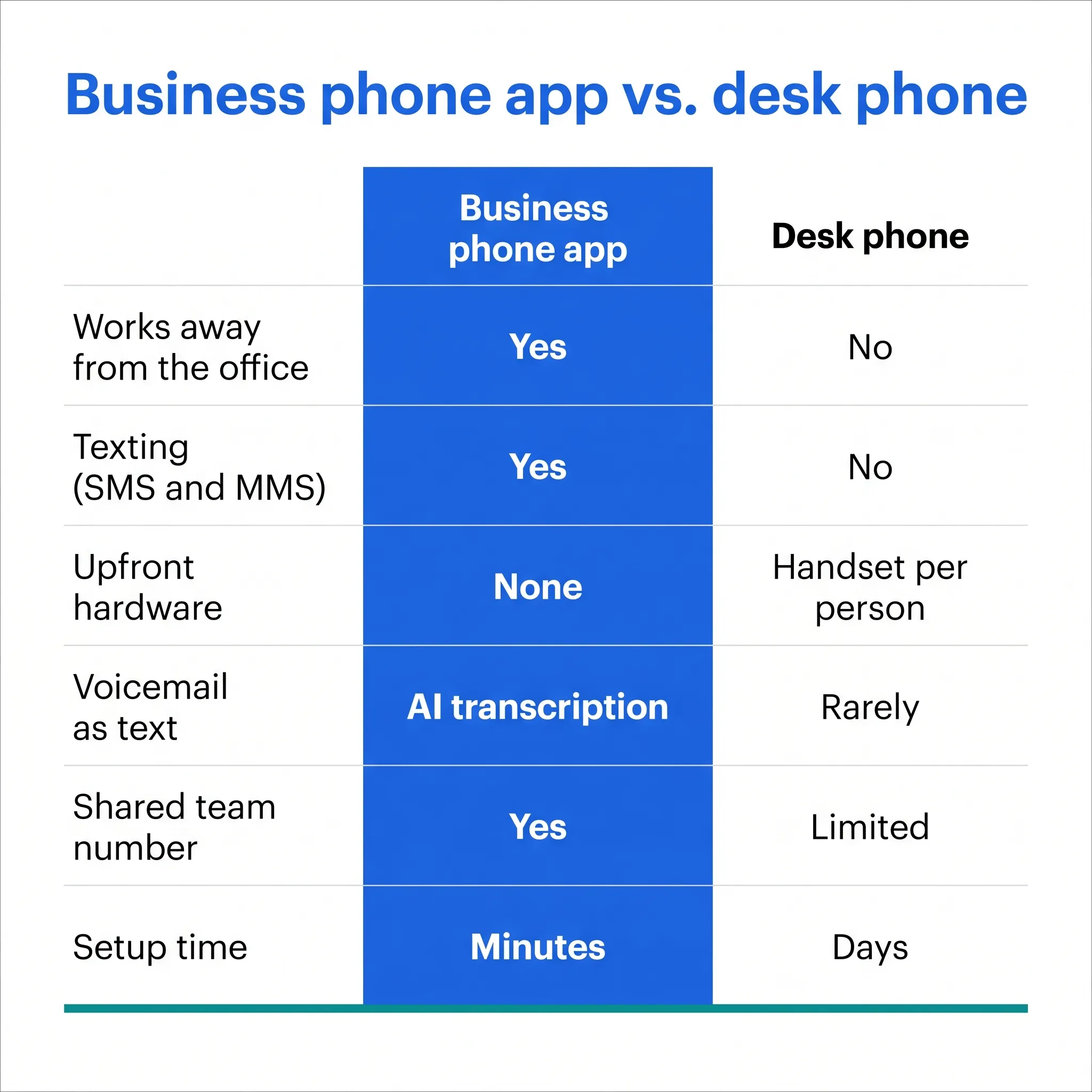
| What matters | Business phone app | Traditional desk phone |
|---|---|---|
| Works away from the office | Yes, anywhere with data or WiFi | No, tied to one desk |
| Texting (SMS and MMS) | Yes | No |
| Upfront hardware cost | None, use your own phone | Handset per person |
| Voicemail as text | Yes, AI transcription | Rarely |
| Shared team number | Yes | Limited |
| Setup time | Minutes | Days, plus wiring |
For a sales crew that lives on the road, dialnote is the stronger pick: the app does everything the desk phone did, adds texting from the business number, and the flat rate means no per-seat charge. Teams respond 30% faster when calls reach a pocket instead of a desk. Our breakdown of a VoIP phone system for sales teams digs into why mobility usually wins there.
Is a business phone app secure?
Yes, when it's built right. Because the number and call data live in the cloud instead of on the handset, losing your phone doesn't hand your business line to a stranger.
Good business phone apps typically add a few protections worth checking for:
- A secure sign-in, so a random person who grabs your phone can't open the app
- The option to remove app access from a lost or stolen device
- Call and message history stored in your account, not stuck on one phone
But does that actually keep your two worlds separate? Yes, and that's the underrated part. When work lives inside an app you can sign out of, you can close the workday for real. Your personal texts and your business texts never mix in one thread.
How much data does a business phone app use?
Very little. A VoIP call uses roughly half a megabyte per minute, give or take by call quality, so an hour on the phone costs less data than a few minutes of video.
A few habits keep both your data plan and your battery happy:
- Hop on WiFi for long calls, since it usually sounds better than a weak cellular signal anyway.
- Close heavy apps running in the background while you talk.
- Install updates from the official app store so you get the performance fixes.
Traveling abroad? The app runs on any internet connection, so on hotel WiFi you can answer your usual business number from another country without paying voice roaming. For a team that travels even a little, that perk alone pays for the plan.
Mistakes to avoid with a business phone app
Most problems with a business phone app come from setup, not the software. Five minutes in settings prevents nearly all of them.
The ones we see most:
- Leaving push notifications off. The number one cause of "the app missed my call". Without notifications, calls ring into a closed app and nobody hears them.
- Still handing out your personal number. Old habits die hard. If your cell keeps circulating on invoices and business cards, the separation never happens.
- Skipping business hours. No schedule means a 9 p.m. quote question rings your pocket at dinner. Set the window once and forget it.
- Not adding the team. One person answering a shared line is the old landline problem with extra steps. Get every teammate signed in during week one.
- Blaming the app for a weak signal. Call quality follows the connection. Test on solid WiFi before you judge the sound.
None of these are hard to avoid. They're just easy to skip on day one and annoying to discover on day thirty.
What the shift to mobile work means for your phone
Work moved off the desk, and phone systems followed. According to Buffer's State of Remote Work, the large majority of remote workers want to keep working remotely, which means the office landline is no longer where your team actually sits.
A business phone app meets people where they are. The receptionist model where one person guards one desk phone doesn't fit a crew spread across job sites, home offices, and the road. Your phone number should be as mobile as your team is.
Here's the honest caveat: an app is only as reliable as the connection behind it. On weak cellular, call quality dips, same as any internet call. WiFi usually sounds best. That's a fair trade for never missing a call because you weren't at your desk.
Getting started with dialnote
dialnote is an AI business phone system with no per-user pricing. AI voice agents answer calls, capture leads, and book meetings 24/7. Plans from $19/mo. The mobile app is how you carry all of that with you: every plan includes the iOS and Android apps alongside the desktop version, so the setup above is the whole project.
Download the app, sign in, and your work number rings wherever you go. The office phone that only worked at the office? You won't miss it. Questions before you start? Reach the team at support@dialnote.com and get set up in an afternoon.
Frequently asked questions
Yes. Your number lives in the cloud, so the same line rings in the mobile app and the desktop app at once. Every dialnote plan includes both, and you answer from whichever screen is closer.
Yes, it runs on cellular data too. Calls use roughly half a megabyte per minute, so even a long call barely touches your data plan. WiFi usually gives the steadiest voice quality, so use it when you can.
No. Outgoing calls from the app show your business number, even though you're dialing from your personal phone. Customers save one number for your company, and your cell stays private.
Your whole team. dialnote plans are flat-rate with no per-user pricing, so everyone can answer the same shared line from their own phone without the bill going up.
dialnote offers business numbers in the US, Canada, UK, India, and France, and you can call out to 90+ countries from the app. That covers most small teams with customers or vendors abroad.

Written by
Lancelot Dsouza
Chief Marketing Officer, SmartReach.io
Lancelot Dsouza is the Chief Marketing Officer at SmartReach.io, where he built the Marketing, Sales, and Customer Success verticals from the ground up. With over 25 years of experience spanning digital marketing, business development, and strategic...
Lancelot Dsouza is the Chief Marketing Officer at SmartReach.io, where he built the Marketing, Sales, and Customer Success verticals from the ground up. With over 25 years of experience spanning digital marketing, business development, and strategic...
Related Articles

AI call summaries: never lose a call detail again
See how AI call summaries capture key points, action items, and follow-ups from every call, so your team stops re-listening to recordings for the facts.

CRM phone integration: connect calls to your CRM
Learn how CRM phone integration links calls to HubSpot, Salesforce, and Pipedrive: automatic call logging, AI summaries on the record, and easy setup.
Team collaboration features for busy phone teams
See how team collaboration features like shared inboxes, warm transfers, and call queues keep your phone team in sync and answering more calls.
