AI call summaries: never lose a call detail again
Your call just ended. It went well. Ten minutes later a coworker asks what the client actually agreed to, and your memory's already fuzzy on the numbers.
That gap is where deals stall and follow-ups slip through. AI call summaries close it by turning each conversation into a short, readable recap minutes after you hang up. No scribbled sticky notes, no re-listening to a 20-minute recording just to find one date.
Modern business phone systems build this in. After every call ends, the system writes up the important stuff for you and drops it into your call history, no note-taker required.
TL;DR:
- AI call summaries automatically pull the key points, action items, and follow-ups out of each phone call, so nobody has to take notes by hand.
- The recap lands in your call history within minutes of the call ending, ready to skim.
- Sales, support, and operations teams use them to follow up faster and keep records consistent.
- Summaries are a per-number setting, so you control which lines get recapped, and the data isn't used to train outside AI models.
- dialnote, an AI business phone system, includes call summaries on every flat plan from $19 to $199 a month, alongside call recording, transcripts, and AI voice agents.
What are AI call summaries?
AI call summaries are short, auto-generated recaps of a phone conversation. The system reads the call transcript, finds the topics that mattered, and writes them out as a clean list of points, tasks, and next steps.
Think of it as a note-taker who never zones out. Instead of you typing while half-listening to the customer, the AI handles the write-up and you stay present on the call. When it's done, you get a summary you can scan in about ten seconds.
Most tools break the recap into a few parts. Here's the shape it usually takes.
Key discussion points
The main topics from the call, listed in order so you can quickly see what got covered without opening the full transcript.
Action items
Any promises, tasks, or next steps mentioned during the call get pulled out and listed on their own. That's the part reps forget most, and it's the part that loses deals.
Important details
Names, dates, dollar amounts, and other facts get flagged so they don't disappear into a recording nobody replays.
Why manual note-taking quietly costs you deals
Manual notes cost you deals because memory fades within the hour and half-finished notes turn into guesswork follow-ups. The gap between what was said and what got written is where revenue leaks.
Here's a scenario that plays out every day. Priya runs sales at a small SaaS company. She takes back-to-back calls, scribbles notes when she can, and swears she'll clean them up later. She rarely does.
By Friday she's staring at half-written notes from Tuesday, trying to remember whether the prospect wanted the annual plan or asked for a second demo. She guesses. The follow-up email misses the mark. The deal cools off.
Sound familiar? The problem isn't effort. It's that human memory just isn't built for this. According to research on the forgetting curve first documented by Hermann Ebbinghaus, people forget roughly half of new information within an hour of learning it. A phone call is a firehose of new information, and an hour later most of it is gone.
There's a cost angle too. According to Salesforce's State of Sales research, reps spend only about a third of their working time actually selling. The rest goes to admin, and manual call notes are a chunk of that. Cut the note-taking and you hand time back to the work that pays.
How do AI call summaries work?
After a call ends, the system turns the audio into a transcript, then an AI model reads that transcript and writes the recap. The whole thing runs on its own, with no button to press.
Here's the flow, step by step:
- You finish a normal call. Nothing changes about how you talk or dial.
- The call gets transcribed into text automatically.
- The AI reads the transcript and pulls out the key points, action items, and details.
- A formatted summary appears in your call history, usually within a few minutes.
- You open it, skim it, and act, or share it with a teammate.
That's it. No plugins to babysit, no separate app open on a second monitor. The summary just shows up where the call already lives.
What does an AI call summary look like?
A finished summary reads like a tidy meeting recap, not a wall of transcript. It groups the conversation into scannable sections you can act on right away.
Here's a sample of the format:
Call Summary
Duration: 12 minutes

Key Points:
- Customer asked about team pricing
- Discussed moving their existing numbers over
- Reviewed a rollout timeline (2-3 weeks estimated)

Action Items:
- Send the pricing breakdown by Friday
- Book a technical demo for next Tuesday
- Loop in the onboarding specialist

Follow-up Required: Yes
Priority: High
Notice what's missing: filler. You don't get a minute-by-minute replay. You get the parts that change what you do next.
Here's the real thing in the inbox, attached to a 34-second call: the recap, the sentiment, whether it's resolved, and a topic tag, all sitting right under the recording.

How accurate are AI call summaries?
Accurate enough to act on, but not perfect. Summaries reliably catch topics, action items, dates, and amounts, while unusual names and heavy crosstalk can still trip up the transcript underneath.
Accuracy mostly comes down to the audio. A clear line, one person speaking at a time, and normal pacing give the AI something solid to work with. A speakerphone in a noisy warehouse? Expect a few garbled words.
Three habits push accuracy up without any extra tooling:
- Recap out loud before you hang up. Say "so to confirm: pricing by Friday, demo on Tuesday." That one sentence hands the AI a clean anchor for the action items.
- Spell out unusual names and numbers. "That's Kwiatkowski, K-W-I..." feels awkward on the call and saves you a wrong-name email later.
- Check the transcript when money's involved. The summary is your working notes, not a contract. For a disputed quote, go back to the source.
One honest caveat: we can't always explain why the model nails one accent and stumbles on another. Speech recognition is still probabilistic under the hood, ours included. Should you trust a summary blindly? No. Treat it as a sharp assistant rather than a court reporter and it won't let you down.
Who gets the most out of AI call summaries?
Any team that lives on the phone, but three groups feel it most. Sales teams stop losing promises, support teams get instant context, and operations teams spot patterns across hundreds of calls.
Sales teams
Never forget what you promised a prospect. Accurate summaries mean sharper follow-ups, whether you're calling or emailing next, and managers can review call quality without sitting through every recording.
Support teams
When a customer calls back, you don't want to say "let me pull up your file" and then read nothing. A quick summary of the last conversation gives you the context in seconds, so the customer doesn't repeat their whole story.
Operations teams
One call is a data point. Five hundred summaries are a map. Ops leaders read across summaries to catch recurring complaints, common questions, and where the process keeps breaking. Pair that with a call analytics dashboard and you've got both the numbers and the "why" behind them.
Honestly? For most small teams, the sales use case alone pays for the feature. The rest is upside.
How do you turn on AI call summaries in dialnote?
dialnote is an AI business phone system with no per-user pricing. AI voice agents answer calls, capture leads, and book meetings 24/7. Plans from $19/mo. Call summaries ride on the same AI layer as transcripts, and they're a per-number toggle, so you decide which lines get recapped.
Want to watch your first summary land?
10-day free trial, no credit card needed. Switch the toggles on and make one test call.
To switch them on:
- Go to Settings → Phone Numbers and select the number you want recapped
- Scroll to the AI & Intelligence section
- Toggle AI Transcription on
- Toggle AI Summaries on
- Make a test call and hang up
- Open the conversation in your inbox to read the finished summary
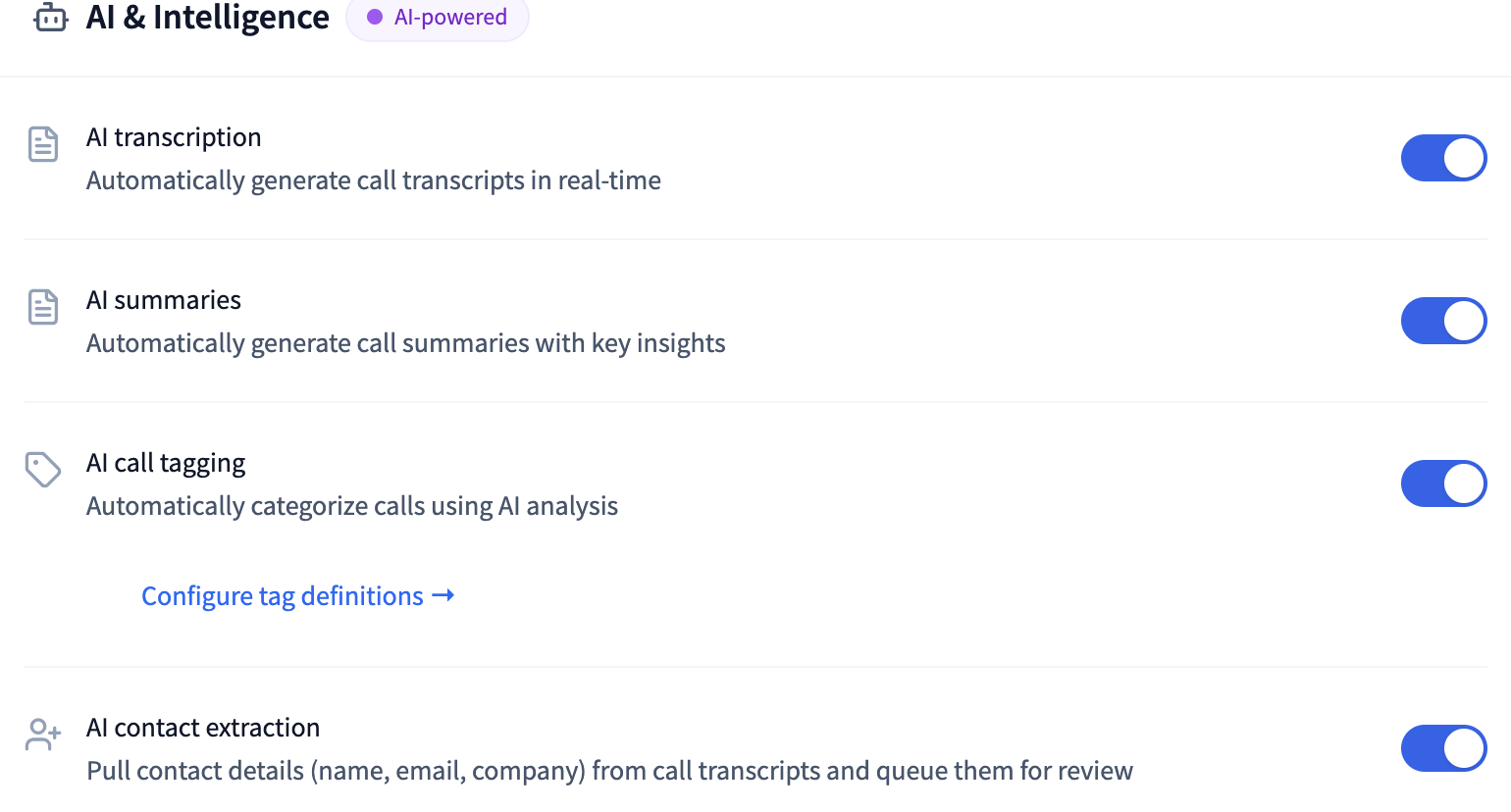
Transcription comes on by default for new numbers, so often the only change is flipping on the summaries. Once that's done, summaries generate on their own after each qualifying call. You don't have to remember to trigger anything, which is the whole point.
How do you make call summaries part of your routine?
Skim the recap before your follow-up, turn action items into tasks the same day, and share summaries instead of forwarding recordings. Small habits, and they compound fast.
Take Amy, a senior SDR who books 8 to 10 meetings a week. She used to lose close to two hours a day to note-taking and cleanup, typing while the last call was still fresh and the next one was already ringing. Now she skims each summary in the gap between calls and fires off the follow-up while the context is still warm. Her follow-ups go out the same afternoon, not on Friday.
Five habits worth copying:
- Skim before you send. Thirty seconds with the summary beats rewriting a follow-up after the customer corrects you.
- Turn action items into tasks the same day. An action item nobody moves into a task list is just a well-formatted regret.
- Share the summary, not the recording. Your teammate needs the decision, not 20 minutes of audio.
- Spot-check details that carry risk. Prices, dates, legal terms: confirm them against the transcript before they go in writing.
- Read a week of summaries every Friday. Patterns jump out in fifteen minutes that you'd never catch call by call.
One habit you can skip: copying notes into the CRM. dialnote syncs the call notes to HubSpot, Salesforce, or Pipedrive after each call ends, so the record stays current without anyone typing a word.
Which mistakes make call summaries useless?
Most teams stumble in one of four ways: treating summaries as legal records, recapping everything, collecting instead of acting, and rolling out solo. All four are avoidable.
Treating the summary as a legal record. A summary is a working note. If a call might end up in a dispute, the recording and transcript are your evidence, and consent rules apply before anything else.
Summarizing everything. Recap every standup and quick internal sync and your call history turns into noise. Pick the lines that carry money or commitments, and summarize those.
Collecting instead of acting. Does a summary nobody opens help anyone? A recap you read on Tuesday beats a perfect archive you never touch.
Rolling out solo. One rep using summaries is a productivity tweak. The whole team using them is a shared memory. Get everyone reading the same call history or you'll still be answering "what did the client say?" on Slack.
Are AI call summaries private and secure?
Yes. Summaries are visible only to authorized users on your account, they stay inside your workspace, and you decide which numbers generate them in the first place.
A few specifics worth knowing:
- Your call data isn't used to train outside AI models.
- Only people you've authorized can see a given summary.
- Summaries are a per-number toggle, so numbers that handle sensitive calls can stay out.
Recording and summarizing calls also carries legal duties depending on where you and your callers are. Consent laws vary by state and country. If you're not sure what applies to you, it's worth reading up on call recording rules for small businesses before you flip everything on. We're not lawyers, and the rules aren't always clear-cut, so check your local requirements.
AI call summaries vs. the old way
AI call summaries beat manual notes, re-listening, and memory alone on time, consistency, and searchability. Every fallback most teams rely on has a hole in it.
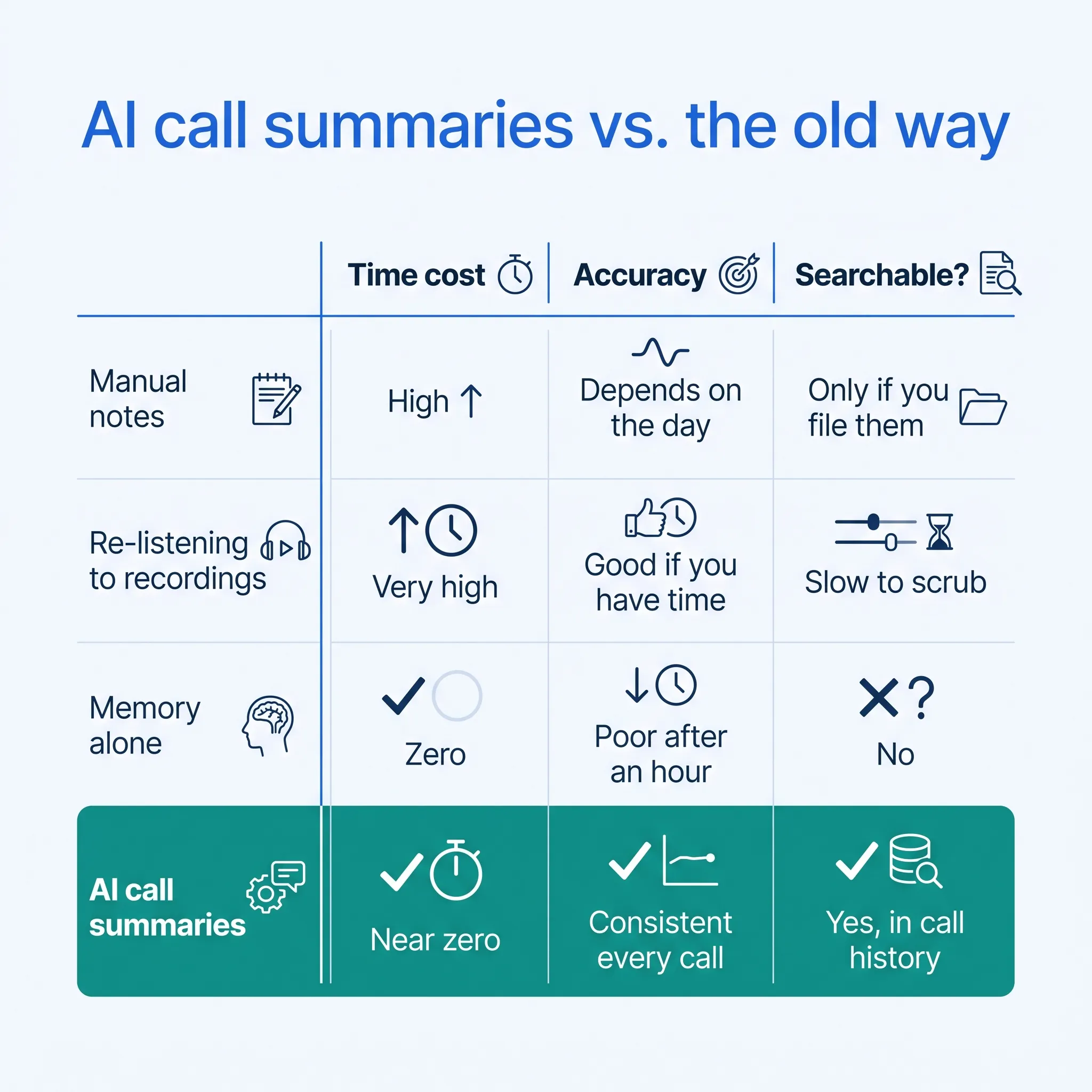
| Method | Time cost | Accuracy | Searchable later? |
|---|---|---|---|
| Manual notes | High, during the call | Depends on the day | Only if you file them |
| Re-listening to recordings | Very high | Good, if you have time | Slow to scrub through |
| Memory alone | Zero | Poor after an hour | No |
| AI call summaries | Near zero | Consistent every call | Yes, in call history |
The habit that loses every time? Memory alone. It feels free, but it's the most expensive option once a missed detail costs you a customer.
How much do AI call summaries cost?
In dialnote, nothing extra. Every plan includes automatic transcription, AI call summaries, and action items, on flat monthly pricing: Solo at $19, Team at $49, Business at $99, and Pro at $199.
The pricing is per account, not per user. Team and up include unlimited users, so a growing team doesn't watch the bill climb with every hire.
Compare that with standalone AI note-takers, which usually charge per seat per month. Five reps on a per-seat tool cost five times what one rep costs. Five reps on one flat plan cost the same as one. And a standalone note-taker still needs a phone system underneath it, so you're stacking two subscriptions to do one job.
What's next for AI call summaries
This is a starting point, not the finish line. The AI features on the roadmap build on the same foundation, so summaries get more useful over time.
On the way (not live yet):
- AI coaching so managers get suggestions on call handling.
- Deeper insights that roll trends up across a whole team's calls.
We'll keep these clearly marked as coming soon until they ship. No vaporware dressed up as a live feature.
Want your calls to write themselves up? Open Settings → Phone Numbers, switch on the two toggles, and your next call shows up with its own recap. Curious what else the same AI layer covers? The full feature set is a short read. Questions? Our team is one message away at support@dialnote.com.
Frequently asked questions
Usually a few minutes. The call is transcribed automatically after it ends, the AI writes the recap, and the finished summary lands in your call history without you pressing anything.
Yes. dialnote's AI features support 14 languages, so calls in Spanish, French, and other major languages can still be transcribed and recapped in your call history.
No, they sit alongside them. The summary gives you the fast skim, the transcript gives you exact wording, and the recording is the source of truth when a detail is disputed.
No. Summaries stay inside your dialnote workspace, they're visible only to authorized users on your account, and your call data isn't used to train outside AI models.
Yes, per phone number. Summaries are a number-level toggle in dialnote, so sales and support lines get recapped automatically while numbers that handle sensitive calls stay out.

Written by
Lancelot Dsouza
Chief Marketing Officer, SmartReach.io
Lancelot Dsouza is the Chief Marketing Officer at SmartReach.io, where he built the Marketing, Sales, and Customer Success verticals from the ground up. With over 25 years of experience spanning digital marketing, business development, and strategic...
Lancelot Dsouza is the Chief Marketing Officer at SmartReach.io, where he built the Marketing, Sales, and Customer Success verticals from the ground up. With over 25 years of experience spanning digital marketing, business development, and strategic...
Related Articles
dialnote business phone app: work from anywhere
Learn how a business phone app puts your work number, texts, and voicemail on your smartphone so you take calls from anywhere without a second cell.

CRM phone integration: connect calls to your CRM
Learn how CRM phone integration links calls to HubSpot, Salesforce, and Pipedrive: automatic call logging, AI summaries on the record, and easy setup.
Team collaboration features for busy phone teams
See how team collaboration features like shared inboxes, warm transfers, and call queues keep your phone team in sync and answering more calls.
