AI in business communication: a practical guide
Your phone rings during a client meeting. You let it go to voicemail. By the time you call back, that lead already booked with a competitor who picked up on the first try. Sound familiar?
AI in business communication is quietly fixing gaps like that one. It's not about robots hijacking your phone lines. It's about software that listens, takes notes, and answers when your team can't, so fewer conversations slip away.
TL;DR:
- AI in business communication means using speech and language tools to transcribe, summarize, answer, and route calls automatically.
- The biggest wins are automatic call notes and searchable transcripts, not fully autonomous bots.
- An AI receptionist can catch after-hours and overflow calls so leads never hit a dead-end voicemail.
- Start small: turn on transcription and summaries first, then add answering and analytics.
- Flat-rate cloud plans with AI included run $19 to $199 a month, so you don't need an enterprise budget to try this.
- Tell callers when AI is involved, and keep a human in the loop for anything sensitive.
What AI in business communication really means
AI in business communication is the use of speech recognition and language models to handle parts of a phone call for you: notes, summaries, answers to routine questions, and routing.
Think of it as a very fast assistant that never gets tired. It sits on the line, catches every word, and turns messy audio into something you can search, share, and act on. No shorthand. No "wait, what did they say their account number was?"
For years this kind of tech was locked inside giant call centers with big budgets. That's changed. Cloud phone tools now put the same features in front of a five-person shop paying a flat monthly rate.
Why this shift matters right now
Missed and mishandled calls cost real money, and small teams feel it most. One person out sick can mean a whole afternoon of calls going nowhere.
Here's the honest version. Most of your team's time on the phone isn't the talking. It's the after-part: typing notes, updating the CRM, remembering to follow up. That's the busywork AI eats for breakfast.
Teams respond 30% faster. We see that in our own call data once automatic notes and summaries take the admin off a team's plate. Less typing, quicker callbacks, fewer dropped threads. We're not 100% sure why some teams adopt this faster than others, but the ones who turn it on rarely turn it back off.
A real scenario: one agent, forty calls a day
Meet Priya. She runs a three-person insurance agency and fields about forty calls a day between quotes, renewals, and claims questions. By 4 p.m. her notepad is a mess and half the details live only in her head.
One Friday she forgets to log a callback promise. The client waits all weekend, gets annoyed, and shops the policy elsewhere. A four-figure renewal, gone over a sticky note that fell off the monitor.
After she turns on call transcription and AI summaries, every call writes its own notes. Follow-ups get flagged. Priya stops being the bottleneck, and her weekends get quieter. Small change, big relief.
Where AI actually shows up on your calls
AI in business communication isn't one feature. It's a handful of them working together. Here are the ones that pull real weight.
Transcription and call summaries
Modern speech-to-text turns a live call into accurate text in real time. After the call, an AI summary boils a ten-minute conversation down to a few lines plus action items.
Summary:
- Customer called about a duplicate charge
- Traced to a billing error on the 5th
- Refund processed on the call
- Customer happy with the fix

Action items:
- Confirm refund landed in 3 days
- Flag account to prevent repeat charge
That block used to take five to ten minutes of typing per call. Now it's waiting for you before you hang up. Searchable, too, so finding "that call about the broken unit" takes seconds instead of a scroll through voicemail.
Answering and smart routing
When nobody's free, an AI receptionist can pick up, greet the caller, answer common questions, and book a time on the calendar. It can also send each call to the right person based on what the caller needs.
The better systems go one step further with lead capture. You decide which details matter (name, reason for calling, budget, callback number), the AI asks for them, and every answer gets logged before the call ends. No sticky notes required.
VoIP systems typically route by simple rules (press 1 for sales). AI answering goes further by understanding plain speech, so a caller can just say what they want. That flexibility is what makes it feel less like a phone tree and more like talking to a real front desk.
Analytics and sentiment cues
AI can score calls, spot repeat complaints, and surface trends across hundreds of conversations you'd never have time to review by hand. Some systems flag when a caller sounds frustrated so a manager can step in.
This is where a good dashboard earns its keep. If you want the deeper version, our guide to a call analytics dashboard shows what's worth tracking and what's just noise.
How much does AI on your calls actually save?
Most teams get back five to ten minutes of admin per call, which compounds into several hours a week. The table below shows the everyday tasks AI shrinks or removes.
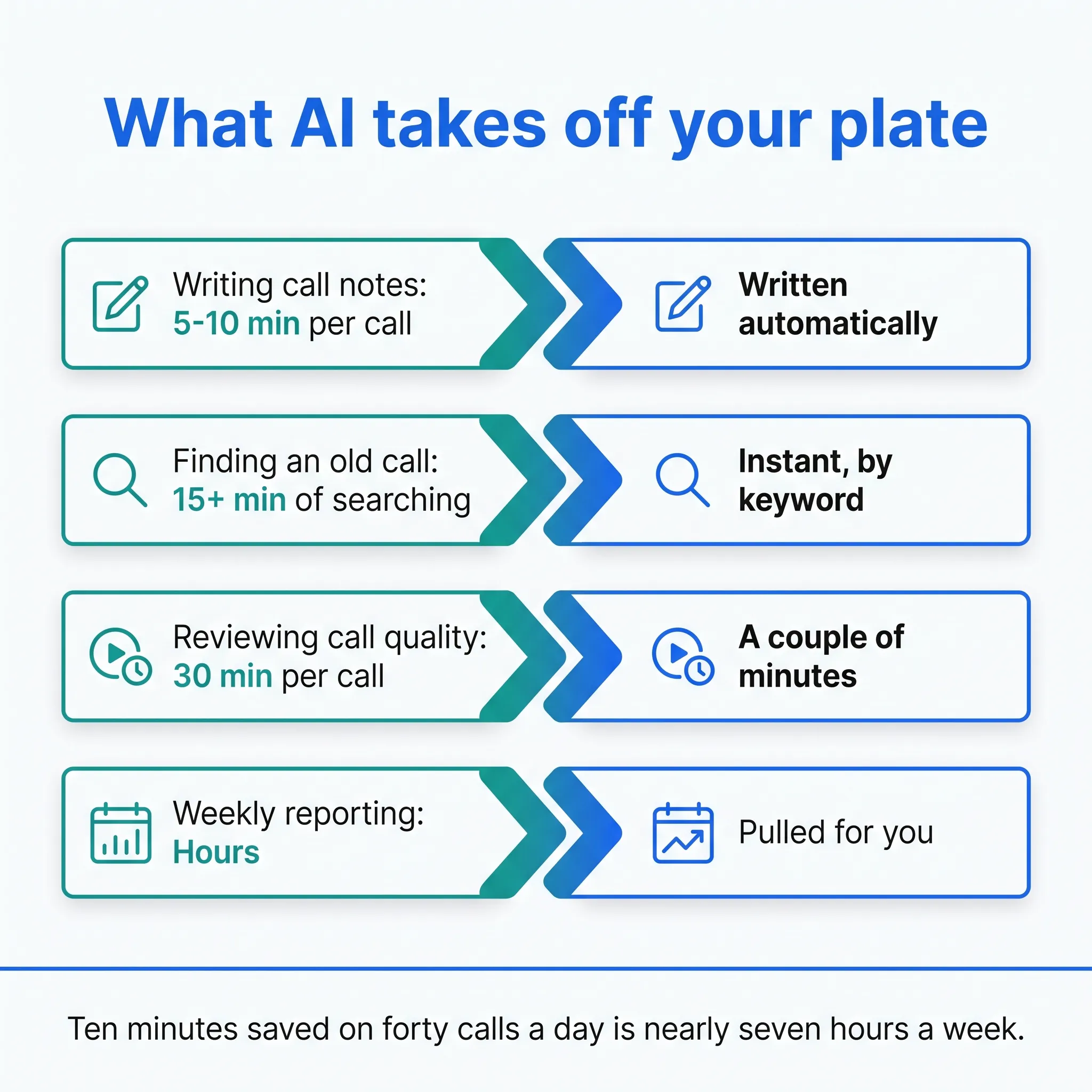
| Task | Before AI | With AI |
|---|---|---|
| Writing call notes | 5-10 min per call | Written automatically |
| Finding an old call | 15+ min of searching | Instant, by keyword |
| Reviewing call quality | 30 min per call | A couple of minutes |
| Weekly reporting | Hours | Pulled for you |
But does it actually pay off for a small shop? Usually, yes, because the savings compound. Ten minutes saved on forty calls a day is nearly seven hours a week. That's most of a working day handed back, every single week.
Honestly? Most "AI phone" pitches oversell the flashy autonomous bots. The real, boring wins are the notes that write themselves and the calls you stop losing after hours.
What does AI in business communication cost?
Flat-rate cloud phone plans with AI built in usually land between $19 and $199 a month. That's the whole bill: the phone line, transcription, summaries, answering, and analytics together.
The market splits into three rough tiers, and picking the wrong one is the priciest mistake on this page.
- Bolt-on note takers. Apps that only transcribe and summarize. Cheap or free to start, but they don't answer your phone, so missed calls stay missed.
- Cloud phone systems with AI included. One flat monthly price covers calls, texts, and the AI features in a single bill. This is the sweet spot for small teams.
- Enterprise contact-center platforms. Impressive demos, per-seat pricing that climbs fast, and rollouts measured in months. Overkill for anyone under 20 people.
Watch per-seat pricing closely. A "cheap" per-user plan quietly doubles the day you hire two more people, while flat-rate plans with unlimited seats don't punish growth.
One more pattern to watch: AI minutes. Some vendors cap how many calls the AI can answer each month, then bill overage by the minute. That's fine if you know your call volume. It stings if you don't, so pull your last phone bill and count before you commit.
And the cost nobody puts on a spreadsheet? Doing nothing. Every after-hours call that dies in voicemail is a lead you already paid to attract.
Is AI worth it for a small team?
For most small teams, yes, as long as you start with the basics instead of the sci-fi stuff. Transcription, summaries, and after-hours answering pay for themselves quickly; full automation can wait.
The trap is buying a giant enterprise platform you'll never grow into. Skip that. A flat-rate cloud system with AI built in gets you the same core features without the six-month rollout. If you're weighing tools, the roundup of the best AI receptionist software is a good place to compare features honestly.
How do you pick the right AI phone tool?
Pick the tool that plugs into the software you already run, collects the caller details you care about, and hands off to a human in one tap. Feature lists all blur together, so run these four checks instead.
- Integration fit. Call notes should land in your CRM (HubSpot, Salesforce, and Pipedrive are the usual suspects) without anyone retyping them, synced automatically after each call. If the tool connects to Zapier, that one link covers thousands of smaller apps.
- Lead capture you control. A good AI receptionist asks the questions you set and logs every answer. You decide what gets asked. Generic bots that just take messages barely beat voicemail.
- A clean human handoff. The AI should transfer a live call to a teammate the moment things get complicated, not trap callers in a loop.
- Honest, flat pricing. You should know your monthly bill before you sign up, not after your first invoice surprises you.
Stan, a sales ops manager, learned check number one the hard way. He spent three weeks building a call activity dashboard, then found nearly half the data was missing because reps logged calls by hand. Once the phone system wrote and synced the notes itself after each call, the gap closed without a single reminder email.
So where do you even start?
You don't flip everything on at once. Roll it out in stages so your team actually adopts it.
- Turn on transcription. Get every call into searchable text first. This alone kills the "what did they say?" problem.
- Add AI summaries. Let each call write its own notes and action items. Watch the after-call admin drop.
- Set up an AI receptionist. Have it catch overflow and after-hours calls, answer FAQs, and book appointments.
- Layer in analytics. Once you have data flowing, start tracking trends, call quality, and follow-up rates.
- Review and adjust. Check the AI's accuracy monthly. Fix bad answers, refine routing, and keep a human on anything sensitive.
Start at step one and stop whenever it feels like enough. Plenty of teams live happily on transcription and summaries alone for months before adding more.
Five mistakes to avoid with AI on your calls
Most AI in business communication rollouts fail on habits, not technology. These five mistakes show up again and again in small teams, and every one of them is avoidable.
- Flipping everything on at once. Your team needs time to trust the transcripts before they'll trust an AI receptionist with live callers. Stage it.
- Hiding the AI from callers. People forgive a disclosed assistant. They don't forgive feeling tricked, and some recording laws require the heads-up anyway.
- Trusting week-one transcripts blindly. Accents, product names, and crosstalk cause slips early on. Skim transcripts for the first few weeks and correct recurring terms.
- Letting the AI touch sensitive calls. Billing disputes, health details, angry customers: route these to a person, every time.
- Buying for the team you wish you had. That enterprise platform with 40 features sounds great until you're paying for 35 you never open.
Avoid these five and you're already ahead of most teams who bought the shiniest demo in the room.
Privacy, ethics, and staying honest with callers
AI on live calls comes with responsibilities you can't skip. Handle it carelessly and you'll erode the trust you're trying to build.
A few ground rules that keep you on the right side:
- Tell callers when AI is involved. A quick heads-up at the start goes a long way.
- Protect the data. Transcripts and recordings should be encrypted and access-controlled.
- Follow the law. Match your recording practice to GDPR rules in Europe, CCPA requirements in California, and any local consent laws.
- Keep a human in the loop. AI should assist your team, not replace judgment on billing disputes, health questions, or anything high-stakes.
Recording rules trip up a lot of owners. Before you switch anything on, check the consent laws in the states you call into, since some need both parties to agree.
What's coming next
The near future points toward calls that translate in real time, service that reaches out before a problem lands in your inbox, and AI that handles simple end-to-end tasks on its own. Some of that already works. The rest is close.
Voice quality is moving fast too. The stilted robot voice of two years ago is mostly gone, and callers often can't tell in the first few seconds. Whether that's exciting or unsettling probably depends on the day you ask us.
Will every promise pan out? Hard to say. The jury's still out on how far full automation should go before customers push back. Our take: let AI do the grunt work and keep humans on the moments that need a heartbeat.
Bringing AI in business communication to your phone system
Here's the quiet part most of these tools share: they only help if they're actually built into the phone system your team uses every day, not bolted on as a clumsy add-on.
The other blocker is momentum. "Add AI to our phones" sounds like an IT project, so it sits on the someday list while after-hours calls keep dying in voicemail and the note-taking hours pile up.
dialnote is an AI business phone system with no per-user pricing. AI voice agents answer calls, capture leads, and book meetings 24/7 on the Team plan. Right after signup you land on a Quick Start page that turns the whole rollout into a short list of task cards, and setting up the AI agent is one of them, with a time estimate of about three minutes.
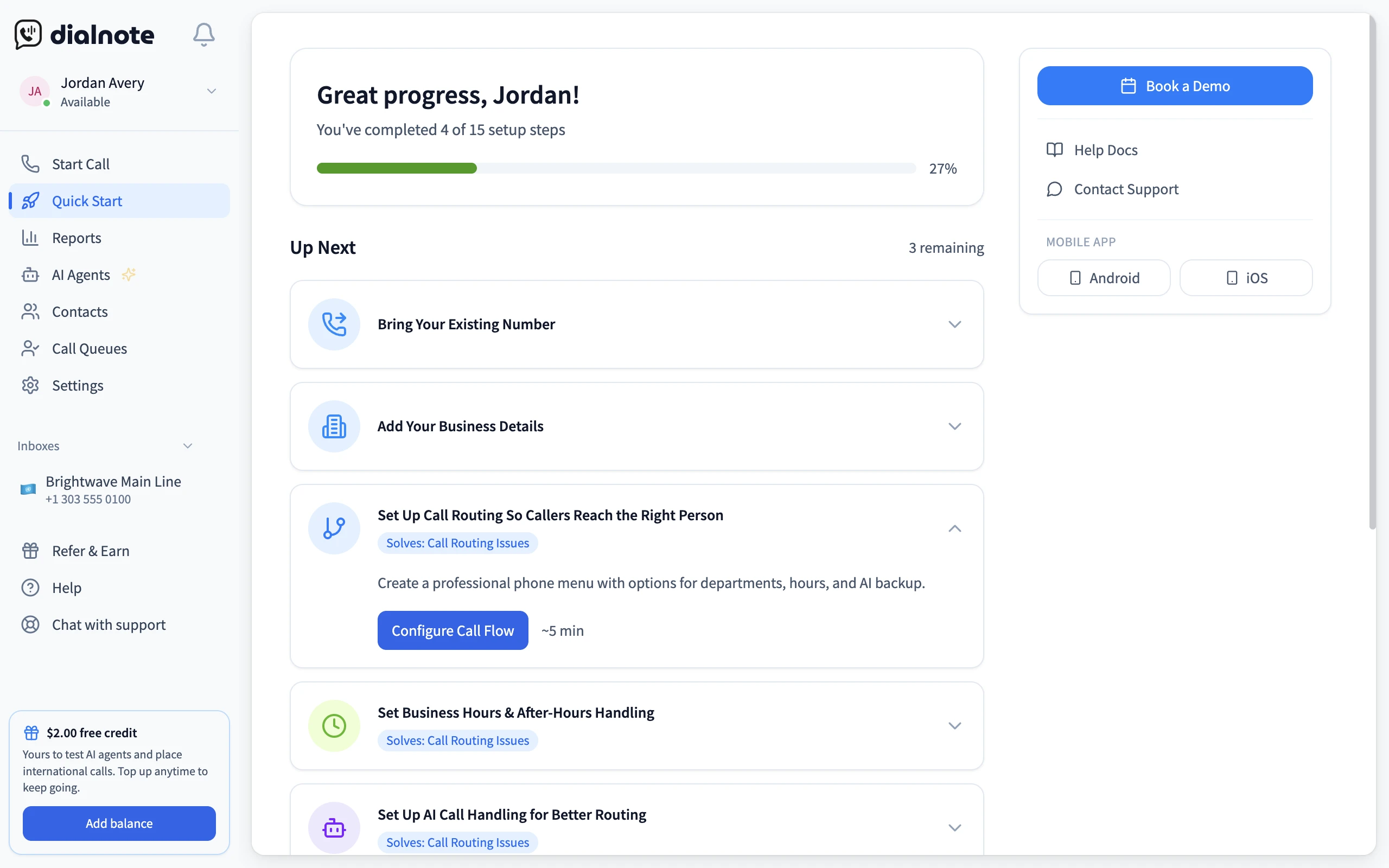
From that screen, the setup is four moves:
- Go to AI Agents in the sidebar
- Click Configure AI Agent
- Add your business info: name, hours, and the questions callers ask most
- Call your number from another phone and listen to how the agent handles it
If it fumbles your trickiest question, edit the business info and call again. That listen-and-tweak loop is the whole rollout, and the first AI call summary lands right after that test call. Compare it with the six-month enterprise timeline from earlier and the "IT project" worry mostly evaporates.
Set up your AI agent from one task card
10-day free trial, no credit card needed.
Frequently asked questions
No. It catches overflow, after-hours, and routine questions so your team isn't chained to the phone. Humans still handle judgment calls like billing disputes and upset customers. Think of it as backup, not a replacement.
Yes, with consent. Some US states need one party to agree, others need both, and GDPR adds rules for EU callers. A short disclosure at the start of each call covers most cases, but check the rules where your callers live.
No. Cloud phone systems run on the computers and mobile phones you already own. You download an app, pick a number, and the AI features work from day one. There's nothing to install in a server closet.
Accurate enough to trust for notes and search, but not perfect. Heavy accents, crosstalk, and industry jargon still cause slips, so skim transcripts during your first weeks and correct recurring terms.
Yes. Flat-rate cloud plans with AI included usually run $19 to $199 a month, far less than hiring reception help. Many tools offer free trials, so you can measure the time savings on your own calls before paying anything.
Without AI, they hit voicemail and many callers hang up without leaving a message. With an AI receptionist, calls get answered, common questions get handled, details get collected, and appointments get booked while you're closed.

Written by
Lancelot Dsouza
Chief Marketing Officer, SmartReach.io
Lancelot Dsouza is the Chief Marketing Officer at SmartReach.io, where he built the Marketing, Sales, and Customer Success verticals from the ground up. With over 25 years of experience spanning digital marketing, business development, and strategic...
Lancelot Dsouza is the Chief Marketing Officer at SmartReach.io, where he built the Marketing, Sales, and Customer Success verticals from the ground up. With over 25 years of experience spanning digital marketing, business development, and strategic...
Related Articles
Voice AI vs Chatbots: When to Use Each for Your Business
Learn when voice AI beats chatbots and when chat wins. Compare voice AI vs chatbot costs, setup time, and use cases to pick the right fit for your team.

Phone vs Email Sales Strategy: When to Pick Up the Phone
Learn when to call and when to write with this phone vs email sales guide: real response data, a hybrid cadence, and the mistakes that cost you meetings.

How to improve customer call experience
Learn how to improve customer call experience with faster routing, shorter hold times, and simple steps that turn phone calls into loyal customers.
