Best AI Receptionist Software For Businesses Ranked
You're picking the best AI receptionist software for your business, which means you already know what's broken: missed calls after hours, voicemail dead ends, no clean way to staff a phone 24/7 without paying a person more than the job's worth. So this guide skips the sales pitch and goes straight to comparing platforms.
We've been building dialnote at SmartReach.io for years, and my team's tested most of the platforms below as buyers and as competitors. After 25+ years building marketing teams in B2B and B2C, I've learned the only honest way to rank a tool is to read the worst reviews, not the marketing pages.
So we pulled the lowest-rated G2 and Capterra reviews for each platform, scanned Reddit threads on r/smallbusiness and r/CRM, and re-ran trials on the ones we hadn't touched in a while.
This list ranks 8 AI receptionist platforms built for businesses (no developer-only APIs) on the metrics that actually drive your invoice: real 10-user cost, per-minute AI fees on top of the plan, AI voice agent quality, AI SMS agent, IVR, call queueing, and AI actions. Every number reflects 2026 pricing.
TL;DR:
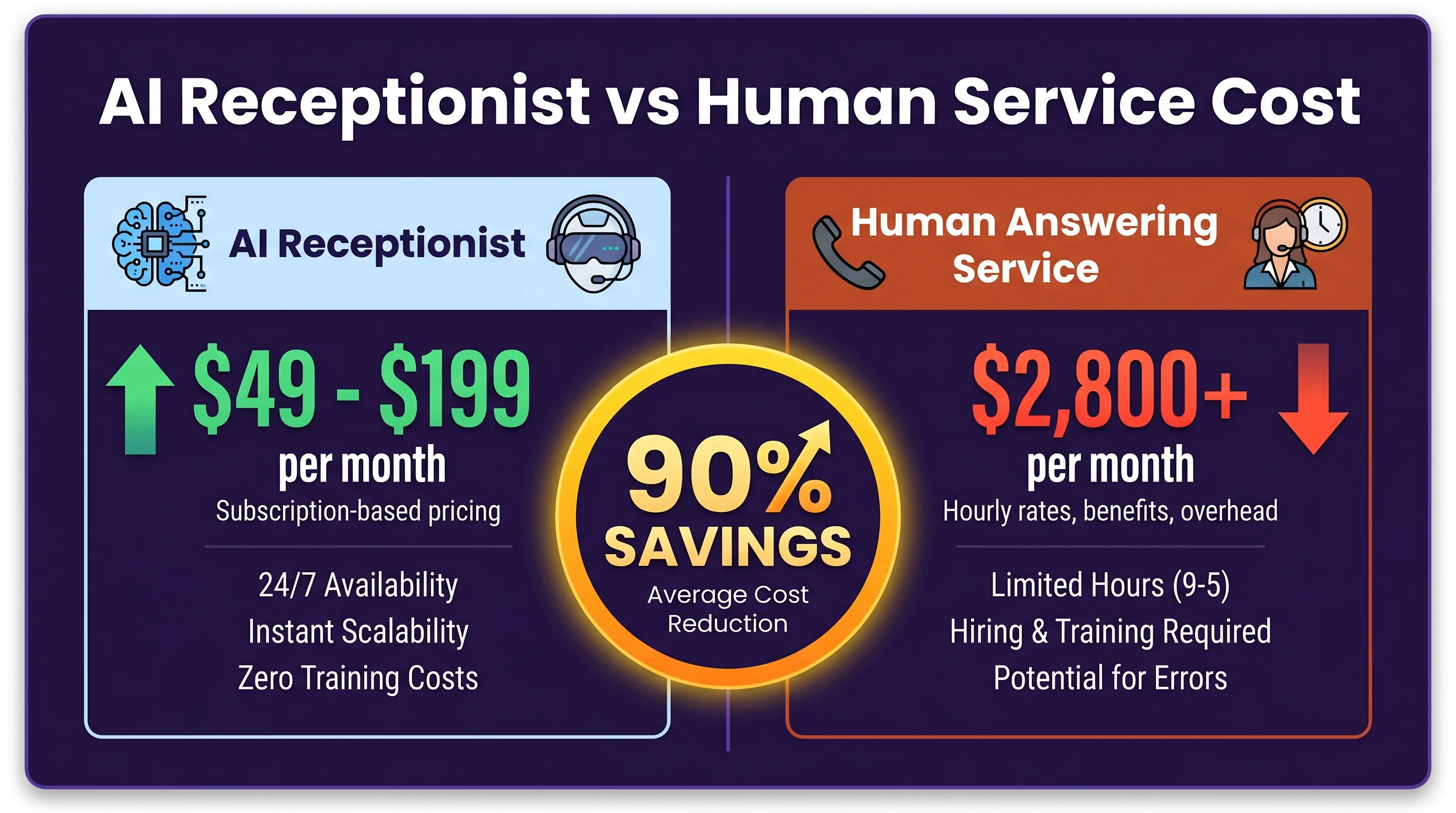
- The best AI receptionist software for most businesses is flat-rate: at 10 users, dialnote is $49/mo flat, Goodcall $59/mo, and Smith.ai $95/mo, while per-seat bundles like RingCentral AIR ($339), Nextiva XBert ($399), and CloudTalk with CeTe ($540) cost 7-11x more.
- Most AI receptionists charge per-minute on top of the platform plan (RingCentral $0.50/min, CloudTalk $0.35-$0.50/min, dialnote $0.89/min from a monthly wallet); Goodcall and Rosie offer unlimited minutes but cap on unique callers.
- Steady call volume favors flat-rate pricing; spiky volume can be cheaper on per-minute tools like Synthflow or CloudTalk if you watch the meter.
- dialnote is the only pick here that bundles a full business phone system with the AI voice agent and AI SMS agent included from $49/mo, with unlimited seats so hiring doesn't move the bill.
What we evaluated (and what real users complain about)
Marketing pages all look the same. Reviews don't. Here's what we weighted across all 8 platforms:
- Real 10-user monthly cost including AI minutes, voice add-ons, recording, transfer fees, and per-seat math, not just the headline number
- Per-minute AI usage fee on top of the platform plan, which is hidden in most ads
- AI voice agent quality based on independent tests, accents, cross-talk, and noisy environments
- AI SMS agent support, since missed calls now turn into texts (your AI should answer both)
- IVR or call flow builder depth, visual drag-and-drop versus JSON config
- Call queueing for teams that need overflow handling, not just one-and-done routing
- AI actions and webhooks to call your own API for booking, payments, lookups
- Integration honesty: most "100+ integrations" claims just mean Make or Zapier connectors, so we noted what's native versus middleware (you should always check the integrations you actually need)
- Worst reviews from G2, Capterra, and Reddit threads, since common complaints predict your second month of usage better than 5-star reviews do
We didn't rank by raw feature count. The tool with 7,000 integrations isn't the right pick for a 4-person clinic that needs the AI to book consults after 6 pm. For broader market context, G2's voice AI category tracks 60+ tools by similar criteria.
Best AI receptionist software compared: 10-user cost, AI fees, and core features
Here's the side-by-side. Detailed reviews follow below.
| # | Tool | 10-user cost | Per-min AI cost | AI voice agent | AI SMS agent | IVR / Call flow | Call queueing | AI actions |
|---|---|---|---|---|---|---|---|---|
| 1 | dialnote | $49/mo flat (unlimited seats) | $0.89/min from wallet | Included | Native | Yes (Business+) | Yes (Pro) | Yes (all plans) |
| 2 | Smith.ai | $95/mo (call bundle) | Per-call, not per-min | Included | Limited | Limited | No | Limited |
| 3 | RingCentral AIR | $339/mo (bundle) | $0.50/min overage | Add-on | No | Yes | Yes | Limited |
| 4 | Goodcall | $59/mo flat | Unlimited minutes | Included | Yes (basic) | Limited | No | Limited |
| 5 | Rosie AI | $49/mo flat | Unlimited minutes | Included | Limited | Basic | No | Limited |
| 6 | Synthflow | $130-$240/mo (~1k min) | $0.13-$0.24/min | Pay-as-you-go | Yes | Visual builder | No | Yes |
| 7 | Nextiva XBert | $399/mo (bundle) | 100 resolutions/mo cap | Add-on | Yes | Yes | Yes | Yes |
| 8 | CloudTalk + CeTe | $540/mo (bundle) | $0.35-$0.50/min | Add-on | Limited | Yes | Yes | Yes |
Two patterns jump out. First, every per-seat platform compounds fast. 10 users on RingCentral, Nextiva, or CloudTalk costs 7-11x what a flat-rate tool charges. Second, the AI itself is rarely "free" with the plan: most platforms charge per-minute on top, and that's where overage bills surprise people. dialnote stays flat on seats and meters AI from a predictable monthly wallet.
The 8 best AI receptionist platforms reviewed
1. dialnote: best AI receptionist software for unlimited seats
Best for: Growing businesses (3-50 people) that want a VoIP phone system with unlimited seats, an AI voice agent included from day one, and no per-seat math.
dialnote is the AI phone system and AI receptionist we build at SmartReach.io. We priced it flat after watching small businesses pay $300-$1,000/month on per-seat tools just to add a third receptionist. The whole point of unlimited seats is that you stop dreading new hires. Add a part-timer in March, add a summer intern in June. The bill doesn't move.
Why dialnote wins on 10-user cost:
A 10-person team on a typical per-seat AI receptionist platform spends $300-$540/month before AI overages. dialnote stays at $49/month for 10 users. Or 30. That's $5 per person at 10 seats and $1.60 at 30. Most "small business" tools assume small means 3-5 people. We assumed it means 5-50. That assumption changes the bill by an order of magnitude.
dialnote plans (monthly billing):
-
Team ($49/mo, recommended starter): Unlimited users, 2 phone numbers, 700 included minutes, automatic call recording, AI transcription and summaries, 1 AI voice agent, native AI SMS agent, knowledge base, advanced call forwarding, transfers, hold, ring order, group calling, API and webhooks, HubSpot, Salesforce, Pipedrive, Slack, Zapier integrations.
-
Business ($99/mo, most popular): Everything in Team, plus 5 AI voice agents, AI multi-language across 14 languages, visual Call Flow builder (proper IVR), and live chat support.
-
Pro ($199/mo): Everything in Business, plus 10 AI voice agents, AI branding (custom voice), AI Call Tags, AI Call Evaluation, disposition codes, call queueing, contact sharing permissions, Zoho Desk, Gong, priority support, dedicated CSM.
AI usage cost: $0.89/min from a monthly wallet allowance. Every plan includes a monthly wallet credit ($8 on Team, $15 on Business, $30 on Pro). The wallet covers AI agent minutes, international calls, and any minutes beyond the included pool. So the AI agent is technically pay-as-you-go from the wallet, with the wallet topped up automatically each cycle. No surprise overage invoices.
Annual billing: Save 20%. Team drops to $39/mo, Business to $79/mo, Pro to $159/mo.
What dialnote's AI receptionist does on a call:
- Answers 24/7 in 14 languages with voices from ElevenLabs, OpenAI, Deepgram, and PlayHT
- Books appointments by checking real-time Calendly or Cal.com availability and confirming over SMS
- Transfers calls based on caller intent, business hours, or urgency
- Sends SMS during the call with links, scheduling URLs, intake forms, or follow-up info
- Pulls from your knowledge base (up to 500 URLs, 25 PDFs at 50MB each, 50 text snippets), with URLs auto-refreshing every 12 hours
- Calls custom webhooks for AI actions like booking lookups, ticket creation, payment links
- Voice and SMS agents share the same knowledge base, so an SMS reply after a missed call gets the same intelligence the voice agent had
You can try the dialnote AI receptionist demo without signing up. Two minutes, no credit card.
Pros:
- Genuinely flat: 5 users or 50, the bill doesn't move
- AI voice agent and AI SMS agent included from $49/mo (most platforms charge $30-$100/mo extra for the AI module)
- Wallet model means no shocking overage invoices, you watch the meter
- Free 10-day trial with Pro features, no credit card required
- International calling supported in 90+ countries via wallet
- Native voice and SMS agents share the same knowledge base
- API, webhooks, and Make/n8n on Team and up for actual AI actions
Cons:
- Newer than RingCentral or established AI tools, so fewer Reddit threads if you research that way
- Visual Call Flow builder (full IVR) opens up at Business ($99), not Team
- Call queueing is on Pro ($199), not on lower tiers
- 700 minutes on Team is plenty for most domestic businesses but light for outbound-heavy sales teams (use Business or Pro for those)
What reviewers say: Early G2 and Capterra reviewers cite the unlimited-seats pricing as the main reason for switching from RingCentral and OpenPhone. The most common critique: the visual call flow builder opens up at Business, not Team. Reddit threads on r/smallbusiness echo the same. Fair, since we've kept the visual builder as the upgrade incentive.
The honest take: if you're picking the best AI receptionist software for a business phone system with more than one user, dialnote is the cheapest fully-featured option in this list. The trade-off: we're newer than the legacy giants, so if you need a decade-long enterprise SLA on paper, a bigger vendor might fit better. Most of you don't.
2. Smith.ai: best for hybrid AI plus human staff
Best for: Service businesses (law firms, agencies, healthcare) that want AI for routine calls and a human staffer to take over when callers need empathy.
Smith.ai is the only major AI receptionist platform that pairs an AI agent with US-based human receptionists. AI handles the routine 90%, and when a call needs a person (refunds, complaints, complex intake), it transfers to a real receptionist trained on your scripts. Founded in 2015, Smith.ai is the established hybrid option.
Pricing:
- AI Receptionist: Starts at $95/month for prepaid call bundles. Per-call pricing beyond the bundle. No setup fees, no contracts, no spam call charges.
- Human Virtual Receptionist: $292.50 to $975/month for 30 to 100 calls included, with overage at $9.75/call.
- Per-minute AI cost: Smith.ai is per-call, not per-minute. Long calls don't cost more, but call count does. A 200-call month on a 100-call bundle adds $975 in overage.
Features:
- 7,000+ integrations claimed, but most beyond the headline names (Clio, MyCase, HouseCall Pro, Service Titan, Calendly, HubSpot, Salesforce) come through Zapier. Check that the ones you need are native or middleware before signing
- Automatic call recording and transcription with PII auto-redaction (real differentiator for healthcare and legal)
- Customizable AI personality, voice, routing rules, knowledge, and FAQs
- 500+ North American human agents available 24/7 for escalations
- 14-day risk-free trial with full money-back guarantee
10-user cost: $95/mo flat for the AI Receptionist starter, since pricing is call-based, not per-user. Add a hybrid human plan and you're at $292.50-$975/mo.
Pros:
- Only major platform with real human fallback inside the same product
- Strong on legal and healthcare compliance with PII redaction
- US-based human staff (matters for some customers)
- Big integration catalog (verify what's native versus Zapier)
Cons:
- Per-call pricing punishes high-volume businesses: 100 calls beyond bundle = $975 in overage
- AI Receptionist plan starts at $95, roughly double what flat-rate tools charge
- Hybrid model means two billing meters to watch (AI calls plus human escalations)
- No native AI SMS agent, voice-only on the AI plan
What reviewers say: G2 and Capterra reviewers consistently flag billing surprises. Overage rates compound fast on busy months. Reddit threads on r/lawpracticemanagement praise the human receptionist coverage but criticize call quality variance between agents. The lowest-rated reviews tend to mention support response time and difficulty getting price clarity before signing.
The honest take: Smith.ai is the best AI receptionist software for businesses where human fallback is a feature, not a redundancy. Law firms, medical practices, and white-glove agencies often justify the price. For straight call-answering volume, you'll spend less on a flat-rate tool.
3. RingCentral AIR: best for existing RingCentral users
Best for: Mid-market and enterprise teams already running RingCentral's phone system who want native AI without stitching tools together.
RingCentral AIR is the AI receptionist module built into RingCentral's UCaaS platform, with a standalone version called "AIR Everywhere" that works on top of any phone system.
Pricing:
- AIR Everywhere (standalone): $59/month with 100 minutes included
- AIR + RingEX bundle: $39/month for AIR plus $30/month per RingEX Core seat, so $69 for one seat, scaling per user from there
- Per-minute AI cost: $0.50/min overage on standalone; bundled overage runs similar
Features:
- Human-like conversations in multiple languages without rigid IVR menus
- Routing by names, locations, and keywords
- Google Calendar and Outlook integration with availability checks and RingCentral Video link generation
- STIR/SHAKEN spam call blocking
- SMS for appointment confirmations, intake forms, and follow-ups
- Native fit with RingCentral phone, video, team chat, and contact center
10-user cost: Standalone AIR Everywhere is $59/mo flat for 100 minutes. Bundled with RingCentral phone for 10 seats: $39/mo for AIR plus ($30/seat × 10) = $339/mo.
Pros:
- Native integration if you're already on RingCentral, no API stitching
- STIR/SHAKEN spam blocking out of the box
- Strong for mid-market teams that need video, fax, chat, and AI in one place
- Multilingual without extra config
Cons:
- Per-seat pricing for the bundled version scales linearly: 50 RingCentral users = $3,450/month before AI overage
- 100 included minutes runs out fast for service businesses (about 30-40 calls)
- $0.50/min overage is steep, over 5x more than running AI minutes through dialnote's wallet
- Standalone AIR Everywhere is decent but loses the native fit that justifies the price
- Onboarding takes weeks, not hours, like the rest of the RingCentral suite
What reviewers say: G2 worst reviews flag onboarding delays (4-8 weeks is common), inconsistent support, and the maze of paid add-ons that aren't clear at signup. Reddit threads on r/sysadmin complain about contract lock-ins and difficulty downgrading mid-contract. Capterra reviews note that AIR works well technically, but the surrounding admin console feels dated.
The honest take: AIR makes sense if you're already paying for RingCentral and the AI receptionist is a checkbox upgrade. For everyone else, the price-to-feature ratio doesn't compete with dialnote, Rosie, or Goodcall.
4. Goodcall: best for DIY service businesses
Best for: Owner-operators in plumbing, HVAC, dental, salons, and similar service businesses that want to configure an AI agent themselves without code.
Goodcall built its product around the business owner who wants to set up an AI receptionist in an afternoon without hiring a developer. Founded in 2021, the product has a drag-and-drop workflow builder with preset responses for common service-business intents.
Pricing:
- Starter ($59/month): 1 form, 1 logic flow, 3 team members, 3 directory contacts, 7-day call history, 100 unique customers per month, unlimited minutes and tokens
- Growth ($99/month): 3 forms, 3 logic flows, 9 team members, 25 directory contacts, 30-day history, 250 unique customers per month
- Scale ($199/month): Higher limits across the board
- Each plan charges $0.50 per extra unique customer once the cap is reached
- Annual billing saves 30%
- 14-day free trial, no credit card required
- Per-minute AI cost: None. Goodcall caps on unique callers, not minutes
Features:
- Drag-and-drop logic flow builder for non-technical owners
- Multilingual support
- HIPAA-compliant configurations available (rare in this price range)
- SMS follow-up with booking page links (basic AI SMS, not a full conversational agent)
- Conditional call forwarding (you can't port your number, you forward to Goodcall)
- Industry templates for service businesses
10-user cost: $59/mo flat on Starter (up to 100 unique callers/mo) or $99/mo on Growth (up to 250). Per-caller pricing, so user count doesn't move the bill.
Pros:
- Genuinely DIY: most owners ship a working agent in under 2 hours
- HIPAA compliance documentation is a real differentiator at this price
- Unlimited minutes on the base plan
- Strong for very small teams under 5 people
Cons:
- Voice quality has higher latency than newer Gen-3 AI tools, occasionally feels robotic on tricky words
- $0.50 per extra unique caller adds up fast above 500 callers/month
- No number porting: you keep your number elsewhere and conditional-forward to Goodcall
- 7-day call history on Starter is too short for most retention or audit needs
- AI SMS is link-based follow-up, not a back-and-forth conversational agent
What reviewers say: G2 and Capterra reviews praise the setup speed but flag voice quality on names, addresses, and accents, a common complaint across HVAC and plumbing teams where dispatch addresses matter. Reddit r/smallbusiness threads flag occasional latency between AI turns, which can sound awkward on shorter questions. Worst reviews mention support response times during weekends.
The honest take: Goodcall is a clean pick for businesses under 250 unique callers/month who want a simple DIY setup at a flat price. Past 500 callers/month, the per-caller fee tilts things toward dialnote or Rosie, and our Goodcall alternatives guide runs the full comparison.
5. Rosie AI: best for flat unlimited minutes
Best for: Small-to-medium businesses that miss calls, want simple flat pricing, and don't need 50 integrations.
Rosie AI is one of the fastest-growing AI answering service platforms in 2026, consistently showing up at the top of independent comparison tests. Setup takes under an hour, with the AI auto-training from your website and Google Business profile.
Pricing:
- Starts at $49/month with unlimited minutes
- 7-day free trial across all plans
- Higher tiers for advanced calendar integrations and custom training
- Per-minute AI cost: None on the base plan. Truly unlimited minutes
Features:
- Direct Google Calendar and Calendly integration with real-time availability checks and automatic event creation
- Bilingual support (English and Spanish) on all plans
- Auto-trains from your website and Google Business profile
- Custom training data upload (spreadsheets, FAQs)
- 24/7 AI call answering
- SMS follow-ups and call summaries (link-based, not full conversational SMS agent)
10-user cost: $49/mo flat on the base plan with unlimited minutes. Pricing is call-based, so 10 users cost the same as 1.
Pros:
- Flat pricing with truly unlimited minutes (one of the few tools that means it)
- Fast setup, often working within an hour
- Strong call quality in independent tests
- Bilingual on every plan, not gated to higher tiers
- Built specifically for SMBs that can't afford a 24/7 receptionist
Cons:
- Smaller integration catalog than RingCentral or Smith.ai (no Salesforce-grade enterprise CRM native)
- Custom workflow logic is lighter than Goodcall or Synthflow
- US/CA focus, less proven for non-English-non-Spanish markets
- Single-purpose tool: no broader phone system, just the receptionist
- No real two-way AI SMS agent
What reviewers say: G2 reviews praise the call quality and setup speed; Capterra reviews flag limited customization for complex routing and gaps in deeper CRM integrations beyond HubSpot and Calendly. Reddit threads on r/smallbusiness recommend Rosie for solo and 2-3 person businesses but caution against it for teams that also need a shared inbox or outbound calling.
The honest take: if you need an AI receptionist that just works and don't care about owning the broader phone system, Rosie is excellent. Where dialnote wins is when you also want a full phone platform with shared inbox, team calling, CRM integration, and the AI receptionist all in one place.
6. Synthflow AI: best for custom no-code workflows
Best for: Operations teams and tech-comfortable owners who want to design custom AI conversation flows without writing code.
Synthflow positions itself as the "build-your-own AI receptionist" platform. You design conversation logic in a visual editor, deploy at 100+ concurrent calls, and tap into voice cloning to keep the agent on-brand. They moved to a pay-as-you-go pricing model for new users in 2025.
Pricing:
- Pay-as-you-go: $0.13-$0.24 per minute all-in, depending on your LLM (GPT-4 versus cheaper) and telephony choice
- Older Starter, Pro, Growth, Agency tiers no longer available for new signups
- 50 minutes free trial (concurrent up to 5 calls)
- No flat-rate plan, which is a meaningful tradeoff
- Per-minute AI cost: $0.13-$0.24/min. This is the platform itself, not an add-on
Features:
- Visual conversation flow builder with branching logic
- 100+ concurrent calls on a single AI agent
- 20+ languages
- Voice cloning for brand-consistent agents
- API and webhook support for AI actions
- CRM integrations including HubSpot, Salesforce, Zapier (always check Zapier versus native)
- Calendar booking via Cal.com and Calendly
- AI SMS workflows can be built but require flow design
10-user cost: Pay-as-you-go, so cost tracks call volume, not user count. A 10-person team running ~1,000 minutes a month lands at $130 to $240/mo depending on LLM choice.
Pros:
- Most flexible workflow builder in this list
- Voice cloning is impressive for brand-consistent agents
- 100+ concurrent calls handles real spikes (think Black Friday for ecommerce)
- 20+ languages
- Strong for agencies building white-label AI receptionists for clients
Cons:
- Pay-as-you-go pricing is hard to budget: a 10-minute booking call costs $1.30 to $2.40 on its own
- Flow builder has a learning curve, not as click-and-ship as Goodcall or Rosie
- No flat-rate option: high-volume businesses pay more here than on dialnote
- Fewer industry-specific templates compared to vertical tools
- Pricing model changed in 2025, so older review sites still show flat tiers that no longer exist
What reviewers say: G2 reviewers praise the visual builder but flag the pricing transition from flat to pay-as-you-go as a frustration. Capterra reviews note a steeper learning curve and inconsistent voice latency on complex flows. Reddit threads on r/agency criticize the unpredictable monthly bills, since traffic spikes hit invoices directly.
The honest take: Synthflow is the best AI receptionist software for businesses that need custom logic an off-the-shelf tool can't deliver. Per-minute pricing is a trap for high-volume call centers, but for moderate volume with custom workflows, it's the most flexible tool here. Most owners we talk to don't actually need this level of customization.
7. Nextiva XBert: best for omnichannel customer service teams
Best for: Customer-facing teams that want an AI receptionist tied into a full omnichannel platform handling calls, chat, SMS, and email through one inbox.
Nextiva launched XBert in 2024 as an add-on to the broader Nextiva phone and customer experience platform. XBert handles inbound calls, texts, and chats with a natural voice, books appointments, and transfers complex calls with full context.
Pricing:
- XBert AI Receptionist: $99/month flat for up to 100 resolutions (calls, texts, or chats combined)
- Nextiva platform: Digital $20/user/mo (no voice), Core $30/user/mo, Engage $40/user/mo, Power Suite $60/user/mo. Voice starts at Core, often with a 36-month contract for the lowest sticker price.
- 7-day trial available for XBert
- Per-minute AI cost: Capped at 100 resolutions/month (a "resolution" is a completed call, text, or chat). Overages priced per resolution, not per minute.
Features:
- Natural voice answering for calls, texts, and chats from one AI agent
- AI SMS agent (genuine two-way conversations, not just confirmations)
- Appointment booking, confirmation, rescheduling with reminders
- Knowledge base learning from your website during onboarding
- Real-time call transfer to specialists with conversation context
- Sentiment analysis and call analytics on the broader Nextiva platform
10-user cost: XBert standalone at $99/mo flat. Bundled with Nextiva Core for 10 seats: $99 plus ($30 × 10) = $399/mo, plus you're locked into a multi-year contract for the advertised seat price.
Pros:
- Genuine omnichannel: calls, SMS, and chat all answered by one AI
- Real two-way AI SMS agent, not just link-based follow-up
- 100 resolutions/mo is plenty for most small businesses
- Tight fit with Nextiva's customer experience suite if you already use it
- Assisted onboarding included
Cons:
- Total cost of XBert plus Nextiva platform climbs fast for 10+ users (per-seat math compounds)
- Multi-year contracts (often 36 months) for the advertised platform pricing
- AI gated behind a separate $99/mo add-on, not bundled into core plans
- Reporting splits between contact center and business phone with no native bridge
What reviewers say: G2 reviews praise the omnichannel handoff but flag contract length as the single biggest deal-breaker for SMBs. Capterra reviews mention support response gaps on the contact center side. Reddit r/CRM threads complain about hidden add-on costs (recording, advanced analytics) that aren't in the headline price.
The honest take: Nextiva XBert is the best AI receptionist software for businesses that want one system handling voice, text, and chat across customer service workflows. The catch: you're buying a $99/mo AI add-on plus a per-seat phone platform with long-term contracts, so the total cost lands well above flat-rate alternatives.
8. CloudTalk + CeTe: best for international call centers
Best for: Sales and support call centers running multilingual outbound and inbound campaigns at scale, with regulated-industry compliance needs.
CloudTalk is a call center platform with an AI Voice Agent named CeTe layered on top. It's built for teams that handle hundreds of calls a day across multiple countries and need AI to qualify leads, schedule appointments, and run payment-reminder workflows. The infrastructure is HIPAA and GDPR compliant.
Pricing:
- CloudTalk platform: Starts at $19/user/mo in North America and LATAM (Starter), with Essential, Expert, and Custom tiers above for richer call routing, analytics, and integrations
- AI Voice Agent (CeTe): $350/month for 1,000 minutes, or pay-as-you-go at $0.50/minute. Overage minutes from $0.35/min on the monthly plan
- 14-day trial available for the platform; AI Voice Agent often quoted via custom pricing
- Per-minute AI cost: $0.35-$0.50/min, on top of the per-seat platform fee
Features:
- AI Voice Agent (CeTe) handles inbound and outbound calls in 60+ languages and accents
- Lead qualification, appointment scheduling, payment reminders, 24/7 coverage
- HIPAA and GDPR compliant infrastructure for regulated industries
- 160+ supported countries for outbound dialing
- Native CRM integrations: HubSpot, Salesforce, Pipedrive, Zoho, Intercom, Zendesk
- Smart dialer, call recording, sentiment analysis, real-time analytics
- Power Dialer, Predictive Dialer, and IVR routing on higher tiers
- Call queueing on Essential and above
10-user cost: CloudTalk Starter at $19/user × 10 = $190/mo platform plus AI Voice Agent at $350/mo for 1,000 minutes = $540/mo. Pay-as-you-go AI at $0.50/min lands lower if you're under ~700 minutes/mo.
Pros:
- Strongest international coverage in this list (60+ languages, 160+ countries)
- Genuine call center capabilities (Power Dialer, Predictive Dialer, queue analytics)
- HIPAA and GDPR compliance baked in, not an upsell
- Deep CRM integrations beyond Zapier-style middleware
Cons:
- AI Voice Agent at $350/mo flat (or $0.50/min) is the priciest AI in this list for low-volume teams
- Per-seat platform fees scale linearly: 50 users on Starter = $950/mo before AI
- Built for call centers, so the UX overhead is heavier than Goodcall or Rosie for a 5-person SMB
- Lowest advertised platform price often requires annual commit
- AI SMS support is limited compared to Nextiva XBert
What reviewers say: G2 reviews praise the international call quality but flag the AI add-on cost as the most common reason teams skip CeTe and stay on the base platform. Capterra reviews mention complex pricing. Multiple add-ons and quote-based AI pricing make budgeting tricky. Reddit r/sales threads complain about support response times in non-EU regions.
The honest take: CloudTalk is the best AI receptionist software for businesses that already operate as a call center, particularly cross-border ones. For a 5-person plumbing company that just wants AI to pick up after-hours, this is overkill and overpriced. The $540/mo blended cost for 10 users is 11x what dialnote Team charges, and most of that premium pays for call center features (predictive dialer, advanced analytics) you don't need if you're not running outbound campaigns at scale.
How do you choose the best AI receptionist software for your business?
Three questions decide it.
1. How predictable is your call volume? Steady volume means flat-rate beats per-minute every time. dialnote, Rosie, Goodcall, and Smith.ai all flat-rate. Spiky volume means per-minute (Synthflow, CloudTalk) can be cheaper, but you have to watch the meter weekly.
2. Do you need a tool, or a phone system? Rosie, Goodcall, Smith.ai, and Synthflow are AI receptionist tools. They answer calls but don't replace your phone system. RingCentral, Nextiva, CloudTalk, and dialnote are full phone systems with the AI receptionist either bundled (dialnote) or sold as a paid add-on (the rest).
3. How many seats are you adding in the next year? This is where unlimited-seats matters. If you're hiring, you're picking between $30-$60/seat platforms (RingCentral, Nextiva, CloudTalk) and flat platforms (dialnote, Goodcall, Rosie). Run the math at 10 seats and 30 seats. The gap is real.
dialnote is different. It's a full business phone system with the AI receptionist included on the Team plan. Your team makes and receives calls, manages a shared inbox, syncs to CRM, and runs the AI agent for after-hours, all from one app. One bill, not two.
Which AI receptionist would we actually pick?
Honestly? Most businesses overthink this. We've watched owners spend three weeks comparing 12 tools when the answer landed in week one. Here's the rule of thumb that's worked across hundreds of conversations:
- Under 5 people, simple needs: Goodcall or Rosie at $49-$59/month. Both ship in an afternoon.
- 5-50 people, want a full phone system plus AI: dialnote Team ($49) or Business ($99). Unlimited seats, one bill.
- Already on RingCentral: RingCentral AIR. The native fit justifies the price.
- Omnichannel customer service workflows: Nextiva XBert if you also need calls, SMS, and chat in one inbox.
- International or multilingual call centers: CloudTalk plus CeTe. 60+ languages and HIPAA/GDPR compliance baked in.
- Legal, healthcare, or hybrid AI plus human staff: Smith.ai. The compliance and human fallback are worth it.
- Custom workflows, agency white-label: Synthflow. The flow builder is unmatched.
For everyone else, skip the spreadsheet. Try the dialnote AI receptionist demo for two minutes, then start the free 10-day trial. If it doesn't work for you, you're out 10 days, no credit card.
Next steps for picking the best AI receptionist software
The best AI receptionist software for your business is the one that picks up calls when you can't, books the appointment, and stops costing more than the missed-call problem it solves. Most of the 8 tools above can do that. The differences come down to seat math, per-minute AI fees, and which features (IVR, call queueing, AI SMS agent, AI actions) matter on day one versus year three.
dialnote is the one we built because we kept seeing small businesses pay double for a fragmented stack: a phone system, plus an AI tool, plus a CRM connector, plus a calendar widget. We rolled all of it into one $49/month plan with unlimited seats, 1 AI agent included, scaling to 5 or 10 agents as you grow.
Try the AI receptionist demo before signing up. Then start a free 10-day trial with Pro features and no credit card. If the AI doesn't sound like the kind of receptionist you'd want answering a $2,000-job call, walk away. We'll be honest about that.
Frequently asked questions
dialnote is the best AI receptionist software for small business at $49/month flat with unlimited seats and 1 AI voice agent included. Strong picks also include Smith.ai for hybrid AI plus human coverage, Goodcall for DIY service businesses, and Rosie AI for flat unlimited minutes.
For 10 users, AI receptionist software costs $49/mo on dialnote (flat, unlimited seats), $59/mo on Goodcall, $95/mo on Smith.ai, $339/mo on RingCentral AIR bundle, $399/mo on Nextiva XBert bundle, and $540/mo on CloudTalk with CeTe. Per-seat platforms scale linearly; flat-rate doesn't.
Most do, on top of the platform plan. Synthflow is $0.13-$0.24/min, RingCentral AIR is $0.50/min over 100 included minutes, CloudTalk's CeTe is $0.35-$0.50/min, and dialnote uses $0.89/min from a monthly wallet. Goodcall and Rosie offer unlimited minutes but cap on unique callers.
AI receptionists handle 90-95% of routine calls: bookings, FAQs, messages, and routing. For complex emotional situations or sensitive escalations, a human still performs better. Most businesses use AI for after-hours and overflow, and keep a person for high-value calls.
Look for AI voice agent, AI SMS agent, IVR or call flow builder, call queueing, calendar booking, CRM sync, multi-language support, and custom webhooks for AI actions. Flat-rate pricing matters more than per-minute pricing if your call volume is steady.

Written by
Lancelot Dsouza
Chief Marketing Officer, SmartReach.io
Lancelot Dsouza is the Chief Marketing Officer at SmartReach.io, where he built the Marketing, Sales, and Customer Success verticals from the ground up. With over 25 years of experience spanning digital marketing, business development, and strategic...
Lancelot Dsouza is the Chief Marketing Officer at SmartReach.io, where he built the Marketing, Sales, and Customer Success verticals from the ground up. With over 25 years of experience spanning digital marketing, business development, and strategic...
Related Articles
Best Call Center Software: 10 Top Picks Ranked
Compare the best call center software by 10-user cost, AI agents, IVR, call queueing, and real reviews. Picks for SMBs and enterprise teams.
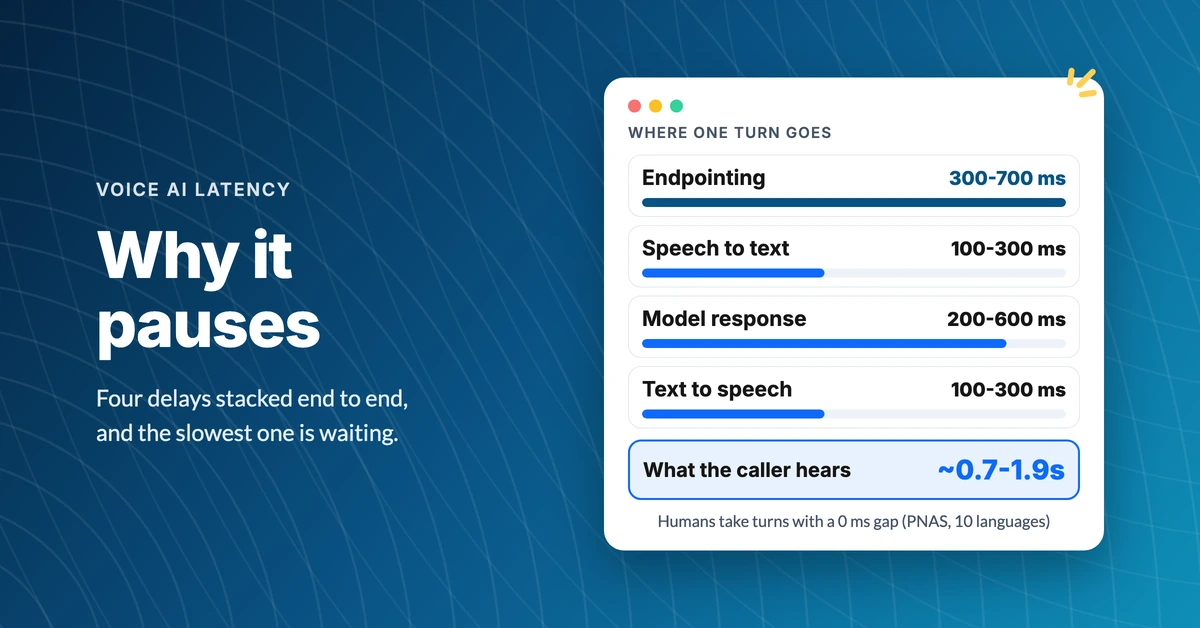
Why Does an AI Voice Agent Pause Before Answering?
Find out why an AI voice agent pauses before answering, what each millisecond is spent on, and how to tell a well-built agent from a sluggish one.
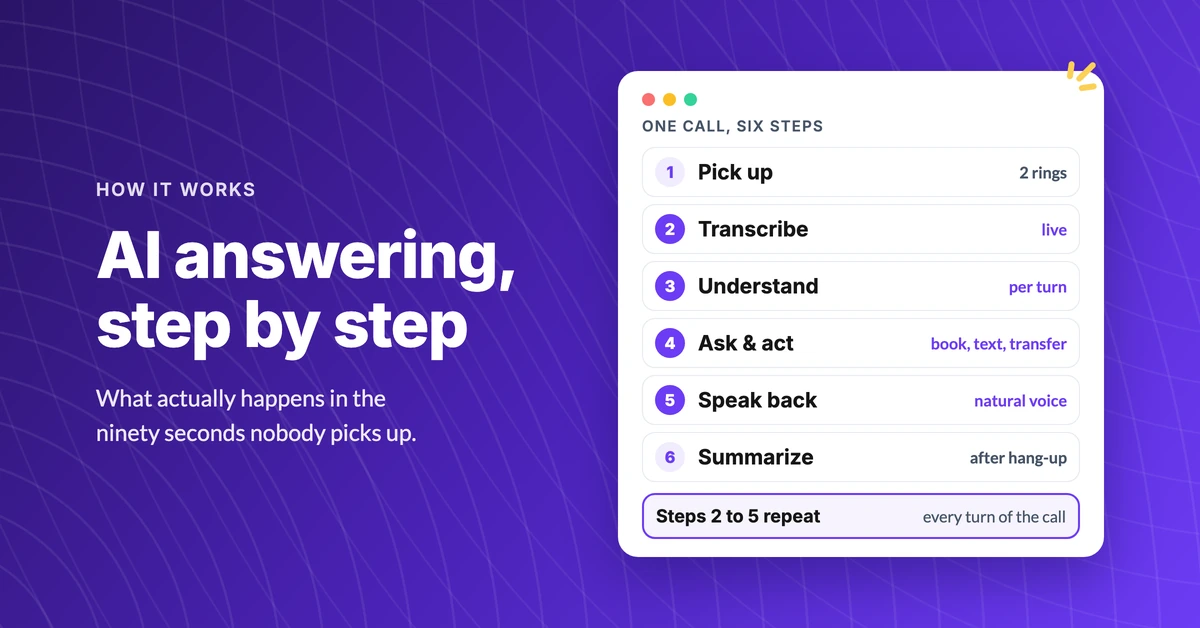
How Does an AI Answering Service Actually Work?
See how an AI answering service works, step by step: what happens in the first four seconds, what it can do on the call, and where it hands off to a human.
