Google Voice for business and when your team outgrows it
Google Voice for business sounds like the obvious move if your company already pays Google for email. You get a phone line inside Gmail, the app is familiar, and the plans start at $10. Plenty of small businesses run on it for years. Plenty of others find out, a few hires in, that it was built around one person's phone, not a team's.
Ray runs operations for a property management company with four offices and 15 people. Everyone already has a Google Workspace account. So when the old landline contract came up for renewal, his boss asked the reasonable question: "We already pay Google. Why don't we just use Google Voice?"
Ray spent a week finding out. This guide is what he learned, in the order he learned it.
TL;DR:
- Google Voice for business is Google's paid phone service. It costs $10 or $20 a month for one person on its own, or $10, $20 or $30 per user a month as a Google Workspace add-on (as of November 2026).
- The free Google Voice is a consumer product for one person, with no 911 calling and no 24/7 support. Google sells separate paid plans for business use.
- Teams need Workspace Standard ($20 per user) for ring groups, call queuing and an auto attendant, and every user also needs a paid Workspace seat.
- It fits solo owners and small teams that already live in Workspace and answer most of their own calls.
- It stops fitting when unanswered calls cost you jobs, when you need toll-free numbers or CRM logging, or when per-user pricing outgrows the team. dialnote, an AI business phone system, covers unlimited users from $49 a month.
Jump to: What it is · Free vs business · Setup · Call flow · Day to day · By business type · Signs to switch
What is Google Voice for business?
Google Voice for business is the paid version of Google's internet phone service. Each licensed user gets a phone number that rings in a browser, on the Voice mobile app and on supported desk phones. It comes with voicemail transcripts and US texting, and higher plans add ring groups, a phone menu and call queues.
You can buy it three ways, and the right one depends on how many people answer the phone:
| How you buy it | Price (as of Nov 2026) | Who it's for | Needs Google Workspace? |
|---|---|---|---|
| Voice Starter standalone | $10 a month | One person, US only | No, a Gmail account works |
| Voice Standard standalone | $20 a month | One person who wants a phone menu | No, a Gmail account works |
| Voice for Workspace (Starter, Standard, Premier) | $10, $20 or $30 per user a month | Teams | Yes, a paid seat for every user |
The free Google Voice isn't on that list on purpose. It's a separate consumer product, and the next section covers why that matters.
If you're mainly here for the numbers, our Google Voice pricing breakdown adds up the Workspace seat and shows all-in totals for 1, 3 and 10 people. This guide is about fit: what it takes to actually run a business on Google Voice, and where that gets hard.
Can you use free Google Voice for a business?
You can, but Google doesn't sell it for that. Google's terms call the free version "a free consumer offering." Its standalone paid plans are the services that "are for business use." That's Google drawing the line between personal and business, in its own words (Google Voice Personal terms).
Lots of sole traders use the free version for their business line anyway, and Google doesn't publish how it enforces the split. We're not going to pretend to know. What we do know is what a business gives up on the free plan:
- No 911 calling. Emergency calling is only on paid accounts.
- No support line. If calls stop ringing, you have help pages and community forums.
- One person, one number. Nobody else can answer it.
- A reclaim risk. Google can take back a number that goes unused for too long.
Our Google Voice pros and cons post goes through each of those in detail. The short version: if the number is printed on your van, your cards and your Google Business Profile, it's worth $10 a month to put it on a plan Google actually sells for business.
So what's the real difference between Google Voice personal vs business? It's not the app. It's who's on the other end when something breaks, whether 911 works, and whether a second person can ever answer.
How to set up Google Voice for your business
Google Voice business setup depends on which version you bought. A solo owner can be live in ten minutes. A team on Workspace needs an admin and an afternoon.
Setting it up as a one-person business
The standalone plans sign up from a personal Gmail account at voice.google.com:
- Sign in with the Gmail account you'll use for the business.
- Link your existing mobile number for verification.
- Pick a US number by city or area code. You can port your current number in later from settings.
- Upgrade the account to Voice Starter or Voice Standard.
- Record a voicemail greeting and choose which devices ring.
That's it. Standalone plans are US only, according to Google's admin FAQ, and they cover exactly one person.
Setting it up for a team on Google Workspace
For a team, Google's own setup guide for Workspace admins lists the order. Here it is with what each step means in practice:
- Add Voice to your Workspace subscription. Pick Starter, Standard or Premier. Most teams that share calls need Standard, because ring groups and the auto attendant start there.
- Add your Voice locations. Each office address becomes a location. This is the service address Voice sends to emergency services when someone dials 911, so get it right for every site.
- Assign Voice licenses. Every person who makes or takes calls needs a license, and a Workspace seat underneath it.
- Assign numbers. In the Admin console, go to Menu > Apps > Google Workspace > Google Voice > Users, point to a person and click Assign number. Batch assign handles a whole team at once, though Google says it can take up to 24 hours.
- Port your existing numbers. Optional, but most businesses want their old main line. Google's porting rules list what can't move in, starting with toll-free numbers.
- Build the call flow. Ring groups, an auto attendant, business hours, call queuing and desk phones come last, once people have numbers.
For Ray's four offices, steps 1 to 4 took a morning. Step 5 is where he hit his first wall: the company's 800 number, the one on every lease and every tenant welcome letter, couldn't come with them.
Moving your existing business number in
Local numbers from most US carriers can port into Google Voice. A few kinds can't, per Google's porting rules:
- Toll-free numbers
- Numbers outside Voice's coverage area, even in a supported country
- European mobile, VoIP and non-geographic numbers
- Numbers in a different Google Workspace domain
Google's admin FAQ also notes that porting numbers into Voice isn't supported in Canada yet. If your business number falls into any of these groups, you'll either run two providers or change the number customers already know.
Setup mistakes that cost businesses calls
Most Google Voice problems we hear about aren't bugs. They're setup choices that looked harmless on day one. Here are the six worth checking before you go live:
- Publishing personal numbers. If customers call each person's direct line, every departure and every vacation breaks a customer relationship. Put ring group and auto attendant numbers on your website and listings instead.
- Leaving open hours at the default. Google's auto attendant guide says open hours default to 24 hours a day, which means your after-hours message never plays. Set real hours and add your holiday closures.
- One service address for everyone. Remote staff who dial 911 from home need their own address on file, not the head office's. Add a location for anyone who works somewhere else.
- Licensing people who never answer. Every license costs Voice plus a Workspace seat. A bookkeeper who takes two calls a month can usually be reached through a ring group member instead.
- Buying desk phones first. Only certain Poly models work. Check Google's list before anyone orders hardware.
- Never calling yourself. Ring your main number from an outside phone, after hours, on a holiday, with everyone busy. It's the only way to hear what a customer hears.
Ray's first test call caught the second one. He rang the main line at 8 PM and got the daytime menu, because the hours were still set to 24/7. Would a customer have noticed? Only the ones calling at night.
How to design your call flow in Google Voice
A good business call flow answers three questions: what does a caller hear first, who rings, and what happens when nobody picks up? Google Voice handles the first two well on the Standard plan. The third is where it's thinnest.
Start with an auto attendant on the main number. Google's auto attendant guide says the feature is on Standard and Premier. The attendant also needs its own Voice number that isn't assigned to a person. Menus are keypad-based. Each key can send a caller to a person, a ring group, another menu, an outside phone number, a recorded message or voicemail.
Put people in ring groups. A ring group is a shared number for a team. It can ring everyone at once, in a fixed order, or round robin (a shuffled order). For Ray, that meant one ring group per office: press 1 for Riverside, 2 for Northgate, and so on.
Turn on call queuing. Ring groups on Standard can hold up to 50 callers for up to 30 minutes, with your own hold audio, according to Google's call queuing guide. That's genuinely useful for a front desk with a lunchtime rush.
Set business hours and holidays. Outside the hours you set, the attendant plays an after-hours message. After-hours callers can be disconnected, sent to voicemail or transferred.
Decide where unanswered calls go. And this is the gap. When the queue times out or the office is closed, a caller ends up in voicemail, on a message, or transferred to a number that a human still has to answer. Nothing in Google Voice picks up the call, asks what the caller needs and books them in.
Here's the flow Ray sketched for his four offices:
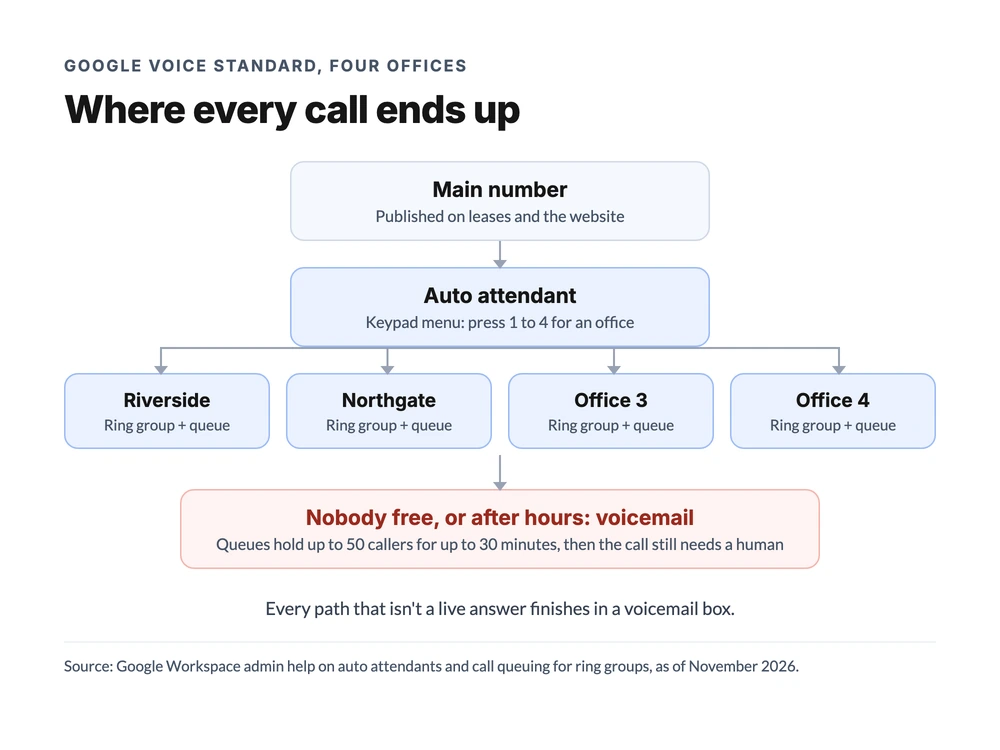
It looks tidy. Then he counted where the arrows ended. Every path that wasn't a live answer finished in a voicemail box, and the old system's call log was full of after-hours tenants who hung up without leaving a message. Is a voicemail box really a plan for an emergency leak at 9 PM?
Running Google Voice day to day
Setup is a one-time job. Knowing how to use Google Voice for business day to day is where a business either settles in or starts looking around. Here's what admins and staff actually deal with.
When someone leaves
Numbers belong to the company on Workspace, which is a real advantage over everyone using personal free accounts. But there's a catch worth knowing before your first resignation.
When an admin unassigns a number, Google puts it on a 30-day hold "to prevent immediate recycling and misdirected calls," per its reassign guide. During that hold, the number can only go back to the original user, not to their replacement. So if a property manager quits on a Friday, their direct line can't go to the new hire on Monday. Customers calling the old number in the meantime need somewhere else to land.
The fix is to publish ring group numbers, not personal ones. If tenants call "the Riverside office," it doesn't matter who leaves.
Texting customers
Business texting on Google Voice works in the US only, according to Google's admin FAQ, and it's built for conversations, not campaigns. Google's texting help says Voice may temporarily stop you sending if you send a lot of messages in a short time or recipients mark them as spam. Group texts top out at 8 people including you.
That's fine for "I'm running 10 minutes late." It's not fine for sending 200 rent reminders on the first of the month.
Recording and notes
Every paid plan can record calls on demand: someone presses record on each call. Automatic recording of every call needs Premier at $30 per user.
This is one place Google Voice has quietly improved. On Standard and Premier, Google's "take notes for me" feature writes a summary, action items and a transcript once someone taps Notes. It then emails them to that person (Google Voice help). The notes belong to whoever started them, though, so they don't land anywhere the rest of the team can see by default.
Logging calls in a CRM
Google ran a beta that logged Voice calls to Salesforce contacts. Its admin help page now says the beta is closed and access has been revoked. There's no native HubSpot connection either. If your team logs calls in a CRM today, plan on copying notes over by hand or paying for a third-party connector.
Desk phones
Desk phones are supported on every paid plan. Google's admin FAQ lists Poly models, including the EDGE B10, B20 and B30 and the VVX 150 to 450 OBi Edition. If your front desk wants a physical handset, check the model list before you buy.
Is Google Voice good for your kind of business?
Google Voice for business is a good fit when the people who take calls already work in Google Workspace and answer most calls live. It's a weak fit when calls arrive while everyone's busy, or when the phone is the main way new customers reach you.
Here's how that plays out by business type, as of November 2026:
| Business | Fit | Why |
|---|---|---|
| Solo consultant, coach or freelancer | Good | Voice Starter or Standard standalone gives a business number for $10 or $20 with no Workspace |
| Small office already on Workspace, people mostly at desks | Good | Standard adds ring groups, a menu and queues inside tools the team already uses |
| Law firm or accounting practice | Mixed | Works for calls, but intake notes don't reach a practice-management or CRM tool on their own |
| Trades crew (plumbing, HVAC, electrical) | Weak | Techs miss calls on jobs, and unanswered calls go to voicemail |
| Clinic or salon front desk | Weak | Rush-hour calls queue, but after-hours booking calls get no answer |
| Multi-location business | Mixed | Ring groups per site work, but per-user pricing grows with every hire at every site |
| Sales team | Weak | No native CRM logging, and texting isn't built for volume |
| Business with a toll-free number | Weak | Toll-free numbers can't be ported in |
The pattern is simple. Google Voice for business is a good phone line. It's a thin phone system.
If a missed call is a mild annoyance for you, it's often enough. If a missed call is a lost $2,000 job, it's not built for that.
Signs your business has outgrown Google Voice
Most businesses don't leave Google Voice because of one big problem. They leave because of five small ones that stack up. Here are the signs we hear most:
- You're buying Workspace seats just for phones. Someone who never uses Gmail still needs a seat to get a Voice license.
- Your bill rises with every hire. At $20 per user on Standard, a 15-person team pays $300 a month for Voice alone, even if half of them take two calls a week.
- Callers hit voicemail more than you'd like. Queues help during the day. After hours and during rushes, there's nobody to answer.
- You can't use the number customers know. A toll-free number that can't port in means running two systems.
- Call notes live in someone's inbox. If your CRM is the source of truth, copying notes by hand doesn't last.
- You want to text customers in bulk. Reminders, confirmations and updates hit Google's conversation-only limits.
- New hires wait for a number. The 30-day hold on unassigned numbers slows down every replacement.
If two or three of those sound familiar, it's worth pricing the alternative. If none do, Google Voice is probably doing its job.
Google Voice for business vs an AI business phone system
The real difference is who answers when nobody on the team can. dialnote is the AI business phone system priced for your whole team: shared numbers, call routing, branded AI voice agents that answer, qualify, and book, and automatic CRM sync, all included, with no per-user cost.
Here's how the two compare on the jobs a business phone has to do, as of November 2026:
| Job | Google Voice for Workspace (Standard) | dialnote (Team or Business) |
|---|---|---|
| Pricing model | $20 per user a month, plus a Workspace seat for each user | Team $49 or Business $99 a month flat, unlimited users |
| Shared main number | Ring groups and an auto attendant | Shared numbers, IVR phone menus and group calling |
| Calls nobody picks up | Voicemail, a message or a transfer | An AI voice agent answers, asks your questions and books into Calendly or Cal.com |
| Call recording | On demand; automatic only on Premier ($30) | Automatic on Team and up |
| CRM logging | No native connection | Call details sync to HubSpot, Salesforce or Pipedrive after each call |
| Toll-free numbers | Can't be ported in | Local or toll-free numbers, $5 a month each |
| Domestic calling | Unlimited | 700 pooled minutes on Team, 1,400 on Business |
| Call queuing | Included on Standard | On the $199 Pro plan |
Google Voice genuinely wins a few rows. Domestic calling is unlimited, while the flat plans pool minutes across the team. Call queuing comes with Google's $20 Standard plan; on the other side, it sits on the $199 Pro plan.
And if your team spends all day in Gmail, having calls and AI call notes inside the same tools is a real convenience. For one person, the $10 standalone plan is cheaper than anything here.
Now Ray's numbers. His company already pays for Workspace, so the fair comparison is the Voice license alone. Fifteen people on Standard is $300 a month, or $3,600 a year, and that's before the next hire.
dialnote Business is $99 a month for unlimited users with three numbers included, plus $5 for a fourth office line, so $104. Adding the AI call pack ($25 a month for 65 AI calls) takes it to $129. That's the part that answers the 9 PM leak call his Google Voice flow sent to voicemail.
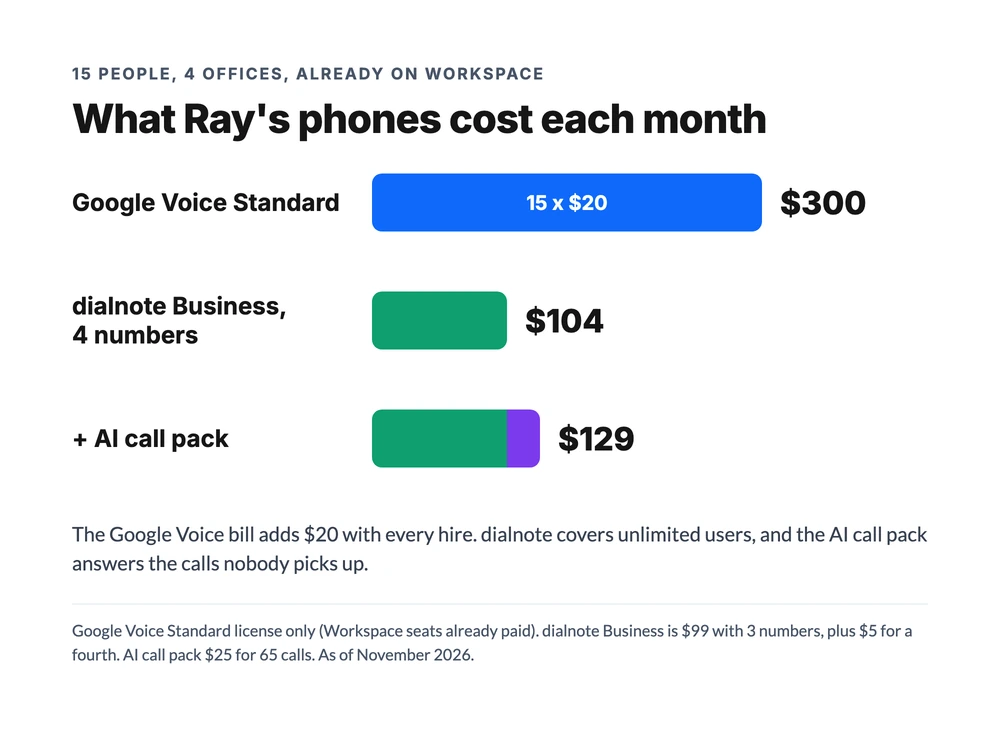
One honest caveat: four offices can talk a lot. If Ray's team runs past 1,400 minutes a month, extra minutes come out of the monthly credit. Or he'd move to Pro, which includes 2,800 minutes and call queuing for $199. Even then, it's less than the Voice bill, and it doesn't change when he hires number 16.
The feature-by-feature comparison has the full side-by-side.
See what your team's calls look like on one flat-priced phone system
10-day free trial, no credit card required. Unlimited users from the Team plan.
If you do move, your Google Voice numbers don't have to change. You release each number for transfer in Google Voice first; on Workspace, an admin handles that from the Admin console, per Google's guide to porting Voice numbers out. The Google Voice porting guide walks through the timing and how to keep the line ringing during the switch.
Is Google Voice good enough for your business?
For a lot of small businesses, yes. A solo owner gets a real business line for $10 a month without touching Workspace. A small office that already lives in Gmail gets ring groups, a menu and queues for $20 per user, set up in an afternoon. That's a good product at a fair price, and switching away from it just to switch isn't worth the hassle.
It stops being enough at a specific point: when the calls your team can't answer start costing more than the phone system does. Per-user pricing grows with every hire, and no plan answers the caller your team misses. For Ray, that point was four offices and a voicemail box full of after-hours tenants, which is where a flat-priced system like dialnote made more sense than another 15 licenses.
What we can't tell you is how long the current setup lasts. Google has added features to Voice steadily, AI notes and standalone plans among them, and it could add more. Check Google's current Voice plans before you decide, and if you're comparing options, our list of Google Voice alternatives for business is a good next stop.
Frequently asked questions
Yes, on a paid plan. Google sells Voice Starter ($10) and Voice Standard ($20) standalone for one person, and Voice for Workspace at $10, $20 or $30 per user for teams. The free version is Google's consumer offering, with no 911 calling and no 24/7 support (as of November 2026).
No. The free Google Voice is a consumer product for one person. Business plans start at $10 a month for one user, and team plans cost $10 to $30 per user a month on top of a paid Google Workspace seat for every person (as of November 2026).
For a team, add Voice to your Google Workspace subscription, add your office locations, assign Voice licenses, then assign numbers under Apps > Google Workspace > Google Voice > Users. Ring groups and an auto attendant need the Standard or Premier plan.
Yes, through a ring group on the Workspace Standard or Premier plan. The group gets its own number and rings members all at once, in a fixed order or round robin. The free and standalone plans cover one person, so they can't share a number across a team.
Google's porting rules list toll-free numbers as not eligible to move into Google Voice, and Google's plan pages only describe local numbers. A business that needs an 800 or 888 number usually keeps it with another provider (as of November 2026).

Written by
Upasana Sahu
Senior Digital Marketing Specialist, SmartReach.io
Upasana Sahu is a Senior Digital Marketing Specialist at SmartReach.io with over 10 years of experience in content marketing, SEO, and digital strategy. She manages end-to-end blog operations, from content creation and on-page/off-page SEO to traffic...
Upasana Sahu is a Senior Digital Marketing Specialist at SmartReach.io with over 10 years of experience in content marketing, SEO, and digital strategy. She manages end-to-end blog operations, from content creation and on-page/off-page SEO to traffic...
Related Articles
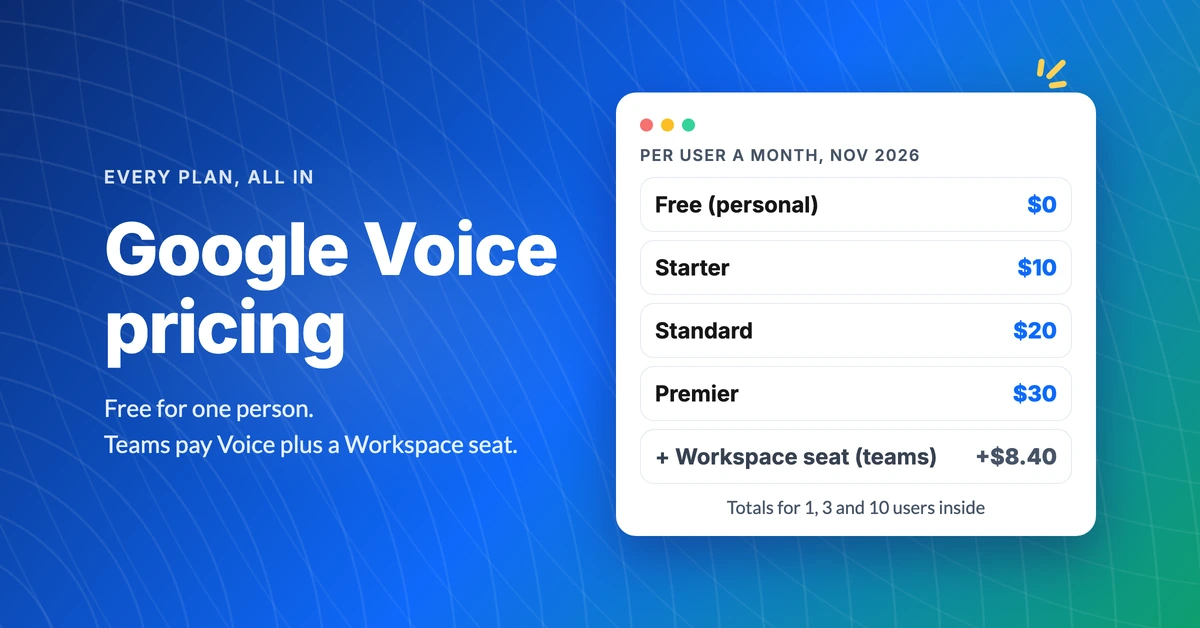
Google Voice pricing and what each plan really costs
See Google Voice pricing plan by plan: free, $10, $20 and $30 a month, the Workspace seat teams pay on top, and real totals for 1, 3 and 10 users.
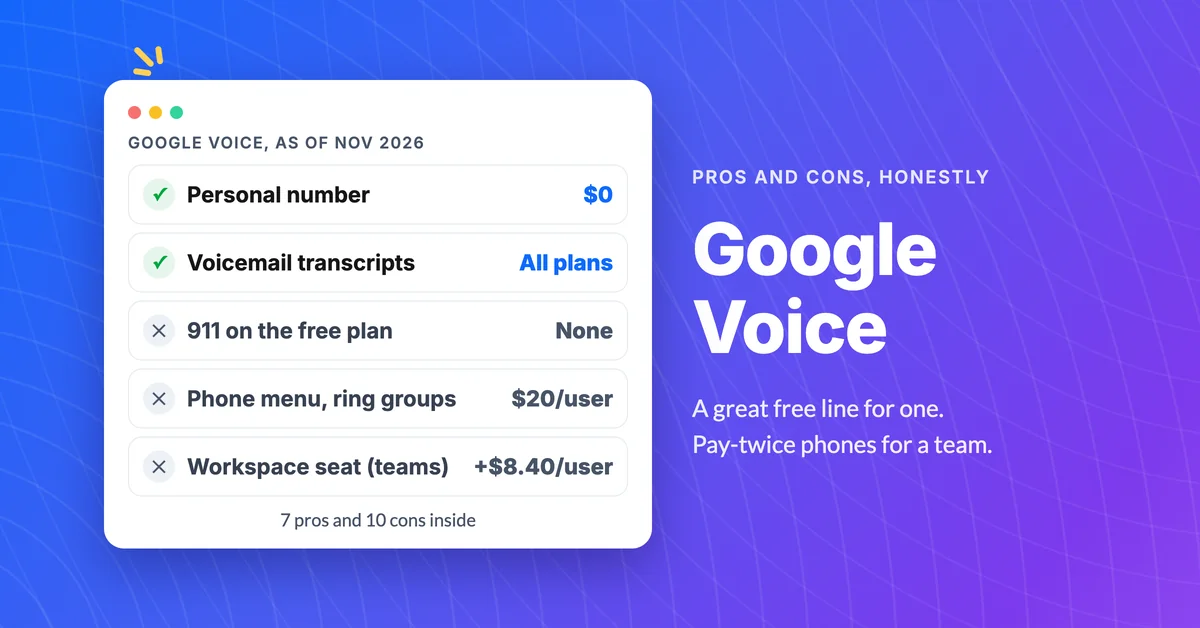
Google Voice pros and cons (7 pros, 10 cons)
Learn the real Google Voice pros and cons: what the free plan does well, where the paid plans fall short for teams, and the signs it's time to switch.
What Does Dialpad Pricing Really Cost a Small Team?
See what Dialpad pricing really costs: $15 to $35 per user, the 3-seat Pro minimum, per-text and admin fees, and real team math at 5, 15 and 30 people.