How to get a business phone number on your cell phone
Here's how to get a business phone number on your cell phone without buying a second phone: add a second number to the phone you already carry, either as a carrier line on an eSIM or through a business phone app. Both take under an hour. The difference shows up later, when you switch carriers, hire help, or want calls to stop at 7 p.m.
Elena is a solo family-law attorney. She printed her personal cell on her first box of business cards because it was the fastest option. Two years later, clients text her at 11 p.m., opposing counsel has her personal number, and she can't tell a new-client call from her sister calling. When she's in court, every call goes to the same voicemail her friends hear.
She doesn't want a phone system project. She wants one more number on the same phone, and she wants it to behave like a business line: its own caller ID, its own voicemail, and an off switch.
TL;DR:
- You can get a business phone number on your cell phone in three main ways: a carrier second line on an eSIM, a business phone app that runs over Wi-Fi or data, or Google Voice.
- A carrier second line costs about $15 a month (Verizon Second Number, as of November 2026) and stays tied to that carrier and that phone.
- A business phone app keeps the number with your account, so it survives a new phone or a new carrier, and it adds business hours, a business voicemail and a way for a teammate to answer.
- Google Voice is free for one person in the US but doesn't grow into a team phone.
- dialnote, an AI business phone system, puts a business number on your cell from $19 a month, with a 10-day free trial and no credit card.
Jump to: What it means · The options · Step by step · Keep work at work · When you hire · Costs · Mistakes
What a business number on your cell phone actually is
A business number on your cell phone is a second phone number that rings on the phone you already own, separate from your personal number. Calls you make from it show the business number on caller ID. It has its own voicemail, and you can silence it after hours without silencing your personal line.
There are two ways your phone can carry that second number, and they behave very differently:
- A second cellular line. Your carrier issues a second number on an eSIM. Your phone treats it like a second SIM card: it uses your carrier's network, and calls show up in the regular Phone app.
- An app line. A business phone app runs the number over the internet (Wi-Fi or mobile data). The number lives with your account at the provider, not on your SIM, and calls ring through the app.
Why does that distinction matter? Because it decides who owns the number in practice. A carrier line belongs to your carrier plan and lives on one phone. An app line belongs to your account, which you can sign into on any phone, laptop or tablet.
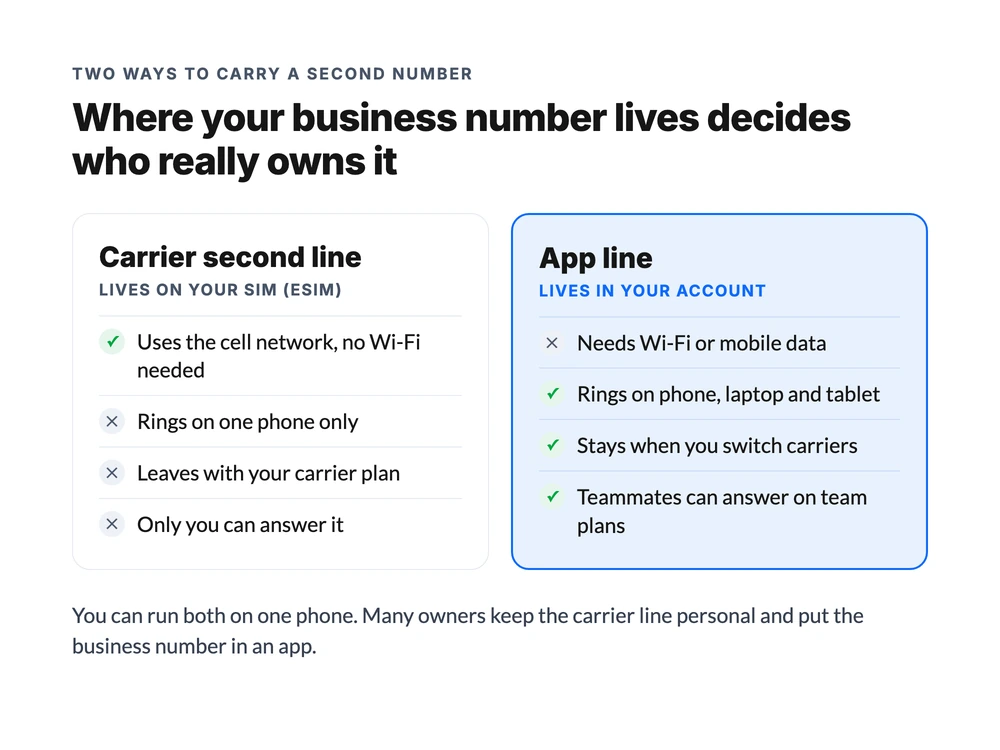
You can run both on one phone. Many owners keep the carrier line personal and put the business number in an app.
Why not just keep using your personal number?
Plenty of owners start there, and it works for a while. These are the four problems that eventually push people off it:
- You can't hand it off. When you hire, go on vacation or get sick, nobody else can answer your personal cell. The business number is stuck with you.
- You can't switch it off. Customers save your personal number forever. There's no "business hours" setting for your own cell, so a quote question at 10 p.m. rings the same as a call from family.
- You can't tell calls apart. Without a second number, every unknown call might be a new customer or a spam call, and you answer both the same way.
- The number isn't the business's. If you ever sell the business or bring in a partner, the number customers know is your personal phone.
4 ways to get a business phone number on your cell phone
There are four realistic routes. Each one is right for someone, so here's the honest version of each, including how to set it up and where it lets you down.
1. A carrier second line (eSIM)
Most big US carriers sell a second number that sits on an eSIM in your current phone. Verizon's Second Number, for example, is $15 a month on its own, or $10 as a perk on some Unlimited plans, per Verizon's Second Number FAQ (as of November 2026). It includes unlimited talk and text in the US, Mexico and Canada, uses your main line's data, and has no activation or cancellation fee.
The hardware has to support it. On an iPhone, Dual SIM with an eSIM works on the iPhone XS, XS Max, XR and later, and iPhone 13 and later can hold two eSIMs, according to Apple's Dual SIM guide. Many Android phones support it too, though the menu names vary by phone maker.
Once the line is active, three iPhone settings make it behave like a business line:
- Label it. Go to Settings → Cellular, tap the number, then Cellular Plan Label, and name it "Business."
- Pick the default line. The default line is the one your iPhone uses for numbers that aren't in your contacts. Most people keep personal as the default, so a new contact doesn't get a text from the business number by accident.
- Set a line per contact. Open a client's contact card, tap default under their name, and choose Business. Your iPhone then calls and texts that client from the business number every time.
Where it shines: calls run on the cell network, so you don't need Wi-Fi, and everything stays in your phone's own dialer and Messages app.
Where it breaks:
- It's tied to one carrier and one phone. It doesn't ring on a laptop, and if you switch carriers, the line goes with your old plan unless you port it out.
- There's no business setup. You get a voicemail box, but no business hours, no phone menu, and no way for someone else to answer.
- Two lines can trip over each other. Apple notes that only one line can use cellular data at a time, and call waiting only works within the same line, so a call to your business line can be missed while you're on a personal call. Turning on Allow Cellular Data Switching helps, but it doesn't fix call waiting.
2. A business phone app
A business phone app gives you a number from a phone system provider and runs it in an app on your phone (and usually in a browser too). You pick the number, install the app, sign in, and calls ring in the app over Wi-Fi or mobile data. Outgoing calls show the business number, not your personal one.
Because the calls run over the internet, they use data rather than your plan's calling minutes. On iPhone, a well-built app rings through the normal incoming-call screen, so you can answer from the lock screen like any other call.
Where it shines:
- The number moves with you. New phone? Sign in. New carrier? Nothing changes. Laptop on the desk? It rings there too.
- It's a real business line. You get a business voicemail greeting, business hours, call recording, and usually a shared inbox where calls, texts and notes for that number sit in one timeline.
- It grows. When you hire, the same number can ring a teammate as well, which no carrier second line can do.
Where it breaks:
- It needs a connection. In a basement or a rural job site with no Wi-Fi and one bar of signal, an app call can drop where a cell call might hold on.
- Phones can put it to sleep. On Android especially, battery savers can stop background apps from ringing. You'll need to exempt the app from battery optimization (more on that in the troubleshooting section below).
- It costs money. Expect a monthly fee, usually in the same range as a carrier second line for one person.
3. Google Voice
Free Google Voice gives you a US number that rings in the Google Voice app on your cell. You verify with an existing US phone number, pick a new number by city or area code, and you're set. Calls to the US and Canada are almost all free, and international calls run on prepaid credit. For one person who wants a free second line, it's hard to beat.
Where it breaks: the free plan is for personal use, covers one user, has no 911 calling, and Google can reclaim a number that sits unused for too long. A phone menu needs the $20 Standard plan, and anything team-shaped needs a Google Workspace seat for every user on top of the Voice license. We cover the full list in Google Voice pros and cons.
4. A forwarding-only number
Some services sell a number that simply forwards every call to your cell. No app, no setup.
Where it breaks: incoming calls show up as regular calls on your personal line, so you often can't tell a business call from a personal one before you answer. Calling back from your cell shows your personal number, which defeats the point of having a business number at all. It's fine for a listing you check twice a year and not much else.
Here's how the four compare side by side:
| Route | Rings on | Caller ID when you call out | Survives a carrier switch | Can a second person answer? |
|---|---|---|---|---|
| Carrier second line | Your phone only | Business number | No, it stays with the carrier | No |
| Business phone app | Phone, laptop, tablet | Business number | Yes | Yes, on team plans |
| Google Voice (free) | Phone and browser | Business number | Yes | No, one user |
| Forwarding-only number | Your personal line | Your personal number | Yes | Only by forwarding |
Our take: if you're sure you'll always be the only person answering and you want calls in your regular dialer, a carrier second line is fine. For everyone else, the app route is the better long-term bet, because the number belongs to you and not to a SIM card.
How to get a business phone number on your cell phone, step by step
The steps are the same whichever app you choose. You're making five decisions, and each one is harder to undo once the number is printed on your cards:
- Pick the area code. Use the one where most of your customers are. A local area code reads as "nearby" on caller ID. A toll-free number (800, 888 and so on) makes sense only if customers call from all over the country.
- Pick the number. Check that it supports both calls and texts before you take it. Capabilities come from the carrier behind the number, and not every number has both.
- Install the app and sign in on the phone you carry every day, and allow microphone access and notifications.
- Set the caller ID so calls go out from the business number, not your personal one.
- Make a test call to someone else's phone and check what caller ID they see.
The slow way is stitching this together: a number from one service, forwarding through another, and a voicemail box you forget to set up. The faster way is a phone system that does all five in one account. dialnote is the AI business phone system priced for your whole team: shared numbers, call routing, branded AI voice agents that answer, qualify, and book, and automatic CRM sync, all included, with no per-user cost.
Part 1: claim your business number
You'll need an account first, and the trial gives you one without a card.
Step one: start your free account
10-day free trial, no credit card needed.
Then claim the number in the web app:
- Go to Settings → Phone Numbers and click Add New Number
- Click Claim this number to take the suggested number, or See more numbers to search
- Narrow the search by State and Area code, or type a word like
CARE - Check the number's capability badges (Call, SMS, MMS)
- Verify your email and your personal mobile number when the Confirm it's you panel asks
- Click Confirm Purchase
Up to 10 numbers show at a time, and the results refresh as you change the filters. The verification step is there to stop fraud: you confirm the personal mobile number once, and it's never shown to callers.
Once the number is yours, you land on its settings page. That's where the voicemail greeting, business hours and call routing live, so it's worth five minutes now while you're there (more on that below).
Part 2: put it on your cell and make the first call
Now move to your phone. The dialnote app is on the App Store (iOS 15.1 or later) and Google Play (Android 10 or later), and you can sign in with email, Google or Microsoft:
- Install the dialnote app and sign in with the same account
- Tap Dialer in the bottom navigation
- Pick your new business number in the From dropdown at the top
- Type a number you can check, like a friend's cell or your office line, starting with +1 (long-press 0 to type the plus sign)
- Tap the green Call button and allow microphone access when your phone asks
- Ask whoever answers what caller ID they see: it should be the business number
The From number sticks between calls, so you won't have to pick it again. If they saw the business number, you're done: every call you make from the app now goes out as the business.
Now test the other direction. Call the business number from your personal line (or have the friend call it back) and make sure it rings in the app. If it does, the setup is finished. If it doesn't, the next section fixes it.
If calls don't ring on your cell
Almost every "my business number doesn't ring" problem comes down to one of three settings:
- Notifications are off. On iPhone, open Settings, find the app, tap Notifications and turn on Allow Notifications. On Android, go to Settings → Apps, pick the app and turn notifications on.
- Battery saving is putting the app to sleep. On Android, go to Settings → Apps, pick the app, tap Battery and choose Unrestricted (or "Don't optimize" on older versions). Samsung, Xiaomi and OnePlus phones have their own battery savers too, so add the app to those exception lists.
- The microphone was denied. If you said no to the microphone prompt, calls won't connect at all. Turn the microphone back on for the app in your phone's settings.
The app also has a built-in check under Settings → Support & About → Calls not ringing? It tests notifications, push registration and the calling service, offers a one-tap fix for each, and lists the battery steps for your exact phone brand.
Keep your current number instead
Already printed your number everywhere? You don't have to start over. If the number is with a carrier, you can usually port it into a business phone app rather than buying a new one. For US and Canadian numbers, you start the port request from the Phone Numbers page, and the number keeps working on your old carrier until the transfer finishes, so you don't miss calls in between.
One caution: if the number you want to move is your personal cell, porting it means it leaves your personal plan. Most people keep the personal number personal and give customers a new business number instead.
Set it up so work stays at work
Getting the number is the easy part. The reason most people want a business number on their cell is to stop work from bleeding into the rest of the day, and that takes four settings.
A real voicemail greeting. A business number with a robotic default greeting sounds like a side project. Keep it to 15 to 20 seconds: who you are, when you'll call back, and what to leave.
Elena's says: "You've reached Elena's family law office. I'm in court most mornings and return calls by 5 p.m. the same day. Please leave your name, number and a sentence about your matter."
Business hours. Decide when the business line rings and what callers get outside those hours. Most phone systems let you send after-hours calls straight to voicemail, so your phone stays quiet at dinner. This matters more than notification settings, because muting notifications usually doesn't stop an incoming call from ringing.
A status or Do Not Disturb. Business phone apps usually have a status (Available, Away, Do Not Disturb) that syncs between your phone and your laptop. Set it to Do Not Disturb on your day off. On an iPhone, a Focus mode can do the same for a carrier second line.
Pick the alerts you want. Most apps let you choose which events send a push notification: missed calls, voicemails, new texts, call summaries. Keep missed calls and voicemails on, and turn off anything you'd only check at your desk anyway.
Elena ended up with exactly that. Her cell shows two kinds of calls now, and the business ones stop at 6 p.m.
New clients get a greeting that tells them she's in court until 3 and will call back the same day. She's honest that she still checks voicemail at night sometimes. But it's her choice now, not her clients'.
When someone else needs to answer too
This is where the route you picked starts to matter. Six months later, Elena brings in a contract paralegal three days a week, and she wants the paralegal to take intake calls while she's in court.
- On a carrier second line, there's no way to do that. The number lives on Elena's SIM. The best she can do is forward it to the paralegal's phone, which then gets every call, including the ones Elena wanted.
- On free Google Voice, the plan is one user. Adding a second person means moving to the Workspace version, with a Workspace seat and a Voice license for each of them.
- On an app line with a team plan, she invites the paralegal, and the same business number rings both phones. Whoever picks up first takes it, either one can transfer the call to the other, and both see the same call and text history.
There's a middle option, too. If nobody can pick up, an AI voice agent can answer, ask the intake questions you set, and book a consultation through Calendly or Cal.com, so the call doesn't end in voicemail. On a flat team plan, adding the paralegal doesn't change the bill at all.
What a business number on your cell costs
Here's the price of each route for one person, as of November 2026:
| Option | Monthly price | Per year | What you get |
|---|---|---|---|
| Google Voice (free) | $0 | $0 | One US number, personal use, no 911 |
| Google Voice Starter | $10 | $120 | One user, 911 and support, no phone menu |
| Verizon Second Number | $15 ($10 as a perk on some plans) | $180 | A second carrier line on eSIM, one phone, one carrier |
| dialnote Solo | $19 | $228 | One user, one business number, 250 included minutes, call recording, AI transcription and summaries |
| dialnote Team | $49 | $588 | Unlimited users, 2 numbers, 700 included minutes, texting, an AI voice agent |
For a solo owner who'll never hire, the free and $10 options are honest choices. The math changes the day a second person needs to answer. Carrier lines and per-person app plans multiply with every hire: three people on $15 carrier lines is $45 a month, five is $75, and none of them share a number. A flat team plan stays the same price whether it's two people or ten.
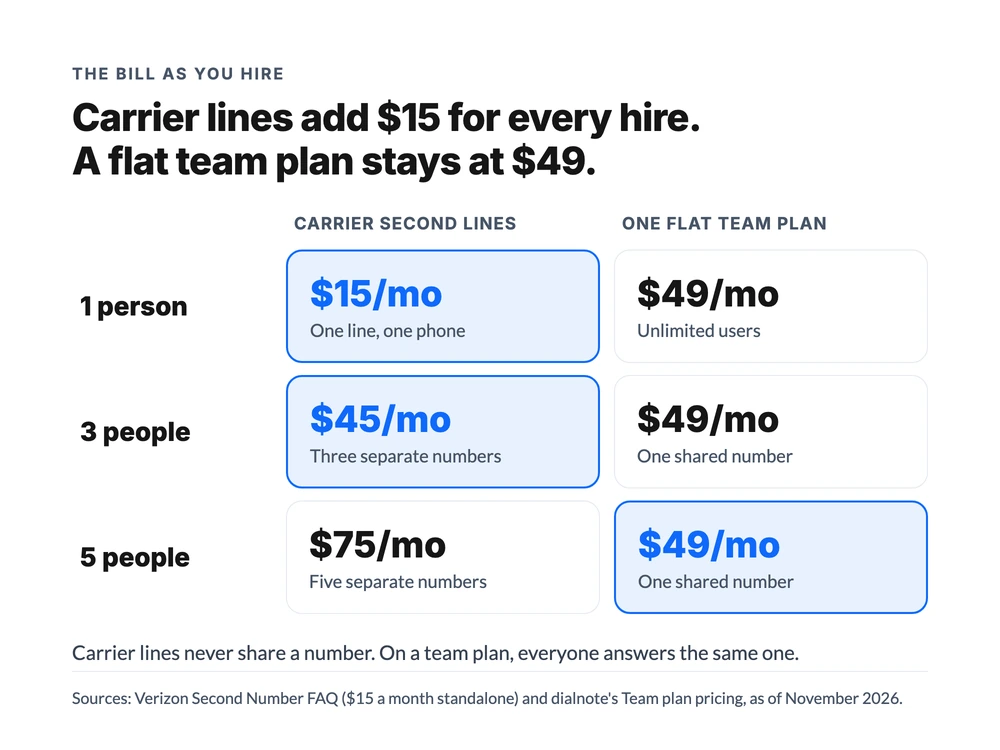
On the pricing page you can see every plan side by side, and the phone numbers page lets you search for an available number before you sign up.
Is a business number on your cell worth paying for at all? If customers find you by phone, yes. For Elena, one new family-law client covers years of any plan in that table. The first missed new-client call usually costs more than the line ever will.
Mistakes to avoid
A few patterns trip up people setting this up for the first time:
- Printing the number before testing it. Make the test call both ways first. Cards and van wraps are expensive to redo.
- Picking a random area code. Customers trust local numbers. If you work in Austin, get a 512 or 737 number, not whatever the app suggested first.
- Skipping the greeting. The default greeting is the first thing a new customer hears when you can't pick up.
- Leaving battery savers on. On Android, an app line that isn't exempt from battery optimization can miss calls while the screen is off. Fix it on day one, not after the first missed call.
- Letting your phone pick the line. On a Dual SIM phone, a new contact gets whichever line is the default. Set the line per client, or you'll eventually text a customer from your personal number.
- Forgetting about texting rules. In the US, business texting from an app number needs A2P 10DLC registration. Start it the day you get the number, because it can take a while.
- Tying the number to a carrier you might leave. A carrier second line goes where your carrier plan goes. If you might switch carriers in the next couple of years, use a number you can keep.
Not sure whether you need a full phone system at all? Our guide to getting a business number without a landline covers the bigger setup, from VoIP plans to porting an existing number.
The short version: pick a number you'll own, put it on the phone you already carry, and spend the extra ten minutes on the greeting, business hours and battery settings. With dialnote, that whole setup runs in the mobile app and starts at $19 a month, with the $49 Team plan covering everyone once you hire.
Frequently asked questions
Yes. You can add a second carrier line on an eSIM if your phone supports Dual SIM (iPhone XS and later), or install a business phone app that runs a second number over Wi-Fi or mobile data. The app route works on any phone and keeps the number if you switch carriers.
As of November 2026, Google Voice is free for one personal user, a Verizon Second Number line is $15 a month, and business phone apps usually start around $15 to $20 a month. dialnote's Solo plan is $19 a month and its Team plan is $49 a month for unlimited users.
Yes, if the plan includes texting. In the US, business texting from an app-based local number also needs a one-time carrier registration called A2P 10DLC before messages go out reliably, so start it the day you get the number.
An app-based business number stays with your account, so you sign in on the new phone and it rings there. A carrier second line stays with that carrier: switch carriers and you'll need to port the number out or lose it.
No. A second line on eSIM or a business phone app puts the business number on the phone you already carry. A separate phone only makes sense if you want work to physically stay at work, and it doubles your hardware and plan costs.

Written by
Upasana Sahu
Senior Digital Marketing Specialist, SmartReach.io
Upasana Sahu is a Senior Digital Marketing Specialist at SmartReach.io with over 10 years of experience in content marketing, SEO, and digital strategy. She manages end-to-end blog operations, from content creation and on-page/off-page SEO to traffic...
Upasana Sahu is a Senior Digital Marketing Specialist at SmartReach.io with over 10 years of experience in content marketing, SEO, and digital strategy. She manages end-to-end blog operations, from content creation and on-page/off-page SEO to traffic...
Related Articles
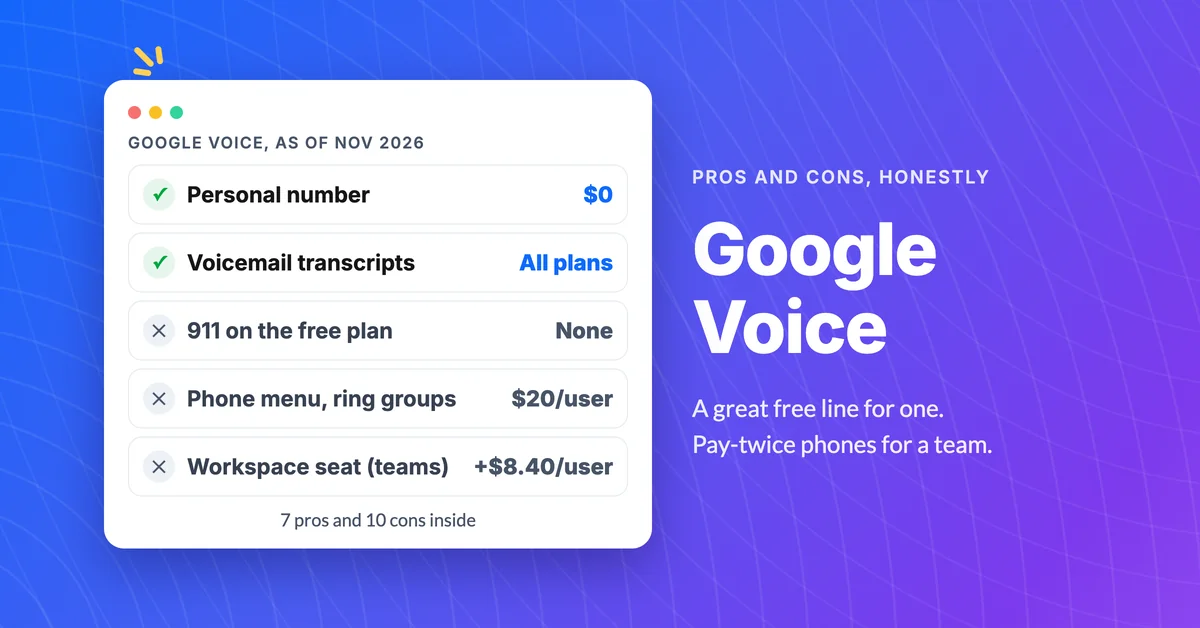
Google Voice pros and cons (7 pros, 10 cons)
Learn the real Google Voice pros and cons: what the free plan does well, where the paid plans fall short for teams, and the signs it's time to switch.
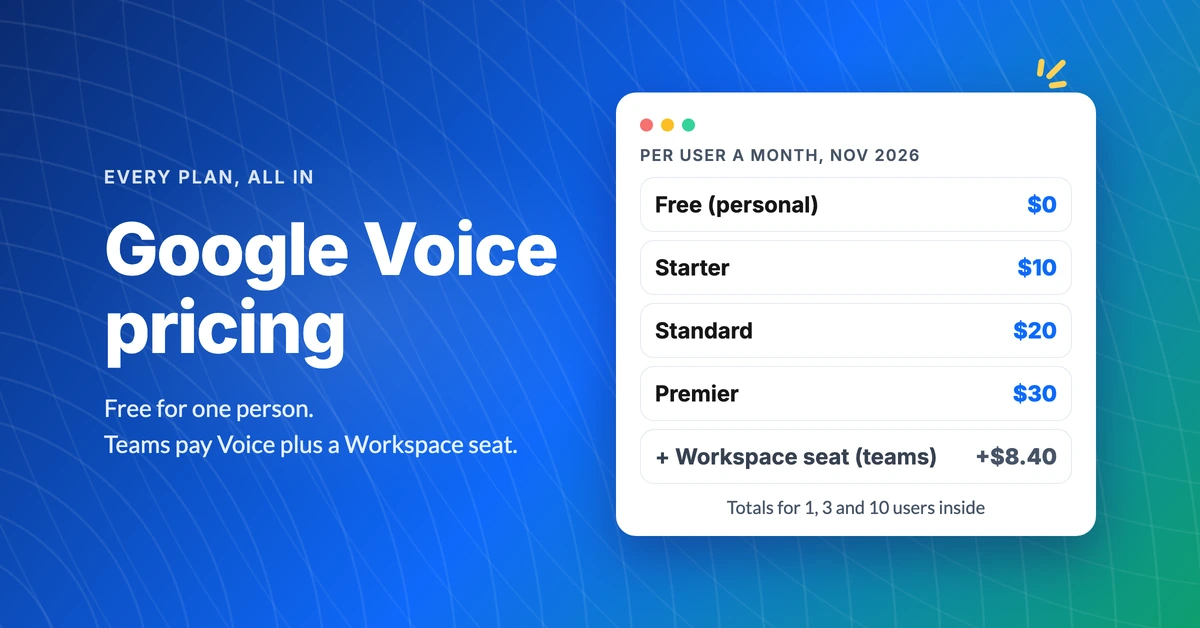
Google Voice pricing and what each plan really costs
See Google Voice pricing plan by plan: free, $10, $20 and $30 a month, the Workspace seat teams pay on top, and real totals for 1, 3 and 10 users.
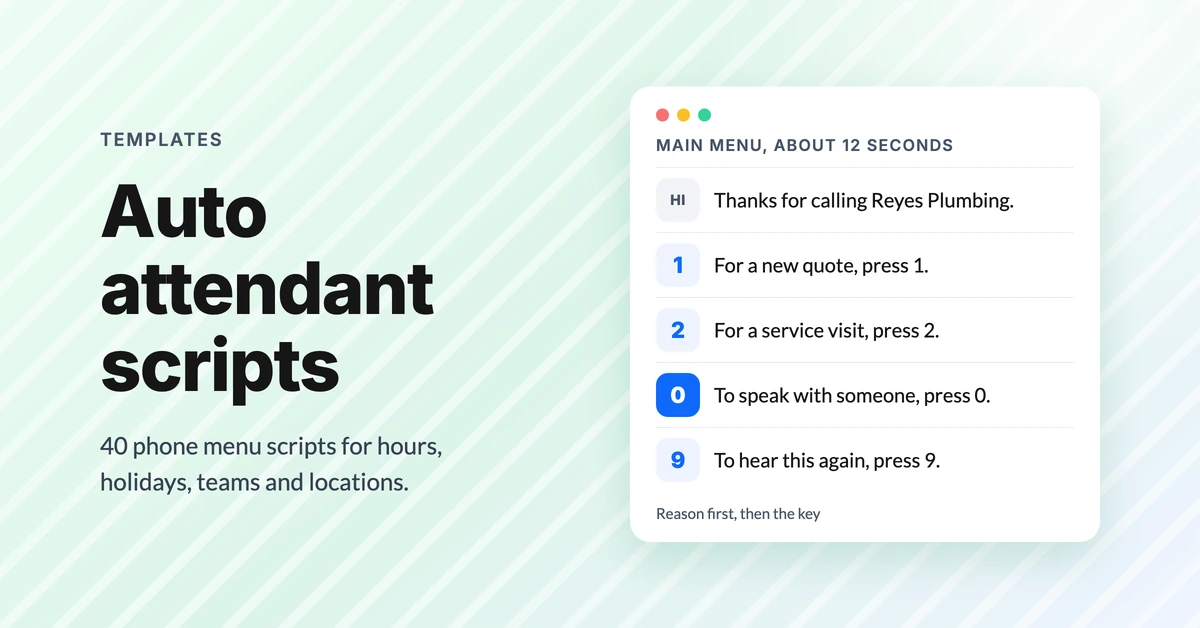
Auto attendant script examples (40 phone menu scripts)
Copy 40 auto attendant script examples for main menus, after hours, holidays, multiple locations and bilingual lines, plus the rules that stop hang-ups.