Remote team communication: best practices that work
Picture this. It's 9 a.m. in Austin and 6 p.m. in Berlin, and your designer just dropped a question into a chat thread nobody will read for six hours. That's the quiet tax of remote team communication: not the big blowups, but the small delays that pile up until a two-minute answer takes two days.
Good remote team communication isn't about buying more tools. It's about clear channels, shared habits, and a phone system that follows your people wherever they log in. Get that right and a distributed team feels tight-knit. Get it wrong and even simple decisions stall out.
So what actually works when your team is scattered across cities and time zones?
TL;DR:
- Strong remote team communication starts with clear rules for which channel to use, not more apps.
- Match the message to the medium: calls for urgent stuff, chat for quick questions, async video or docs for deep context.
- A cloud VoIP phone system lets people use one business number on any device, so calls don't die when someone's away from a desk.
- Write for async first: complete messages, recorded updates, and decisions documented where everyone can find them.
- Guard a shared overlap window and write daily handoff notes so work keeps moving while half the team sleeps.
- Track response times and tool adoption, then adjust. Culture needs deliberate check-ins, not luck.
Why remote team communication breaks down
Remote work doesn't fail because people stop caring. It fails because the signals people relied on in an office just vanish. You can't tap a shoulder. You can't read the room. Every message has to carry its own context, or it gets misread.
Meet Priya, an ops lead at a 20-person startup with people in four time zones. Her team wasn't lazy or checked out. But questions sat unanswered overnight, "quick calls" got booked three days out, and two engineers once built the same feature because neither saw the other's update. Sound familiar?
According to Buffer's State of Remote Work report, communication and collaboration rank among the top struggles remote workers name year after year. The tools exist. The habits often don't.
Here's the blunt truth: most remote communication problems are process problems wearing a technology costume. New software won't save a team that hasn't agreed on how it talks. So before you shop for apps, get honest about your rules.
Build a communication stack that fits your team
Your stack is the set of tools your team uses to talk: calling, messaging, video, and the apps that tie them together. The goal isn't the longest feature list. It's coverage for how your people actually work.
VoIP vs UCaaS: what's the difference?
VoIP (voice over IP) is internet-based calling. It swaps old phone lines for flexible calling that works anywhere you have a connection. UCaaS (unified communications as a service) bundles VoIP with video, messaging, and integrations in one platform.
Think of VoIP as the foundation and UCaaS as the finished house. Which do you need?
- VoIP alone: you mainly need reliable business calling and texting from any device.
- UCaaS: your team lives across voice, video, and chat all day and wants them stitched together.
For most small teams, a solid cloud VoIP system plus a couple of focused apps beats an all-in-one suite nobody fully uses. Want the deeper trade-off? See our guide on cloud-based vs on-premise phone systems.
Features that matter for distributed teams
When you compare options, weigh these over flashy extras:
- One number on every device: call and text from your business line on a laptop or phone.
- Business caller ID: your team's personal numbers stay private.
- Voicemail you can read: missed calls turn into notes you can scan.
- Call recording and summaries: absent teammates catch up fast.
- CRM sync: caller context shows up without digging.
- Mobile app: the field, the couch, the airport, all covered.
A phone system that gives everyone unlimited seats also stops per-user fees from punishing you for growing. We break that down in business phone systems with unlimited seats.
What does a remote communication stack cost?
Budget for three things: software seats, phone service, and the overlap tax of tools that duplicate each other. The third one quietly eats the most money.
Pricing models matter more than sticker prices. Per-user plans punish growth: every new hire raises the bill, so teams start sharing logins and coverage gets messy. Flat-rate plans with unlimited seats keep the math boring, which is exactly what you want.
Watch the add-ons too. Some providers sell call recording, integrations, or reporting as paid upgrades, and the "cheap" plan doubles once you bolt on what you actually need.
Here's a five-minute exercise: add up what you pay per person per month across every communication tool. Most teams that do this find at least one subscription nobody would miss. Cancel it and nobody blinks.
What are the best practices for remote team communication?
The best practices for remote team communication come down to four moves: set clear channels, agree on response norms, write for async first, and make meetings earn their spot. Here's how to run each one.
- Set clear channels. Decide what goes where so people stop guessing.
- Agree on response times. Name expectations for chat, email, and after-hours.
- Default to async. Assume the reader is offline and give full context.
- Make meetings count. Agenda, start time, action items, or don't meet.
Match the channel to the message
| Message type | Best channel | Why |
|---|---|---|
| Urgent, needs a decision now | Phone call | Instant, no waiting |
| Quick question | Team chat | Fast, low interruption |
| Complex or emotional topic | Video call | Tone and body language |
| Decisions to keep | Email or doc | Searchable record |
| Status update | Recorded voice or video note | Watch on their own time |
The mistake I see most? Teams route everything through chat, then wonder why urgent stuff gets buried under memes and stand-up notes. A ringing phone still beats a message when minutes matter.
Set response-time expectations
Write your norms down. How fast should a chat get answered during work hours? When is it fine to go heads-down and mute notifications? What counts as a real emergency worth a call after hours? Vague expectations breed anxiety. Clear ones set people free.
How do you keep async communication clear?
Async communication works when each message stands on its own: full context, a clear ask, and no need for a live reply. Assume your reader is asleep when they open it, because half the time they are.
A few habits carry most of the weight:
- Lead with the ask, then the background.
- Record a 60-second voice or video note instead of booking a call.
- Drop decisions into a shared doc, not a thread that scrolls away.
- Skip "got a minute?" pings. State the question straight up.
Tools help here too. When calls get auto-summarized, a teammate three time zones away reads the recap instead of chasing you for a replay. That's the idea behind AI call summaries: the context travels even when you're offline.
How do you work across time zones without losing a day?
Set a shared overlap window, put handoffs in writing, and rotate the meeting pain. Time zones stop hurting once work can move forward while half the team sleeps.
Ever waited a full day for a one-word answer? That's the time zone tax, and it compounds. Three habits shrink it:
- Guard an overlap window. Find the two or three hours when everyone's awake and protect them for decisions, live calls, and anything that needs real back-and-forth. Everything else goes async.
- Write handoff notes. End each day with a short note: what moved, what's blocked, and what the next person can pick up. Teams that do this pass work around the clock like a relay baton.
- Rotate meeting times. If the all-hands always lands at 9 p.m. for the Berlin crew, resentment builds fast. Share the awkward slots.
Your phone setup matters here too. Call routing by working hours means a customer call at 3 a.m. Austin time rings whoever's actually awake, instead of dying in voicemail. No heroics required, just rules that follow the sun.
How do you roll out a remote team communication system?
Roll it out in a week, not a quarter: audit what you have, write the rules, pick the stack, train once, then review after 30 days. Speed beats perfection here.
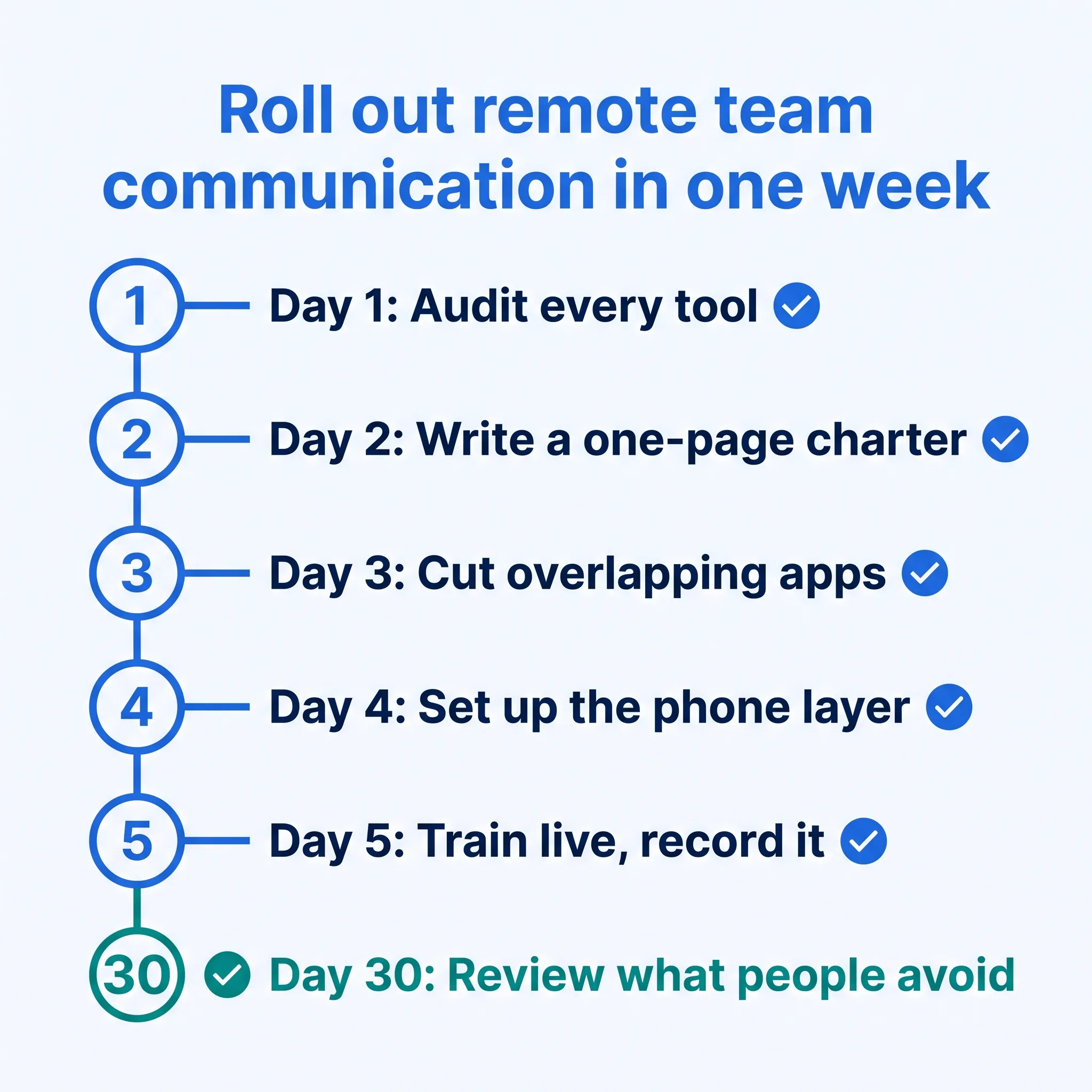
A drawn-out rollout is how new systems die. Here's the sequence that works:
- Audit your tools (day 1). List every app your team talks in and what each one's actually used for. Most teams find overlap they're paying for twice.
- Write a one-page charter (day 2). Which channel for which message, response-time norms, and meeting rules. One page. Nobody reads a 12-page policy.
- Cut the overlap (day 3). Pick one tool per job and retire the rest. Fewer places to check means fewer things missed.
- Set up the phone layer (day 4). Business numbers on every device, routing rules by working hours, voicemail you can read, mobile apps installed.
- Train live, once (day 5). One session, recorded for whoever's asleep. Walk through the charter with real examples, not abstractions.
- Review at 30 days. Ask what people avoid using and why. Then fix that, not what the dashboard says.
Remember Priya? Her team ran this exact play. The charter took one afternoon to write. Status updates moved to async notes, and calls now route through one shared business number by working hours. The duplicate-feature disaster hasn't repeated, and "quick calls" happen the same day instead of three days out.
Security matters when your team works from everywhere
Remote setups widen your attack surface: home Wi-Fi, personal devices, and more phishing attempts aimed at scattered staff. A few basics cover most of the risk.
- Turn on multi-factor authentication everywhere it's offered. CISA's MFA guidance is blunt: accounts with it are far less likely to get hacked.
- Pick communication tools that encrypt calls and messages in transit.
- Train the team to spot phishing, because people are the soft target.
- Keep a short written policy for handling customer data off-site.
You don't need an enterprise security team to do these. You need to actually do them, and then check that people follow through.
Which remote team communication mistakes should you avoid?
The big five: tool sprawl, treating every chat as urgent, defaulting to meetings, letting decisions vanish into threads, and running business calls through personal phones.
Stan, a sales ops manager, once mapped his company's stack and found four different apps with chat built in. Four. Nobody knew which one counted, so messages went wherever the sender felt like typing. Sound extreme? It's more common than you'd think.
- Tool sprawl. Every extra app splits attention and creates one more inbox to miss. One tool per job, ruthlessly.
- Treating chat like a fire alarm. When every ping demands an instant reply, nobody gets deep work done. Response-time norms fix this.
- Meetings as the default. A meeting is the most expensive way to share information. Save it for decisions and hard conversations.
- Decisions trapped in threads. If a choice lives in a chat scroll, it's gone within a week. Write decisions where search can find them.
- Personal phones for business calls. When someone leaves, their number and call history walk out the door with them. A business line keeps continuity, records, and coverage.
Notice a pattern? Each of these is a habit problem first and a tool problem second. Fix the habit, then let the tool make the good behavior automatic.
Keep culture alive across time zones
Remote culture runs on small, repeated rituals: casual channels, honest 1:1s, and wins celebrated in public. Big staged events don't do the job.
Here's where I'll take a stand: forced "virtual fun" is usually a waste of everyone's time. Mandatory scheduled games rarely build real connection, and people can smell the obligation. What works is small and consistent.
- Keep a casual channel for non-work chatter, and let it breathe.
- Run regular 1:1s that leave room for how people actually feel.
- Celebrate wins in the open so remote folks feel seen.
- Give quieter async channels to people who dread big video calls.
Connection on a distributed team accumulates in ordinary moments, not at the annual offsite. Ever notice how the strongest remote teams have inside jokes? That's the tell.
How do you measure remote team communication?
Track a handful of signals and adjust: response times, tool adoption, meeting load, and plain old team feedback. If people can't tell you where to ask a question, your system's broken no matter what the dashboard says.
The data isn't perfectly clean on which single habit matters most, but response speed is the one almost every healthy remote team gets right. This is where a phone system with real reporting earns its keep. dialnote is a cloud-based VoIP phone system with an AI receptionist that answers, routes, and logs calls for small and mid-sized teams. In our own dialnote call logs, teams that route calls to the right person on the first try respond about 30% faster than teams juggling scattered numbers.
Numbers like response time and missed-call rate tell you fast whether your remote setup is holding up. Watch them for a month, then fix the weakest link.
Bring remote team communication together with dialnote
Great remote team communication is habits first, tools second. But the right tools make the good habits automatic instead of aspirational, which is the whole point.
That's what a cloud VoIP phone system does for a distributed team: one business number on every device, calls that route to the right person, call recordings and summaries you can search, and an AI receptionist catching what your team can't. It runs on any device, connects to CRMs like HubSpot, Salesforce, and Pipedrive, and covers calling in 90+ countries.
Ready to give your remote team a phone system that travels with them? Start a 10-day free trial, no credit card needed, and see how much smoother the calls feel.
Frequently asked questions
There's no single best tool. Strong remote teams run a small stack: cloud VoIP for calls, chat for quick questions, video for hard conversations, and shared docs for decisions. The rules for using them matter more than the brands.
Less than you think. One weekly team meeting plus regular 1:1s covers most teams. Move status updates to async notes, and save live meetings for decisions, complex topics, and anything emotional.
Async communication means sending a message without expecting an instant reply. You give full context up front so the reader can respond on their own schedule. It's the default mode for teams spread across time zones.
Yes, if customers call you. A cloud VoIP system gives everyone one business number that works on any device, keeps personal numbers private, and records calls so absent teammates can catch up fast.
Start with a one-page charter: which channel for which message, expected response times, and meeting rules. Then track response times for a month and fix the weakest link. Most problems are habit problems, not tool problems.

Written by
Lancelot Dsouza
Chief Marketing Officer, SmartReach.io
Lancelot Dsouza is the Chief Marketing Officer at SmartReach.io, where he built the Marketing, Sales, and Customer Success verticals from the ground up. With over 25 years of experience spanning digital marketing, business development, and strategic...
Lancelot Dsouza is the Chief Marketing Officer at SmartReach.io, where he built the Marketing, Sales, and Customer Success verticals from the ground up. With over 25 years of experience spanning digital marketing, business development, and strategic...
Related Articles
Best Business Phone Systems: Traditional, VoIP & Cloud
Compare the 10 best business phone systems for small business. Find the right VoIP solution for your team size, budget, and features without overpaying.

What Is a Virtual Phone Number? A Complete Guide
Learn what a virtual phone number is, how it works, what it costs, and how to get one in minutes. See why businesses save up to 75% on phone costs.

Getting started with VoIP for your business
Learn how getting started with VoIP works, what you need to switch, and the steps to set up a business phone system that saves money and adds features.