VoIP Phone System for Sales: How dialnote Works
Your phone rings. Your best rep is on another call. Two others are in a meeting. That inbound lead? Gone.
We've seen this play out dozens of times with sales teams who come to us looking for a VoIP phone system for sales that actually solves this problem. It's not about making calls. It's about making sure you never lose an inbound lead because nobody picked up.
Alex runs a 10-person sales team at a mid-size SaaS company. Last quarter, he pulled call data and found something painful: his team was missing 38% of inbound calls. Not because they were slacking. They were busy, on other calls, in demos, updating the CRM.
The leads that called in during those gaps? Most never called back.
Sound familiar? That's exactly the problem we built dialnote to fix.
A VoIP phone system for sales shouldn't just give you a phone number. It should catch every call, route it to the right person, and fill the gaps when your team can't pick up. Here's how dialnote does that, and why inbound sales teams choose it over generic phone platforms.
TL;DR:
- A VoIP phone system for sales catches every inbound lead by ringing your whole team at once, queuing callers with position updates, and handing overflow to an AI agent.
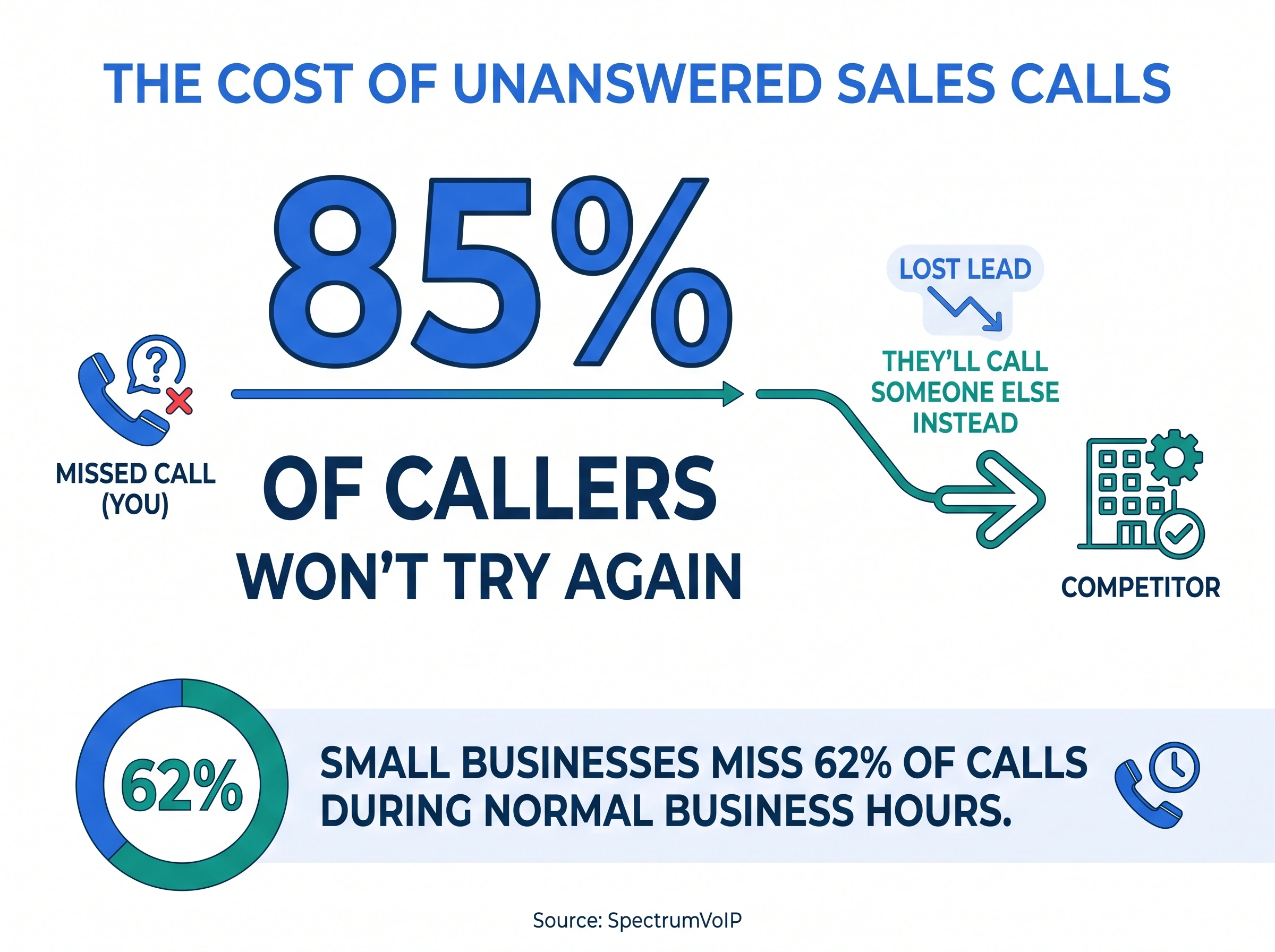
- Small businesses miss about 62% of calls during work hours, and 85% of callers won't try again, so missed inbound calls are a direct revenue leak.
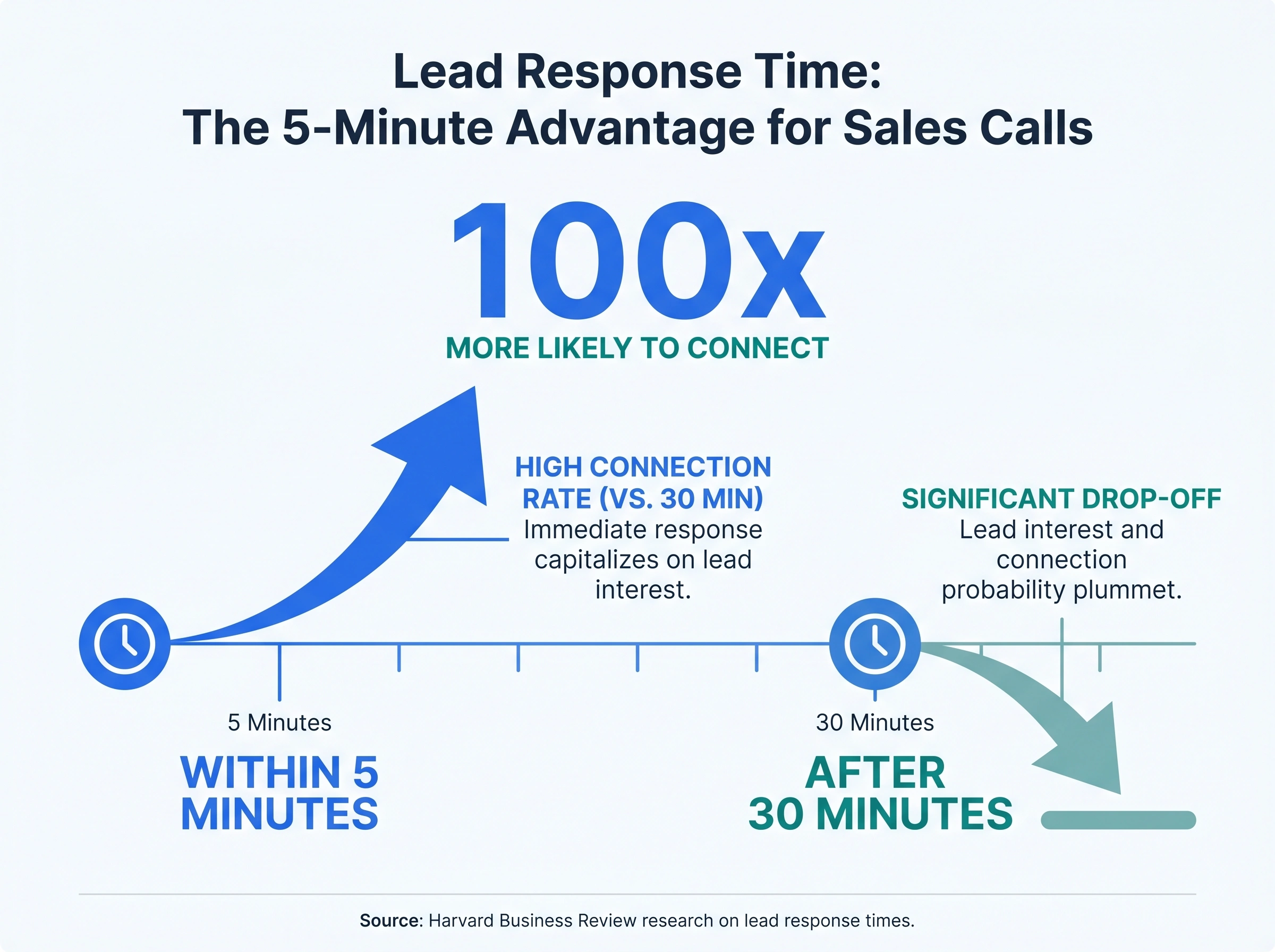
- Responding to an inbound lead within 5 minutes makes you 100x more likely to connect than waiting 30 minutes.
- dialnote handles inbound-first sales with a visual call flow builder, smart routing, dedicated sales call queues, and a 24/7 AI receptionist that qualifies leads and books meetings.
- dialnote isn't built for high-volume outbound cold calling today, so pair it with a dedicated dialer if that's your team's main motion.
Why do sales teams need a VoIP phone system?
A VoIP phone system routes calls over the internet instead of traditional phone lines. For sales teams, that means you can take calls from anywhere, route them intelligently, and plug in AI to handle overflow.
But the real reason sales teams need one is simpler: speed to lead.
When a prospect calls your business, they're ready to talk right now. Not in an hour. Not tomorrow. According to research from Harvard Business Review, responding within 5 minutes makes you 100x more likely to connect with that lead compared to waiting 30 minutes. On inbound calls, that window is even tighter. They're already on the line. If nobody answers, they're calling your competitor.
Traditional landlines can't solve this. They ring one phone. Maybe two. A VoIP system can ring your entire team simultaneously, queue the caller with hold music and position updates, or hand them to an AI agent that qualifies them while your reps finish their current calls.
That's the difference between a phone and a phone system.
The real cost of missed inbound sales calls
Let's put numbers to this.
According to SpectrumVoIP, 85% of callers won't try again if you don't answer the first time. They'll call someone else. And research shows small businesses miss about 62% of calls during normal business hours.
Think about that for a second. If your average deal is worth $5,000 and you miss just 3 qualified inbound calls per week, that's $780,000 in pipeline you never even get to work. Some of those calls would've closed. Some wouldn't have. But you'll never know because you never spoke to them.
The math gets worse when you factor in what you paid to generate those calls. PPC ads, SEO content, conference sponsorships, referral programs. All that money spent getting someone to pick up the phone. And then nobody picks up on your end. (If you're curious about the cost side, we broke down the ROI of switching to VoIP in a separate post.)
This isn't a minor gap. It's a revenue leak that most sales teams don't measure because they can't see what they never had.
Here's where it really stings. Your highest-value leads are the ones most likely to call. Someone who fills out a contact form might be casually browsing.
Someone who picks up the phone and dials your number? They want to talk. They're further along in the buying process. They're comparing two or three vendors, and the first one to have a real conversation wins.
We've talked to sales teams that tracked their missed calls for a month. Almost every one was shocked. The number was always higher than they guessed. One team found they were missing an average of 7 inbound calls per day. At their average contract value, that was over $1 million in potential annual revenue they never touched.
The fix isn't hiring more reps (though that helps). The fix is building a system that catches calls your current team can't get to.
What should a VoIP phone system for sales actually do?
Not all VoIP systems are built with sales teams in mind. Some are built for call centers. Others for general business communication. Here's what specifically matters for inbound sales:
Smart call routing - When a lead calls, the system should know who to send them to. Based on time of day, territory, deal stage, or just who's available right now. You don't want a prospect in Texas waiting while your East Coast team finishes lunch.
Call queues with transparency - If nobody's free immediately, don't dump the caller to voicemail. Put them in a queue. Tell them their position. Play something better than elevator music. According to research, callers will wait 2-3 minutes if they know someone's coming.
Simultaneous and sequential ring - Ring everyone at once for speed, or ring in order if you want specific reps handling specific calls. Your VoIP phone system for sales should support both.
IVR menus that actually help - "Press 1 for sales, press 2 for support." Simple. But it routes the caller to the right queue instantly instead of bouncing between departments.
AI backup for overflow - When everyone's busy, an AI voice agent can greet the caller, ask qualifying questions, and either book a meeting or transfer to a rep when one opens up.
CRM integration - Every call logged automatically. Who called, when, how long, what was discussed (via transcript). Your reps shouldn't spend 15 minutes after each call typing notes.
But does any of that matter if calls still go unanswered? The features are only useful if the system is designed to catch calls at every stage. That's the lens to evaluate with.
Here's my honest take: skip the all-in-one platforms if inbound is your priority. Most of them are built for outbound-heavy teams and treat inbound as an afterthought. They'll give you a dialer, a power dialer, parallel dialing. Great for cold calling. But their routing, queueing, and AI agent features? Often basic or bolted on.
Look for systems that treat inbound and outbound as equally important. Or better yet, ones that excel at whatever your team actually spends most of its time doing. That's the approach we took with dialnote.
How dialnote handles inbound sales calls
We built dialnote with inbound-first teams in mind. Here's how the pieces fit together for a sales team:
Visual call flow builder - You design exactly what happens when a call comes in. No code, no IT tickets. Drag and drop: check business hours, ring the sales team, if nobody answers within 30 seconds, hand off to your AI agent, then fall back to voicemail. You can see the entire flow on a canvas.
Ring strategies - Ring everyone simultaneously (first to pick up wins) or sequentially (primary rep first, then backup). For sales teams where speed matters, simultaneous is usually the play. Only available team members ring, so calls skip anyone set to "away" or "do not disturb."
Call queues built for sales - Create a dedicated sales queue with position announcements and estimated wait times. Pick "simultaneous" ring strategy so the first available rep grabs the call fast. Or use "longest idle" to spread calls evenly across your team.
Business hours routing - During working hours, calls go to your team. After hours, they route to your AI voice agent (more on that below). Weekends get a different flow. Each phone number can have its own schedule.
Shared phone numbers - Give your whole team access to one inbound sales line. Everyone can see the call history, pick up ringing calls, and view transcripts. No more "who talked to that lead last week?" confusion.
Auto-transcription and AI summaries - After every call, dialnote transcribes it and generates a summary with action items. Your reps can glance at the summary instead of listening to a 20-minute recording. Call scoring and sentiment analysis help you spot deals that need attention.
Queue analytics - Track how many calls entered your sales queue, how many connected to a rep, how many callers abandoned, and what the average wait time was. You'll see per-agent breakdowns showing who handled the most calls and how fast they picked up. An hourly volume chart helps you staff the right number of reps during peak hours.
Here's what a typical inbound sales flow looks like in practice:
A lead clicks your Google ad and calls your sales number. dialnote checks business hours (it's 2:15 PM, Tuesday). The call enters your sales queue and all 5 available reps ring simultaneously. Rep 1 picks up in 8 seconds.
After the call ends, dialnote generates a transcript, pulls out action items ("Send pricing proposal, schedule follow-up for Thursday"), and logs everything in the conversation history.
Now imagine that same call at 6:30 PM. Nobody's available. The AI agent picks up: "Hi, thanks for calling. I'm the virtual assistant for Acme Solutions. How can I help you today?"
The caller explains they're looking for pricing on your enterprise plan. The agent asks about company size, timeline, and budget range. Then it checks your calendar and books a meeting for the next morning. The caller gets a confirmation text with the meeting link. Your rep walks in the next day with a qualified meeting already on the books.
That's the difference between a system that just rings phones and one that actually sells.
Can an AI receptionist for sales qualify your leads?
Can AI really handle the nuance of a sales conversation?
Here's what we've learned: AI won't close your deals. But it's surprisingly good at the first 60 seconds of a call. That's the part where you're qualifying: who are you, what do you need, when do you want to talk?
Most inbound sales calls follow a predictable pattern. The caller introduces themselves, explains what they're looking for, and asks a few questions. An AI receptionist for sales can handle that entire opening exchange naturally. It gathers the info your reps need before they even pick up the phone.
dialnote's AI voice agents handle inbound calls when your team is unavailable. They greet the caller in a natural voice, ask qualifying questions, and can take real actions:
- Book appointments directly on your calendar (connects to Calendly or Cal.com)
- Send follow-up texts with links, confirmations, or meeting details
- Transfer to a rep when a high-priority lead needs a human right now
- Answer common questions using your knowledge base (pricing, availability, services)
- End calls politely when the inquiry doesn't match what you sell
You configure the agent with your own instructions. Define the agent's identity ("You're Sarah, a receptionist at Acme Solutions"), set task steps ("Greet the caller, ask about their company size, check calendar availability"), choose an interaction style, and set guardrails on topics to avoid.
The voice selection matters more than you'd think. You pick from providers like ElevenLabs, OpenAI, and Deepgram, with male or female voices, various accents, and formal or casual tones. A B2B SaaS company might want something professional and neutral. A local service business might want warm and friendly. The AI supports English, Spanish, French, German, and 15+ other languages.
The agents work 24/7. Weekends. Holidays. 2 AM when a prospect on the West Coast calls after seeing your ad. Instead of voicemail, they get a conversation. Instead of a lost lead, you get a booked meeting waiting in your calendar Monday morning.
Here's a setup we see work well for sales teams: during business hours, calls ring your reps first. If nobody answers in 30 seconds, the AI agent picks up, qualifies the lead, and either books a callback or transfers them when a rep frees up. After hours, the AI handles everything, books meetings for the next business day, and sends the caller a confirmation text.
Is it perfect? No. Complex sales conversations with technical questions or heavy negotiation still need your best reps. But for initial qualification and appointment setting? It's better than a missed call. Every time.
What about outbound calling?
Let's be upfront here. If your team's primary motion is outbound cold calling with power dialers and parallel dialing, dialnote isn't built for that today. We don't offer a dialer or AI voice agent for outbound calls right now.
You can absolutely make outbound calls from dialnote. The built-in dialer works from your browser or mobile app. Click a number, connect, talk. You get call recording, transcription, and AI-generated summaries on outbound calls too. So for warm outbound (following up with inbound leads, returning missed calls, checking in with existing prospects), it works great.
But if you're running a 50-rep SDR team that needs to blast through 200 dials per person per day, you'll want a dedicated outbound tool for that specific workflow. Parallel dialing, auto-dialing, and predictive dialing are features built for a very specific use case, and they require different architecture than what makes a great inbound system.
Honestly, the jury's still out on whether AI can fully replace human reps for outbound cold calling. The tech is getting there, but cold outbound is a different beast than handling inbound inquiries. Inbound callers want to talk to you. Outbound targets didn't ask for your call. Those are fundamentally different conversations.
We're building outbound capabilities that we think will be genuinely useful, and they're coming in the next few months. But we'd rather ship something that works well than rush a mediocre dialer to market.
For now, many of our sales teams use dialnote for all their inbound calls and a separate outbound tool for cold calling. That split works well because the requirements are genuinely different. Your inbound system needs smart routing, queueing, and AI backup. Your outbound system needs volume and speed. Trying to force one tool to do both usually means both suffer.
Getting started with dialnote for your sales team
Setting up a VoIP phone system for sales doesn't take weeks. Here's what the first day looks like with dialnote:
-
Get a phone number - Pick a local or toll-free number in your target market. Takes about 30 seconds.
-
Build your call flow - Open the visual builder, add a "ring users" step with your sales team, set a fallback to AI agent or voicemail. Five minutes, tops.
-
Set up your AI agent - Describe what your business does and how you want the agent to behave. Pick a voice. Connect your calendar. Test it with a live simulation before going live.
-
Create a sales queue - Add your reps, pick simultaneous ring, and set max wait time. Enable position announcements so callers know they're not forgotten.
-
Share the number - Give your team access. They'll see all calls, transcripts, and history from day one.
That's it. No hardware to install, no IT department to involve, no 6-week implementation project.
The most common question we get: "What about my existing phone number?" You can port it. It takes 1-2 weeks depending on your carrier, and dialnote handles the paperwork. During the transition, calls still come through to your old system so you don't miss anything.
One more thing worth mentioning. dialnote works on desktop (any browser) and mobile (iOS and Android). Your reps can take sales calls from their laptop at the office and from their phone at a coffee shop. Same number, same call history, same everything. The app stays in sync across devices.
Your sales team's job is to talk to prospects. A good phone system makes sure more prospects actually get through to them. The ones that don't answer? They're leaving money on the table every single day.
Frequently asked questions
The best VoIP phone system for sales depends on whether you're focused on inbound or outbound. For inbound-heavy teams, look for call queues, AI receptionists, and smart routing that connects leads to reps fast.
Yes. Modern AI receptionists can ask qualifying questions, check appointment availability, and route hot leads to the right rep. They won't close deals, but they'll make sure good leads don't slip through.
According to industry research, small businesses miss about 62% of incoming calls during normal hours. That's a big problem when 85% of callers won't try again if nobody picks up.
No. Cloud-based VoIP systems work with your existing laptops, smartphones, and headsets. You download an app, log in, and start making calls. No desk phones required.
Most cloud VoIP systems take under a day to set up. You can get a phone number, configure call routing, and start taking calls within hours. No IT team needed.

Written by
Lancelot Dsouza
Chief Marketing Officer, SmartReach.io
Lancelot Dsouza is the Chief Marketing Officer at SmartReach.io, where he built the Marketing, Sales, and Customer Success verticals from the ground up. With over 25 years of experience spanning digital marketing, business development, and strategic...
Lancelot Dsouza is the Chief Marketing Officer at SmartReach.io, where he built the Marketing, Sales, and Customer Success verticals from the ground up. With over 25 years of experience spanning digital marketing, business development, and strategic...
Related Articles
VoIP Phone System for Customer Support: dialnote
See how dialnote's VoIP phone system helps support teams handle more queries with AI agents, smart routing, call queues, and 50+ integrations.

How to Get a Business Phone Number Without a Landline
Learn how to get a business phone number without a landline in under 30 minutes. Compare VoIP, virtual, and mobile options for small businesses.

Google Voice Alternatives: 7 Picks for Business
Compare 7 Google Voice alternatives built for serious business use by AI features, multi-level IVR, CRM sync, and real per-user costs.