Is a 24/7 AI Answering Service Worth It? Cost & Setup
85% of callers won't try again if you don't answer the first time. One missed ring, and your potential customer is already dialing your competitor.
For small businesses, this hits especially hard. An AI answering service picks up every call, day or night, so you don't have to choose between sleep and revenue. And the technology has gotten surprisingly affordable in the last couple of years.
Stan runs a plumbing company with six employees. His phone rings at all hours, but after 6 PM, those calls go straight to voicemail. He figured most people would leave a message and call back in the morning. They didn't. (This is a common pattern we break down in our after hours answering service guide.)
When he finally checked his numbers, roughly $500 a month was walking out the door from unanswered calls alone. That's over $6,000 a year. Enough to hire a part-time helper.
What happens to those calls when nobody picks up? Most of the time, the caller moves on. According to Entrepreneur, 82% of callers won't bother leaving a voicemail. They'll just call the next business that shows up on Google.
That's the problem a 24/7 AI answering service solves. And it's way more affordable and easier to set up than most business owners expect.
What an AI answering service actually does
An AI answering service is software that picks up your business phone calls using artificial intelligence. It talks to callers in a natural-sounding voice, answers common questions, books appointments, takes messages, and routes calls to the right person on your team.
It's like a virtual receptionist that never takes a break. It works around the clock, handles multiple calls at the same time, and doesn't need retraining every time you change your hours or pricing.
The AI uses natural language processing to understand what callers want. If someone calls asking about your business hours, it answers. If they want to schedule a service call, it books the appointment right into your calendar. And if the issue needs a real person, it transfers the call to whoever's on duty.
This isn't the clunky, button-pressing phone tree from ten years ago. Modern AI answering services carry real conversations. They handle follow-up questions, manage interruptions, and respond in ways that sound surprisingly human. Some can even recognize returning callers and pull up their history before the conversation starts.
The difference between an AI answering service and a basic IVR (interactive voice response) system is worth understanding. An IVR says "press 1 for sales, press 2 for support." An AI answering service says "Hi, how can I help you?" and figures out the rest from context. It's a completely different experience for the caller.
The technology works across industries, too. Dentist offices use it for appointment booking. Law firms use it to screen potential clients after hours. Landscaping companies, plumbing businesses, HVAC companies, contractors, pest control companies, and other home service companies use it to capture emergency calls at midnight. Auto shops and dealerships use it to book service appointments and capture after-hours leads.
Real estate agents use it so they never miss a hot lead. Property management companies use it to catch tenant calls, triage maintenance emergencies, and handle leasing inquiries around the clock. The core idea is the same: every call gets answered, no matter when it comes in.
If you're curious about how AI voice assistants work in small business phone systems, we've covered the technology in more detail.
How much does an AI answering service cost
Here's the part everyone wants to know first. Pricing for AI answering services falls into a fairly wide range, so let me break it down by tier.
Entry-level AI plans: $25-$100/month. These work for businesses that get fewer than 100 calls a month. You'll get basic call answering, message taking, and simple appointment scheduling. If you're a solo operator or a small shop just starting out, this tier is probably enough.
Mid-tier plans: $100-$300/month. These cover higher call volumes and add features like CRM integration, custom call scripts, analytics dashboards, and multilingual support. This is the sweet spot for growing businesses with steady call flow and teams of 5-20 people.
Enterprise and custom plans: $300+/month. Built for high-volume operations that need advanced call routing, real-time reporting, custom AI training on industry-specific terms, and dedicated account support. If you're running a multi-location business or a contact center, this is where you'd land.
Most providers charge either a flat monthly fee, a per-minute rate (usually $0.20-$0.30 per minute), or a hybrid of both. Some offer unlimited minutes at higher tiers, which is great if your call volume swings up and down unpredictably.
How does that compare to the alternatives?
| Service type | Monthly cost | Hours available | Calls at once |
|---|---|---|---|
| Traditional answering service | $200-$1,000+ | Limited after-hours | Depends on staff size |
| AI answering service | $25-$300 | 24/7/365 | Unlimited (most plans) |
| In-house receptionist | $2,500-$4,000+ | Business hours only | One at a time |
Hard to say exactly what you'll pay, since pricing varies a lot by provider, plan structure, and monthly call volume. But the math points one direction: AI answering costs a small fraction of what you'd spend on a human receptionist or a traditional answering service.
Some providers go a step further and bundle AI answering into a complete business phone system. dialnote, for example, charges a flat $99/month for unlimited seats on its Business plan. No per-user fees at all. You get around 1,000 calling minutes included, and extra minutes cost roughly $10 per 900, depending on whether you're calling local or international numbers. The AI voice agent is a $30/month add-on that covers 30 minutes of AI conversation time, with additional minutes at about $0.89 each. So a 10-person team pays roughly $129/month for a full phone system with AI answering built right in. That's tough to beat.
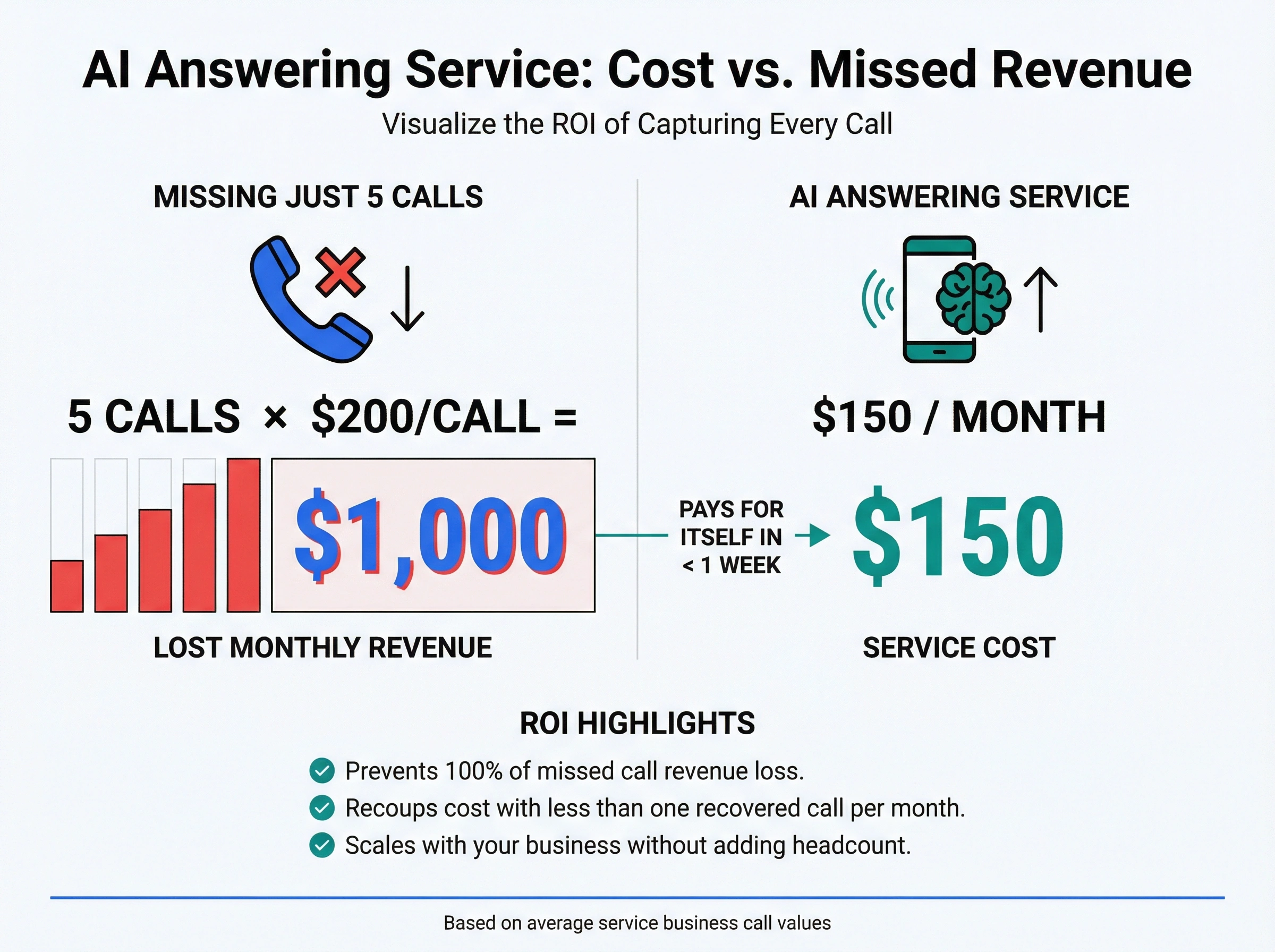
Quick ROI calculation: If you're losing even 5 calls a month that would've been worth $200 each, that's $1,000 in missed revenue. A $150/month AI answering service pays for itself before the first week is over.
If you're already looking at ways to cut your phone costs, an AI answering service stacks well on top of VoIP savings.
5 benefits of a 24/7 AI answering service
1. You never miss a call
This one's obvious, but it's the biggest deal by far. Your AI picks up every call, whether it's 2 PM on a Tuesday or 3 AM on a Sunday. No voicemail. No hold music. No "sorry, we're closed, call back tomorrow."
For service businesses like plumbers, dentists, and law firms, after-hours calls are often the most valuable ones. Someone with a burst pipe at midnight isn't casually browsing. They're ready to pay. Miss that call and they'll hire whoever answers first.
About 62% of business calls go unanswered on average. That's not just an inconvenience. It's a revenue leak that adds up fast.
The math gets even worse for businesses that rely on phone calls for bookings. A missed call for a dentist might be a $300 cleaning. For a lawyer, it could be a $5,000 case.
For a home services company like a plumber, it's a $1,200 job that goes to the competitor down the road. An AI answering service turns those missed calls into booked revenue.
2. You save serious money
Let's run the numbers. A full-time receptionist costs at least $30,000 a year in salary. Add benefits, training time, sick days, and vacation, and you're looking at $40,000-$50,000 annually.
An AI answering service at $150/month costs $1,800 a year. Even premium plans at $300/month come to just $3,600. That's a 90%+ cost reduction compared to a dedicated human hire. And the AI doesn't call in sick on Mondays or need two weeks off in August.
Plus, you're not paying for downtime. A human receptionist handles one call at a time and takes lunch breaks. Your AI handles dozens of calls simultaneously without missing a beat.
3. Your customers get instant answers
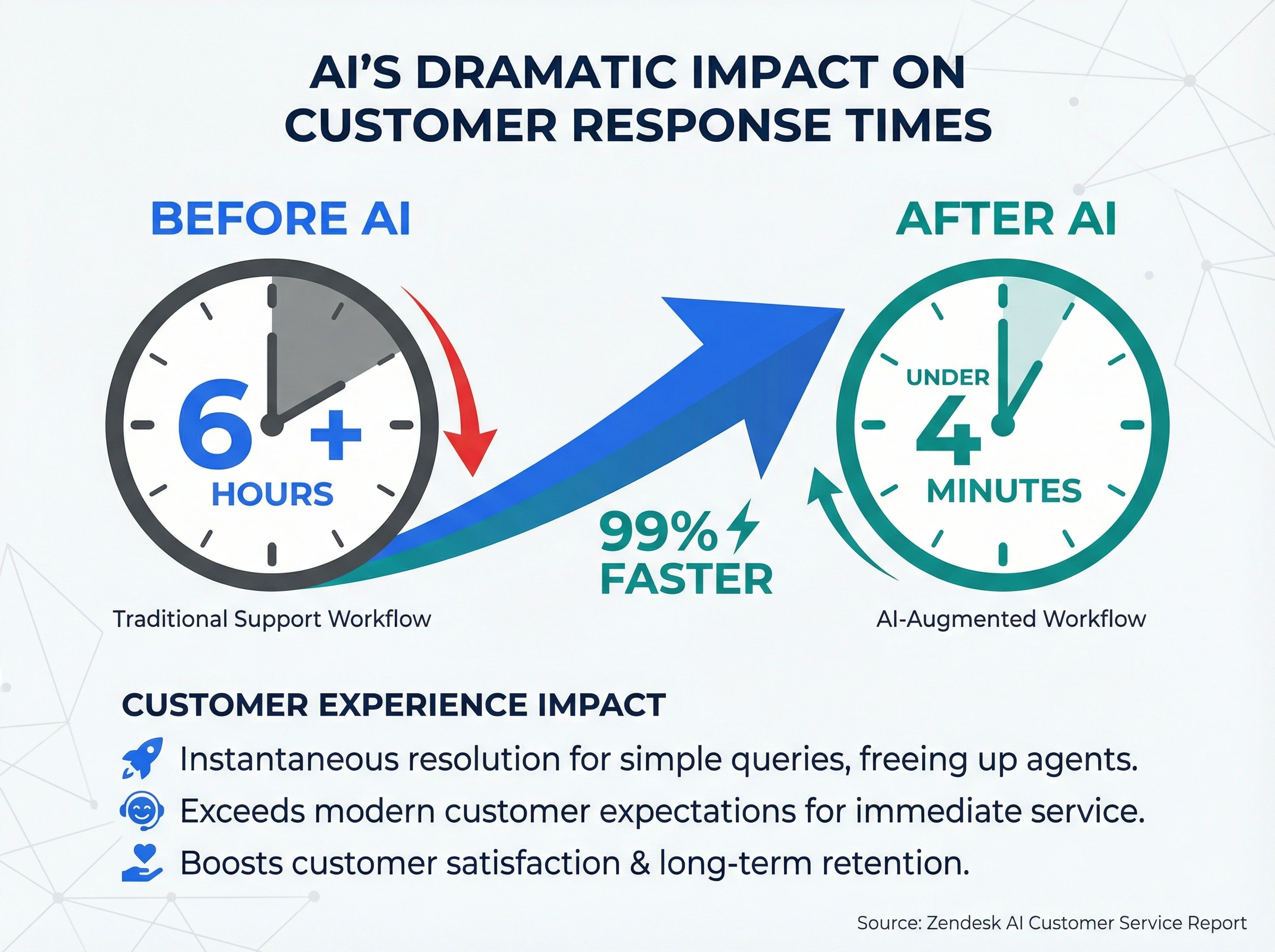
Nobody likes waiting on hold. A Zendesk analysis of AI in customer service found that first response time dropped from over 6 hours to under 4 minutes when businesses added AI to their support workflow. That's not a minor tweak. That's a completely different customer experience.
If you've ever sat on hold for 20 minutes listening to elevator music, you know exactly how your callers feel when they can't get through. Speed matters, and AI delivers it. For a deeper look at how AI and VoIP work together for support teams, check out our VoIP phone system for customer support guide.
4. You can scale without hiring
Busy season hits. Call volume doubles or triples overnight. With a human team, you'd need to recruit, interview, hire, and train new staff. That takes weeks, sometimes months. With an AI answering service, it just handles more calls. No interviews, no onboarding, no extra desks.
This matters a lot for seasonal businesses and companies in growth mode. You can jump from 50 calls a week to 500 without changing a single thing about your setup. The system scales with you automatically, no extra work required.
5. You get better data on every call
Most AI answering services log every interaction automatically. You'll see who called, when they called, what they asked about, and how the call ended. Some platforms even score calls by sentiment or urgency level.
That kind of data is incredibly valuable for spotting patterns you'd never notice otherwise. Maybe most of your missed calls happen on Tuesdays between 4-6 PM. Or maybe 30% of callers ask about a service you don't even advertise on your website. Now you know exactly where to focus your attention and marketing budget.
For a deeper look at what AI and automation can do for your phone system, we've written a full breakdown.
How to set up your AI answering service
Setting up an AI answering service is way simpler than most people expect. Here's a step-by-step walkthrough based on how most modern platforms work.
Step 1: Pick your provider
Start by comparing 3-4 options side by side. Our ranked roundup of the best AI receptionist software covers 9 of them with real pricing and features. Key things to evaluate:
- Industry fit. Some AI services specialize in healthcare, legal, or home services. Industry-specific training means the AI already knows your common call types. Clinics, for example, need an AI that handles appointment scheduling, prescription refills, and HIPAA-compliant calls.
- Integrations. Does it connect to your CRM, calendar, or helpdesk? Good integrations save hours of manual data entry every week.
- Pricing model. Per-minute, flat fee, or hybrid? Match it to your actual call volume so you're not overpaying.
- Language support. If you serve bilingual customers, check that the AI handles multiple languages naturally.
- Call quality. Don't just read the marketing page. Listen to actual demo calls and read user reviews from businesses like yours.
Step 2: Set up your business profile
Once you've picked a provider, you'll enter your business details: company name, operating hours, services you offer, common FAQs, and how you want different types of calls handled.
This is what the AI uses to answer questions accurately. Think of it as giving your virtual receptionist a full briefing on your business. Most platforms make this easy through a guided setup wizard. Some can even pull information straight from your website to speed things up.
Step 3: Build your call flows
Map out what should happen for different types of incoming calls:
- New customer inquiry: answer their questions, then book an appointment
- Existing customer: look up their account, transfer to their rep if needed
- After-hours emergency: forward immediately to your on-call staff
- General question: respond with pre-set information about hours, location, pricing
- Wrong number or spam: politely redirect or end the call
Keep it simple at first. You can always add more branches and complexity later based on what the data tells you.
Step 4: Test everything
Before going live, call your own number. Run through every scenario you can think of. Ask weird questions. Hang up mid-sentence. Try calling during business hours and after hours. Ask for something the AI shouldn't know.
The goal is to find gaps before your real customers do. Most services let you tweak responses in real time, so if something sounds off during testing, you can fix it on the spot.
Plan to make at least 10-15 test calls covering your most common scenarios.
Step 5: Launch and monitor
Turn it on and keep a close eye on the dashboard for the first week or two. Review call logs daily. Listen to recordings if the platform supports it. Pay attention to calls where the AI transferred to a human. Those transfers tell you what the AI needs more training on.
The full setup process takes anywhere from a couple of hours to a few days, depending on how complex your call flows are. For most small businesses, you can be up and running by the end of the afternoon.
One thing worth mentioning: don't wait until your setup is "perfect" to launch. The fastest way to improve your AI answering service is to get real call data flowing in. You'll learn more from 50 real calls than from hours of guessing what callers will ask.
If you're weighing whether to use voice AI or a chatbot for customer communication, the answer usually depends on how your customers prefer to reach you. Phone-heavy businesses almost always get more value from voice AI.
Mistakes to avoid when picking an AI answering service
Choosing based on price alone
The cheapest plan isn't always the best deal. A $25/month service that sounds robotic and confuses callers will cost you more in lost business than a $150/month service that actually converts leads into booked appointments. Pay for quality where it matters.
Skipping the testing phase
Why does this keep happening? Businesses sign up, flip the switch, and don't bother running test calls. Then a real customer calls, gets a confusing or incorrect answer, and hangs up. You've lost trust and revenue in one interaction. Always test before going live.
Ignoring the call data
Your AI service collects detailed data on every call for a reason. If you're not reviewing it at least once a week, you're missing chances to improve. Look at call outcomes, peak times, the questions callers ask most, and where the AI struggles.
Overcomplicating your call flows
Honestly? Most businesses overthink this part. You don't need 15 different call paths and a decision tree that looks like a subway map. Start simple with 3-4 main scenarios and add complexity gradually as you learn what your callers actually need. Simple flows are also easier for the AI to execute well.
Not feeding the AI your real content
Generic, one-size-fits-all responses are what make callers feel like they're talking to a machine. And that defeats the whole purpose. Give the AI your actual FAQs, your real pricing, your specific service list, and your company's personality. The more context it has, the more natural and helpful it sounds on every call.
How dialnote handles AI answering for small businesses
If you've been reading this and thinking "okay, but which service actually does all of this?", dialnote is worth a look. It's a full AI-powered phone system built for small and growing teams, and it covers most of what we've talked about in this post.
Here's what makes it a good fit for the AI answering service use case:

24/7 AI voice agents that actually sound human. dialnote's AI receptionist picks up calls around the clock, answers FAQs, captures lead info, and books appointments without human help. It supports 14 languages, so if you serve a multilingual customer base, you're covered. When a caller needs a real person, the AI transfers the call with full context so your team doesn't start from scratch.
Built-in call analytics and AI coaching. Every call gets an automatic summary with key points and next steps. You also get full transcripts, sentiment analysis, and call scoring. For teams, there's AI-powered coaching that reviews calls and flags areas for improvement. It's the kind of data we talked about in the benefits section, built right into the platform.
CRM sync that works both ways. dialnote connects to Salesforce, HubSpot, Zendesk, and 100+ other tools through direct integrations, Zapier, and webhooks. When a call comes in, your CRM gets updated automatically. No more manual logging after every conversation.
Smart call routing for every scenario. You can set up conditional routing, after-hours rules, ring groups, and warm transfers. Calls go to the right person (or the AI) depending on time of day, caller history, or department. This is where the "never miss a call" promise actually plays out.
It's not just an answering service. dialnote also gives you unlimited calling seats across the US and Canada, local and toll-free numbers in 75+ countries, a mobile app, voicemail transcription, and team collaboration features like shared inboxes and internal threads. So you're not bolting on an AI answering tool to your existing system. You're replacing the whole stack with something that does more.
At $99/month flat for unlimited seats (plus $30/month for the AI voice agent add-on), it's one of the most affordable complete AI phone systems you'll find. Per-seat plans start at just $15/month if you prefer that model. And there's a free trial if you want to test it before committing.
Your next move with an AI answering service
Here's what the numbers tell us: missed calls cost small businesses thousands of dollars every year. And for most of them, the fix isn't complicated or expensive. An AI answering service solves the problem for a fraction of what you'd pay for a human receptionist or a traditional answering service.
The technology's gotten good enough that most callers can't tell the difference. Setup takes hours, not weeks. And the return on investment shows up in your very first month.
If you want to see how it works for your business, start a free dialnote trial and find out just how many calls you've actually been missing.
Frequently asked questions
It's software that answers your business phone calls using AI. It talks to callers, books appointments, takes messages, and routes calls to your team, all 24/7.
Most AI answering services cost $25-$300/month depending on features and call volume. That's far less than a human receptionist at $2,500+/month.
Yes. Most connect to your calendar and can book, change, or cancel appointments during the call without human help.
Most small businesses get set up in a few hours. You add business details, create call flows, run test calls, and go live.
Most won't. Modern AI answering services sound natural and handle real conversations. For routine calls like scheduling or FAQs, callers often can't tell.

Written by
Upasana Sahu
Senior Digital Marketing Specialist, SmartReach.io
Upasana Sahu is a Senior Digital Marketing Specialist at SmartReach.io with over 10 years of experience in content marketing, SEO, and digital strategy. She manages end-to-end blog operations, from content creation and on-page/off-page SEO to traffic...
Upasana Sahu is a Senior Digital Marketing Specialist at SmartReach.io with over 10 years of experience in content marketing, SEO, and digital strategy. She manages end-to-end blog operations, from content creation and on-page/off-page SEO to traffic...
Related Articles
Best AI Receptionist Software For Businesses Ranked
Compare the best AI receptionist software for businesses by 10-user cost, per-minute AI fees, IVR, call queueing, and real reviews. Pick the right tool.
Does Your Business Need an After Hours Answering Service?
Learn how an after hours answering service captures missed calls, compare pricing for live vs AI options, and set up 24/7 coverage for your business.
AI Phone Answering Service vs Virtual Receptionist?
Compare AI phone answering services and virtual receptionists side by side. Find which option fits your business, budget, and call volume.