AI receptionist for law firms: never miss a client call
It's 6:43 PM on a Thursday. You just left a two-hour deposition. Your paralegal went home at 5. Your phone shows four missed calls and zero voicemails.
One of those callers was a personal injury lead your Google Ads brought in. They needed to talk to someone right now. Instead, they got your voicemail, hung up, and called the firm that answered on the second ring.
That's a $50,000 case you'll never know about.
If you run a law firm, this happens more than you think. An AI receptionist for law firms fixes it by answering every call, screening potential clients, and scheduling consultations while you're in court, in meetings, or just done for the day.
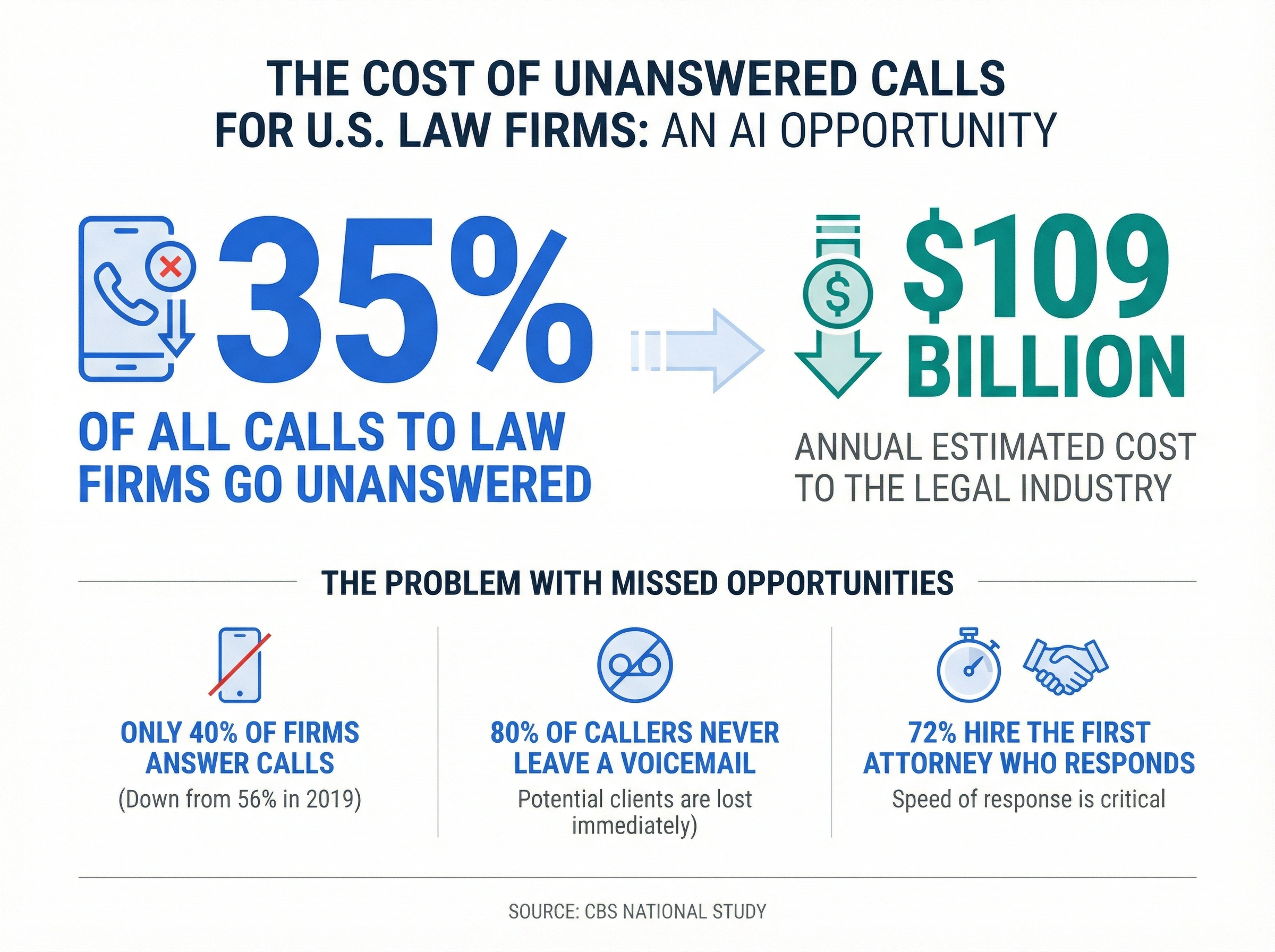
According to a national study reported by CBS, 35% of all calls to U.S. law firms go unanswered, costing the legal industry an estimated $109 billion per year. That's not a typo. Billion with a B.
Why do law firms miss so many client calls?
Law firms miss calls because attorneys are doing the work that actually bills. It's that simple.
You're in court. You're in depositions. You're meeting with clients. You're reviewing contracts or prepping for trial. None of that happens at a desk waiting for the phone to ring.
Solo practitioners and small firms get hit hardest. According to the Clio Legal Trends Report, only 40% of law firms answer phone calls, down from 56% in 2019. That means 60% of firms aren't picking up when potential clients call. And the decline is getting worse, not better.
Here's why that's so costly in legal. When someone calls a law firm, they're usually dealing with something urgent. A car accident. A divorce filing. A criminal charge. An employment dispute. These aren't people browsing casually. They need help now. Research shows that 72% of legal consumers will hire the first attorney who responds. First. Not best. Not cheapest. First.
So when your phone goes to voicemail? That caller isn't leaving a message and patiently waiting. About 80% of callers to law firms never leave a voicemail. They call the next firm on Google. Your marketing dollars just bought your competitor a new client.
The after-hours problem makes it even worse. Most people search for attorneys after their workday ends. They're Googling "personal injury lawyer near me" at 8 PM, reading reviews at 9 PM, and ready to call at 10 PM. During off-hours, up to 90% of law firm calls go unanswered. That's a massive window where your competitors with a law firm virtual receptionist or answering service are scooping up leads you paid to generate.
Sound familiar?
What can an AI receptionist do for a law firm?
An AI receptionist for law firms answers your phone with natural-sounding conversation, screens callers, and captures intake information while you focus on practicing law.
Think of it as a virtual receptionist for your legal practice that never takes lunch, never leaves at 5 PM, and never puts a caller on hold because two lines are ringing at once. When a potential client calls about a car accident case, the AI gathers their name, contact info, what happened, and when it happened, then sends you a clean summary so you can call back with the right questions ready.
It's not one of those "press 1 for family law, press 2 for criminal defense" menus that make callers feel like they're dealing with a call center. Modern AI receptionists use natural language processing to have real conversations. A caller can say "I got rear-ended last week and I think I need a lawyer" and the AI understands they need personal injury, not a traffic ticket.
For law firms specifically, a good AI receptionist handles:
- New client screening. Collects case type, basic facts, timeline, and contact details. Sends a structured intake summary to the right attorney or practice group.
- Consultation scheduling. Books initial consultations directly on your calendar. No double-booking, no back-and-forth emails.
- Practice area routing. Personal injury calls go to one attorney. Family law goes to another. Criminal defense goes to the partner who handles those cases. All automatic.
- Urgent call flagging. If someone mentions a statute of limitations deadline, an arrest, or a restraining order hearing tomorrow, the AI flags it as urgent and rings your cell.
- Basic FAQ answers. "Do you offer free consultations?" "What areas of law do you practice?" "Where are you located?" The AI handles these without using your time.
- After-call text summaries. Every call generates a summary with the caller's name, case type, key facts, and any appointment booked.
Can it handle everything? No. About 85% of calls get handled without human involvement. For the other 15%, like complex legal questions, emotionally distressed callers who need a human voice, or opposing counsel, the AI takes a detailed message and flags it for immediate follow-up. That's still far better than a missed call.
If you're curious about how AI voice assistants work for small businesses, we've covered the technology in a separate guide.
How does it handle legal client intake?
Client intake is where law firms win or lose cases before they even start. An AI receptionist for law firms automates the front end of intake so your team spends time evaluating cases, not playing phone tag.
Here's what a typical AI-powered intake call looks like:
Caller: "Hi, I was in a car accident two weeks ago and the other driver's insurance is giving me the runaround. I think I need a lawyer."
AI receptionist: "I'm sorry to hear about your accident. I can help get you connected with one of our attorneys. Can I get your name and the best number to reach you? And can you tell me a bit more about what happened, like where the accident occurred and if you've seen a doctor?"
The AI captures the caller's name, phone number, email, case type, date of incident, brief description, and whether they've already spoken to another attorney. All of this flows into a structured intake form that lands in your inbox or case management system within seconds.
Why does this matter so much for law firms? Because speed is everything. Responding to a prospect within the first 60 seconds can increase conversion rates by 391%, according to legal marketing research. A law firm AI answering service that captures intake data instantly gives you a massive head start over firms that call back "sometime tomorrow."
We're not 100% sure exactly how much of the conversion lift comes from speed alone versus having better intake data versus just making a stronger first impression. It's hard to isolate. But firms using AI-powered intake consistently report a 15-40% increase in qualified leads. Whatever's driving it, the numbers are clear.
5 ways an AI receptionist helps law firms grow
Growing a law firm is hard when you're the bottleneck for every client call. You can't take on more cases, hire associates, or expand practice areas when every potential client has to reach you personally. Here's how an AI receptionist for law firms removes that constraint.
1. Capture every lead, even at 10 PM
Most legal searches happen after work hours. Potential clients are Googling attorneys at 7 PM, reading reviews at 8 PM, and ready to call at 10 PM. If nobody answers, they move on.
An AI receptionist picks up every call, day or night. A personal injury lead calling at 10 PM on a Saturday gets the same professional intake experience as someone calling at 10 AM Monday. By the time you check your phone Sunday morning, there's a qualified intake summary waiting for you.
2. Free up billable hours
Every hour you spend returning calls, screening leads, and scheduling consultations is an hour you can't bill. For a solo practitioner billing $300/hour, spending just 2 hours a day on phone admin costs you $600 in lost revenue daily, roughly $150,000 per year.
An AI receptionist handles all of that. You get those hours back for the work that actually generates revenue: depositions, court appearances, client consultations, and case strategy.
3. Cut costs without cutting quality
A full-time receptionist costs $35,000-$50,000 per year when you factor in salary, benefits, and training. An AI receptionist for law firms typically runs $50-300 per month.
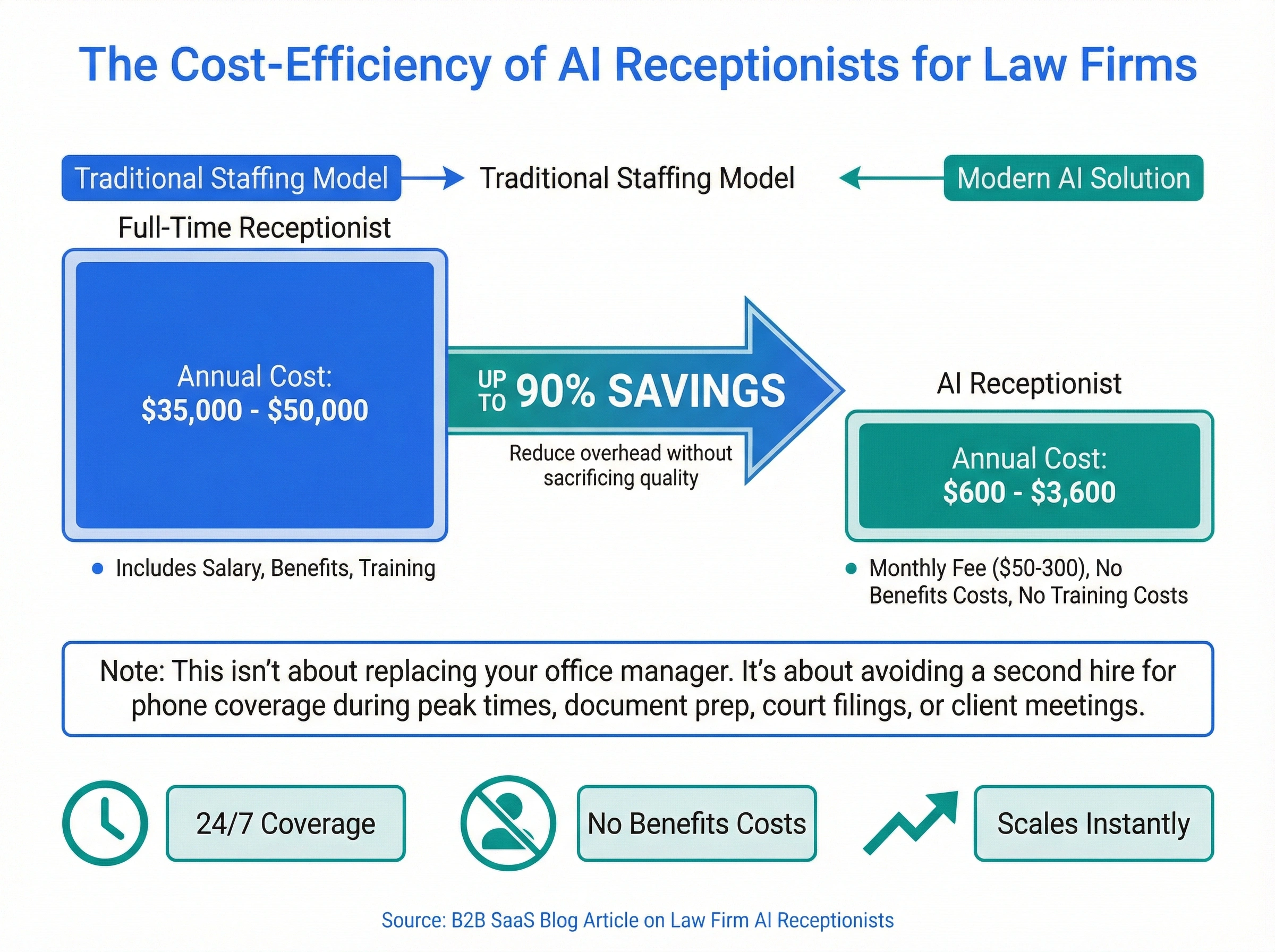
That doesn't mean you fire your office manager. It means you don't need to hire a second person to cover phones when your current staff is buried in document prep, court filings, or client meetings. The AI handles the overflow, and your team handles the work that needs a human touch.
We've broken down the full cost comparison of AI answering services if you want the detailed math.
4. Handle advertising surges without scrambling
Running a Google Ads campaign or just got a great Avvo review? Call volume can spike overnight. Without extra help, those expensive leads go to voicemail right when your marketing is working best.
An AI receptionist scales instantly. Whether you get 10 calls a day or 100, every single one gets answered. No scrambling for temp staff, no missed leads during your busiest weeks.
5. Look like a bigger firm from the first call
First impressions matter in legal. When a potential client calls and immediately gets a professional, knowledgeable response (no hold music, no "leave a message after the beep"), they feel confident they picked the right firm.
Isn't that the whole point? An AI answering service for lawyers gives a solo practitioner the same phone experience as a 50-attorney firm. Clients don't know or care how many people work at your practice. They care that someone picked up and took them seriously.
What about client confidentiality and legal ethics?
Any technology handling client communications at a law firm must protect confidentiality. This is non-negotiable, and it's the first question you should ask any AI receptionist provider.
Here's what confidentiality protection looks like for a legal AI receptionist:
- Encrypted calls and data. All voice data and client information should be encrypted in transit and at rest.
- Confidentiality agreements. The provider should sign an agreement acknowledging the sensitive nature of legal communications.
- Limited data retention. The AI shouldn't store detailed case information beyond what's needed for the intake summary. Call recordings should be handled per your state's rules.
- Access controls. Only authorized staff should see intake summaries. Different practice groups should only see their own calls.
- Compliance with state bar rules. AI receptionists for law firms must follow your jurisdiction's rules about non-lawyer communication. The AI should never provide legal advice, just gather information and schedule consultations.
Honestly? Not every AI receptionist is built for legal. Some are designed for retail or home services and don't understand the confidentiality requirements of legal practice. For a law firm, you need a provider that gets the difference between a sales inquiry and a privileged communication.
We've written about phone system requirements for law firms if you want the full breakdown of what legal-specific features to look for.
What to look for in a law firm AI receptionist
Not all AI receptionists work the same, especially for legal. Here's what actually matters when you're choosing an AI receptionist for law firms like yours.
Legal intake capabilities. Your AI should collect more than just a name and number. It needs to capture case type, date of incident, opposing parties, and other practice-specific details. If it can't do structured legal intake, it's just a fancy voicemail.
Case management integration. Does it push intake data directly into Clio, MyCase, PracticePanther, or whatever system you use? Manual data entry is exactly the busywork you're trying to eliminate.
Practice area routing. A personal injury caller needs a different attorney than a family law caller. Your AI should route based on case type automatically, not dump everything into one queue.
Bilingual support. Depending on your market, a significant portion of your potential clients may speak Spanish. An AI receptionist that handles both English and Spanish means you're not turning away cases because of a language barrier.
Conflict check support. Some AI receptionists can flag potential conflicts by checking new caller names against your existing client database. We're not sure every provider does this well yet, but it's worth asking about.
Analytics and reporting. You should see how many calls come in, what practice areas are busiest, conversion from call to consultation, and peak call times. This data helps you allocate marketing spend and plan staffing.
How a law firm runs on dialnote with AI receptionist
The AI receptionist works best as part of a complete phone system built for how law firms actually operate. Here's what a typical day looks like when a firm uses dialnote with the AI receptionist.
7:30 AM - Before the office opens. A potential client calls about a slip-and-fall that happened yesterday. The AI receptionist picks up, gathers their name, contact details, where it happened, and whether they've sought medical treatment. It sends a structured intake summary to the personal injury partner's email before anyone arrives at the office.
10:15 AM - You're in court. Three calls come in while you're at the bench. Your paralegal is on the phone with the clerk's office. The AI handles all three: one consultation booking, one existing client reschedule, and one caller asking about your practice areas. Your paralegal doesn't miss a beat.
12:30 PM - Lunch break. Your office manager steps out. The AI covers the phones. Two new intake calls come in, both from your Google Ads campaign. Both get full intake screenings and consultation slots booked for this week.
8:45 PM - After hours. A potential criminal defense client calls after getting arrested. The AI recognizes the urgency, captures their information, and immediately routes a notification to the on-call attorney's cell. Non-urgent calls get a professional response with next-day callback scheduling.
Beyond the AI receptionist, dialnote gives your law firm the phone infrastructure to run everything smoothly:
A real business number on your personal phone. dialnote's mobile app puts your firm's number on the phone you already carry. Clients see your firm's caller ID, not your personal cell. When you're in court, Do Not Disturb sends calls to voicemail silently.
Call recording and transcription. Every client call can be recorded and transcribed automatically. AI-powered call summaries give you the key points without replaying the full conversation. This is valuable for case files and dispute documentation.
Analytics that drive smarter marketing. See which practice areas generate the most calls, what times are busiest, and how many leads convert to consultations. This data helps you allocate marketing budget where it actually produces cases.
The AI receptionist is powerful on its own. But when it's part of a complete phone system with shared lines, smart routing, call recording, and analytics, your firm's entire client communication operation gets sharper.
AI receptionist for law firms: your competitive edge
The legal market is getting more competitive every year. According to legal marketing data, 72% of potential clients will hire the first attorney who responds. Not the most experienced. Not the best reviewed. The first one who picks up the phone.
You can't be first if you're in a deposition. You can't be first if your paralegal is at lunch. You can't be first if your phone rings at 9 PM and nobody's there.
An AI receptionist for law firms makes you first, every time. dialnote offers an AI receptionist built for service businesses like yours, from law firms to salons to accounting firms to construction companies. It answers calls, screens clients, schedules consultations, and sends you summaries so you can focus on practicing law instead of playing phone tag.
Try it for yourself and see what happens when you stop losing clients to voicemail.
Frequently asked questions
Most AI receptionist services for law firms run $50-300 per month. That's a fraction of the $35,000-$50,000 you'd pay for a full-time receptionist, and you get 24/7 coverage including evenings and weekends.
Yes. A good AI receptionist collects the caller's name, contact info, case type, and key details, then sends a structured summary to the right attorney. It won't give legal advice, but it captures everything you need to follow up.
It depends on the provider. Look for encrypted calls, secure data storage, and a provider willing to sign a confidentiality agreement. The AI shouldn't store sensitive case details beyond the call summary.
Most callers don't notice. Modern AI receptionists sound natural and handle common law firm questions smoothly. For complex situations, the AI takes a message and flags it for your team.
Typically 30-60 minutes. You'll configure your practice areas, office hours, and call routing rules. Most providers offer templates for legal practices so setup is quick.

Written by
Lancelot Dsouza
Chief Marketing Officer, SmartReach.io
Lancelot Dsouza is the Chief Marketing Officer at SmartReach.io, where he built the Marketing, Sales, and Customer Success verticals from the ground up. With over 25 years of experience spanning digital marketing, business development, and strategic...
Lancelot Dsouza is the Chief Marketing Officer at SmartReach.io, where he built the Marketing, Sales, and Customer Success verticals from the ground up. With over 25 years of experience spanning digital marketing, business development, and strategic...
Related Articles
Best AI Receptionist Software For Businesses Ranked
Compare the best AI receptionist software for businesses by 10-user cost, per-minute AI fees, IVR, call queueing, and real reviews. Pick the right tool.

Does Your Business Need an After Hours Answering Service?
Learn how an after hours answering service captures missed calls, compare pricing for live vs AI options, and set up 24/7 coverage for your business.
AI Phone Answering Service vs Virtual Receptionist?
Compare AI phone answering services and virtual receptionists side by side. Find which option fits your business, budget, and call volume.