VoIP phone system for IT and operations teams
Marcus runs IT and operations at a 180-person company. Last month, his head of sales asked him to roll out a new phone tool to 40 reps. Half the team is remote. The auditor flagged loose access controls on the old phone vendor. SSO doesn't work with it. And every new hire takes three tickets, two manual steps, and a 20-minute Slack thread to get a working phone line.
Sound familiar?
We've talked to a lot of people in Marcus's seat. The pattern is always the same. The phone system was picked by someone in sales or support. Then IT and ops inherit it, and find out it wasn't built with them in mind. No SSO. No audit logs. No clean way to provision and deprovision. Just a billing portal, a few CSV exports, and a vendor that says "we're working on it."
A phone system for IT and operations teams should look completely different. It should plug into your stack, give you real role-based controls, and let one admin run the show without opening a ticket every time someone joins or leaves. That's the lens we built dialnote through, and it's why this guide exists.
TL;DR:
- A phone system for IT and operations teams needs centralized admin, SSO and 2FA, role-based access, audit-friendly logs, and CRM/webhook integrations, all run by one admin without support tickets.
- dialnote supports social sign-in (Google, Microsoft, Apple) plus two-factor auth, with three workspace roles and per-number access tiers for tight, revocable control.
- Unlimited seats are bundled into every workspace, so your phone bill stops scaling with headcount, the biggest cost lever for IT leaders measured on per-employee SaaS spend.
- Integrations run through OAuth CRM connections (HubSpot, Salesforce, Pipedrive), calendars, Zapier, and three webhook events:
call.completed,call.recording.completed, andnote.created. - Rollout is usually a one-day project: buy or port numbers, build call flows in the visual editor, invite the team, and assign roles, with no hardware or SBCs.
What a phone system for IT and operations teams should do
A phone system for IT and operations teams should give one admin centralized control, plug into the rest of the stack via APIs and webhooks, and produce clean audit-friendly logs without manual exports. That's the short answer.
The longer answer is that most "business phone systems" sell to the wrong buyer. They sell to sales VPs and customer support leaders who need features. Then IT and ops inherit the operational burden of running the thing. Different priorities, same vendor.
Here's what actually matters when you're the one running it:
- Identity: SSO, 2FA, and session policies that match your other SaaS tools
- Access: Granular roles, per-number permissions, and a way to revoke fast
- Visibility: Logs you can hand to a compliance team without screen-scraping
- Lifecycle: Onboarding and offboarding people without breaking call routing
- Integrations: CRM, calendar, ticketing, and webhooks for everything else
- Compliance: Recording consent, A2P 10DLC for SMS, regulatory bundles for international numbers
- Predictable cost: Pricing that doesn't punish you for adding people, numbers, or shared lines (this is where unlimited seats earns its keep)
If a vendor checks all those boxes, you can build a real system on top of it. If they don't, you're going to spend the next year writing scripts and filing support tickets to fill the gaps.
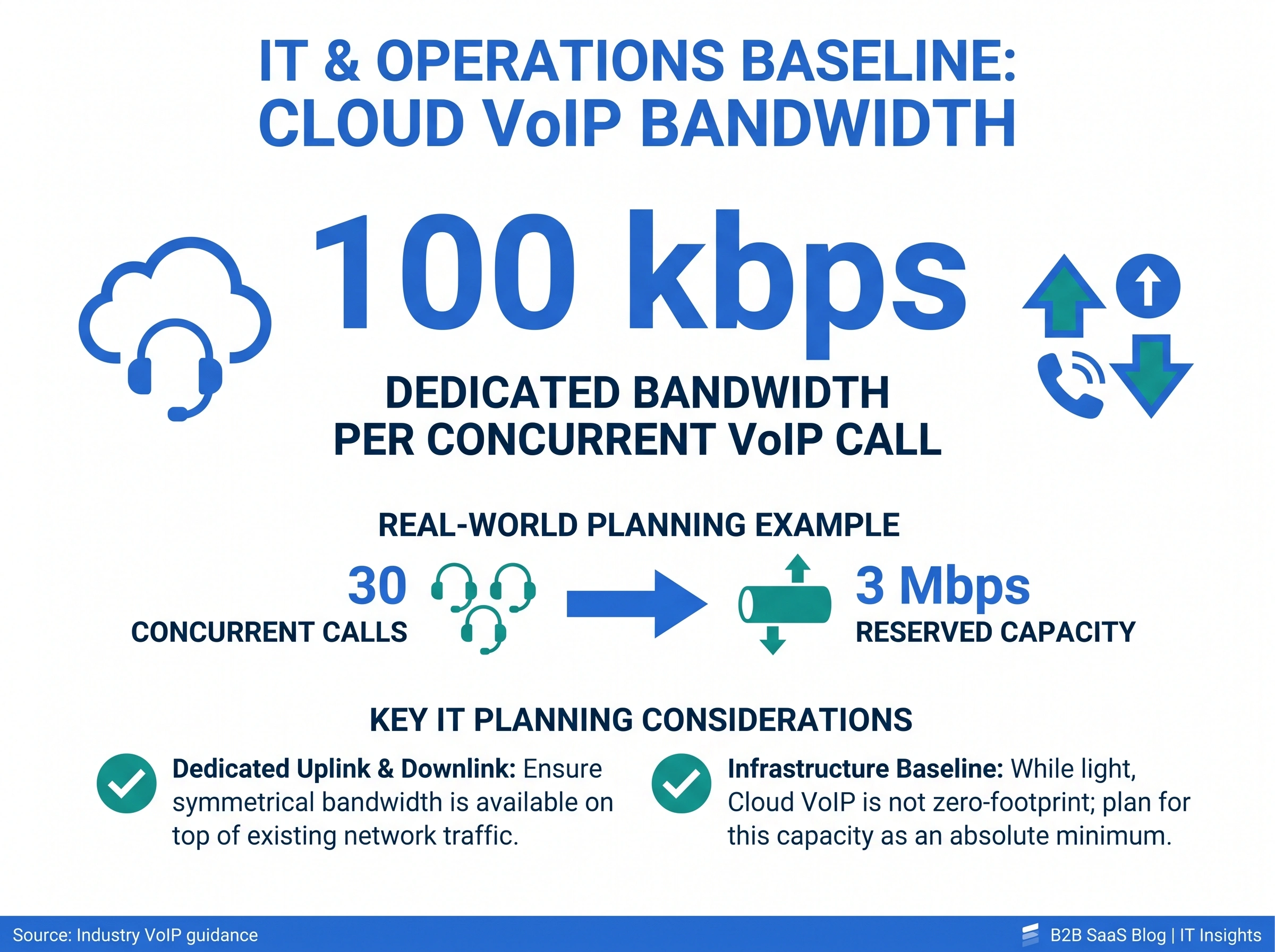
A quick network note before we go deeper. Cloud VoIP is light on infrastructure but it's not zero. Plan for at least 100 kbps of dedicated upload and download bandwidth per concurrent call (the upper end of typical VoIP codec bandwidth, per Cisco's VoIP bandwidth reference). So if 30 people might be on calls at once, that's 3 Mbps reserved on top of normal traffic. A commercial-grade router with QoS rules handles the rest. No SBCs. No telephony cards. No racks.
The FCC's VoIP overview is a useful primer if you want the regulatory baseline before you go shopping.
Centralized admin: roles, SSO, and audit-friendly access
Centralized admin in dialnote means three things: every action runs through a workspace, every member has one role, and every phone number has its own access controls layered on top. One place to look, one place to change.
Here's how the model works.
Workspace roles. dialnote uses three workspace-level roles:
| Role | What they can do |
|---|---|
| Owner | Full control: billing, settings, members, and numbers |
| Admin | Invite members, manage phone numbers, configure workspace settings |
| Member | Make and receive calls, access contacts, use assigned numbers |
Owners and admins are who IT and ops will actually live in. Members are the people you're rolling out to. There's no "super admin" tier you have to reach support to escalate to. If you're an owner or admin, you can do the work yourself.
Per-number access. This is the bit most phone vendors get wrong. Phone numbers in dialnote have their own access tier on top of the workspace role: Owner (full control of that number), Shared User (call and message), or View Only (read-only). So you can make someone an Admin at the workspace level but only give them Shared User access on the support line and View Only access on the executive line. Tight scopes, no shared logins.
Sign-in. dialnote supports email and password (8-128 chars, with verification), plus social sign-in with Google, Microsoft, and Apple. Sessions last 7 days of inactivity and refresh every 24 hours when you're active. Cookies are HTTPS-only and use secure attributes in production. If you're rolling this out to a team that already lives in Google Workspace or Microsoft 365, social sign-in is the path of least resistance. Two-factor authentication is available on top.
Audit-friendly logs. Every call has a transcript, summary, and timestamped record. Recordings are stored in the cloud and tied to the participant list. Sensitive data like API keys and authorization headers are automatically masked in request logs, so they're never exposed in application logging. That matters when your compliance team asks for sign-in trails or call records.
Honestly, this is the part of dialnote we hear the most "oh, finally" feedback on. Most phone tools treat audit trails like a feature you have to argue for. We treat them as a default.
API key controls. If your team integrates with dialnote programmatically, each workspace can have up to 10 active API keys. They're stored as SHA-256 hashes (you only see the raw key once, at creation). Prefixes are masked for safe display, and authentication uses timing-safe comparison to prevent timing attacks. Standard stuff, but worth confirming when you're picking a vendor.
If you're coming from a system where "access control" meant a shared admin password, this part alone is going to feel like a relief.
Unlimited seats and the IT cost KPI
dialnote bundles unlimited seats into every workspace, so your phone bill stops scaling with headcount. For IT leaders whose KPIs include reducing per-employee SaaS spend, that's the single biggest cost lever a phone system can pull.
Here's why this matters more for IT and ops than for anyone else.
Most phone vendors price per seat. Add a rep, pay another $25-30. Add a contractor for a quarter, pay another $25-30. Add a shared receptionist line that two people answer, pay for two seats. The bill grows with your team, even when your call volume doesn't. And the person who has to defend that bill in budget meetings? That's usually the IT or ops lead.
dialnote's unlimited-seats model flips that math. You pay a flat workspace fee, and every employee, contractor, and shared line is included. So:
- Headcount changes are free. Hire 10 reps tomorrow, your phone bill doesn't move.
- Seasonal teams cost nothing extra. Holiday support staff or temp workers? Add them, remove them, no line items.
- Shared lines are actually shared. A reception line answered by 5 admins costs the same as one answered by 1.
- No "license rightsizing" project. You stop having to audit who actually uses the phone every quarter.
For IT heads measured on SaaS cost reduction, this often turns into a quick win. We've talked to teams that cut their phone bill 40-60% just by switching from per-seat to unlimited. Not because dialnote is the cheapest line item by default, but because the pricing model stops growing with the team.
Honestly, this is also the part most vendors don't want to compete on. Per-seat pricing is incredibly profitable for them and incredibly punishing for growing teams. So they'll spend the sales call selling features instead. If the IT or ops buyer doesn't push the cost question hard, the conversation never gets there.
Push the cost question hard.
How does dialnote fit into your existing stack?
dialnote fits into your stack through OAuth-based CRM integrations, calendar tools, Zapier, and custom webhooks. Most teams plug it into HubSpot, Salesforce, or Pipedrive in about two minutes.
The integration layer is the part IT and ops care about more than anyone else. You don't want a phone system that becomes its own data island. You want every call, transcript, and outcome flowing into the systems your team already uses.
Here's what dialnote connects to today:
- CRM: HubSpot, Salesforce, and Pipedrive. Calls, recordings, transcripts, and notes appear on contact and deal records automatically.
- Calendars: Calendly and Cal.com. AI agents can check availability and book meetings during a live call.
- Automation: Zapier (5,000+ apps) and custom webhooks for any HTTPS endpoint.
- Events you can subscribe to:
call.completed,call.recording.completed,note.created. Three event types, everything else is a downstream transform.
How does the connection actually work? OAuth at the workspace level, with phone-level controls. You connect each CRM once for the entire workspace, then choose which phone numbers sync to which CRMs. So the support line can sync to HubSpot, the sales line can sync to Salesforce, and the back-office line can sync to nothing. One connection, granular routing.
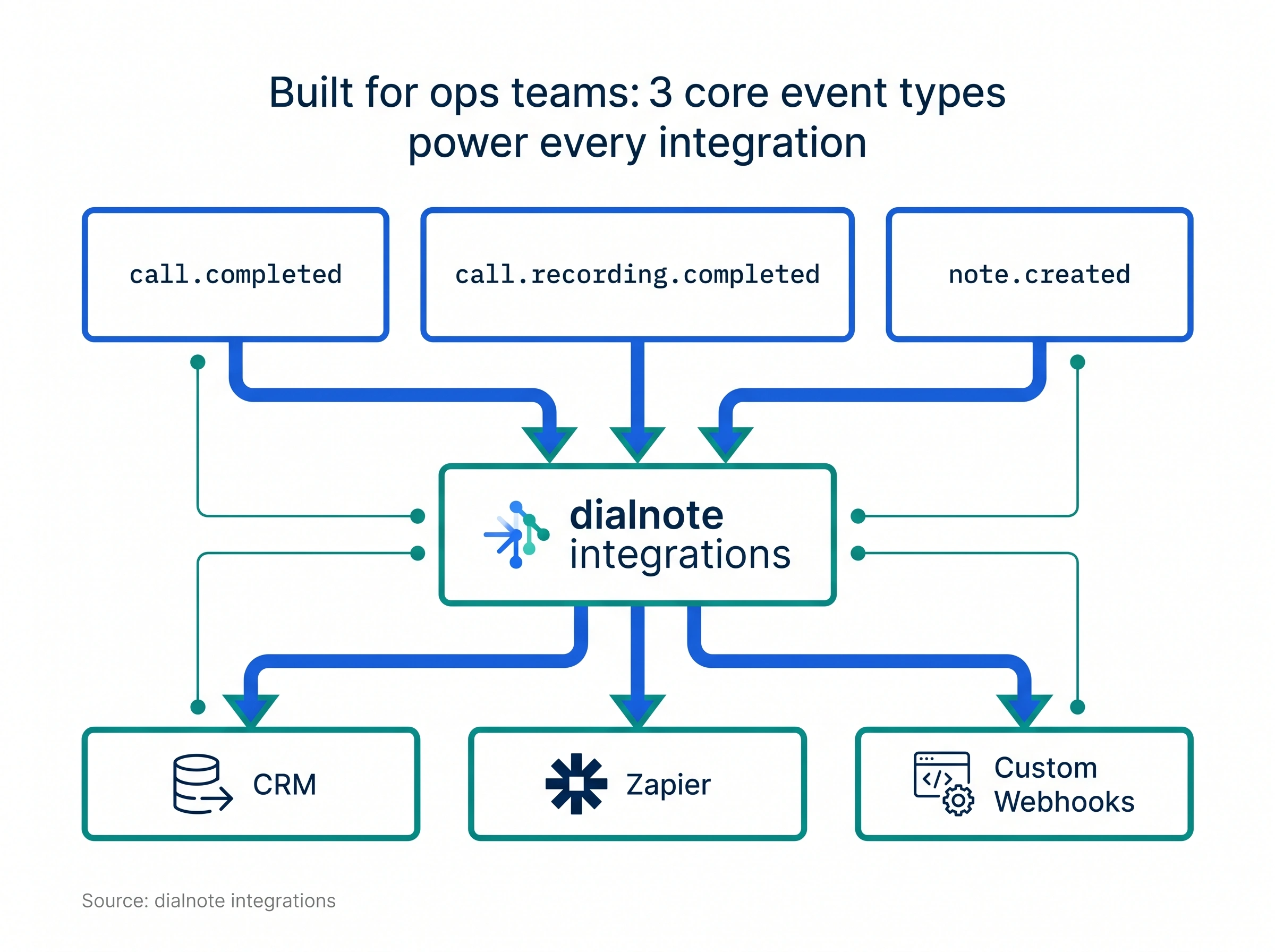
Webhook setup lives in Settings -> Webhooks. Each webhook listens for specific event types and includes a test button so you can verify your endpoint without making a real call. We deliberately kept the event surface small. Three event types cover almost everything an ops team wants to do.
Want to push call data to your data warehouse? Use the webhook for call.completed and write to your ETL pipeline. Want to fire a Slack notification when a recording finishes? Hook call.recording.completed into Zapier. Want to update a Jira ticket when a note is created on a support call? note.created and a custom endpoint.
Here's my honest take: skip the all-in-one platforms that try to bundle every workflow into their own UI. The teams that scale well with dialnote are the ones that treat it as a great phone layer with clean events out, then build the rest in the systems they already trust.
That said, the bundled features matter when they save real time. dialnote's team collaboration features include shared inboxes, internal call notes, and per-conversation assignment. So the day-to-day work happens in dialnote, and the analytics, ticketing, and BI happen wherever you've already invested.
Provisioning, sharing, and deprovisioning at scale
Provisioning in dialnote happens through invitations: an admin sends an email invite, the new member accepts, and you assign phone number access during or after the invite. The team list lives in Settings -> User Management. Standard SaaS lifecycle, no surprises.
Let's walk through the practical scenarios.
A new hire joins. Admin sends an invite from User Management. New hire clicks the link, signs in (email/password or social), and shows up as a Member. Admin assigns them to whichever shared phone numbers they need (sales line, support line, etc.) at Shared User level. They're live.
Someone leaves. Owner or Admin removes the member. Their access disappears. Any phone numbers they had assigned automatically drop them from the routing. If they were on a ring group, they stop ringing. If they had View Only access to a recorded line, that disappears too.
Someone changes teams. An admin updates their phone number assignments. No need to delete and recreate. The audit log reflects the change.
A phone number changes purpose. You can re-share a number with a different group of people without porting it or buying a new one. Each number's access list is independent of every other number's access list.
This is where dialnote gets a lot of "is that really it?" reactions. Yes, that's really it. No CSV imports. No tickets. No middleware. The team list is the source of truth.
That said, here's where we'll be straight with you: dialnote doesn't yet support native SCIM provisioning or directory sync. If you're a 500-seat team that requires automated lifecycle management from Okta or Azure AD, that's a real gap. You can build the same flows yourself with our API today, and we're working on native SCIM, but we're not going to pretend the gap doesn't exist. For most teams under a few hundred seats, manual or API-driven provisioning is faster and cleaner anyway.
Phone number procurement. You buy local, toll-free, or mobile numbers in multiple countries directly from the dashboard. Some countries (UK, parts of the EU) require a regulatory bundle, which is a packet of identity documents you submit before purchase. dialnote walks you through it, the carrier reviews, and once it's approved, you can buy numbers in that country freely.
Porting numbers. If you're moving from another vendor, dialnote handles the porting paperwork. It takes 1-2 weeks depending on your carrier, and during the transition, calls still come through to your old system so you don't drop calls. Talk to your account contact before you start, especially for toll-free or international numbers.
Compliance and recording consent: what IT teams need to know
Compliance in dialnote covers three things you'll actually configure: A2P 10DLC for US SMS, regulatory bundles for international numbers, and recording consent notifications per phone number. Plus automatic TCPA-compliant opt-out handling, which you don't configure at all.
Let's go through them.
A2P 10DLC. If you're sending SMS from US numbers, you have to register your business with carriers before any messages will be delivered. This is carrier policy, not vendor policy. Every legitimate vendor handles it the same way. dialnote walks you through brand registration (1-5 business days for approval) and campaign registration (7-21 days). Until both are approved, US messages won't go through. Plan accordingly. Don't promise the marketing team SMS launches the same week you sign up.
There are 11 supported campaign use cases (customer care, account notifications, marketing, 2FA, fraud alerts, public service announcements, etc.). Pick the one closest to your actual messaging pattern. If you're not sure, customer care covers a lot.
Regulatory bundles. For international numbers in countries that require them, you'll submit identity documents and proof of address before purchase. Bundles can be created and managed in Settings -> Regulatory Bundles, and they go through statuses like Draft, In Review, Approved, and Rejected. Pro tip: create the bundle first, then buy the number. Otherwise the purchase will fail.
Recording consent. Many regions legally require all parties on a call to know when they're being recorded. dialnote gives you per-number controls in Settings -> Phone Number -> Call Features with three notification options: voice-based ("This call is being recorded"), audio tone (a beep), or none (only valid where single-party consent applies). You can set different notifications for inbound and outbound. It's still your responsibility to know your jurisdiction's laws. We give you the controls. We don't give you legal advice.
SMS opt-outs. TCPA requires that opt-out keywords always work on SMS. dialnote handles this automatically. STOP, CANCEL, END, QUIT, UNSUBSCRIBE all opt the person out and confirm they won't get more messages. START and SUBSCRIBE opt them back in. HELP and INFO send instructions. The keyword detection is case-insensitive and runs before any of your auto-replies or AI agents see the message. So even if you've got a misconfigured workflow, opt-outs still work. That's by design and you can't turn it off, which is the right call.
Encryption. All connections use TLS in transit. Sensitive credentials like telephony API keys are encrypted before storage. Passwords are securely hashed. Authorization headers, cookies, and API keys are masked in request logs. The standard cloud SaaS profile, applied where it should be applied.
I know "compliance" makes most people's eyes glaze over. But this is exactly the part IT and ops teams end up explaining to internal stakeholders. Knowing that opt-outs are automatic, that recording notifications are per-number configurable, and that A2P timing is what it is, that's the homework that pays off later.
What can AI agents automate for IT and ops?
dialnote's AI voice agents handle inbound calls end-to-end and can take real actions during the call: book meetings, send follow-up texts, transfer to a human, query your knowledge base, or end the call politely if the inquiry isn't a fit. Every action becomes a logged event your team can audit later.
That's the short list. The longer answer is that AI is where ops teams quietly recover the most headcount.
Here's what an AI agent can do without a human getting involved:
- Book appointments on a connected calendar (Calendly or Cal.com), with timezone awareness and conflict checking.
- Send follow-up texts with confirmations, links, location info, or meeting details right after the call ends.
- Transfer to a human when a qualifying signal is hit (high-priority lead, urgent support, VIP caller list).
- Answer common questions from your knowledge base: pricing, hours, services, locations, return policies, anything you've documented.
- Capture intake data (caller name, company, issue category, account number) and log it as structured fields.
- Trigger webhook events so your downstream systems can act in real time. Think creating a Zendesk ticket the moment an issue is described, or pushing a hot lead into HubSpot before the call ends.
- Hand off context to the human rep when transferring, so the person who picks up isn't asking the caller to repeat themselves.
- End calls politely when the inquiry doesn't match what you sell, with a courteous "thanks for calling" message.
For IT and ops, this matters in two ways. First, the AI handles work that would otherwise be tickets, callbacks, or after-hours overtime. Second, every AI action is captured as event data your dashboards can roll up. Containment rate, average handle time, escalation reasons, all measurable.
You configure agents under Settings -> AI Agents with task steps, knowledge base content, voice selection, language, and guardrails. Agents support 15+ languages including English, Spanish, French, and German. You can run different agents on different phone numbers, so the support line and the sales line use different scripts and different actions.
Heads up: AI features need call recording. Every action above depends on transcripts, which depend on call recording. dialnote auto-records calls handled by AI agents so the system can transcribe, summarize, score, and trigger actions in real time. If your industry, jurisdiction, or company policy is "no recording, ever," then AI agents (and a lot of dialnote's analytics) won't work for you. Be honest about this constraint up front; it's not a workaround we'll engineer around.
The good news is recording consent is per-number configurable, with voice-based, audio-tone, or none notifications, so most regulated environments can still run AI agents safely. But "we don't record any calls under any circumstance" is a real disqualifier. Better to know now than three weeks into evaluation.
What can IT and ops leaders see in analytics?
IT and ops leaders can see call volume, answer rates, missed calls, AI agent containment, agent performance, busy-time heatmaps, disposition codes, and per-number breakdowns. Everything filters by date, team member, phone number, or tag.
This isn't a marketing analytics question, even though analytics dashboards usually get pitched to revenue leaders. For IT and ops, the analytics dashboard answers different questions:
- Are we actually using all the licenses we're paying for?
- Are calls hitting the right teams, or are they bouncing through bad routing?
- Is the AI agent doing its job, or are we paying for it without containment?
- Are we hitting capacity at certain hours and need to add staff?
dialnote's analytics dashboard gives you the cards and reports to answer all four. Top-level cards show total calls, missed calls, answer rate, and time on calls. If your missed call rate goes above 10%, you'll see a priority alert. Voicemail volumes get a dedicated section with daily breakdowns. AI agent performance shows containment rate (calls handled without human escalation), average handle time, and estimated cost savings.
Agent performance table. This one's the big deal for IT and ops. You see every team member's total calls, outgoing calls, answered calls, and time on calls, with current period vs previous period. So you can spot trends like "user X stopped using their phone three weeks ago" or "we hired five new reps but only two are actually picking up calls." Useful for license rightsizing.
Busy times heatmap. A grid where rows are days (Monday to Sunday) and columns are hours (12am to 11pm). Darker cells mean more calls. You can toggle between all calls, human-handled only, or AI-handled only. The first time you look at this for a real account, you'll find at least one peak hour you didn't know about.
Filters and exports. Every report supports date ranges, team member, phone number, tag, and granularity (day/week/month) filters. Hit the Export button and you get a CSV with the current view's data. Filters persist when you switch between reports, which is a small thing that makes the dashboard actually pleasant to use.
If you're putting together a quarterly review for leadership, the data is already there. No need to build a custom dashboard in your BI tool unless you want to combine call data with revenue data. (And if you do want to combine them, that's what the webhooks are for.)
Where does dialnote still need to grow?
dialnote isn't the right fit for everyone. We're going to be straight about where the gaps are, because IT and ops teams have been burned by vendors who weren't.
No native SCIM yet. As covered above. If you need automated provisioning from Okta or Azure AD with no human in the loop, you'll either build it on our API or wait until SCIM ships. Most sub-200-seat teams won't notice. Bigger orgs might.
No power dialer or parallel dialing. dialnote is built for inbound and warm outbound. If your team's primary motion is high-volume cold outbound (200+ dials per rep per day), you'll want a dedicated outbound tool for that. We're shipping outbound capabilities later this year, but we'd rather wait and ship something good than rush a mediocre dialer.
Limited international footprint. We support a growing list of countries for number purchases, but we're not in every market. If your business needs numbers in 40+ countries today, ask us about availability before you buy. That said, if you need a specific country we haven't enabled yet, ping our support team. We typically open up a new region within a day, so a missing country is usually a 24-hour fix, not a dealbreaker.
No on-premise deployment. dialnote is cloud-only. If your security team requires on-premise hosting for any voice infrastructure, this isn't the tool. (Honestly, very few teams that have that requirement are also reading marketing blogs about cloud VoIP, so this probably doesn't apply to you. But it's worth saying.)
Fair warning on AI cost predictability. AI features (agent builder, message bot testing) have hourly rate windows with automatic 15-minute cooldowns if exceeded. If you have a use case that pushes hard on AI volume, talk to us before you go all-in so we can make sure your pricing stays predictable.
That's the honest list. Most phone vendors won't give you one. We'd rather you walk in with eyes open.
Getting your team rolled out on dialnote
A typical IT-led rollout of dialnote looks like a one-day project, not a six-week implementation. Here's how the days play out.
Day 0 (admin setup). One owner signs up, picks a workspace name, and configures the basic settings: business hours, time zone, default voicemail greeting. They invite a couple of admins and assign two-factor authentication. About 30 minutes.
Day 1 (numbers and call flows). Buy or port your phone numbers. Open the visual call flow builder and design the routing for each one. A simple flow looks like: incoming call -> business hours check -> ring users -> queue fallback -> AI agent or voicemail. The visual builder is drag and drop, no code. Most flows take 5 minutes to build. Complex IVR menus might take 15.
Day 2 (integrations). Connect your CRM, calendar, and any webhooks. CRM connection is OAuth, takes about 2 minutes per platform. Webhook setup takes longer because you'll be on the receiving end too.
Day 3 (rollout). Bulk-invite the team. Each member gets an email, signs in, and shows up in your User Management list. Assign them to phone numbers based on role. Run a few test calls to make sure routing works the way you want.
That's the whole rollout. No SBCs to install, no IT visit needed at the office, no per-desk hardware. The comparison between cloud and on-premise tells you why this is so different from legacy phone systems.
A few rollout tips we've seen work well:
- Pilot with 5-10 power users first. Catch routing issues before you cut over the full team.
- Document your call flows in a Confluence or Notion page. The visual editor is great, but a written reference helps when someone asks "why does the after-hours queue route there?"
- Set up at least one webhook integration in week one. Even just a Slack notification on missed calls. It builds the habit of treating dialnote as part of your stack instead of a closed system.
- Schedule a quarterly review of analytics. License rightsizing alone usually pays for the time.
If you're moving off another vendor, the porting paperwork takes 1-2 weeks. Run dialnote and the old vendor in parallel during that window so you don't drop calls. Once the port completes, deprovision the old vendor and you're done.
A phone system for IT and operations teams shouldn't feel like an extra burden you've inherited. It should feel like another tool in your stack: one you can administer, audit, and integrate without filing tickets with the vendor every time you want to change something. That's the bar we built dialnote against.
If you want to see if it fits your team, start a trial or book a walkthrough. We'll show you the admin surface first, not the marketing one.
Frequently asked questions
Centralized admin, role-based access, audit-friendly logs, CRM and webhook integrations, simple provisioning, and clear analytics. Bonus points if it's cloud-native so you don't have to babysit hardware.
Yes. dialnote supports social sign-in with Google, Microsoft, and Apple, plus two-factor authentication. Sessions expire after 7 days of inactivity, and cookies use secure HTTPS-only attributes in production.
Yes. Each phone number has its own access levels: Owner (full control), Shared User (call and message access), and View Only (read-only). Only workspace owners and admins can change number settings.
Most teams go live in under a day. You buy or port numbers, build call flows in the visual editor, invite members, and assign roles. No hardware, no SBCs, no IT ticket queue.
dialnote gives each workspace up to 10 active API keys (SHA-256 hashed) and webhooks for events like call.completed, call.recording.completed, and note.created. You can also pipe data into Zapier and 5,000+ apps.

Written by
Lancelot Dsouza
Chief Marketing Officer, SmartReach.io
Lancelot Dsouza is the Chief Marketing Officer at SmartReach.io, where he built the Marketing, Sales, and Customer Success verticals from the ground up. With over 25 years of experience spanning digital marketing, business development, and strategic...
Lancelot Dsouza is the Chief Marketing Officer at SmartReach.io, where he built the Marketing, Sales, and Customer Success verticals from the ground up. With over 25 years of experience spanning digital marketing, business development, and strategic...
Related Articles
Is Call Recording Software Legal for Small Business?
Learn call recording laws by state, one-party vs. two-party consent rules, and how to choose compliant call recording software for your small business.
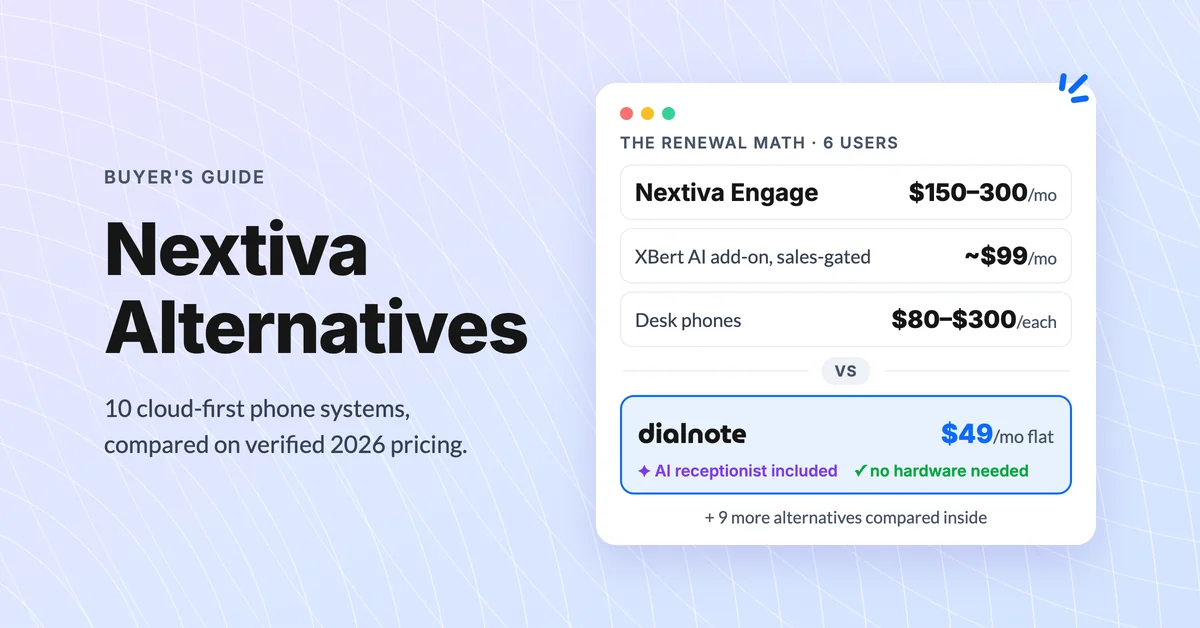
10 Best Nextiva Alternatives for 2026 (Cloud-First)
Compare the 10 best Nextiva alternatives with verified August 2026 pricing, AI answering costs, and desk phone support before you renew.
10 Best RingCentral Alternatives for Small Business
Compare 10 RingCentral alternatives for small business by real per-user cost, AI receptionists, and contract traps before you renew.